
Subscribe to OW blog for an instantly better inbox
Oops! Something went wrong while submitting the form.

Are your visitors really getting the most out of your website? Tree testing (or sometimes referred to as reverse card sorting) takes away the guesswork by telling you how easily, or not, people can find information on your website. Discover why Treejack is the tool of choice for website architects.
Whether you’re building a website from scratch or improving an existing website, tree testing helps you design your website architecture with confidence. How? Tools like Treejack use analysis to help assess how findable your content is for people visiting your website.
It helps answer burning questions like:
Treejack provides invaluable intel for any Information Architect. Why? Knowing where and why people get lost trying to find your content, gives you a much better chance of fixing the actual problem. And the more easily people can find what they’re looking for, the better their experience which is ultimately better for everyone.
Tree testing can be broken down into two main parts:
Whether you’re new to tree testing or already a convert, effective tree testing using Treejack has some key steps.
Ask yourself what part of your information architecture needs improvement – is it your whole website or just parts of it? Also think about your audience, they’re the ones you’re trying to improve the website for so the more you know about their needs the better.
Tip: Make the most of what tree testing offers to improve your website by building it into your overall design project plan
You can build your tree using two main approaches:
Tip: Your category labels are known as ‘parent nodes’. Your information labels are known as ‘child nodes’.
The quality of your tasks will be reflected in the usefulness of your data so it’s worth making sure you create tasks that really test what you want to improve.
Tip: Use plain language that feels natural and try to write your tasks in a way that reflects the way people who visit your website might actually think when they are trying to find information on your site.
The quality of your data will largely depend on the quality of your participants. You want people who are as close to your target audience as possible and with the right attitude - willing and committed to being involved.
Tip: Consider offering some kind of incentive to participants – it shows you value their involvement.
Now for the fun part – making sense of the results. Treejack presents the data from your tree testing as a series of tables and visualizations. You can download them in a spreadsheet in their raw format or customized to your needs.
Tip: Use the results to gain quick, practical insights you can act on right away or as a starter to dive deeper into the data.
Tree testing is useful whenever you want to find out if your website content is labelled and organised in a way that’s easy to understand. What’s more it can be applied for any website, big (10+ levels with 10000s of labels) or small (3 levels and 22 labels) and any size in between. Our advice for using Treejack is simply this: test big, test small, test often.

Think about the last time you were visiting a friend or family member’s house and needed to find something. Like a spoon, for example. You start in the kitchen because that’s where we’ve all been trained to find things like spoons. But where do you look next? Some may look in the drawer near the dishwasher, while others may look to the drawer that’s by the cabinet that holds dishes and bowls. Point is, people use context clues and other points of reference (like familiarity and habits) to find things that they’re looking for.
The same goes for navigating a webpage.
However, unlike the spoon example, there’s much more variation in website structure than kitchen layout. Websites vary from industry to industry, ranging in purpose from ecommerce to digital portfolios and everything in between. So when someone lands on your website to find something or complete a task, is it obvious where they should go to get things done?
Your gut might tell you that it is. The people on your design team might tell you that it is too. But what really matters is what happens with actual users. Whenever you’re building a new website or optimizing an existing one, it’s important that you build it with quality user insights. That starts with user experience (UX) research.
And before you ask if we mean qualitative or quantitative research – the answer is both. Let’s explore a particular user research method that’s essential for gathering the information needed to build intuitive site navigation. It’s called tree testing.
For anyone unfamiliar with tree testing (sometimes referred to as ‘reverse card sorting’ or ‘card-based classification’), it’s a series of tests that help you understand where and why people get lost in your content.
It works by taking text-based versions of websites and stripping the influence of navigation aids or design elements to build a study. Participants are shown the text-only version of your website or app and are asked to indicate where they would find specific items or topics.
By removing everything but the labels and how they’re organized, you can work out just how effective your website structure is at enabling people to find what they need. If test participants consistently struggle to locate specific items, you’ll know there are issues with your structure. It can also help you visualize what paths participants take to get to specific site information.
Another point worth mentioning is that tree testing not only uncovers site navigation flaws, but it reveals word choice and microcopy that may not be clear to users. To reference back to the initial analogy, one person might say “where would I find your spoons,” while another may ask, “where do you keep your utensils?” So, tree testing can also be helpful for understanding which words work best in your site structure.
While it’s best to conduct a tree test early in the research phase of a project, there’s never a wrong time. (Unless that time is not at all). And if you have an existing website, this is a good time to establish a base of your existing site structure. The results you gather here can help to highlight any issues with your site’s structure and provide the data needed to compare to any improvements.
If you’re starting from scratch with a new website, you can run tree tests on different versions of your proposed site structure and then compare the results to determine which makes the most sense to your users.
Running a tree test is simple. You can use an online tool (like TreeJack) to collect all of the necessary quantitative data you need to ensure successful site navigation.

But what about the qualitative side of it all? We’re so glad you asked.
Running tree tests is a great way to gather quantitative data about your site navigation and topic findability, but it's not so good at providing you with qualitative insights, or why people are looking for information the way that they are.
Traditionally, you could get your gift cards ready and set up an in-person study where you watch people perform the tasks laid out in your tree test, and subsequently ask why they searched for things the way they did. But that takes a lot of time, coordination, and compensation. Alternatively, you could set up a remote usability test using a platform designed to record users as they complete your tree test.
This way, you’ll get the quantitative results you need to make decisions, backed by qualitative insights from real people. You’ll be able to set up your test to get answers to questions like:
Teams that solely rely on quantitative data are only getting half the story. By pairing tree testing tools, like Optimal Workshop’s Treejack, with UserTesting’s Human Insight Platform, researchers are able to not only see how people search for information on a website but get to the bottom of why. When used together, quantitative and qualitative data reveal the most valuable insights for tree testing.

Summary: User researcher Ashlea McKay runs through some of her top tips for carrying out advanced analysis in tree testing tool Treejack.
Tree testing your information architecture (IA) with Treejack is a fantastic way to find out how easy it is for people to find information on your website and pinpoint exactly where they’re getting lost. A quick glance at the results visualization features within the tool will give you an excellent starting point, however your Treejack data holds a much deeper story that you may not be aware of or may be having trouble pinning down. It’s great to be able to identify a sticking point that’s holding your IA back, but you also want to see where that fits into the rest of the story and also not just where people are getting lost in the woods, but why.
Thankfully, this is something that is super quick and easy to find — you just have to know where to look. To help you gain a fuller picture of your tree testing data, I’ve pulled together this handy guide of my top tips for running advanced analysis in Treejack.
Treejack results are exciting and it can be all too easy to breeze past the Participants tab to get to those juicy insights as quickly as possible, but stopping for a moment to take a look is worth it. You need to ensure that everyone who has been included in your study results belongs there. Take some time to flick through each participant one by one and see if there’s anyone you’d need to exclude.
Keep an eye out for any of the following potential red flags:
Treejack also automatically excludes incomplete responses and marks them as ‘abandoned’, but you have full control over who is and isn’t included and you might like to reintroduce some of these results if you feel they’re useful. For example, you might like to bring back someone who completed 9 out of a total of 10 tasks before abandoning it as this might mean that they were interrupted or may have accidentally closed their browser tab or window before reaching the end.
You can add, remove or filter participant data from your overall results pool at any time during your analysis, but at a minimum deciding who does and doesn’t belong at the very beginning will save you a lot of time and effort that I certainly learned about the hard way.
Once you’re happy with the responses that will be included in your results, you’re good to go. If you made any changes, all you have to do is reload your results which you can do from the Participants tab and all your data on the other tabs will be updated to reflect your new participant pool.
Pietrees are the heart and soul of Treejack. They bring all the data Treejack collected on your participants’ journeys for a single task during your study together into one interactive and holistic view. After gaining an overall feel for your results by reviewing the task by task statistics under the Task Results tab, pietrees are your next stop in advanced analysis in Treejack.
Start by reviewing the overall size of the pietree. Is it big and scattered with small circles representing each node (also called a ‘pie’ or a ‘branch’)? Or is it small with large circular nodes? Or is it somewhere in between? The overall size of the pietree can provide insight into how long and complex your participants’ pathways to their nominated correct answer were.
Smaller pietrees with bigger circular nodes like the one shown in the example below taken from a study I ran in 2018 testing IKEA’s US website, happen when participants follow more direct pathways to their destination — meaning they didn’t stray from the path that you set as correct when you built the study.

This is a good thing! You want your participants to be able to reach their goal quickly and directly without clicking off into other areas but when they can’t and you end up with a much larger and more scattered pietree, the trail of breadcrumbs they leave behind them will show you exactly where you’re going wrong — also a good thing! Larger and more scattered pietrees happen when indirect and winding pathways were followed and sometimes you’ll come across a pietree like the one shown below where just about every second and third level node has been clicked on.

This can indicate that people felt quite lost in general while trying to complete their task because bigger pietrees tend to show large amounts of people clicking into the wrong nodes and immediately turning back. This is shown with red (incorrect path) and blue (back from here) color coding on the nodes of the tree and you can view exactly how many people did this along with the rest of that node’s activity by hovering over each one (see below image).
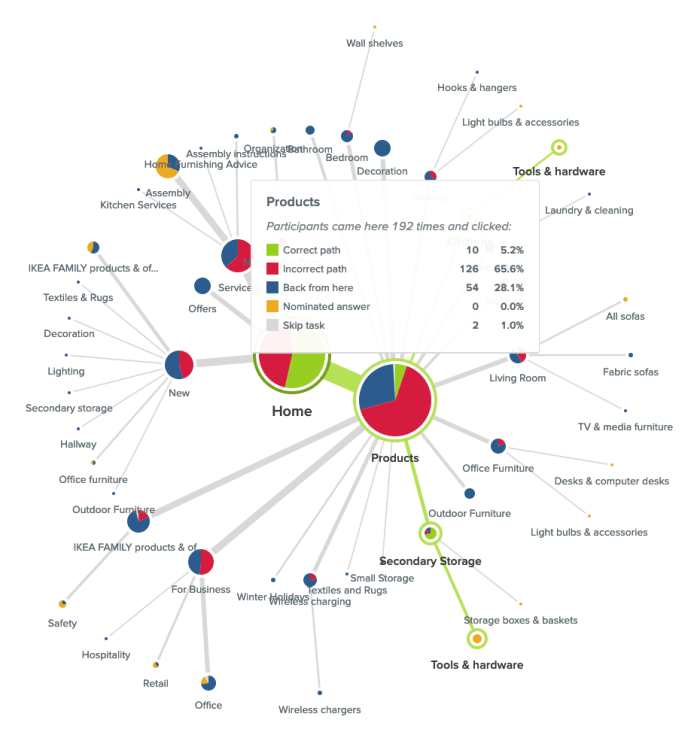
In this case people were looking for an electric screwdriver and while ‘Products’ was the right location for that content, there was something about the labels underneath it that made 28.1% of its total visitors think they were in the wrong place and turn back. It could be that the labels need a bit of work or more likely that the placement of that content might not be right — ‘Secondary Storage’ and ‘Kitchens’ (hidden by the hover window in the image above) aren’t exactly the most intuitive locations for a power tool.
When analyzing your pietree keep an eye out for any labels that might be potentially leading your users astray. Were there large numbers of people starting on or visiting the same incorrect node of your IA? In the example shown below, participants were attempting to replace lost furniture assembly instructions and the pietree for this task shows that the 2 very similar labels of ‘Assembly instructions’ (correct location) and ‘Assembly’ (incorrect location) were likely tripping people up as almost half the participants in the study were in the right place (‘Services’), but took a wrong turn and ultimately chose the wrong destination node.

Have a look at your pietree to see the number of times ‘Home’ was clicked. If that number is more than twice that of your participants, this can be a big indicator that people were lost in your IA tree overall. I remember a project where I was running an intranet benchmarking tree test that had around 80 participants and ‘Home’ had been clicked on a whopping 648 times and the pietrees were very large and scattered. When people are feeling really lost in an IA, they’ll often click on ‘Home’ as a way to clear the slate and start their journey over again. The Paths tab — which we’re going to talk about next — will allow you to dig deeper into findings like this in your own studies.
While the pietrees bring all your participants’ task journeys together into one visualization, the Paths tab separates them out so you can see exactly what each individual got up to during each task in your study.
As we discussed earlier, you want your IA to support your users and enable them to follow the most direct pathway to the content that will help them achieve their goal. The paths table will help show you if your IA is there yet or if it needs more work. Path types are color coded by directness and also use arrows to communicate which direction participants were traveling in at each point of their journey so you can see where in the IA that they were moving forward and where they were turning back. You can also filter by path type by checking/unchecking the boxes next to the colours and their text-based label names at the top of the table.
Here’s what those types mean:

It’s also important to note that while some tasks may appear to be successful on the surface — e.g., your participants correctly identified the location of that content — if they took a convoluted path to get to that correct answer, something isn’t quite right with your tree and it still needs work. Success isn’t always the end of the story and failed tasks aren’t the only ones you should be checking for lengthy paths. Look at the lengths of all your paths to gain a full picture of how your participants experienced your IA.
If you’re seeing large numbers of people failing tasks — either directly or indirectly — it’s worth taking a closer look at the paths table to find out exactly what they did and where they went. Did multiple people select the same wrong node? When people clicked into the wrong node, did they immediately turn back or did they keep going further down? And if they kept going, which label or labels made them think they were on the right track?
In the Sephora study example on that task I mentioned earlier where no one was successful in finding the correct answer, 22% of participants (7 people) started their journey on the wrong first node of ‘Help & FAQs’ and not one of those participants turned back beyond that particular Level 1 starting point (ie clicked on ‘Home’ to try another path). Some did backtrack during their journey but only as far back as the ‘Help & FAQs’ node that they started on indicating that it was likely the label that made them think they were on the right track. We’ll also take a closer look at the importance of accurate first clicks later on in this guide.

Treejack allows participants to skip tasks either before attempting a task or during one. The paths table will show you which node the skip occurred at, how many other nodes were clicked before they threw in the towel and how close (or not) they were to successfully completing their task. People skipping tasks in the real world affects conversion rates and more, but if you can find out where it’s happening in the IA during a tree test, you can improve it and better support your users and in turn meet your business goals.
Coming back to that Sephora study, when participants were looking to book an in-store beauty consultation, Participant 14 (see below image) was in the right area of the IA a total of 5 times during their journey (‘About Sephora’ and ‘Ways to Shop’). Each time they were just 2-3 clicks away from finding the right location for that content, but ultimately ended up skipping the task. It’s possible that the labels on the next layer down didn’t give this participant what they needed to feel confident they were still on the right track.

Borrowing a little functionality from Chalkmark, the first clicks tab in Treejack will help you to understand if your participants started their journey on the right foot because that first click matters! Research has shown that people are 2-3 times as likely to successfully complete their task if they start out on the right first click.
This is a really cool feature to have in Treejack because Chalkmark is image based, but when you’re tree testing you don’t always have a visual thing to test. And besides, a huge part of getting the bones of an IA right is to be deliberately visual distraction-free! Having this functionality in Treejack means you can start finding out if people are on the right track from much earlier stages in your project saving you a lot of time and messy guesswork.
Under the First clicks tab you will find a table with 2 columns. The first column shows which nodes of your tree were clicked first and the percentage of your participants that did that, and the second column shows the percentage of participants that visited that node during the task overall. The first column will tell you how many participants got their first click right (the correct first click nodes are shown in bold text ) and the second will tell you how many found their way there at some point during their journey overall including those who went there first.
Have a look at how many participants got their first click right and how many didn’t. For those who didn’t, where did they go instead?
Also look at how the percentage of correct first clicks compares to the percentage of participants who made it there eventually but didn’t go there first — is the number in the second column the same or is it bigger? How much bigger? Are people missing the first click but still making it there in the end? Not the greatest experience, but better than nothing! Besides that task’s paths table and pietree will help you pinpoint the exact location of the issues anyway so you can fix them.
When considering first-click data in your own Treejack study, just like you would with the pietrees, use the data under the Task results tab as a starting point to identify which tasks you’d like to take a closer look at. For example, in that Sephora study I mentioned, Task 5 showed some room for improvement. Participants were tasked with finding out if Sephora ships to PO boxes and only 44% of participants were able to do this as shown in the image below.

Looking at the first click table for this task (below), we can see that only 53% of participants overall started on the right first click which was ‘Help & FAQs’ (as shown in bold text).

Almost half the participants who completed this task started off on the wrong foot and a quarter overall clicked on ‘About Sephora’ first. We also know that 69% of participants visited that correct first node during the task which shows that some people were able to get back on track, but almost a third of participants still didn’t go anywhere near the correct location for that content. In this particular case, it’s possible that the correct first click of ‘Help & FAQs’ didn’t quite connect with participants as the place where postage options can be found.
As we near the end of this advanced Treejack analysis guide, our last stop is the Destinations tab. Under here you’ll find a detailed matrix showing where your participants ended their journeys for each task across your entire study. It’s a great way to quickly see how accurate those final destinations were and if they weren’t, where people went instead. It’s also useful for tasks that have multiple correct answers because it can tell you which one was most popular with participants and potentially highlight opportunities to streamline your IA by removing unnecessary duplication.
Along the vertical axis of the grid you’ll find your entire IA tree expanded out and along the horizontal axis, you’ll see your tasks shown by number. For a refresher on which task is which, just hover over the task number on the very handy sticky horizontal axis. Where these 2 meet in the grid, the number of participants who selected that node of the tree for that task will be displayed. If there isn’t a number in the box — regardless of shading — no one selected that node as their nominated correct answer for that task.
The boxes corresponding to the correct nodes for each task are shaded in green. Numberless green boxes can tell you in one quick glance if people aren’t ending up where they should be and if you scroll up and down the table, you’ll be able to see where they went instead.
Red boxes with numbers indicate that more than 20% of people incorrectly chose that node as well as how many did that. Orange boxes with numbers do the same but for nodes where between 10% and 20% of people selected it. And finally, boxes with numbers and no shading, indicate that less than 10% selected that node.
In the below example taken from that Sephora study we’ve been talking about in this guide, we can see that ‘Services’ was one of the correct answers for Task 4 and no one selected it.

The Destinations table is as long as the IA when it’s fully expanded and when we scroll all the way down through it (see below), we can see that there were a total of 3 correct answers for Task 4. For this task, 8 participants were successful and their responses were split across the 2 locations for the more specific ‘Beauty Services’ with the one under ‘Book a Reservation’ being the most popular and potentially best placed because it was chosen by 7 out of the 8 participants.

When viewed in isolation, each tab in Treejack offers a different and valuable perspective on your tree test data and when combined, they come together to build a much richer picture of your study results overall. The more you use Treejack, the better you’ll get at picking up on patterns and journey pathways in your data and you’ll be mastering that IA in no time at all!
Further reading
“Questions are never indiscreet, answers sometimes are.”Oscar Wilde
Frequently asked question pages. Love them or hate them, I don’t think they’re going anywhere anytime soon. This debate has been going on for quite some time and there is an equal number of opinions on both sides of the FAQ fence. Nielsen Norman Group’s Susan Farrell says FAQs can still add value to a website when done properly, and Gerry McGovern says FAQs are the dinosaurs of web navigation.
So, how do we really know for sure if they will or won’t add value to a design? Like anything in UX, you have to test it! I don’t know about you, but I’m a shake-it-and-see-what-falls-out kind of UXer, so naturally I decided to run a Treejack study. Scouring the web one fine day, I came across Sainsbury’s Active Kids. Its FAQ page was unlike any I had ever seen and I knew I’d found the one. I was also curious to see how it would test with people who don’t use the website — after all, anyone should be able to use it. Since Active Kids is an active lifestyle program for UK schools and sports clubs, I recruited my participants entirely from the US.
Pull up a chair and get comfy because what I found out should serve as a lesson to us all.
First of all, why did I choose this in the first place? The Active Kids FAQ page caught my attention for three main reasons:
The structure of this FAQs page is quite deep, complex and very different from the rest of the site — almost like another information architecture (IA) had been built within the main structure. Imagine you have a large warehouse with hundreds of shelves, and then somewhere in the middle of it, someone builds a house — that’s how it felt to me.
There are two ways to get to it: through the “Help” label on the top navigation bar and the “FAQ” label in the footer. It also uses a combination of drop-down filters that the user needs to apply, but it also has automatic filter options and confusing labels that can send you down a path you don’t necessarily want to take.
I also found it very interesting that most of the information contained within the FAQs section cannot be located anywhere else on the website and most of this is essential to gaining a fundamental understanding of what Active Kids actually does. Adding to the house in the warehouse analogy, it’s like the house holds all the key information the warehouse needs to function, but no one knows which room it’s kept in.

Treejack was the perfect choice for testing the findability of information on the Active Kids FAQ page and I decided to test the IA of the website as a whole — this means both the warehouse and the house. I couldn’t just test the house in isolation because that’s not how a user would interact with it. The test needed the context of the whole site to gain an understanding of what’s going on. Creating a Treejack study is quick and easy and all you have to do is build the structure out in a basic Excel spreadsheet and then copy and paste it into Treejack.
My next job was to determine the task based scenarios that my participants would use during the study. I decided to choose nine and all were derived from content located in the FAQs section and related to tasks a user might carry out when investigating or participating in the program. Once I had my tree and my tasks, all I had to do was set the correct answers based on where the information currently sits on the Active Kids website and I was ready to launch.
In my experience,recruiting participants for a Treejack study is quick and easy. All you have to do is determine the screener criteria for your participants and Optimal Workshop takes care of the rest. For this study I requested 30 participants and they all had to reside in the US. I ended up with 31 completed responses and it was all over in less than two hours.
So, what fell out of that tree when I tested a website aimed at parents and teachers of kids in the UK with 31 Americans? I’ll be honest with you: it wasn’t pretty. Here’s what I discovered in this study:

On the flip side, 68 per cent of participants in this study were able to locate a phone number to contact Active Kids directly (number 6 on the graph) and 97 per cent were successfully able to work out how to redeem vouchers (number 7). Overall, it wasn’t great.In addition to some very useful quantitative data, Treejack also provides detailed information on the pathways followed by each participant.
Understanding the journey they took is just as valuable as discovering how many found their way to the correct destination. This additional level of granularity will show you where and when your user is getting lost in your structure and where they went next. It’s also handy for spotting patterns (e.g., multiple participants navigating to the same incorrect response).
I always set my studies to collect responses anonymously and when this occurs, Treejack assigns each participant a numerical identifier to help keep track of their experience without the participant having to share his or her personal details. For task 6, the paths chart below shows that participants numbered eight to 20 were able to navigate directly to the correct answer without deviating from the correct path I defined during setup.

For Task 3 (below) , the story told by the paths was quite different. Participant number five navigated back and forth several times through the structure in their attempt to locate information on how to share a wishlist. After all that effort, they were unable to find the information they needed to complete the task and nominated to contact Active Kids directly. Not only is this a bad experience for the user but it also puts unnecessary pressure on the call centre because the information should be readily available on the website.

Treejack also provides insights into where participants started their journey by recording first click data. Just like Chalkmark, this functionality will tell you if your users are starting out on the right foot from that all important first click.In this study I found it interesting that when looking for information regarding the eligibility of home educators in the Active Kids program, 42 per cent of participants clicked on “Schools & Groups” and 19 per cent clicked on “Parents & Community” for their first click. Only 6 per cent clicked on “Help”, which happens to be the only place this information can be found.

I also found the first click results for Task 9 to be very interesting. When looking for basic information on the program, more than half (52 per cent) of the participants in this study went straight to “Help”. This indicates that, for these participants, none of the other options were going to provide them the information they needed.

I mentioned earlier there was a lesson in this for everyone, and rather than dwell on how something tested, it’s time to move on to some lessons learned and constructive ideas for improvement. Based on the results of this Treejack study, here are my top three recommendations for improving the Active Kids website:
Most of the key information required to master the basics of what Active Kids is all about is housed entirely in the FAQs section. FAQs should not be the only place a user can find out basic information needed to understand the purpose of a product, program or service. I believe this website would benefit from some further thinking around what actually belongs in the FAQs section and what could be surfaced much higher.
Another idea would be to follow the lead of the Government Digital Service and remove the FAQs section altogether — food for thought. Frequently asked questions would not be frequently asked questions if people could actually find the information on your site in the first place. Figure out where the answers to these questions really belong.
If you’re using Treejack, just look at the fails in your results and figure out where people went first. Is there a trend? Is this the right place? Maybe think about putting the answer the user is looking for there instead.
If you must have an FAQs section (and believe me I do understand that they don’t just disappear overnight! Just try to keep it as an interim solution only) please consider streamlining the way they are presented to the user. Ditch the filtering and display the list on one page only. Users should not have to drill down through several layers of content and then navigate through each category. For further reading on getting your FAQs straight, this Kissmetrics article is well worth a read.
Looking at the Active Kids website and the results from this study, I feel the intent of this website could use some refining. If we come back to my warehouse and house analogy, the main chunk of the website (the warehouse) seems to be one giant advertisement, while the house (the FAQs) is where the action-oriented stuff lies. The house seems to hold the key information that people need to use the program and I think it could be displayed better. Don’t get me wrong, Active Kids does some incredibly good work for the community and should absolutely shout its achievements from the rooftops, however a sense of balance is required here. I think it’s time for the house and the warehouse to join forces into a solution that offers both rooftop shouting and usable information that facilitates participation.
This study goes to show that regardless of where you are in your design process, whether that’s at the very beginning or a few years post-implementation, there is value to be gained from testing with a fresh set of eyes. I’m still undecided on which side of the FAQs debate I belong to — I’m going to sit on the fence and stand by the “if in doubt — test it” school of thought.

“Dear Optimal, I want to test the structure of a university website (well certain sections anyway). My gut instinct is that it's pretty 'broken'. Lots of sections feel like they're in the wrong place. I want to test my hypotheses before proposing a new structure. I'm definitely going to do some card sorting, and was planning a mixture of online and offline. My question is about when to bring in tree testing. Should I do this first to test the existing IA? Or is card sorting sufficient? I do intend to tree test my new proposed IA in order to validate it, but is it worth doing it upfront too?" — Matt
Dear Matt,
Ah, the classic chicken or the egg scenario: Which should come first, tree testing or card sorting?
It’s a question that many researchers often ask themselves, but I’m here to help clear the air! You should always use both methods when changing up your information architecture (IA) in order to capture the most information.
Tree testing and card sorting, when used together, can give you fantastic insight into the way your users interact with your site. First of all, I’ll run through some of the benefits of each testing method.
Card sorting is a great method to gauge the way in which your users organize the content on your site. It helps you figure out which things go together and which things don’t. There are two main types of card sorting: open and closed.
Closed card sorting involves providing participants with pre-defined categories into which they sort their cards. For example, you might be reorganizing the categories for your online clothing store for women. Your cards would have all the names of your products (e.g., “socks”, “skirts” and “singlets”) and you also provide the categories (e.g.,“outerwear”, “tops” and “bottoms”).
Open card sorting involves providing participants with cards and leaving them to organize the content in a way that makes sense to them. It’s the opposite to closed card sorting, in that participants dictate the categories themselves and also label them. This means you’d provide them with the cards only, and no categories.
Card sorting, whether open or closed, is very user focused. It involves a lot of thought, input, and evaluation from each participant, helping you to form the structure of your new IA.
Tree testing is a fantastic way to determine how your users are navigating your site and how they’re finding information. Your site is organized into a tree structure, sorted into topics and subtopics, and participants are provided with some tasks that they need to perform. The results will show you how your participants performed those tasks, if they were successful or unsuccessful, and which route they took to complete the tasks. This data is extremely useful for creating a new and improved IA.
Tree testing is an activity that requires participants to seek information, which is quite the contrast to card sorting. Card sorting is an activity that requires participants to sort and organize information. Each activity requires users to behave in different ways, so each method will give its own valuable results.
Tree testing and card sorting are complementary methods within your UX toolkit, each unlocking unique insights about how users interact with your site structure. The difference is all about direction.
Card sorting is generative. It helps you understand how users naturally group and label your content; revealing mental models, surfacing intuitive categories, and informing your site’s information architecture (IA) from the ground up. Whether using open or closed methods, card sorting gives users the power to organize content in ways that make sense to them.
Tree testing is evaluative. Once you’ve designed or restructured your IA, tree testing puts it to the test. Participants are asked to complete find-it tasks using only your site structure – no visuals, no design – just your content hierarchy. This highlights whether users can successfully locate information and how efficiently they navigate your content tree.
In short:
Using both methods together gives you clarity and confidence. One builds the structure. The other proves it works.
The right method depends on where you are in your IA journey. If you're beginning from scratch or rethinking your structure, starting with card sorting is ideal. It will give you deep insight into how users group and label content.
If you already have an existing IA and want to validate its effectiveness, tree testing is typically the better fit. Tree testing shows you where users get lost and what’s working well. Think of card sorting as how users think your site should work, and tree testing as how they experience it in action.
In this scenario, I’d recommend running a tree test first in order to find out how your existing IA currently performs. You said your gut instinct is telling you that your existing IA is pretty “broken”, but it’s good to have the data that proves this and shows you where your users get lost.
An initial tree test will give you a benchmark to work with – after all, how will you know your shiny, new IA is performing better if you don’t have any stats to compare it with? Your results from your first tree test will also show you which parts of your current IA are the biggest pain points and from there you can work on fixing them. Make sure you keep these tasks on hand – you’ll need them later!
Once your initial tree test is done, you can start your card sort, based on the results from your tree test. Here, I recommend conducting an open card sort so you can understand how your users organize the content in a way that makes sense to them. This will also show you the language your participants use to name categories, which will help you when you’re creating your new IA.
Finally, once your card sort is done you can conduct another tree test on your new, proposed IA. By using the same (or very similar) tasks from your initial tree test, you will be able to see that any changes in the results can be directly attributed to your new and improved IA.
Once your test has concluded, you can use this data to compare the performance from the tree test for your original information architecture.
Card sorting and tree testing aren’t rivals, view them as allies. Used together, they give you end-to-end clarity. Card sorting informs your IA design based on user mental models. Tree testing evaluates that structure, confirming whether users can find what they need. This combination creates a feedback loop that removes guesswork and builds confidence. You'll move from assumptions to validation, and from confusion to clarity – all backed by real user behavior.
There’s no doubt usability is a key element of all great user experiences, how do we apply and test usability principles for a website? This article looks at usability principles in web design, how to test it, practical tips for success and a look at our remote testing tool, Treejack.
Web usability is defined as the extent to which a website can be used to achieve a specific task or goal by a user. It refers to the quality of the user experience and can be broken down into five key usability principles:
Aside from the obvious desire to improve the experience for the people who use our websites, web usability is crucial to your website’s survival. If your website is difficult to use, people will simply go somewhere else. In the cases where users do not have the option to go somewhere else, for example government services, poor web usability can lead to serious issues. How do we know if our website is well-designed? We test it with users.
There are many ways to evaluate web usability and here are the common methods:
Tree testing is a remote usability testing tool that uses tree testing to help you discover exactly where your users are getting lost in the structure of your website. Treejack uses a simplified text-based version of your website structure removing distractions such as navigation and visual design allowing you to test the design from its most basic level.
Like any other tree test, it uses task based scenarios and includes the opportunity to ask participants pre and post study questions that can be used to gain further insights. Tree testing is a useful tool for testing those five key usability principles mentioned earlier with powerful inbuilt features that do most of the heavy lifting for you. Tree testing records and presents the following for each task:
The level of detail recorded on the pathways followed by your participants makes it easy for you to determine the ease of use, learnability, efficiency and impact of errors of your website. The time taken to complete each task and the directness of each result also provide insights in relation to those four principles and user satisfaction can be measured through the results to your pre and post survey questions.
The first click data brings in the added benefits of first click testing and knowing when and where your participants gave up and moved on can help you identify any issues.Another thing tree testing does well is the way it brings all data for each task together into one comprehensive overview that tells you everything you need to know at a glance. Tree testing's task overview- all the key information in one placeIn addition to this, tree testing also generates comprehensive pathway maps called pietrees.
Each junction in the pathway is a piechart showing a statistical breakdown of participant activity at that point in the site structure including details about: how many were on the right track, how many were following the incorrect path and how many turned around and went back. These beautiful diagrams tell the story of your usability testing and are useful for communicating the results to your stakeholders.
Here are seven practical usability testing tips to get you started:

