Subscribe to OW blog for an instantly better inbox
Oops! Something went wrong while submitting the form.

.avif)
Live site testing is now part of the Optimal platform and is designed to give you real insights from real user interactions without code, installs, or complicated setups.
If you missed our recent Live Site Testing Training webinar or want a refresher, we’ll get you up to speed with this recap of all the key insights.
Optimal’s live site testing lets you watch users navigate any website or web app, including your own staging or production site, or even competitor experiences. It’s all about understanding how people behave in the environments they actually use, helping you identify friction points you might otherwise miss.
In usability research, the “real world” often looks very different from controlled prototype tests. People use their own devices, have distractions, and bring patterns and expectations shaped by real life. Foundational research shows the richest insights often come from observing users in these real contexts.
Live site testing is built to reflect that reality, helping you answer not just if someone completes a task, but how they approach it and why they struggle.
One of the biggest barriers to live site testing historically is complexity, needing code snippets, extensions, or technical setup. Optimal’s tool removes all that friction so you can see natural behaviour without influence or disruption:
When crafting tasks for live site testing, think about real user goals. Asking people to complete realistic tasks (e.g., find a product, book a flight, compare two pages) and encouraging them to think out loud leads to much richer insights than purely metric‑focused tests. You can also mix tasks with survey questions for quantitative data.
A big part of getting real behavior is ensuring participants feel comfortable and unencumbered. Optimal’s built-in task window is readily available when needed but otherwise minimizes to stay out of the way. This flow helps people stay focused and act naturally, which directly improves the quality of insights you collect.
For even deeper insights, pair live site testing with Optimal Interviews. Once you upload live site testing recordings, you get automated insights, transcripts, summaries, as well as highlight reels in Interviews. You can also explore further with AI chat, so you can quickly uncover quotes, compare experiences, and answer ad‑hoc questions.
This combination doesn’t just make analysis faster; it helps you convince stakeholders with clear, digestible, and compelling evidence from real user behaviour. Instead of long reports, you can present snackable, actionable insights that drive alignment and decisions.
We’re evolving live site testing at Optimal with solution testing, a multi-method approach that combines prototypes, live sites, and surveys in a single study. This will let teams capture even richer insights with speak-aloud tasks, automated analysis, highlight reels, and AI chat, making it faster and easier to understand user behavior and share compelling findings.
Can you test staging or test environments and sites behind a password or firewall?
Yes, Optimal's live site testing tool works with any URL, including staging and test environments as well as sites behind a password or firewall.
You can share specific instructions with participants before they start. For example, if participants need to create an account and you don’t want that recorded, you can ask them to do this in advance via the welcome screen. That way, when the study begins, they’re already logged in.
Will live site testing affect my live website or real data?
No, user testers interacting with a live site test cannot make any changes to your website or its data.
What permissions are needed to test competitor websites?
With Optimal’s live site testing, you don't need special approval or permissions to evaluate public competitors' experiences.
If you want to experience the full walkthrough, demo, and Q&A from the session, we encourage you to watch the full webinar! You’ll learn how to start running your own live site tests and uncover real user behavior, plus pick up tips and best practices straight from the training.
User research is invaluable, but in fast-paced environments, researchers often struggle with tight deadlines, limited resources, and the need to prove their impact. In our recent UX Insider webinar, Weidan Li, Senior UX Researcher at Seek, shared insights on Efficient Research—an approach that optimizes Speed, Quality, and Impact to maximize the return on investment (ROI) of understanding customers.
At the heart of this approach is the Efficient Research Framework, which balances these three critical factors:
Within this framework, Weidan outlined nine tactics that help UX researchers work more effectively. Let’s dive in.
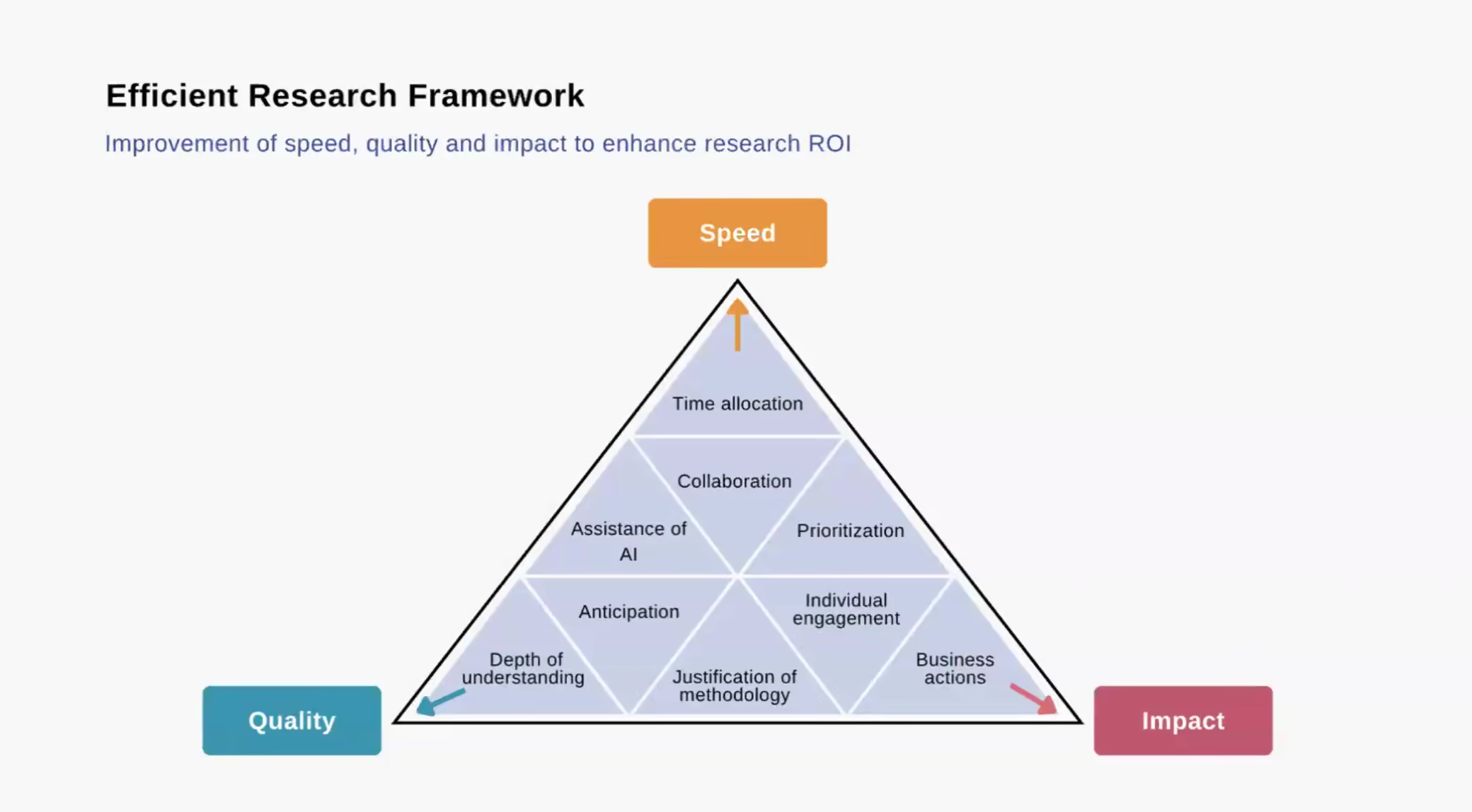
Not all research requires the same level of depth. Efficient researchers prioritize their time by categorizing projects based on urgency and impact:
By allocating time wisely, researchers can avoid spending weeks on minor issues while ensuring critical decisions are well-informed.
AI is transforming UX research, enabling faster and more scalable insights. Weidan suggests using AI to:
While AI can’t replace human judgment, it can free up researchers to focus on higher-value tasks like interpreting results and influencing strategy.
Research has a greater impact when it’s embedded into the product development process. Weidan emphasizes:
When research is shared and collaborative, it leads to faster adoption of insights and stronger decision-making.
With limited resources, researchers must choose their battles wisely. Weidan recommends using a prioritization framework to assess:
By filtering out low-priority projects, researchers can avoid research for research’s sake and focus on what truly drives change.
Speed is important, but efficient research isn’t about cutting corners. Weidan stresses that even quick studies should provide a deep understanding of users by:
Balancing speed with depth ensures research is not just fast, but meaningful.
Proactive researchers don’t wait for stakeholders to request studies—they anticipate needs and set up research ahead of time. This means:
By anticipating research needs, UX teams can reduce last-minute requests and deliver insights exactly when they’re needed.
Stakeholders may question research methods, especially when they seem time-consuming or expensive. Weidan highlights the importance of educating teams on why specific methods are used:
A well-justified approach ensures research is respected and acted upon.
Not all stakeholders consume research the same way. Weidan recommends adapting insights to fit different audiences:
By delivering insights in the right format, researchers increase the likelihood of stakeholder buy-in and action.
The ultimate goal of research is not just understanding users—but driving business decisions. To ensure research leads to action:
Research is most valuable when it translates into real business outcomes.
Efficient research is not just about doing more, faster—it’s about balancing speed, quality, and impact to maximize its influence. Weidan’s nine tactics help UX researchers work smarter by:
✔️ Prioritizing high-impact work
✔️ Leveraging AI and collaboration
✔️ Communicating research in a way that drives action
By adopting these strategies, UX teams can ensure their research is not just insightful, but transformational.
Every month we have informative “bite sized” presentations to add some inspiration to your day. These virtual events allow us to partner with amazing speakers, community groups and organizations to share their insights and hot takes on a variety of topics impacting our industry 🚀
Do you want to learn ways to uplift qualitative researchers and value their skill sets as business assets?
In an effort to make “data-driven” decisions, business leaders look to research for guidance. However, there is often an implicit priority for quantitative research over qualitative research. Often, even if qualitative research is funded and the findings are valued, the qualitative researcher and their skill sets can feel under-appreciated at an organizational or business unit level.
Let’s uplift the qualitative researcher and honor the craft of qualitative research as a transferable skill set. In this talk we will discuss:
Jennifer is a business generalist with UX Research and Information Architecture chops. She spent six years at Factor, an Information Architecture Consulting Firm, where she most recently held the Chief of Staff role. Jennifer has an MBA, a certificate of UX design from School of Visual Concepts in Seattle, and Bachelor of Arts in Theatre. She strongly believes in building stakeholder consensus and adding depth to projects through careful exploration. She lives in Washington State near the U.S./Canadian border and loves hiking in the North Cascades with her family and their German Shepherd mutt.
Take a seat, invite your colleagues and we hope to see you at our next UX Insider!
Every month we have fun and informative “bite sized” presentations to add some inspiration to your lunch break. These virtual events allow us to partner with amazing speakers, community groups and organizations to share their insights and hot takes on a variety of topics impacting our industry.
Susanna Carman is a Strategic Designer and research practitioner who helps people solve complex problems involving services, systems, and human interactions. Specializing in design, leadership, and learning, Susanna brings a high-value toolkit and herself as a Thinking Partner to design leadership and change practitioners who are tasked with delivering sustainable solutions amidst disruptive conditions.
Susanna holds a Master of Design Futures degree from RMIT University. She has over a decade of experience delivering business performance, cultural alignment, and leadership development outcomes to the education, health, community development, and financial services sectors. She is also the founder and host of Transition Leadership Lab, a nine-week learning lab for design, leadership, and change practitioners who already have a sophisticated set of tools and mindsets but still feel these are insufficient to meet the challenge of leading change in a rapidly transforming world.
Grab your lunch, invite your colleagues and we hope to see you at our next Lunch n’ Learn! 🥪
Have you ever used a self-service checkout at the supermarket, or scanned your own bags onto the belt at the airport? As much as these interactions seek to follow the same principles we apply to web and mobile interactions, often there comes a point where we need to improvise and come up with novel ways to apply what we know in a new context.
In this talk, we’ll explore what happens when the things we take for granted as digital designers go out the window and how you can adapt your design to the different needs of ‘phygital’ interactions.
Every month we have fun and informative “bite sized” presentations to add some inspiration to your lunch break. These virtual events allow us to partner with amazing speakers, community groups and organizations to share their insights and hot takes on a variety of topics impacting our industry.
Caitlin Pilcher is a digital experience designer driven by the belief people have a critical role to play in tackling the challenges we face today and building the world we want to see tomorrow. Her background in industrial and digital design has allowed her to investigate how people interact with both physical and digital environments, developing a keen interest in how we can design the space in between. Her work seeks to deeply understand and has focused on exploring complex problems with a sense of curiosity to create simple, human-centred solutions that work towards bringing exciting possible futures to life.
Ben McCarthy is driven to create incredibly positive outcomes for both people and the planet and speed up the inevitable transition to a low carbon future. Ben unpacks the complexity of human-centred systems to aid others in achieving this, looking for key interactions we have with each other, our services, and our institutions to unlock our ability to make the most meaningful change. Ben is unafraid of using novel and proven methods to tackle the most significant societal and environmental challenges we face today.
Grab your lunch, invite your colleagues and we hope to see you at our next Lunch n’ Learn! 🥪
Every month we have fun and informative “bite sized” presentations to add some inspiration to your lunch break. These virtual events allow us to partner with amazing speakers, community groups and organizations to share their insights and hot takes on a variety of topics impacting our industry.
Join us at the end of every month for Lunch n' Learn. 🌯
A lot goes into good content design (AKA UX writing), but what exactly is that "lot" made up of? Torrey Podmajersky tackled the question with research: What are the skills content designers use in their roles? Torrey's research uncovered 94 skills, and her open survey gathered results from every economic region of the globe, surveying more than 800 people in its first month. The insights into the core skills of content design, combined with the impacts that can be made with those skills, are helping designers make better products by investing in the right efforts.
Torrey Podmajersky is the president of Catbird Content and author of the bestselling book Strategic Writing for UX. Torrey helps teams solve business and customer problems using UX and content. She has consulted on and created inclusive and accessible consumer and professional experiences for Fortune 500s and startup clients in consumer, B2B, and enterprise software spaces, including Google, OfferUp, and Microsoft.
Grab your lunch, invite your colleagues and we hope to see you at our next Lunch n’ Learn! 🥪

