Subscribe to OW blog for an instantly better inbox
Oops! Something went wrong while submitting the form.

Articles and Podcasts on Customer Service, AI and Automation, Product, and more
.webp)
Great research has never been about speed alone. It’s about asking the right questions, understanding the context behind them, and uncovering insights that help teams make better decisions.
Optimal's AI Interviewer is designed to support that process. It’s designed to work alongside researchers and teams, so you can move faster without losing the depth and human nuance that makes research valuable.
Before building AI Interviewer, we spoke with and surveyed researchers, designers, and product teams to how they approach interviews today and where AI could genuinely help.
What we heard was consistent:
AI isn’t useful if it ignores how your team works. So instead of building a generic interviewer, we focused on building an AI Interviewer that fits into your current workflows and keeps researchers and teams in the driver's seat.
Here’s what we learned and how we brought it to life with Optimal’s AI Interviewer.
The best interviews start with a clear understanding of what you’re trying to uncover. With the AI Interviewer, you can add your research goals, audience details, company and product context, and additional context you want the AI to consider. This means the AI doesn’t just ask questions; it understands what you’re trying to learn and helps guide conversations in the right direction.
The same context also powers AI insights, helping ensure summaries, key themes, and citations are relevant, accurate, and aligned with what you're trying to learn.
One of the concerns with AI-led interviews is not having enough control. We’ve designed the AI Interviewer with this in mind.
For each question, you can choose how deeply you would like the AI Interviewer to probe and follow-up. You decide when deeper exploration is valuable, how the conversation flows, and the AI can then carry this out on your behalf.
AI Interviewer helps remove some of the barriers that make qualitative research difficult to scale. Use it to:
This isn’t about replacing researchers. It’s about removing operational work so you can focus on higher-value work, like synthesis, storytelling, and decision-making.
Every session comes with recordings, key summaries, and AI-generated insights with clear detailed evidence. Instead of reviewing hours of footage, you can quickly find what matters and confidently back it up. Review insights across your full study, or dive deeper into individual sessions and specific questions.
On the roadmap: Once your interviews are complete, you can use AI Chat to go further with your data and explore patterns across sessions, ask follow-up questions, and validate assumptions with real evidence.
Let’s address the elephant in the room. AI-led interviews aren’t something everyone is immediately comfortable with, and that’s fair. There are real limitations.
Some research scenarios require human sensitivity and judgment. Nuance, emotion, and edge cases still benefit from a human touch. Vulnerable populations and complex topics should always be handled with care. Optimal values a human-in-the-loop approach and know an AI Interviewer isn’t always suitable. With that in mind, we made sure that:
The AI Interviewer supports your work. It doesn’t replace your expertise.
AI Interviewer is now available in early access, and we’re continuing to learn from the teams using it. If you’re looking to scale your research without scaling your workload, run interviews across time zones, and spend less time on logistics and more time on insights, we’d love for you to try it.
👉 Book a demo to see how it fits into your workflow.
Already with Optimal? Register your interest for early access.

There’s not much a parent won’t do to ensure their child has the best chance of succeeding in life. Unsurprisingly, things are much the same in product development. Whether it’s a designer, manager, developer or copywriter, everyone wants to see the product reach its full potential.
Key to a product’s success (even though it’s still not widely practiced) is UX research. Without research focused on learning user pain points and behaviors, development basically happens in the dark. Feeding direct insights from customers and users into the development of a product means teams can flick the light on and make more informed design decisions.
While the benefits of user research are obvious to anyone working in the field, it can be a real challenge to convince others of just how important and useful it is. We thought we’d help.
If you want to sell the importance of UX research within your organization, you’ve got to ensure stakeholders have a clear understanding of what user research is and what they stand to gain from backing it.
In general, there are a few key things worth focusing on when you’re trying to explain the benefits of research:
Use the language of the people you’re trying to convince. A capable UX research practice will almost always improve key business metrics, namely sales and retention.
When embarking on a project, book in some time early in the process to answer questions, explain your research approach and what you hope to gain from it. Here are some of the key things to go over:
When trying to convince someone of the validity of what you’re doing, it’s often best to just show them. There are a couple of effective ways you can do this – at a team or individual level and at an organizational level.
We’ll explain the best way to approach this below, but there’s another important reason to bring others into your research. UX research can’t exist in a vacuum – it thrives on integration and collaboration with other teams. Importantly, this also means working with other teams to define the problems they’re trying to solve and the scope of their projects. Once you’ve got an understanding of what they’re trying to achieve, you’ll be in a better position to help them through research.
Education sessions (lunch-and-learns) are one of the best ways to get a particular team or group together and run through the what and why of user research. You can work with them to work out what they’d like to see from you, and how you can help each other.
Tailor what you’re saying to different teams, especially if you’re talking to people with vastly different skill sets. For example, developers and designers are likely to see entirely different value in research.
Putting together a comprehensive internal repository focused specifically on user research is another excellent way to grow awareness. It can also help to quantify things that may otherwise fall by the wayside. For example, you can measure the magnitude of certain pain points or observe patterns in feature requests. Using a platform like Notion or Confluence (or even Google Drive if you don’t want a dedicated platform), log all of your study notes, insights and research information that you find useful.
Whenever someone wants to learn more about research within the organization, they’ll be able to find everything easily.
Getting a stakeholder along to a research session (usability tests and user interviews are great starting points) will help to show them the value that face-to-face sessions with users can provide.
To really involve an observer in your UX research, assign them a specific role. Note taker, for example. With a short briefing on best-practices for note taking, they can get a feel for what’s like to do some of the work you do.
You may also want to consider bringing anyone who’s interested along to a research session, even if they’re just there to observe.
Research is about more than just testing a hypothesis, it’s important to actually take your research back to the people who can action the data.
By sharing your research findings with teams and stakeholders regularly, your organization will start to build up an understanding of the value that ongoing research can provide, meaning getting approval to pursue research in future becomes easier. This is a bit of a chicken and egg situation, but it’s a practice that all researchers need to get into – especially those embedded in large teams or organizations.
Anything else you think is worth mentioning? Let us know in the comments.

Summary: In this post, David goes through the process of running an audit of Optimal Workshop’s content – and why you should probably think about doing your own.
When was the last time you ran a website content audit? If the answer’s either ‘I don’t know’ or ‘Never’, then it’s probably high time you did one. There are few activities that can give you the same level of insight into how your content is performing as a deep dive into every blog post, case study and video on your website.
At a very high level, a website content audit is a qualitative analysis of all blogs, landing pages, support articles and guides on your website. It’s like taking inventory or stock-taking. In real terms, a content audit will often be a spreadsheet with fields for things like content type, URL, title, view count and category – the fields differ depending on your own needs and the types of content you’re auditing.
There’s really no better way to understand how all of your content is performing than a comprehensive audit. You’re able to see which articles and pages are driving the most traffic and which ones aren’t really contributing anything.
You can also see if there are any major gaps in your content strategy to date. For example, is there a particular area of your business that you’re not supporting with guides or blog articles?
A holistic understanding of your website’s content allows you to create more effective content strategies and better serve your audience.
Content had grown organically at Optimal Workshop. In the 10 years since we started countless people had a hand in creating blog articles, landing pages, videos and other types of content – much of it often created without following a clear content strategy. That’s often fine for a small startup, but not the right direction to stay on for a rapidly growing business.
When I started to scope the task of auditing everything content-related, I first took note of where all of our content currently sat. The ‘learn hub’ section of our website was just a fairly convoluted landing page pointing off to different sub-landing pages, while the blog was a simply a reverse-chronological order display of every blog post and far too many categories. There was clearly room for significant improvement, but taking stock of everything was a critical first step.
With a rough idea of where all of our content was located – including the many live pages that weren’t accessible through the sitemap – I could begin the process of collating everything. I’d decided on a spreadsheet as it allowed me to achieve quite a high information density and arrange the data in a few different ways.
I came up with several fields based on the type of content I was auditing. For the blog, I wanted:
At an individual level, these categories gave me a good idea as to whether or not a piece of content was performing well. When looking at all of the blog posts in my finished audit, I could also quickly identify any factors that the best-performing pieces of content had in common.
One of the most interesting, although not entirely surprising, learnings from this audit was that our more practical and pragmatic content (regardless of channel) always performed better than the lighter or fluffier content we occasionally produced. The headline was almost certainly the deciding factor here. For example, articles like ‘A guide to conducting a heuristic evaluation’ and ‘How to create use cases’ attracted view counts and read times well above articles like ‘From A to UX’ and ‘Researching the researchers and designing for designers’. Interestingly, content written to support the use of our tools also often attracted high view counts and read times.
Intuitively, this makes sense. We’re a software company writing for a community of researchers, designers and professionals, many of whom will have come to our blog as a result of some interaction with our tools. It makes sense they’d see more value in content that can help them accomplish a specific task – even better if it supports their use of the tools.
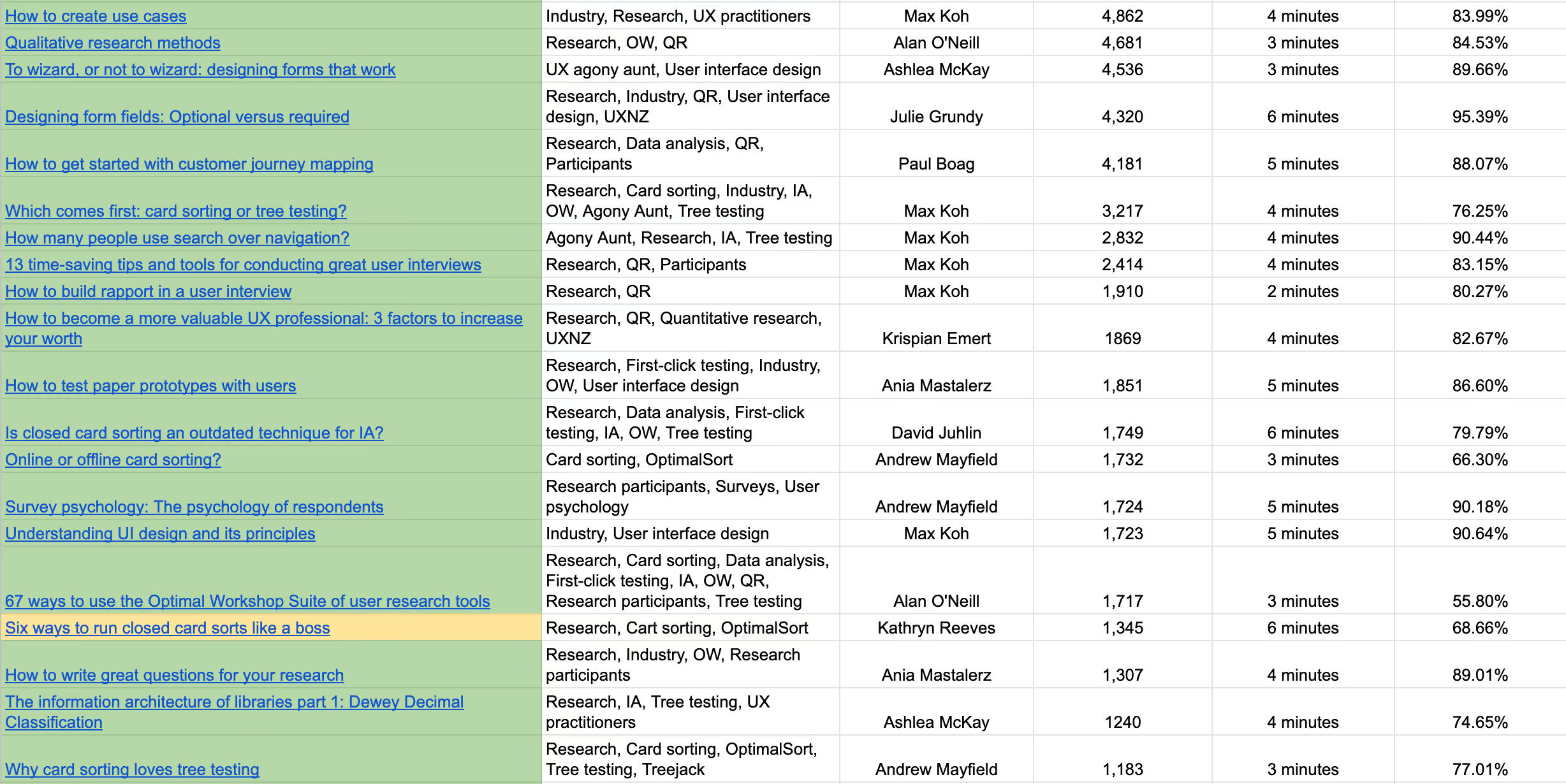
Following my audit of the blog, I moved onto the other areas of the learn hub. I created an entirely new spreadsheet that contained everything that wasn’t a blog post, with a set of different fields:
I knew before even starting the audit that our series of 101 guides received a significant share of our learn hub page traffic, but I wasn’t quite prepared for just much they attracted. Each guide received far and away more traffic than the other learning resources. It’s results like these that serve to really highlight the value of frequent content audits. Few other exercises can provide such informative insights into content strategy.
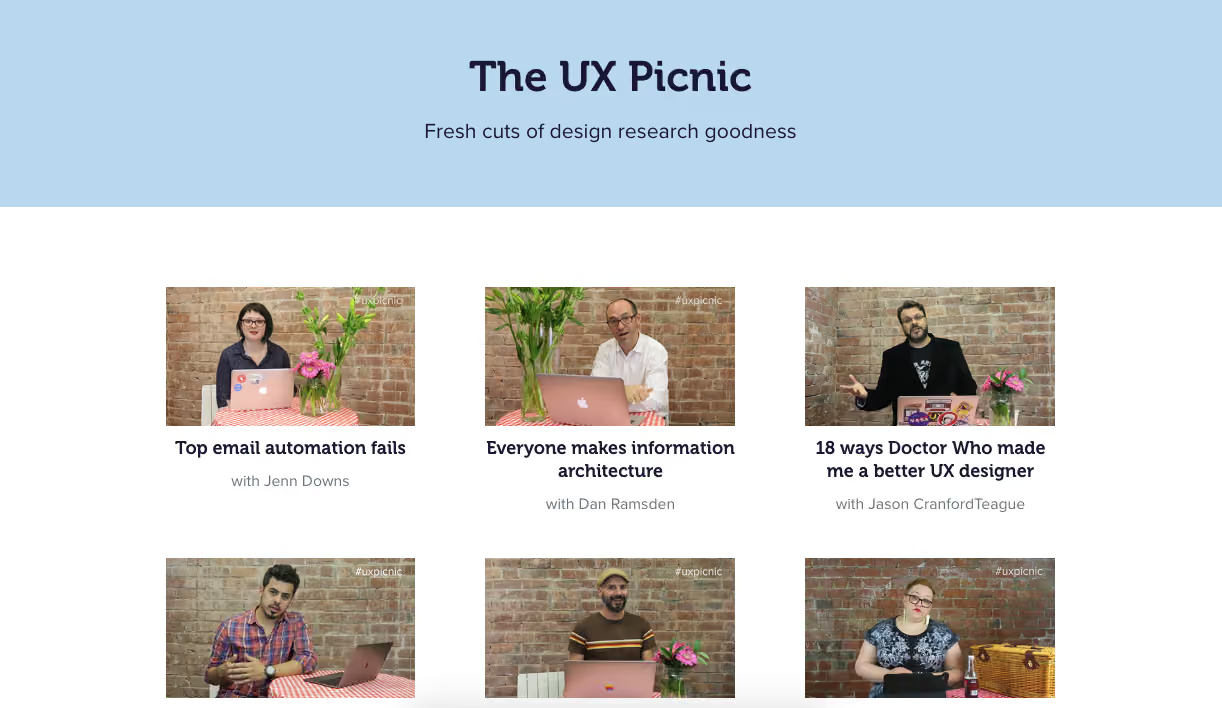
At some point in the past, we’d also run a short video series called ‘UX Picnic’, where we’d asked different guest user researchers to share interesting stories. Similarly, we had two case studies live on the website, with a third one delisted but still available (as long as you knew the URL!). We hadn’t seen spectacular traffic with any of these pieces of content and all were good candidates for further investigation. Seeing as we had big plans for future case studies, analyzing what worked and what didn’t with these earlier versions would prove a useful exercise.
A product demo page, information architecture guide page and how to pick the right tool page made up the final pieces of our audit puzzle, and I popped these last 2 on a third ‘other pages’ spreadsheet. Interestingly, both the information architecture guide page and how to pick the right tool page had received decent traffic.
An important function of a content audit is to identify ways to improve the content strategy moving forward. As I made my way through the blog articles, guides and case studies, I was finding that while we’d seen great results with a number of different topics, we’d often move onto another topic instead of producing follow-up content.
Keyword research revealed other content gaps – basically areas where there was an opportunity for us to produce more relevant content for our audience.
Once I’d finished the initial content pull from the website, we (the Community Education team) realized that we wanted to add another layer of categorization.
With a focus specifically on the blog (due to the sheer quantity of content), we came up with another tagging system that could help us when it came time to move to a new blogging platform. I went back through the spreadsheet containing every blog post, and tagged posts with the following system:
This system meant we had a much better idea of how we’d approach moving our blog content to a new platform. Specifically, what we could bring across and the content we’d need to improve.
Auditing everything ‘content’ at Optimal Workshop proved to be a pretty useful exercise, allowing me to see what content was performing well (and why) and the major gaps in our content strategy. It also set us up for the next stage of our blog project (more coming soon), which was to look at how we’d recategorize and re-tag content to make it easier to find.
If you’ve just jumped down straight down here without reading the introduction at the top of the page, this section outlines how to run your own content audit. To recap, a content audit is a qualitative assessment of your website’s content. Running one will enable you to better understand the pros and cons of your current content strategy and help you to better map out your future content strategy.
To do a content audit, it’s best to start with a clear list of categories or metrics. Commonly, these are things like:
The sky’s the limit here. Just note that the more categories you add, the more time you’ll have to spend gathering data for each piece of content. With your categories defined, open a new spreadsheet and begin the process of auditing each and every piece of content. Once you’ve finished your audit, socialize your insights with your team and any other relevant individuals.
Then, you can move onto actually putting your content audit into practice. Look for gaps in your content strategy – are there any clear areas that you haven’t written about yet? Are there any topics that could be revisited. Ideally, a content audit should be kept updated and used whenever the topic of “content strategy” comes up.

Whether it’s Fortune 500 companies or tiny startups, people are recognizing the value of building products with a user-first methodology.But it’s not enough to merely say “we’re doing research”, it has to be the right UX research. Research that combines richness of different people's experiences and behavioral insights with tangible numbers and metrics. Key to this is an approach called mixed methods research.
Here, we’ll dive into the what and why of mixed methods research and cover a few examples of the approach.
Mixed methods isn’t some overly complicated practice that’ll take years to master — it simply refers to answering research questions through a combination of qualitative and quantitative data. This might mean running both interviews and surveys as part of a research project or complementing diary study data with analytics looking at the usage of a particular feature.A basic mixed methods question could be: “What are the key tasks people perform on my website?”. To answer this, you’d look at analytics to understand how people navigate through the page and conduct user interviews to better understand why they use the page in the first place. We’ve got more examples below.
It makes sense: using both qualitative and quantitative methods to answer a single research question will mean you’re able to build a more complete understanding of the topic you’re investigating. Quantitative data will tell you what is happening and help you understand magnitude, while qualitative data can tell you why something is happening. Each type of data has its shortcomings, and by using a mixed methods approach you’re able to generate a clearer overall picture.
There’s really no “time to do mixed methods research”. Ideally, for every research question you have, evaluate which qualitative and quantitative methods are most likely to give you the best data. More often than not, you’ll benefit from using both approaches.We’ve put together a few examples of mixed methods research to help you generate your own UX research questions.
Imagine this. You’re on the user research team at BananaBank, a fictional bank. You and your team want to investigate how the bank’s customers currently use their digital banking services so your design team can make some user-focused improvements.We’ve put together a few research questions based on this goal that would best be served by a mixed methods approach.
As we touched on at the beginning of this article, mixed methods research isn’t a technique or methodology, it’s more a practice that you should develop to gain a more holistic understanding of the topic you’re investigating. What’s more, using both types of methods will often mean you’re able to validate the output of one method by using another.When you plan your next research activity, consider complementing it with additional data to generate a more comprehensive picture of your research problem.

As the focus on user-centered design continues to grow in organizations around the world, we’ll also need effective leaders to guide UX teams. But what makes a great UX leader?
Leadership may come as naturally as breathing to some people, but most of us need some guidance along the way. We created this article to pull together a few tips for effectively running UX teams, but be sure to leave a comment if you think we’ve missed anything. After all, part of what makes a great leader is being able to take feedback and to learn from others!
There’s a pretty clear distinction between managers and leaders. As a leader, your job isn’t necessarily to manage and tell people what to do, but instead to lead. You should enable your team to succeed by providing them with the tools and resources they need.
Intel’s Andy Grove, who infamously ruled the Silicon Valley semiconductor company with an iron fist, may be a polarizing figure in the leadership sphere, but he did institute (or at least help popularize) some techniques that are still widely practised today. One of these was to sit in an office cube with his fellow employees, instead of in a siloed office by himself. There’s a good lesson here. Instead of sealing yourself away from your team, immerse yourself in their environment and their work. You’ll develop a much better understanding of the types of problems they deal with on a daily basis and as a result be in a better position to help them.
You can also take this a step further and conduct an audit of your team’s strengths and weaknesses. Also known as a skills audit, this process is more commonly performed in organizations at scale, but it’s a good way to show you where your capabilities lie – even in small teams. With an intimate understanding of your UX team you’ll be in a good position to assess which projects your team can and can’t take on at any given time.
Taking this process even further, you can undertake a skills audit of yourself. If you want to develop yourself as a leader, you have to understand your own strengths and weaknesses.
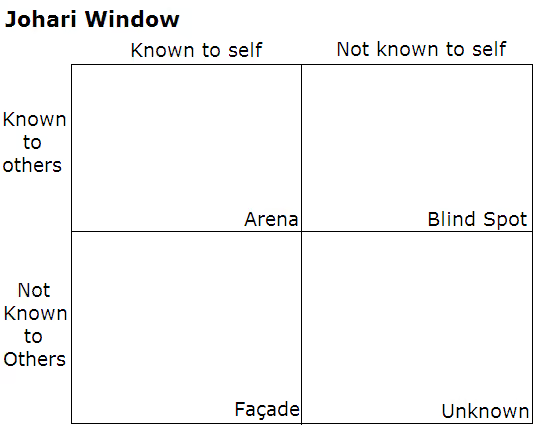
This quote by Donald Rumsfeld, although it applies to crisis management, provides a great way to self-audit: “There are known knowns: there are things we know we know. We also know there are known unknowns: That is to say, we know there are some things we do not know. But there are also unknown unknowns: the things we don't know we don't know". You can see a visual example of this in the Johari Window:
Source: Wikipedia
Here’s how you can take this approach and use it for yourself:
NASA astronaut Frank Borman, echoing a sentiment since shared by many people who’ve been to space, said: “When you're finally up on the moon, looking back at the earth, all these differences and nationalistic traits are pretty well going to blend and you're going to get a concept that maybe this is really one world and why the hell can't we learn to live together like decent people?”.
On an admittedly much smaller scale, the same learning can and should be applied to UX teams. When it comes time to take on a new project and define the vision, scope and strategy, bring in as many people as possible. The idea here isn’t to just tick an inclusivity box, but to deliver the best possible outcome.
Get input from stakeholders, designers, user researchers and developers. You certainly don’t have to take every suggestion, but a leader’s job is to assess every possible idea, question the what, why and how, and ultimately make a final decision. ‘Leader’ doesn’t necessarily have to mean ‘devil’s advocate’, either, but that’s another role you’ll also want to consider when taking suggestions from a large number of people.
Anyone who’s ever stepped into a leadership role will understand the significant workload increase that comes along with it – not to mention the meetings that seemingly start to crop up like weeds. With such time pressures it can be easy to overlook things like regular one-on-ones, or at the very least making time for members to approach you with any issues.
Even with the associated pressures that come along with being a leader, stand-ups or other weekly meetings and one-on-ones should not be ignored.
Sit down with each member of your team individually to stay up to date on what they’re working on and to get a feel for their morale and motivation. What’s more, by simply setting some time aside to speak with someone individually, they’re more likely to speak about problems instead of bottling them away. Rotating through your team every fortnight will mean you have a clear understanding of where everyone is at.
Hosting larger stand-ups or weekly meetings, on the other hand, is useful in the way that large team meetings have always been useful. You can use the forum as a time for general status updates and to get new team members acclimated. If there’s one piece of advice we can add on here, it’s to have a clear agenda. Set the key things to cover in the meeting prior to everyone stepping into the room, otherwise you’re likely to see the meeting quickly get off track.
You know the feeling. It’s Wednesday afternoon and one of the product teams has just dropped a significant amount of work on your team’s plate – a plate that’s already loaded up. While it can be tempting to join in with the bickering and complaining, it’s your job as the leader of your UX team to keep a level head and remain calm.
It’s basic psychology. The way you act and respond to different situations will have an impact of everyone around you – most importantly, your team. By keeping calm in every situation, your team will look to you for guidance in times of stress. There’s another benefit to keeping a level head: your own leaders are more likely to recognize you as a leader as well as someone who can handle difficult situations.
Two leadership development consultants ran a study of over 300,000 business leaders, and sorted the leadership skills they found most important for success into a numbered list. Unsurprisingly, an ability to motivate and inspire others was listed as the most important trait.
While no user researcher or designer will doubt the value of UX research, it’s still an emerging industry. As a result, it can often be misunderstood. If you’re in charge of leading a UX team, it’s up to you to ensure that your team always has a seat at the table – you have to know when to speak up for yourself and your team.
If you a problem, you need to voice your concern. Of course, you need to be able to back up your arguments, but that’s the point of your role as a leader. Those new to leadership can find this aspect of the the job one of the hardest parts to master – it’s no surprise one of the key qualities in a great leader is an ability to speak up if they feel it’s the right thing to do.
Finally, you’ve got to assume the role of a buffer. This is another general leadership quality, and it’s similarly important. Take the flak from executives, upper management or the board of directors and defend your UX team, even if they’re not aware of it. If you need to take some information or feedback from these people and give it to your team, pay close attention to how you relay it to them. As an example, you want to be sure that a message about reducing customer churn is made relevant and actionable.
Stepping into a UX leadership position isn’t an excuse to stop developing yourself professionally. After all, it was those skills that got you there in the first place. Continue to focus on upskilling yourself, staying up to date on movements and trends in the industry and immersing yourself in the work your team carries out.
A leader with the skills to actually function as a member of their team is that much more capable – especially when another pair of hands can help to get a project over the line.
The field of user research continues to grow and mature, meaning the need for effective leaders is also increasing. This means there are near-limitless opportunities for those willing to step into UX leadership roles, provided they’re willing to put in the work and become capable leaders.
As we stated earlier, many of the skills that make a great leader also translate to UX leadership, and there’s really no shortage of resources available to provide guidance and support. In terms of UX specifically, here are a few of our favorite articles – from our blog and elsewhere:

What an epic year. It’s certainly been one of significant change for us. We’ve welcomed a number of talented new people into our family (our team has grown by 64%), traveled around the world to visit and learn from our community, and refined and expanded our tools.Here’s what’s been going on at Optimal Workshop this year.Changing how we workOne of the biggest internal changes we made this year was to switch from primary working groups based on roles to smaller cross-functional teams called squads. Each of the squads has a set of objectives tied to the overarching goals of the company and they’re left to determine how to best meet these objectives. What’s more, squads are also self-managing, meaning they have no assigned manager. It’s different, and it’s working well for us. People are reporting higher levels of autonomy, enjoyment and focus.

Our Community Education squad hard at work.
We’ve also learned more about the importance of clarity this year, which I think is to be expected given our growth. I read a great article from Brené Brown, where she notes that “clear is kind, unclear is unkind”. Building a shared understanding is hard, and it’s well worth it.Happy and healthy

A highlight reel of some of the amazing smoothies and juices we’ve sampled this year.
What started as an initiative to cut back on our coffee consumption (and the subsequent afternoon slumps) has turned into a daily tradition here. We continued to make fresh fruit and vegetable juices daily this year, promoting healthy dietary decisions and giving everyone something to look forward to in the morning. I think we’ll just keep doing this as long as it seems like a good idea! If you’d like to hear my rationale for these kinds of crazy initiatives, here it is: If we expect people to come in and do their best work, we need to create an environment that’s conducive to people working at their best. Read the Stuff article about us here for more information and a video.Hitting the road (again)

Karl repping the Optimal Workshop team at the DesignOps Summit in New York City this year.
We’ve been to a lot of events this year, both at home and abroad. In fact, our team traveled a cumulative 205,349 miles in 2018 to connect with our community face to face. While that’s not quite the distance to the Moon, we were pretty close! I guess that’s the price of living in New Zealand, tucked away at the bottom of the globe (the bottom right corner on most maps).Moving house

Our new (still under construction) home.
In what’s possibly the biggest piece of news in this post, we’re moving into a new office late next year. Allen Street has been good to us, but it’s time to grow into a new space. Where are we moving, I hear you ask? Well, we’re actually taking over a piece of Wellington history and setting up shop in the converted Paramount picture theater. We’re really excited to share more with you – and even more excited to move in there ourselves!Our getaway to Riversdale

It’s always a good idea to bring a drone with you!
It’s no secret we like to do things a little different here – and the end of the year is no exception. Instead of hanging around in the office on a Friday afternoon or going out to a bar, we arose bright and early and clambered aboard a bus to head over the hill to the Wairarapa for a very traditional Kiwi beach day. Highlights included paintball, ping pong, some lovely team meals, freezing swims in the ocean and much celebration. It was certainly a great way to see the end of the working year in.Until next year

Anyway. That’s all for my end of year update. We really love what you do and we can’t wait to get right back into making this suite of tools the best, most cohesive home for your research that it can be. I’ve said it before, but we want to be the place where you and your team find signals in the noise and meaning in the mess. After all, we’re all about helping you create meaningful experiences.Keep your eyes peeled. We’ve got many more exciting changes on the way in 2019.As ever, we’re just getting started.Andrew MayfieldCEO

In Part 1 of this series we looked at how to interpret results from open and hybrid card sorts and now in Part 2, we’re going to talk about closed card sorts. In closed card sorts, participants are asked to sort the cards into predetermined categories and are not allowed to create any of their own. You might use this approach when you are constrained by specific category names or as a quick checkup before launching a new or newly redesigned website.In Part 1, we also discussed the two different - but complementary - types of analysis that are generally used together for interpreting card sort results: exploratory and statistical. Exploratory analysis is intuitive and creative while statistical analysis is all about the numbers. Check out Part 1 for a refresher or learn more about exploratory and statistical analysis in Donna Spencer’s book.
Closed card sort analysis is generally much quicker and easier than open and hybrid card sorts because there are no participant created category names to analyze - it’s really just about where the cards were placed. There are some similarities about how you might start to approach your analysis process but overall there’s a lot less information to take in and there isn’t much in the way of drilling down into the details like we did in Part 1.Just like with an open card sort, kick off your analysis process by taking an overall look at the results as a whole. Quickly cast your eye over each individual card sort and just take it all in. Look for common patterns in how the cards have been sorted. Does anything jump out as surprising? Are there similarities or differences between participant sorts?
If you’re redesigning an existing information architecture (IA), how do your results compare to the current state? If this is a final check up before launching a live website, how do these results compare to what you learned during your previous research studies?If you ran your card sort using information architecture tool OptimalSort, head straight to the Overview and Participants Table presented in the results section of the tool. If you ran a moderated card sort using OptimalSort’s printed cards, you’ve probably been scanning them in after each completed session, but now is a good time to double check you got them all. And if you didn’t know about this handy feature of OptimalSort, it’s something to keep in mind for next time!
The Participants Table shows a breakdown of your card sorting data by individual participant. Start by reviewing each individual card sort one by one by clicking on the arrow in the far left column next to the Participants numbers. From here you can easily flick back and forth between participants without needing to close that modal window. Don’t spend too much time on this — you’re just trying to get a general impression of how the cards were sorted into your predetermined categories. Keep an eye out for any card sorts that you might like to exclude from the results. For example participants who have lumped everything into one group and haven’t actually sorted the cards.
Don’t worry- excluding or including participants isn’t permanent and can be toggled on or off at anytime.Once you’re happy with the individual card sorts that will and won’t be included in your results visualizations, it’s time to take a look at the Results Matrix in OptimalSort. The Results Matrix shows the number of times each card was sorted into each of your predetermined categories- the higher the number, the darker the shade of blue (see below).
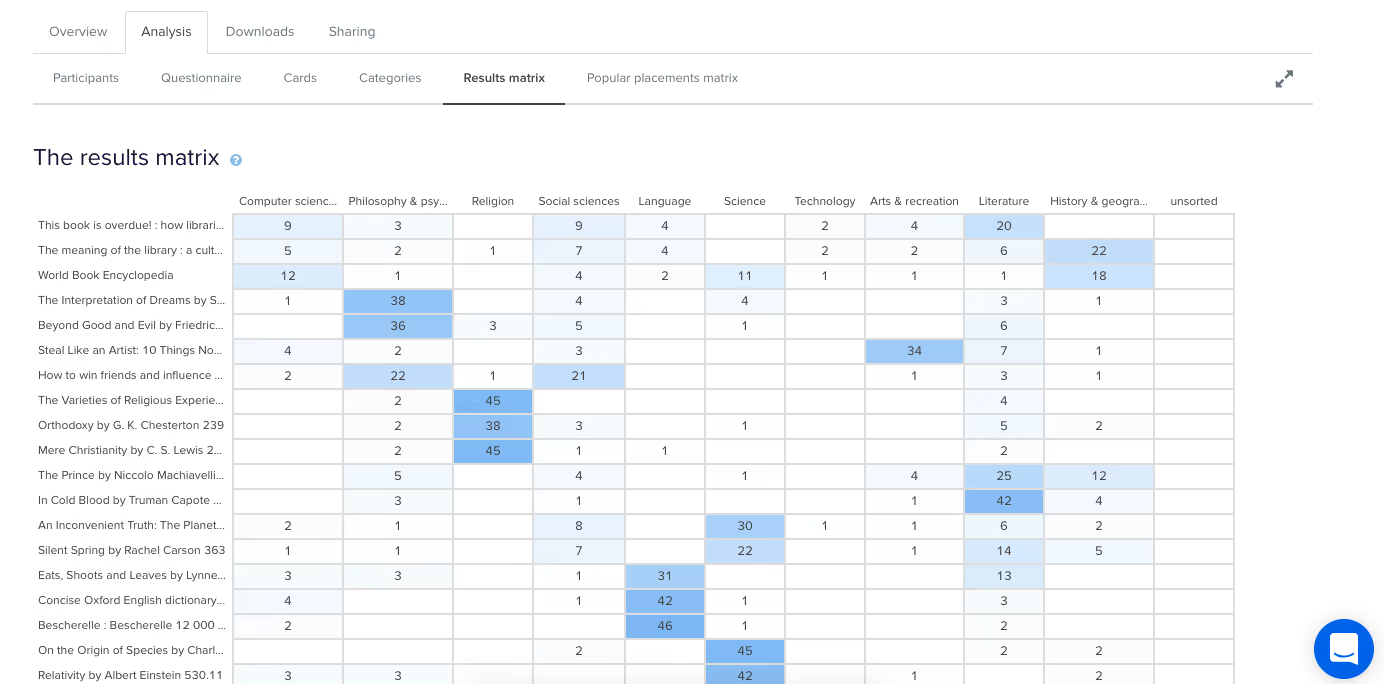
This table enables you to quickly and easily get across how the cards were sorted and gauge the highest and lowest levels of agreement among your participants. This will tell you if you’re on the right track or highlight opportunities for further refinement of your categories.If we take a closer look (see below) we can see that in this example closed card sort conducted on the Dewey Decimal Classification system commonly used in libraries, The Interpretation of Dreams by Sigmund Freud was sorted into ‘Philosophy and psychology’ 38 times in study a completed by 51 participants.
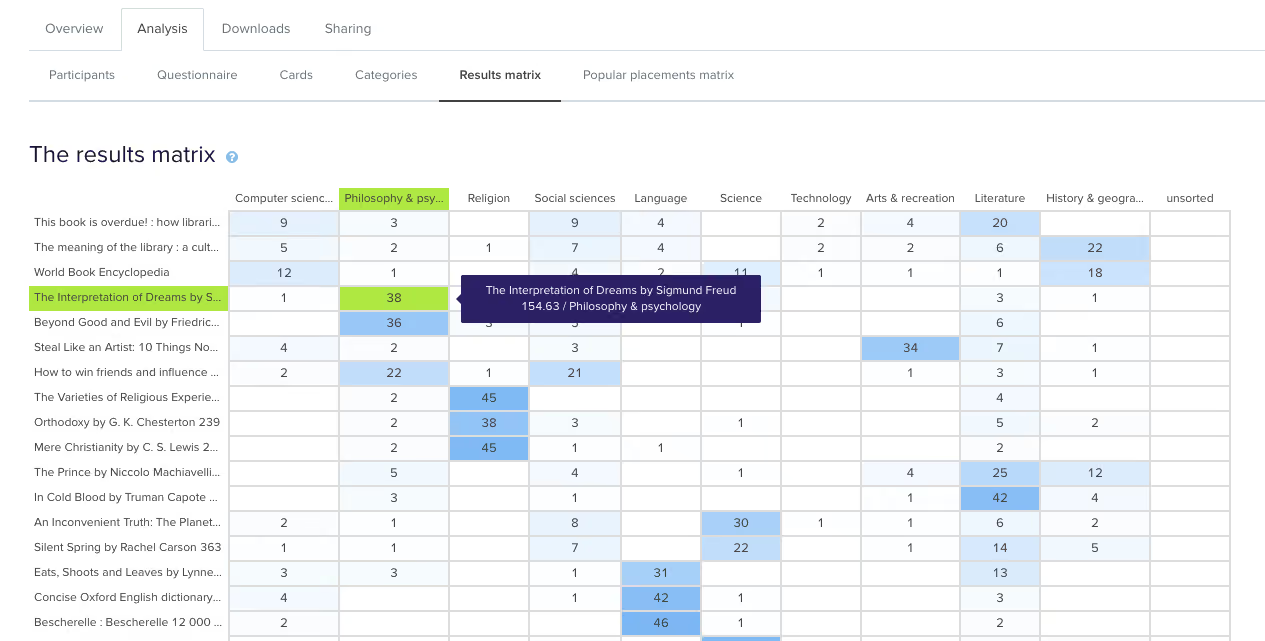
In the real world, that is exactly where that content lives and this is useful to know because it shows that the current state is supporting user expectations around findability reasonably well. Note: this particular example study used image based cards instead of word label based cards so the description that appears in both the grey box and down the left hand side of the matrix is for reference purposes only and was hidden from the participants.Sometimes you may come across cards that are popular in multiple categories. In our example study, How to win friends and influence people by Dale Carnegie, is popular in two categories: ‘Philosophy & psychology’ and ‘Social sciences’ with 22 and 21 placements respectively. The remaining card placements are scattered across a further 5 categories although in much smaller numbers.
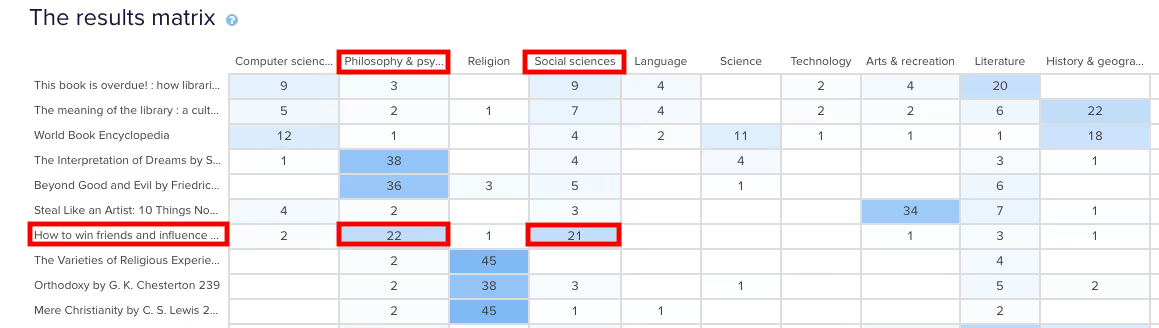
When this happens, it’s up to you to determine what your number thresholds are. If it’s a tie or really close like it is in this case, you might review the results against any previous research studies to see if anything has changed or if this is something that comes up often. It might be a new category that you’ve just introduced, it might be an issue that hasn’t been resolved yet or it might just be limited to this one study. If you’re really not sure, it’s a good idea to run some in-person card sorts as well so you can ask questions and gain clarification around why your participants felt a card belonged in a particular category. If you’ve already done that great! Time to review those notes and recordings!You may also find yourself in a situation where no category is any more popular than the others for a particular card. This means there’s not much agreement among your participants about where that card actually belongs. In our example closed card sort study, the World Book Encyclopedia was placed into 9 of 10 categories. While it was placed in ‘History & geography’ 18 times, that’s still only 35% of the total placements for that card- it’s hardly conclusive.

Sometimes this happens when the card label or image is quite general and could logically belong in many of the categories. In this case, an encyclopedia could easily fit into any of those categories and I suspect this happened because people may not be aware that encyclopedias make up a very large part of the category on the far left of the above matrix: ‘Computer science, information & general works’. You may also see this happening when a card is ambiguous and people have to guess where it might belong. Again - if you haven’t already - if in doubt, run some in-person card sorts so you can ask questions and get to the bottom of it!After reviewing the Results Matrix in OptimalSort, visit the Popular Placements Matrix to see which cards were most popular for each of your categories based on how your participants sorted them (see below 2 images).
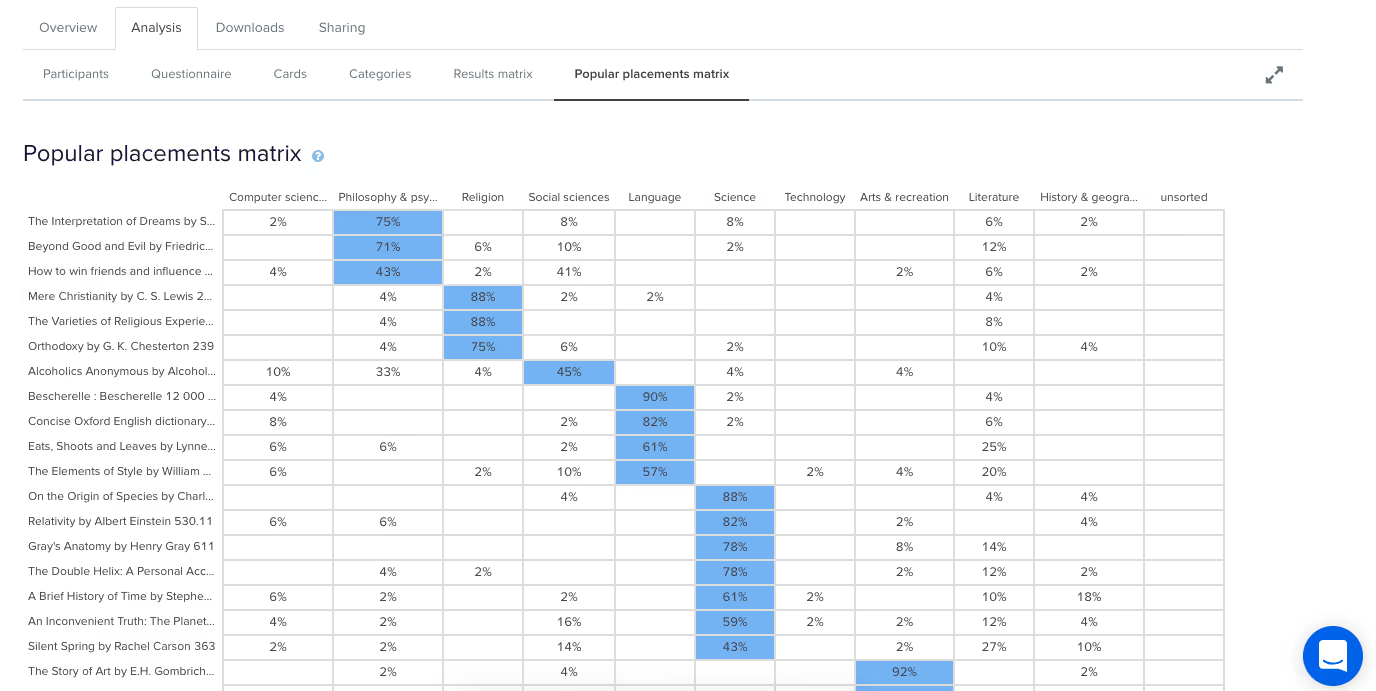
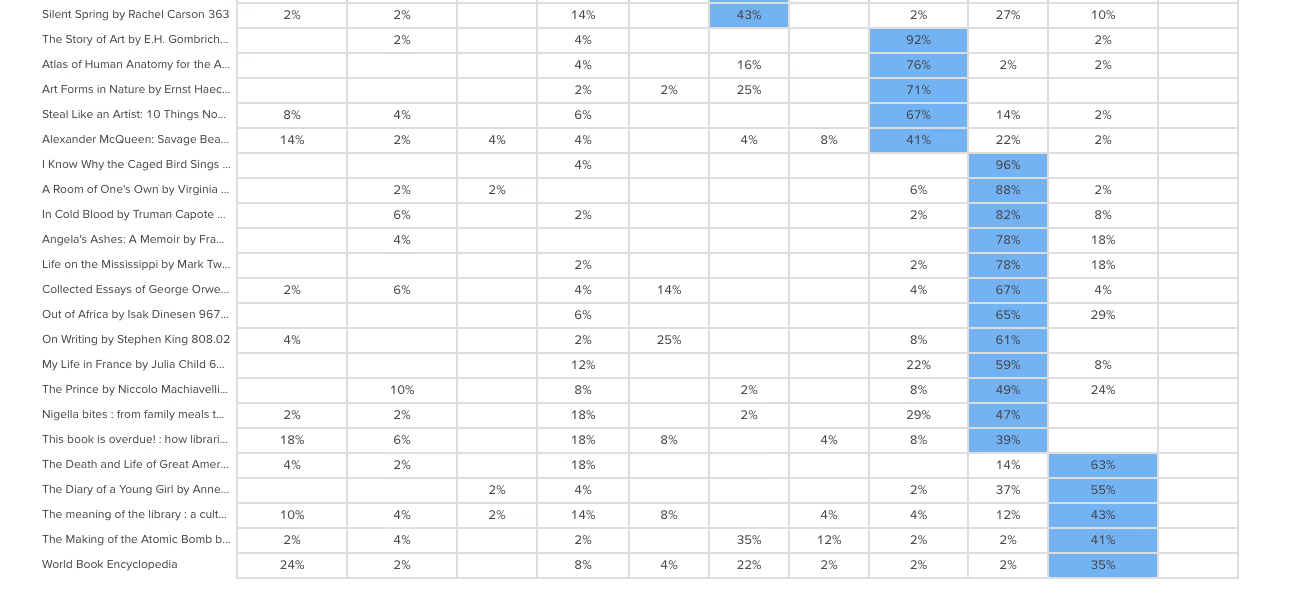
The diagram shades the most popular placements for each category in blue making it very easy to spot what belongs where in the eyes of your participants. It’s useful for quickly identifying clusters and also highlights the categories that didn’t get a lot of card sorting love. In our example study (2 images above) we can see that ‘Technology’ wasn’t a popular card category choice potentially indicating ambiguity around that particular category name. As someone familiar with the Dewey Decimal Classification system I know that ‘Technology’ is a bit of a tricky one because it contains a wide variety of content that includes topics on medicine and food science - sometimes it will appear as ‘Technology & applied sciences’. These results appear to support the case for exploring that alternative further!
Now that we’ve looked at how to interpret your open, hybrid and closed card sorts, here are some next steps to help you turn those insights into action!Once you’ve analyzed your card sort results, it’s time to feed those insights into your design process and create your taxonomy which goes hand in hand with your information architecture. You can build your taxonomy out in Post-it notes before popping it into a spreadsheet for review. This is also a great time to identify any alternate labelling and placement options that came out of your card sorting process for further testing.From here, you might move into tree testing your new IA or you might run another card sort focussing on a specific area of your website. You can learn more about card sorting in general via our 101 guide.
When interpreting card sort results, don’t forget to have fun! It’s easy to get overwhelmed and bogged down in the results but don’t lose sight of the magic that is uncovering user insights.I’m going to leave you with this quote from Donna Spencer that summarizes the essence of card sort analysis quite nicely:Remember that you are the one who is doing the thinking, not the technique... you are the one who puts it all together into a great solution. Follow your instincts, take some risks, and try new approaches. - Donna Spencer
