What if you could turn real user feedback into your next design iteration with a single prompt?
With Optimal MCP and Figma Agent, you can turn user research to design updates in minutes. Pull insights from your Optimal studies into Figma, then let its AI design agent update multiple frames and screens based on real participant feedback. As you gather more feedback, you can keep refining your designs, testing updated prototypes with real users and using what you learn to shape the next iteration.
Together, Optimal MCP and Figma Agent help close the loop between research and design, helping you turn real user feedback into better designs with every iteration.
How does the Optimal MCP & Figma Agent work?
Optimal MCP and Figma Agent help you connect the dots between research and design. Connect Optimal to Figma and draw on findings from one or multiple studies, including participant feedback, usability insights, transcripts and prototype task results. Figma’s AI design agent can use these insights to update existing designs or generate new ones based on your prompts.
Then, bring your updated prototypes back into Optimal to test them with real participants and see how your changes perform.
So what does this look like in practice? Imagine you've run a usability study and discovered that participants are struggling to find an important action in your product. Here’s how to put this research design loop into action.
Optimal MCP + Figma Agent in action
From research insight to your next breakthrough
1. Turn user insights into new design possibilities
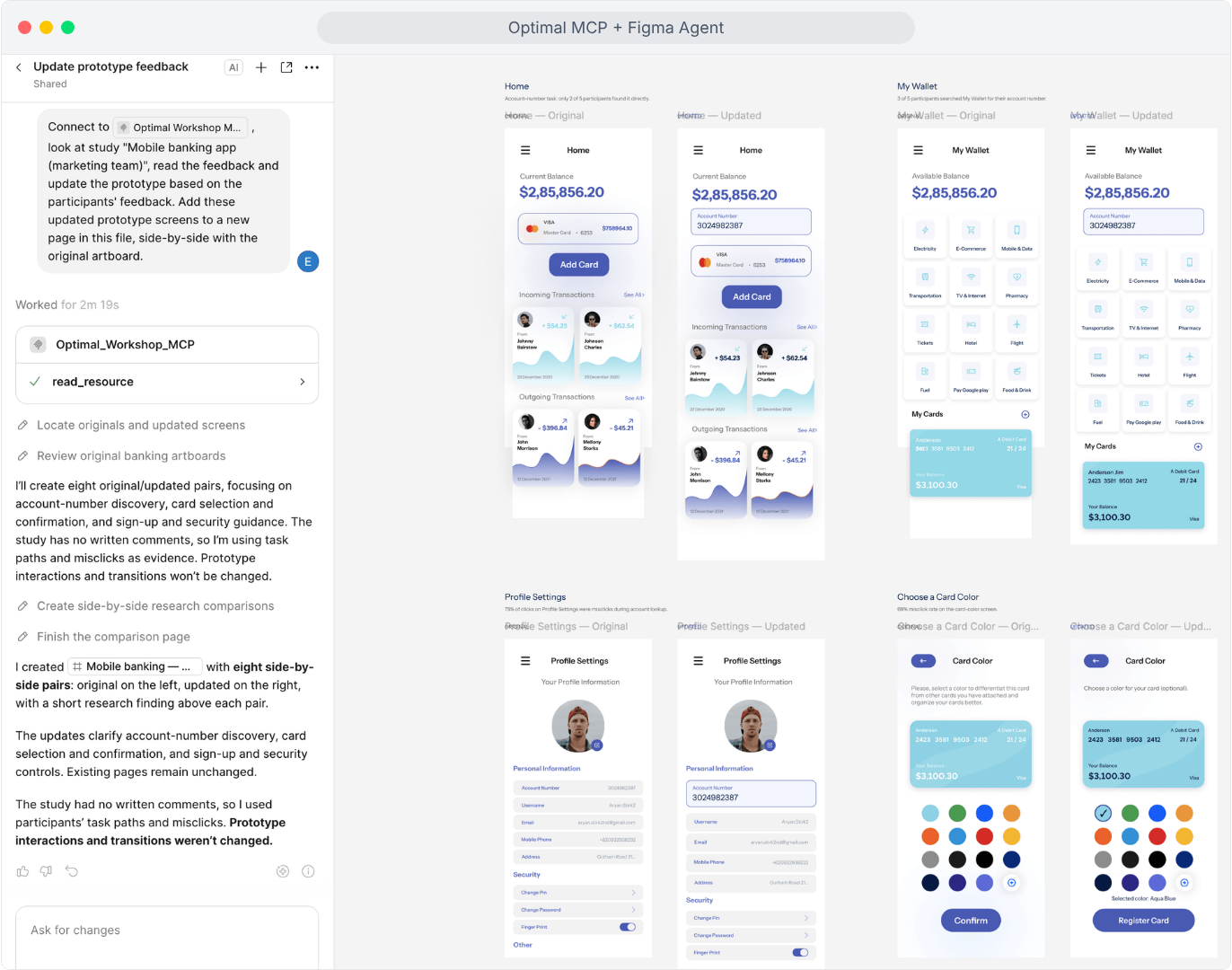
Reference Optimal MCP and one or more Optimal studies in Figma’s agent chat. Ask the agent to explore solutions to the usability issues your research revealed and generate design changes to address them.
Example prompt: "Connect to Optimal Workshop MCP, look at study "Mobile banking app", read the feedback and update the prototype based on the participants' feedback. Add these updated prototype screens to a new page in this file, side-by-side with the original artboard."
2. Explore further. Iterate faster.
Use AI to explore alternatives, challenge your first approach and move through design possibilities faster. Then bring your expertise to the process. Evaluate the trade-offs, review the prototype flows, refine the details and decide which ideas best serve your users.
As more participant feedback to your Optimal studies comes through, ask the agent to pull feedback from those new participants to bring those fresh insights into your Figma iterations.
3. Put your changes to the test
Here's where the loop gets even more exciting.
Put your newly updated prototype to the test with a new Optimal study. Have you made that important action easier to find? Does the new design solve the original problem? What could be even better?
You can test multiple prototypes or combine multiple methods in one study, whether you're working with a prototype, live website or web app, or AI prototype with Optimal’s Usability Testing tool or keep it focused on one prototype with Optimal’s Prototype Testing tool.
Every round of testing gives you more to work with. Every new insight creates another opportunity to improve.
Ready to bring user research into your next design iteration?
AI is changing how quickly we can move from an idea to a design. Make the most of your research by connecting Optimal to Figma’s AI Design Agent with Optimal MCP to build experiences and products people love.
AI is opening up new possibilities for qualitative research. But for researchers, it’s not enough for an AI Interviewer to ask relevant questions. An effective AI Interviewer needs to create an experience where participants feel comfortable sharing their perspectives, have the space to explain their thinking and explore their answers in more depth.
To find out more, we ran a study using Optimal’s AI Interviewer to look at general attitudes towards AI, better understand what participants valued about an AI Interviewer experience, and what worked well and where they saw room for improvement.
One theme stood out: the value of AI interviews depends not just on the technology, but on the experience it creates for the people taking part.
What do people think about interacting with AI?
As AI becomes more familiar in everyday life, the conversation is shifting from whether people will use it to when, why and under what circumstances they find it useful. In a survey of 1,005 US consumers led by Adobe Express, 61% said they were comfortable having conversations with AI-powered systems.
Another survey of more than 1,000 participants across six countries found that people who knew they were interacting with AI reported satisfaction rates 34% higher than those who weren't informed.
These findings suggest that interacting with AI isn't inherently uncomfortable for everyone. But comfort with AI doesn't automatically translate into a positive research experience. A quick customer-service interaction is different from a qualitative research interview, where people need to reflect on their experiences, explain their reasoning and sometimes share sensitive or complicated perspectives.
For researchers, the more useful question is: what makes an AI-led conversation feel comfortable, natural and valuable for participants?
What makes an AI-moderated research experience successful?
In qualitative research, the quality of the conversation matters just as much as the number of responses collected.
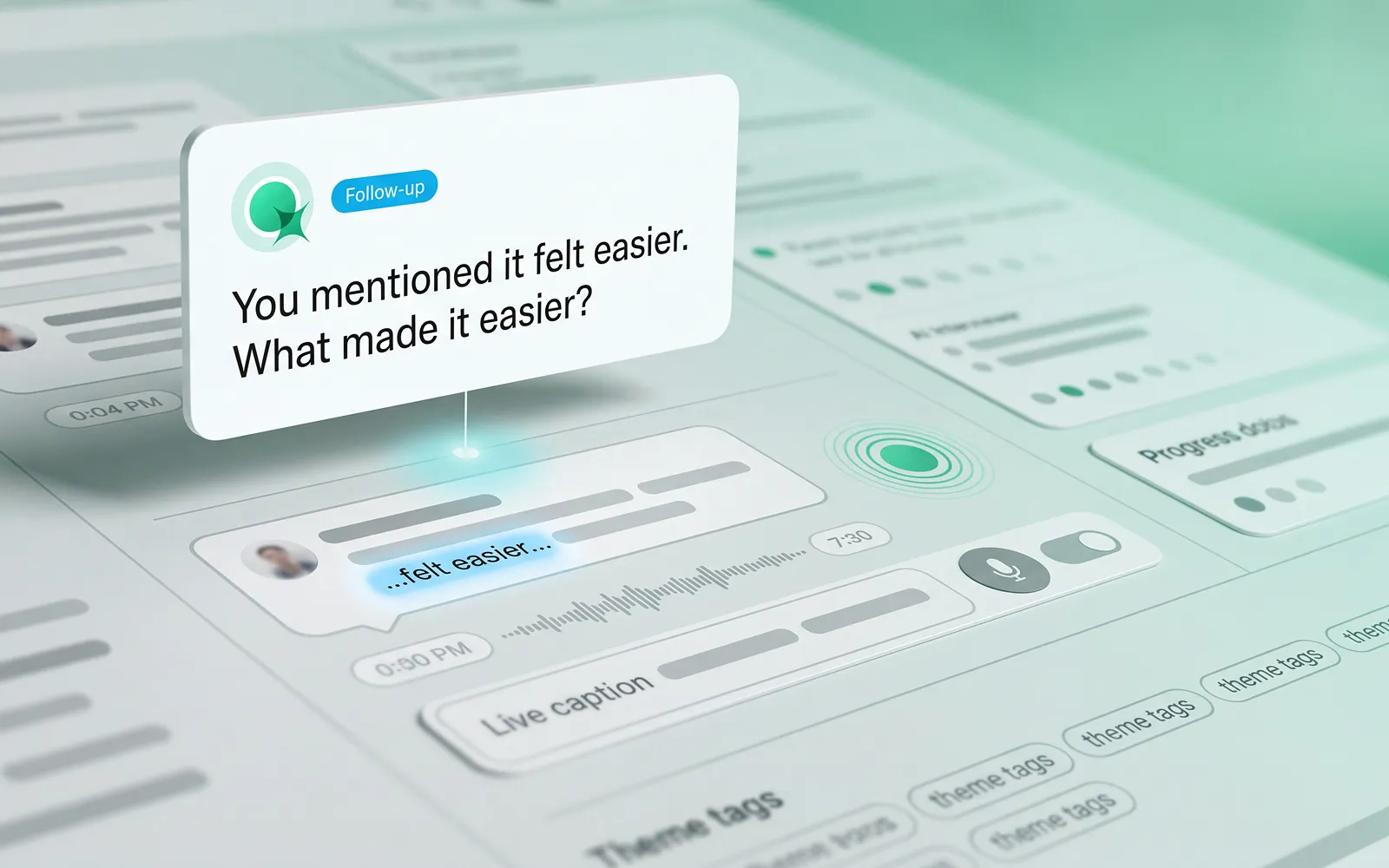
A good AI-moderated interview should give participants the freedom to express themselves in their own words, ask relevant follow-up questions and create opportunities to explore an answer beyond the initial response, and go beyond simply moving people through a series of questions.
Here are considerations that stood out from participants interacting with Optimal’s AI Interviewer for the first time.
1. Making AI interviews feel natural and conversational
Qualitative research aims to uncover the reasoning behind people's choices, not just capture their first response. Relevant follow-up questions can encourage participants to elaborate, clarify an opinion or explore an experience in more depth. The ability to answer in their own words, rather than select from predefined options, is also central to gathering richer feedback.
In our study, the majority of participants described their experience with Optimal’s AI Interviewer as “seamless,” “smooth”, “natural”, and even "fun". Several were pleasantly surprised by how the interaction felt, including participants who had reservations beforehand. One participant said, "I have no problems speaking freely."
Automated highlight reel: "The overall experience was widely rated as positive and enjoyable"
On participant remarked,"It was pleasant and I enjoyed it. And you were great." Others described the AI interview format as something they had “come to expect,” framing it as routine rather than novel.
Automated highlight reel: "Overall satisfaction with the AI interview experience was high"
These responses offer an encouraging perspective on what AI-moderated research can feel like for participants with the right cadence and context. Multiple participants also highlighted that the AI Interviewer’s replies were clearly based on what they had just said, rather than following a rigid script.
One participant noted it felt like talking to a real person because responses were grounded in their own words: "I really felt like I was talking to a real person and that the responses were based off of what I what I said."
Automated highlight reel: "Contextual follow-up questions made the conversation feel natural and responsive."
Another participant highlighted how the AI concisely summarized their points before moving on, without asking the same question in different ways — something they’d found frustrating when using other AI interview tools.
2. Helping participants feel comfortable and confident
People are more likely to engage when they understand what to expect and feel comfortable taking part. Several participants found the AI interview easier to talk to than a traditional interview. For some, the absence of a human interviewer reduced the pressure of the interaction, making it easier to share their thoughts.
Automated highlight reel: "Talking to an AI felt easier than a live human interview"
The experience wasn't just about how the conversation sounded either. Participants also found the on-screen text helpful for following along with the spoken interaction. One participant who experiences auditory processing difficulties specifically highlighted this as a useful accessibility feature.
These observations suggest that small details in the participant experience can make a meaningful difference. Clear instructions, the ability to follow a conversation in more than one way, and a format that feels comfortable can all help people engage with a study.
One participant noted that they felt a person would more deeply grasp the feelings and emotions behind their answers, but overall rated their experience with the AI Interviewer positively.
Comfort will vary by person and research context, so the goal isn't to assume AI moderation will suit everyone and every situation, but to provide another considered way for people to share their perspectives.
3. Giving participants control over their experience
A positive AI interview experience doesn't mean every participant will prefer the same format.
With Optimal’s experience, participants appreciated the ability to choose a preferred conversational style that works best for them. One participant, who preferred greater control, initially chose the “submit response” mode. This allowed them to decide when to submit an answer and move on to the AI Interviewer's next question or follow-up.
After a positive experience with the AI Interviewer, they said they would be willing to try the “free form” option. In this mode, the AI Interviewer responds naturally when the participant finishes speaking. This highlights the value of offering choice and helping participants gain familiarity and comfort.
Clip: New comfort and willingness to try "free form"
A new way to engage with participants
For UX research, design, and product teams, AI Interviews offer another option for gathering qualitative feedback, creating more flexibility in how conversations take place, and supporting gathering evidence at scale.
The opportunity isn't to replace the human aspect of research. It's to give researchers more ways to listen, learn and make informed decisions.
Ready to explore AI interviews? Get in touch for a demo or find out how to access Optimal’s AI Interviewer in Early Access.
Great research has never been about speed alone. It’s about asking the right questions, understanding the context behind them, and uncovering insights that help teams make better decisions.
Optimal's AI Interviewer is designed to support that process. It’s designed to work alongside researchers and teams, so you can move faster without losing the depth and human nuance that makes research valuable.
Shaped by discovery
Before building AI Interviewer, we spoke with and surveyed researchers, designers, and product teams to how they approach interviews today and where AI could genuinely help.
What we heard was consistent:
Interviews are powerful, but time-intensive
Scaling across time zones is challenging
Synthesising conversations can take longer than running them
And most importantly, context matters
AI isn’t useful if it ignores how your team works. So instead of building a generic interviewer, we focused on building an AI Interviewer that fits into your current workflows and keeps researchers and teams in the driver's seat.
Here’s what we learned and how we brought it to life with Optimal’s AI Interviewer.
Context matters
The best interviews start with a clear understanding of what you’re trying to uncover. With the AI Interviewer, you can add your research goals, audience details, company and product context, and additional context you want the AI to consider. This means the AI doesn’t just ask questions; it understands what you’re trying to learn and helps guide conversations in the right direction.
The same context also powers AI insights, helping ensure summaries, key themes, and citations are relevant, accurate, and aligned with what you're trying to learn.
Control the conversation
One of the concerns with AI-led interviews is not having enough control. We’ve designed the AI Interviewer with this in mind.
For each question, you can choose how deeply you would like the AI Interviewer to probe and follow-up. You decide when deeper exploration is valuable, how the conversation flows, and the AI can then carry this out on your behalf.
Scale your research without losing depth
AI Interviewer helps remove some of the barriers that make qualitative research difficult to scale. Use it to:
Scale research without hiring additional moderators
Run interviews across different geographies and time zones
Keep research moving, even when your team is offline
Encourage more honest, candid feedback with an AI interviewer that participants may find easier to open up to
This isn’t about replacing researchers. It’s about removing operational work so you can focus on higher-value work, like synthesis, storytelling, and decision-making.
Richer insights, backed by evidence
Every session comes with recordings, key summaries, and AI-generated insights with clear detailed evidence. Instead of reviewing hours of footage, you can quickly find what matters and confidently back it up. Review insights across your full study, or dive deeper into individual sessions and specific questions.
On the roadmap: Once your interviews are complete, you can use AI Chat to go further with your data and explore patterns across sessions, ask follow-up questions, and validate assumptions with real evidence.
Humans in the loop, by design
Let’s address the elephant in the room. AI-led interviews aren’t something everyone is immediately comfortable with, and that’s fair. There are real limitations.
Some research scenarios require human sensitivity and judgment. Nuance, emotion, and edge cases still benefit from a human touch. Vulnerable populations and complex topics should always be handled with care. Optimal values a human-in-the-loop approach and know an AI Interviewer isn’t always suitable. With that in mind, we made sure that:
You define the context
You control the structure
You decide when and how to use it
The AI Interviewer supports your work. It doesn’t replace your expertise.
Early access: help shape what comes next
AI Interviewer is now available in early access, and we’re continuing to learn from the teams using it. If you’re looking to scale your research without scaling your workload, run interviews across time zones, and spend less time on logistics and more time on insights, we’d love for you to try it.
👉 Book a demo to see how it fits into your workflow.

.webp)
.webp)