Subscribe to OW blog for an instantly better inbox
Oops! Something went wrong while submitting the form.

Articles and Podcasts on Customer Service, AI and Automation, Product, and more
.webp)
Great research has never been about speed alone. It’s about asking the right questions, understanding the context behind them, and uncovering insights that help teams make better decisions.
Optimal's AI Interviewer is designed to support that process. It’s designed to work alongside researchers and teams, so you can move faster without losing the depth and human nuance that makes research valuable.
Before building AI Interviewer, we spoke with and surveyed researchers, designers, and product teams to how they approach interviews today and where AI could genuinely help.
What we heard was consistent:
AI isn’t useful if it ignores how your team works. So instead of building a generic interviewer, we focused on building an AI Interviewer that fits into your current workflows and keeps researchers and teams in the driver's seat.
Here’s what we learned and how we brought it to life with Optimal’s AI Interviewer.
The best interviews start with a clear understanding of what you’re trying to uncover. With the AI Interviewer, you can add your research goals, audience details, company and product context, and additional context you want the AI to consider. This means the AI doesn’t just ask questions; it understands what you’re trying to learn and helps guide conversations in the right direction.
The same context also powers AI insights, helping ensure summaries, key themes, and citations are relevant, accurate, and aligned with what you're trying to learn.
One of the concerns with AI-led interviews is not having enough control. We’ve designed the AI Interviewer with this in mind.
For each question, you can choose how deeply you would like the AI Interviewer to probe and follow-up. You decide when deeper exploration is valuable, how the conversation flows, and the AI can then carry this out on your behalf.
AI Interviewer helps remove some of the barriers that make qualitative research difficult to scale. Use it to:
This isn’t about replacing researchers. It’s about removing operational work so you can focus on higher-value work, like synthesis, storytelling, and decision-making.
Every session comes with recordings, key summaries, and AI-generated insights with clear detailed evidence. Instead of reviewing hours of footage, you can quickly find what matters and confidently back it up. Review insights across your full study, or dive deeper into individual sessions and specific questions.
On the roadmap: Once your interviews are complete, you can use AI Chat to go further with your data and explore patterns across sessions, ask follow-up questions, and validate assumptions with real evidence.
Let’s address the elephant in the room. AI-led interviews aren’t something everyone is immediately comfortable with, and that’s fair. There are real limitations.
Some research scenarios require human sensitivity and judgment. Nuance, emotion, and edge cases still benefit from a human touch. Vulnerable populations and complex topics should always be handled with care. Optimal values a human-in-the-loop approach and know an AI Interviewer isn’t always suitable. With that in mind, we made sure that:
The AI Interviewer supports your work. It doesn’t replace your expertise.
AI Interviewer is now available in early access, and we’re continuing to learn from the teams using it. If you’re looking to scale your research without scaling your workload, run interviews across time zones, and spend less time on logistics and more time on insights, we’d love for you to try it.
👉 Book a demo to see how it fits into your workflow.
Already with Optimal? Register your interest for early access.
Summary: The notetaking side of qualitative research is often one of the most off-putting parts of the process. We developed Reframer to make this easier, so here are 6 tips to help you get the most out of this powerful tool.
In 2018, a small team at Optimal Workshop set out to entirely revamp our approach of providing learning resources to our users and community. We wanted to practice what we preached, and build a new blog website from the ground up with a focus on usability and accessibility. As you can probably imagine, this process involved a fair amount of user research.
While we certainly ran our fair share of quantitative research, our primary focus was on speaking to our users directly, which meant carrying out a series of user interviews – and (of course) using Reframer.
There’s really no overselling the value of qualitative user research. Sure, it can be off-putting for new researchers due to its perceived effort and cost, but the insights you’ll gain about your users can’t be found anywhere else.
We knew of the inherent value in qualitative research, but we were also aware that things like interviews and usability testing would be put off due to the time required to both carry out the tests and time spent hours in workshops trying to pull insights out of the data.
So, with that in mind, here are 6 tips to make the most out of our recently released from beta tool, Reframer!
Observations are a core piece of the puzzle when it comes to effectively using Reframer. Observations are basically anything you see or hear during the course of your interview, usability test or study. It could be something like the fact that a participant struggled with the search bar or that they didn’t like the colors on the homepage.
Once you’ve collected a number of observations you can dive into the behaviors of your users and draw out patterns and themes – more on this further on in the article.
As for creating good observations using Reframer, here are a few tips:
The ability to tag different observations is one of the most powerful aspects of Reframer, and can significantly speed up the analysis side of research. You can think of tags as variables that you can use to filter your data later. For example, if you have a tag labeled “frustrated”, you can apply it to all of the relevant observations and then quickly view every instance when a participant was feeling frustrated after you’ve concluded your test.
When it comes to user interviews and usability tests, however, there are a couple of things to keep in mind when tagging.
For user interviews, it’s best not to apply tags until after you’ve finished the session. If you go and preload in a number of tags, you’ll likely (if unintentionally) introduce bias.
For usability tests, on the other hand, it’s best to set up your tags prior to going into a session. As just one example, you might have a number of tags relating to sentiment or to the tasks participants will perform. Setting up these types of tags upfront can speed up analysis later on.
If there’s one universal rule to keep in mind when it comes to Reframer tags, it’s that less is more. You can use Reframer’s merge feature to consolidate your tags, which is especially useful if you’ve got multiple people adding observations to your study. You can also set up groups to help manage large groups of tags.

Yes, it’s tempting to just shut your laptop and focus on something else for a while after finishing your session – but here’s an argument for spending just a little bit of time tidying up your data.
The time straight after a session has finished is also the best time to take a quick pass over your observations. This is the time when everything about the interview or usability test is still fresh in your mind, and you’ll be able to more easily make corrections to observations.
In Reframer, head over to the ‘Review’ tab and you’ll be presented with a list of your observations. If you haven’t already, or you think you’ve missed some important ones, now is also a good time to add tags.
You can also filter your observations to make the process of reviewing data a little easier. You can filter by the study member who wrote the observation as well as any starred observations that study members have created. If you know what you’re looking for, the keyword search is another useful tool.
Taking the time to make corrections to tags and observations now will mean you’ll be able to pull much more useful insights later on.
With all of your observations tidied up and tags correctly applied, it’s time to turn our attention to the theme builder. This is one of the most powerful parts of Reframer. It allows you to see all of the different relationships between your tagged observations and then create themes based on the relationships.
The really neat thing with the theme builder is that as you continue to work on your study by feeding in new observations, the top 5 themes will display on the Results Overview page. This means you can constantly refer back to this page throughout your project. Note that while the theme builder will update automatically, it’s best to tag as many observations as possible to get the most useful data.
You can read a detailed guide of how to actually create themes using the theme builder in our Knowledge Base article.
So, whether your experience with Reframer starts with this article or you’ve already had a play around with the tool, it should be clear that tags are important. This functionality is really what enables you to get the kind of analysis and insight that you can out of your data in Reframer.
But you can actually take this a step further and transform the data from your tagging into visualizations – perfect for demonstrating your results to your team or to stakeholders. There are 2 visualization options in Reframer.
First of all, there’s the chord diagram. As you can see from the picture below, the chord diagram allows you to explore the relationships between different tagged observations, which in turn helps you to spot themes. The different colored chord lines connect different tag nodes, with thicker lines representing the more times 2 tags appear on the same observation. Again, the more data you have (observations and tags), the richer or more in-depth the visualization.
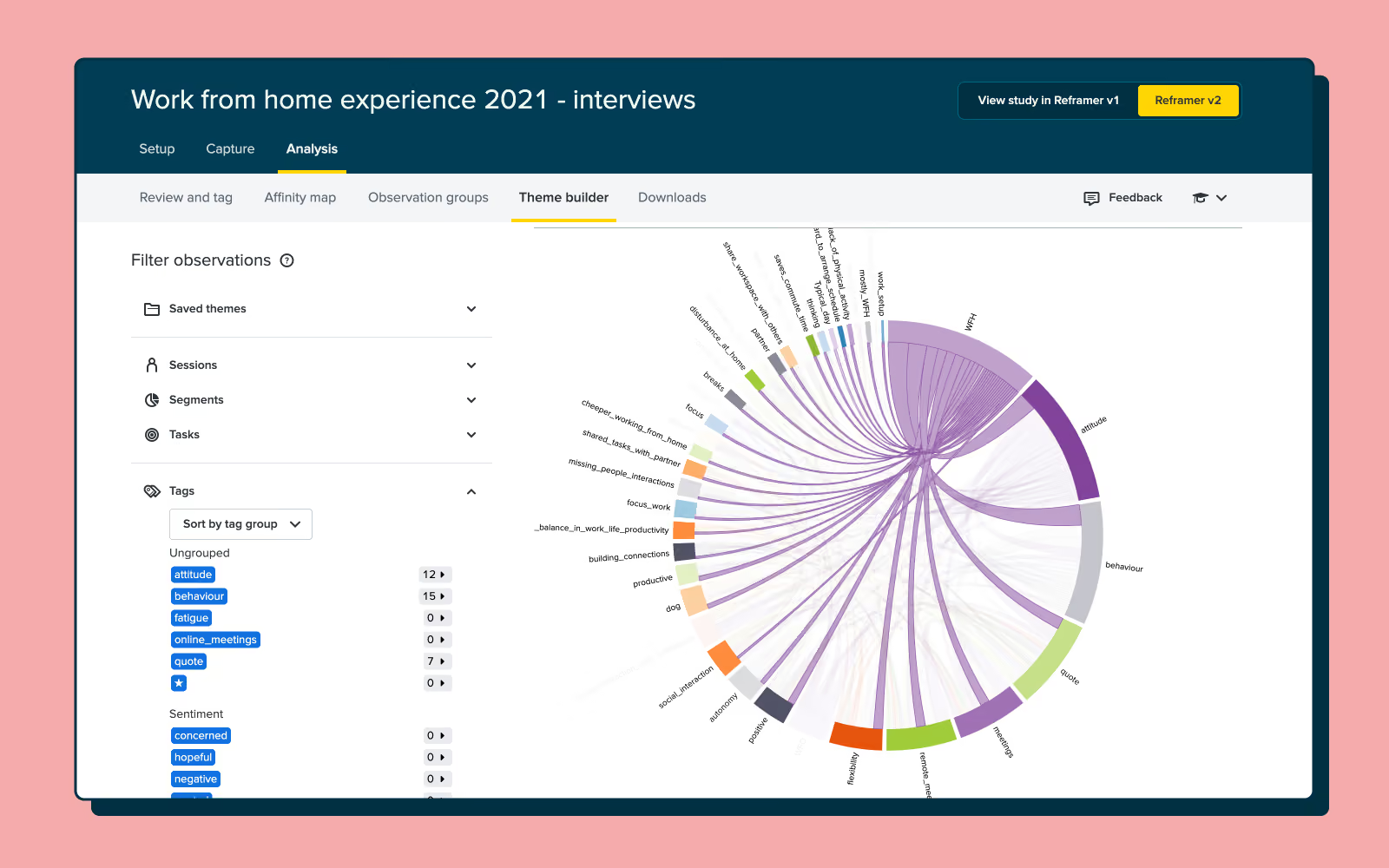
The bubble chart is a little different. This visualization simply shows the frequency of your tags as ‘bubbles’ or circles. The larger the bubble, the more frequently that tag appears in your observations.
Reframer works best when it’s used as the one repository for all of your qualitative research. After all, we designed the tool to replace the clutter and mess that’s typically associated with qualitative research.
You can easily import all of your existing observations from either spreadsheets or text documents using the ‘Import’ function. It’s also possible to just enter your observations directly into Reframer at any point.
You’ll likely find that by using Reframer in this way, there’ll be little chance of you losing track of research data over time. One of the biggest issues for research or UX teams is information loss when someone leaves the organization. Keep everything in Reframer, and you can avoid that loss of data if someone ever leaves.
While quantitative research is often considered easiest to wrap your head around, qualitative research is also well-worth adding into to your workflow to ensure you're seeing the whole picture as you make important design decisions. This article is really just a surface-level overview of some of the neat things you can do with Reframer. We’ve got some other articles on our blog about how you can best use this tool, but the best place to really dig into the detail is in the Optimal Workshop Knowledge Base.
Summary: You’ve run some user interviews and a couple of cards sorts, now it’s time to learn how to make the case for larger research projects.
In many ways, the work you do as a researcher is the fuel that product and design teams use to build great products. Or, as writer Gene Luen Yang once put it: “Creativity requires input, and that's what research is. You're gathering material with which to build”.
One of the toughest challenges for a user researcher is making the case for a bigger project. That is, one potentially involving more participants, a larger number of research methods, more researchers and even new tools. Sure, you’ve done small studies, but now you’ve identified a need for some bigger (and likely more expensive) research. So how exactly do you make a case for a larger project? How do you broach the subject of budget and possibly even travel, if it’s required? And, perhaps most importantly, who do you make the case to?
By understanding how to pitch your case, you can run the research project that needs to be run – not whatever you’re able to scrape together.
You know how important the research question is. After all, this is what you center your research around. It’s the clear, concise, focused and yet also complex heart of any research project. The importance of a good research question holds true from the smallest of studies right through to the massive research projects that require large teams of researchers and involve usability tests in real-world locations.
We’ve written about user research questions before, but needless to say, keep your question top-of-mind as you think about scaling your research. While most other aspects of your research will get bigger the larger your research project grows (think things like budget, number of participants and possibly even locations), your research question should remain concise and easy to understand. ‘Say it in a sentence’ – This is a good rule to keep in mind as you start to meet with stakeholders and other interested parties. Always have the detail ready if people want it, but your question is basically an elevator pitch.
Your research question will also form an important part of your pitch document – something we’ll come back to later on in this article.
With your research question in hand (or more likely in a Google Drive document), you have to start asking yourself the tough questions. It’s time to map out the why of this entire process. Why exactly do you need to run a larger research project? Nailing all of this detail is going to be critical to getting the support you need to actually scale up your research.
To help get you thinking about this, we’ve put together some of the most common reasons to scale a user research project. Keep in mind that there’s a lot of crossover in the below sections simply due to the fact that methods/tools and participants are essentially 2 sides of the same coin.
Recruiting participants can be quite expensive, and it’s often a limiting factor for many researchers. In many cases, the prospect of remunerating even something like 10 participants can blow out a small research budget. While certain types of testing have ideal maximums for the number of participants you should use, scaling up the number of people feeding into your research can be quite fruitful. This could either running more tests with a lower number of participants or running a few tests with more.
By bringing in more people, you’re able to run more tests over the course of your project. For example, you could run 5 card sorts with different groups. Or, you could carry out a larger series of usability tests and user interviews with groups of different demographics and in different locations.
It’s easy to see how useful a larger or even unrestricted recruitment budget can be. You can go from needing to scrounge up whoever you can find to recruiting the ideal participants for your particular project.
User research has been around in one form or another for decades (and possibly even longer if you loosen your definition of ‘user research’). With this in mind, the types of tools available to researchers have come along way since the days of paper prototypes – and even paper card sorts. Now, a cursory Google search will throw up dozens of UX tools tailored for different research methods and parts of the research process. There are tools for validating prototypes, getting fast feedback on UX copy and running complex, branching surveys. As just one example, we (at Optimal Workshop) offer a number of tools as part of our platform, focusing on areas including:
You can read more about the Optimal Workshop platform here on our features page if you’re interested in learning more.
Integrating more tools is a strong reason to scale a research project, as tools can both lighten your workload and open up entirely new avenues of research. Plus, you’ll often find tools will automate difficult parts of the research process, like recruitment and analysis. Using one of our tools as an example, with Reframer, you can take notes during a user interview, tag them, and then Reframer will help you pull out various themes and insights for you to review.
A bigger project usually means a bigger budget, allowing you to spend time investigating possible new methods, tools and research techniques. Always wanted to investigate tree testing but could never quite find the time to sit down and assess the method and the various tools available? Now could be the perfect time.
Remote testing has fast become one of the most practical options for user researchers who are short on time and budget. Instead of needing to go out and physically sit down with participants, researchers can instead recruit, run tests and analyze results as long as they have a decent internet connection. It makes sense – on-location research is expensive. But there are definitely some major advantages.
It is possible to conduct user interviews and usability tests remotely, but the very nature of these types of research means you’ll get a lot more out of doing the work in person. Take a user interview as just one example. By sitting down face to face with someone, you can read their facial expressions, better pick up on their tone and establish a stronger rapport from the outset.
Being able to go to wherever your users are means you’re not constrained by technology. If you need to study people living in rural villages in China, for example, you’re unlikely to find many of these people online. Furthermore, in this example, you could bring along a translator and actually get a real feel for your audience. The same applies to countless other demographics all over the world. Scaling up your research project means you can start to look at traveling to the people who can give you the best information.
One of the most important (and potentially difficult) parts of scaling a research project is getting buy-in from your stakeholders. As we’ve mentioned previously, your pitch document is an essential tool in getting this buy-in, but you also need to identify all of your stakeholders. Knowing who all of your stakeholders are will mean you get input from every relevant area in your organization, and it also means you’ll likely have a larger support base when making your pitch to scale your research project.
Start by considering the wider organization and then get granular. Who is your research project likely to impact? Consider more than just product and design teams – how is your larger project likely to impact the budget? Again, capturing all of this detail in the pitch document will help you to build a much stronger case when it comes to convincing the people who have the final say.
Note: Building strong relationships with C-level and other people with influence is always going to be useful – especially in a field like UX where many people are still unsure of the value. Investing time into both educating these people (where appropriate) and creating a strong line of communication will likely pay dividends in future.
If you’re from the world of academia, the idea of pitching your research is likely second nature. But, to a user researcher, the ‘pitch’ often takes many forms. In ideal circumstances, there’s a good enough relationship between researchers and UX teams that research is just something that’s done as part of the design process. In organizations that haven’t fully embraced research, the process is often much more stilted and difficult.
When you’re trying to create a strong case for scaling your research project, it can help to consolidate all of the detail we’ve covered above (research question, high-level reasons for a running a larger project, etc.) and assemble this information in the form of a pitch document. But what exactly should this document look like? Well, borrowing again from the world of institutional research (but slightly tweaked), the main purpose of a research proposal is to explain that:
With this in mind, it’s time to take a look at what you should include in your user research pitch document:
You don’t necessarily need to take your pitch document and present it to stakeholders, but as a tool for ensuring you’ve covered all your bases, it’s invaluable. Doing this exercise means you’ll have all of the relevant information you require in one place.
Happy researching!
Lately, I’ve found myself sitting in the participant’s chair at the UX research table more and more and it’s been an eye-opening collection of experiences. As UX researchers, we’re definitely not our users, but we are someone else’s. We use products, services and tools too! I’ve recently discovered that participating in user research not only helps out a fellow UXer with their qualitative research, but has also helped me grow my skills.
Here are 3 reasons why you should try being a participant for yourself.
Having facilitated hundreds of UX research sessions over the years, I didn’t think I would be as nervous as I was going in as a participant! When we design our research sessions we don’t often give our participants a heads up on what we’re going to talk about because we don’t want to influence them for one, but truly not knowing what to expect made me feel slightly jittery. Before and at the beginning of these experiences, I felt quite unprepared. I wasn’t expecting to feel that way.
During these sessions I often found myself wondering things like: Were my answers detailed enough? Will my responses be kept confidential? (I could never seem to remember if that had been covered in the introduction!). I worried that I wasn’t giving helpful responses or if I was talking too much. When misunderstandings arose in the conversation, I felt responsible and I was kicking myself for not communicating clearly enough!
As a participant, I completely lost track of time during the session and developed an entirely new appreciation for timekeeping as a facilitator! I could have talked well beyond the scope of the interview timeframe and needed to be kept on track.
I also very quickly discovered that thinking aloud is a lot harder to do than it sounds. It’s not a simple matter of verbalizing your thoughts as they happen. You have to think them, process them, decide how to verbalize them and then talk – all while someone (often a complete stranger) is looking at you expectantly and eagerly. It’s awkward and it feels weird. And look, it is widely acknowledged that it’s challenging and unnatural, but I didn’t fully appreciate or understand that until I was required to do it myself in a research environment.
Did I experience some of these thoughts and feelings because I’m a UX researcher and I know what the other side looks and feels like? Maybe. It’s certainly possible and I’d be remiss if I didn’t call out this potential bias, but I do feel that having done this I now have a greater capacity to empathize with the participant experience. I’ve now been on the receiving end of the introductory spiel (and tuned out during it!), I’ve now got first-hand experience with the on-the-spot answering of those questions we carefully craft and I’ve scrambled for words when I’ve been asked to explain why I said what I said.
These experiences have taught me that there’s a good chance the participant is just as nervous as I am and that a little reassurance or confirmation of usefulness goes a very long way. I’ve learned that regardless of the skill or experience of the researcher, interview questions can be super confusing and hard to answer. Having questions rephrased and being told that what I shared was helpful made me feel significantly more comfortable and able to think clearly and open up more - therefore providing more value to the researcher.
I’ve also been itching to find out what happened next after the sessions ended. Was I helpful and in what way? Where did the insight I provided lead? I’ve learned that while we walk away with more questions, so might our participants and what can we do about that? We’re so busy, but stopping for a moment further down the track if/where possible to reach out and say ‘Hey, I just thought you might like to see what we did with all that great information you shared with us’ might be nice. It’s not always practical or possible and sometimes we have to wait until the thing goes live, but it’s food for thought.
Every UX researcher is different and we all have our own approaches and styles. As a notetaker for other researchers, I’ve always enjoyed having the opportunity to observe them in action, but somehow experiencing it as a participant felt different in the best possible way. It felt more immersive. Perhaps it was because I didn’t have to think about anything else or observe the participant’s reactions and was able to absorb every second of that experience as it was happening to me rather than in front of me.
I participated in a usability testing session with two researchers - one facilitating and one taking notes - and the notetaker was so unobtrusive and quiet that I completely forgot they were there! They said a quick hello at the beginning of the session and then sat back behind me and blended in with the furniture and didn’t make a sound until they piped up with a question at the very end. Note taking is such a grossly underrated UX research skill. There’s a lot to think about, a lot to avoid thinking about (e.g., jumping into solution right there in the session) and of course we have to be mindful of the potential impact of our behavior on the participant, but this went beyond stifling disappointment or resisting the urge to speak. This was a dignified and seamlessly elegant note taker existence unlike anything I have ever seen.
In other sessions as a user interview participant I was delighted when researchers injected multiple moments of humor into those previously mentioned introductory spiel snooze fests. It did more than just make me feel comfortable - humor helped me focus better on what was being said and remember important details during and well after the session had ended.
I also learned a thing or two about comfortable silences when I participated in a contextual session with two researchers. One researcher kept prodding and repeatedly asking questions while the other exuded a quiet and calm demeanor and simply patiently waited for me to complete my task and talk about it in my own time (and way). It won’t work in all situations or with all participants, but it made me feel relaxed and comfortable enough to talk through what I was thinking and seeing. This approach also made thinking aloud easier for me.
It’s important to remember that it doesn’t matter if you’re an experienced UX researcher or if you’re just starting out, everyone can learn something new from another researcher and stepping up into a session as an actual participant is a great way to do that.
One of my favourite things about the UX industry has always been its sense of community. We’re a group of people who care. We care about our users, we care about each other and we care about our capability as an industry and where we’re headed. Agreeing to be a participant in another researcher’s study is a great way to give back.
As I mentioned earlier, we use products and services too and in addition to this, there’s a whole heap of them out there designed just for us! It makes sense that in the same way that we as researchers ask our own customers and users to help us design better products, we should be open to doing the same for the people who design for us.
The cool thing about being a participant who is also a researcher is that we pick up issues other people might not. We might be a little tougher and less likely to let a usability issue slide. We might be the person that provides the external and fresh-eyed validation a researcher needs to convince a stakeholder that a design needs to be changed or worked on some more. A researcher in the participant’s chair is a powerful hybrid - it’s a participant and expert reviewer in one.
As a general rule of thumb, if you’re invited to participate in another researcher’s study, I do think it’s best to always be upfront with them about who you are and what you do so that they can determine if you are potentially too biased to be included. It’s their study and informed consent matters. Think about what you would want as a researcher. And if they’re specifically asking you to participate because you’re a researcher - that’s awesome!
So those are just some of the reasons why you should take a spin in the participant’s chair. Professional development is a lifelong learning process for us all. I’m looking forward to implementing what I’ve learned from these experiences and continuing to plonk myself in that participant chair to keep growing my perspective and helping out other researchers along the way.
Happy researching (and participating)!

Within the UX industry, there are myriad terms and concepts you’ll need to understand in order to get your job done. One of the most common you’ll come across is information architecture (IA).
What is it? How do you find it? How do you research it? And how do you create it?
We’ve compiled an extensive directory where you can find authoritative content from information architects all over the world.
Read on to learn all the ins and outs of IA including topics for beginners, those with an intermediate skill level, and some bonus stuff for you experts out there.
Information architecture is the system and structure you use to organize and label content on your website, app or product. It’s the foundation on top of which you provide the design.
Every successful design project involves a good dose of user research. You need to be able to understand the behavior, thoughts, and feelings of people.
Here’s an overview of the different types of user research you can conduct for information architecture projects.
Usability testing is one of the best ways to measure how easy and intuitive to use something is by testing it with real people. You can read about the basics of usability testing here.
Earlier this year, a small team within Optimal Workshop completely redesigned the company blog. More than anything, we wanted to create something that was user-friendly for our readers and would give them a reason to return. I was part of that team, and we ran numerous sessions interviewing regular readers as well as people unfamiliar with our blog. We also ran card sorts, tree tests and other studies to find out all we could about how people search for UX content. Unsurprisingly, one of the most valuable activities we did was usability testing – sitting down with representative users and watching them as they worked through a series of tasks we provided. We asked general questions like “Where would you go to find information about card sorting”, and we also observed them as they searched through our website for learning content.
By stripping away any barriers between ourselves and our users and observing them as they navigated through our website and learning resources, as well as those of other companies, we were able to build a blog with these people’s behaviors and motivations in mind.
Usability testing is an invaluable research method, and every user researcher should be able to run sessions effectively. Here are 5 tips for doing so, in no particular order.
Never go into a usability test blind. Before you ever sit down with a participant, make sure you know exactly what you want to get out of the session by writing down your research goals. This will help to keep you focused, essentially giving you a guiding light that you can refer back as you go about the various logistical tasks of your research. But you also need to take this a step further. It’s important to make sure that the people who will utilize the results of your research – your stakeholders – have an opportunity to give you their input on the goals as early as possible.
If you’re running usability tests with the aim of creating marketing personas, for example, meet with your organization’s marketing team and figure out the types of information they need to create these personas. In some cases, it’s also helpful to clarify how you plan to gather this data, which can involve explaining some of the techniques you’re going to use.
Lastly, find out how your stakeholders plan to use your findings. If there are a lot of objectives, organize your usability test so you ask the most important questions first. That way, if you end up going off track or you run out of time you’ll have already gathered the most important data for your stakeholders.
A list of pre-prepared questions will help significantly when it comes time to sit down and run your usability testing sessions. But while a list is essential, sometimes it can also pay to ‘follow your nose’ and steer the conversation in a (potentially) more fruitful direction.
How many times have you been having a conversation with a friend over a drink or dinner, only for you both to completely lose track of time and find yourselves discussing something completely unrelated? While it’s not good practice to let your usability testing sessions get off track to this extent, you can surface some very interesting insights by paying close attention to a user’s behavior and answers during a testing session and following interesting leads.
Ideally, and with enough practice, you’ll be able to answer your core (prepared) questions and ask a number of other questions that spring to mind during the session. This is a skill that takes time to master, however.
While a usability test script may sound like a fancy name for your research questions, it’s actually a document that’s much more comprehensive. If you prepare it correctly (we’ll explain how below), you’ll have a document that you can use to capture in-depth insights from your participants.
Here are some of the key things to keep in mind when putting together your script:
It’s often easiest to have a document with your script printed out and ready to go for each usability test.
You’d never see a builder without a toolbox full of a useful assortment of tools. Likewise, software can make the life of a user research that much easier. The paper-based ways of recording information are still perfectly valid, but introducing custom tools can make both the logistics of user research and the actual sessions themselves much easier to manage.
Take a tool like Calendly, for example. This is a powerful piece of scheduling software that almost completely takes over the endless back and forth of scheduling usability tests. Calendly acts as a middle man between you and your participants, allowing you to set the times you’re free to host usability tests, and then allowing participants to choose a session that suits them from these times.
Our very own Reframer makes the task of running usability tests and analyzing insights that much easier. During your sessions, you can use Reframer to take comprehensive notes and apply tags like “positive” or “struggled” to different observations. Then, after you’ve concluded your tests, Reframer’s analysis function will help you understand wider themes that are present across your participants.
There’s another benefit to using a tool like Reframer. Keeping all of your notes in place will mean you easily pull up data from past research sessions whenever you need to.
Usability tests (and user interviews, for that matter) are a great opportunity to open up research to your wider organization. Whether it’s stakeholders, other members of your immediate team or even members of entirely different departments, giving them the chance to sit down with users will show them how their products are really being used. If nothing else, these sessions will help those within your organization build empathy with the people they’re building products for.
There are quite a few ways to bring others in, such as:
There are myriad other tips and best practices to keep in mind when usability testing, many of which we cover in our introductory page. Important considerations include taking good quality notes, carefully managing participants during the session (not giving them too much guidance) and remaining neutral throughout when answering their questions. If you feel like we’ve missed any really important points, feel free to leave a comment!
Summary: The equipment and tools you use to run your user testing sessions can make your life a lot easier. Here’s a quick guide.
It’s that time again. You’ve done the initial scoping, development and internal testing, and now you need to take the prototype of your new design and get some qualitative data on how it works and what needs to be improved before release. It’s time for the user testing to begin.
But the prospect of user testing raises an important question, and it’s one that many new user researchers often deliberate over: What gear or equipment should I take with me? Well, never fear. We’re going to break down everything you need to consider in terms of equipment, from video recording through to qualitative note-taking.
The ability to easily record usability tests and user interviews means that even if you miss something important during a session, you can go back later and see what you’ve missed. There are 3 types of recording to keep in mind when it comes to user research: audio, video and screen recording. Below, we’ve put together a list of how you can capture each. You shouldn’t have to buy any expensive gear – free alternatives and software you can run on your phone and laptop should suffice.
Notetaking and qualitative user testing go hand in hand. For most user researchers, notetaking during a research session means busting out the Post-it notes and Sharpie pens, rushing to take down every observation and insight and then having to arduously transcribe these notes after the session – or spend hours in workshops trying to identify themes and patterns. This approach still has merit, as it’s often one of the best ways to get people who aren’t too familiar with user research involved in the process. With physical notes, you can gather people around a whiteboard and discuss what you’re looking at. What’s more, you can get them to engage with the material directly.
But there are digital alternatives. Qualitative notetaking software (like our very own Reframer) means you can bring a laptop into a user interview and take down observations directly in a secure environment. Even better, you can ask someone else to sit in as your notetaker, freeing you up to focus on running the session. Then, once you’ve run your tests, you can use the software for theme and pattern analysis, instead of having to schedule yet another full day workshop.
Ah, participant scheduling. Perhaps one of the most time-consuming parts of the user testing process. Thankfully, software can drastically reduce the logistical burden.
Here are some useful pieces of software:
Dedicated scheduling tool Calendly is one of the most popular options for participant scheduling in the UX community. It’s really hands-off, in that you basically let the tool know when you’re available, share the Calendly link with your prospective participants, and then they select a time (from your available slots) that works for them. There are also a host of other useful features that make it a popular option for researchers, like integrations and smart timezones.
If you’re already using the Optimal Workshop platform, you can use our survey tool Questions as a fairly robust scheduling tool. Simply set up a study and add in prospective time slots. You can then use the multi-choice field option to have people select when they’re available to attend. You can also capture other data and avoid the usual email back and forth.
One of the biggest challenges for user researchers is effectively storing and cataloging all of the research data that they start to build up. Whether it’s video recordings of usability tests, audio recordings or even transcripts of user interviews, you need to ensure that your data is A) easily accessible after the fact, and B) stored securely to ensure you’re protecting your participants.
Here are some things to ask yourself when you store any piece of customer or user data:
Don’t make the mistake of thinking user data is ‘secure enough’, whether that’s on a company server that anyone can access, or even in an unlocked filing cabinet beneath your desk. Data privacy and security should always be at the top of your list of considerations. We won’t dive into best practices for participant data protection in this article, but instead, just mention that you need to be vigilant. Wherever you end up storing information, make sure you understand who has access.
Hopefully, this guide has given you an overview of some of the tools and software you can use before you start your next user test. We’ve also got a number of other interesting articles that you can read right here on our blog.
