Subscribe to OW blog for an instantly better inbox
Oops! Something went wrong while submitting the form.
Articles and Podcasts on Customer Service, AI and Automation, Product, and more
The pace of product development has never been faster, and the cost of building on assumptions has never been higher. At Optimal, we've spent nearly two decades helping teams get closer to their users, and what we're seeing right now is a fundamental shift in how research gets done. More teams are running research than ever before and timelines to act on findings are tighter, while the expectations for what research needs to deliver keep rising.
That shift is exactly what's driving Optimal 3.0, our most ambitious reinvention of the platform yet, designed to give every team the speed, depth, and flexibility that modern research demands. Today's release is the next step in that journey.
Optimal's new mixed-methods research tool tears down the boundaries between methods. It brings prototype testing, live site testing, and surveys into a single, end-to-end study workflow. And grounded in our product principles: speed to insights, access for all, and communication.
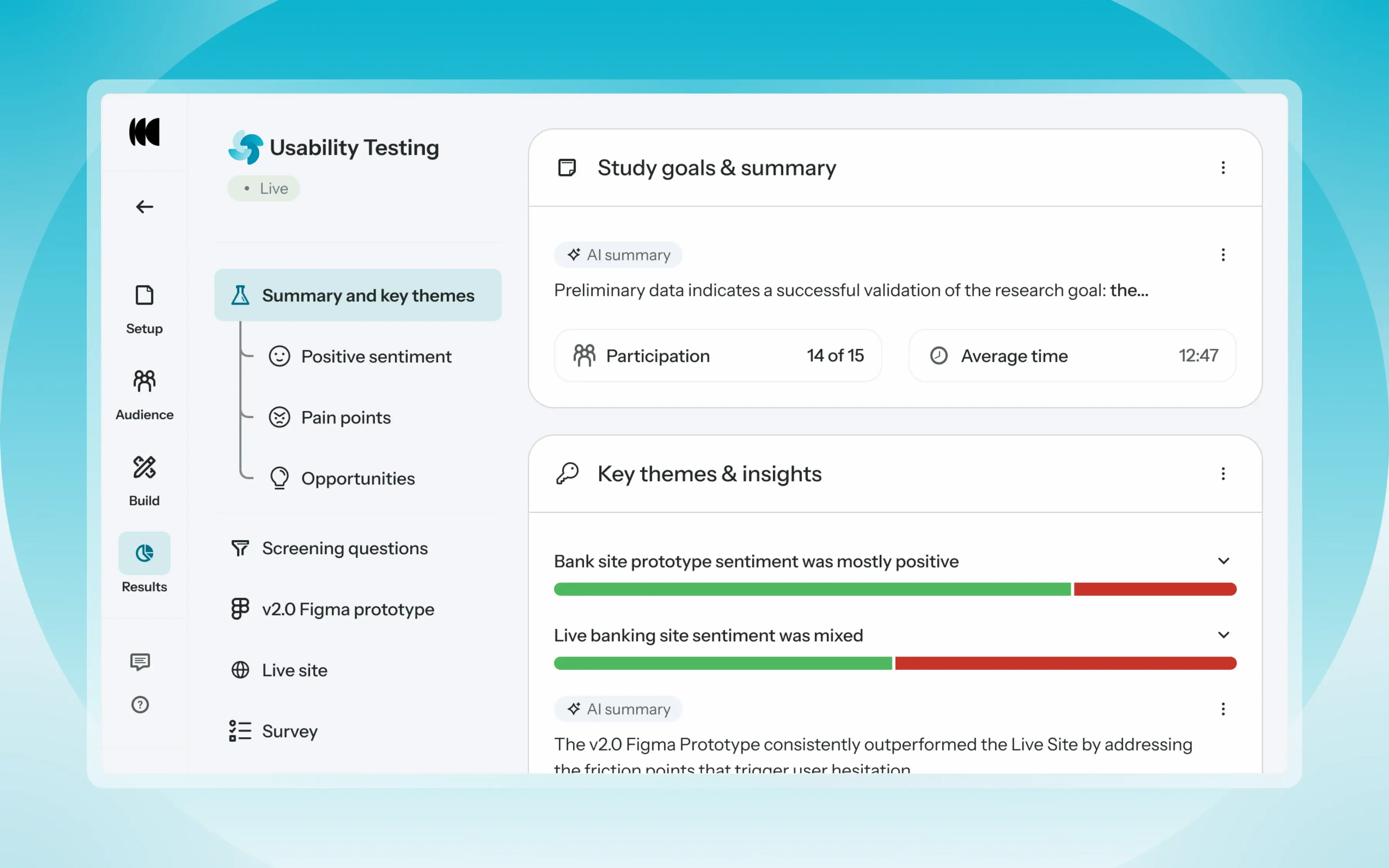
Optimal’s new Usability Testing tool marks the next step in the evolution of Optimal 3.0, giving teams the flexibility to evaluate experiences in whatever form they exist today.
Combine prototype testing, AI prototype testing, live site testing, and surveys in a single study. Test multiple prototypes side by side, compare different live URLs, or mix prototype and live site tasks together all in one workflow. Research can now mirror how products actually evolve, from early concept to shipped experience.
New speak-aloud question types, custom message blocks, auto-generated transcripts and insights, citations and highlight clips help you capture the context and reasoning behind every action. AI-assisted analysis then helps you make sense of it all fast and communicate with impact.
Review a study overview surfacing key themes, pain points, and sentiment analysis combining insights across all your study methods along with detailed results, task analysis and recordings, transcripts, key quotes, and automatically generated citations and video clips.
Coming soon: you can also use AI Chat to chat with your data directly, asking questions and pulling new insights and evidence across all your qualitative and quantitative inputs.
Modern product development is no longer linear. Teams continuously move between:
Traditional usability testing tools were not built for this fluidity. Optimal’s Usability Testing brings the flexibility to match how teams actually work today.
By combining multiple methods into a single study and pairing it with AI-powered synthesis, Usability Testing helps teams reduce setup and analysis time, recruit once, capture richer qualitative context, compare experiences more easily, move faster from feedback to action, and tell clearer, more compelling insight stories.
Learn how to get started with Usability Testing in Optimal and accelerate your path from idea to insight. Book a meeting, start exploring in your account, or join our live training webinar on June 24th to see it in action.
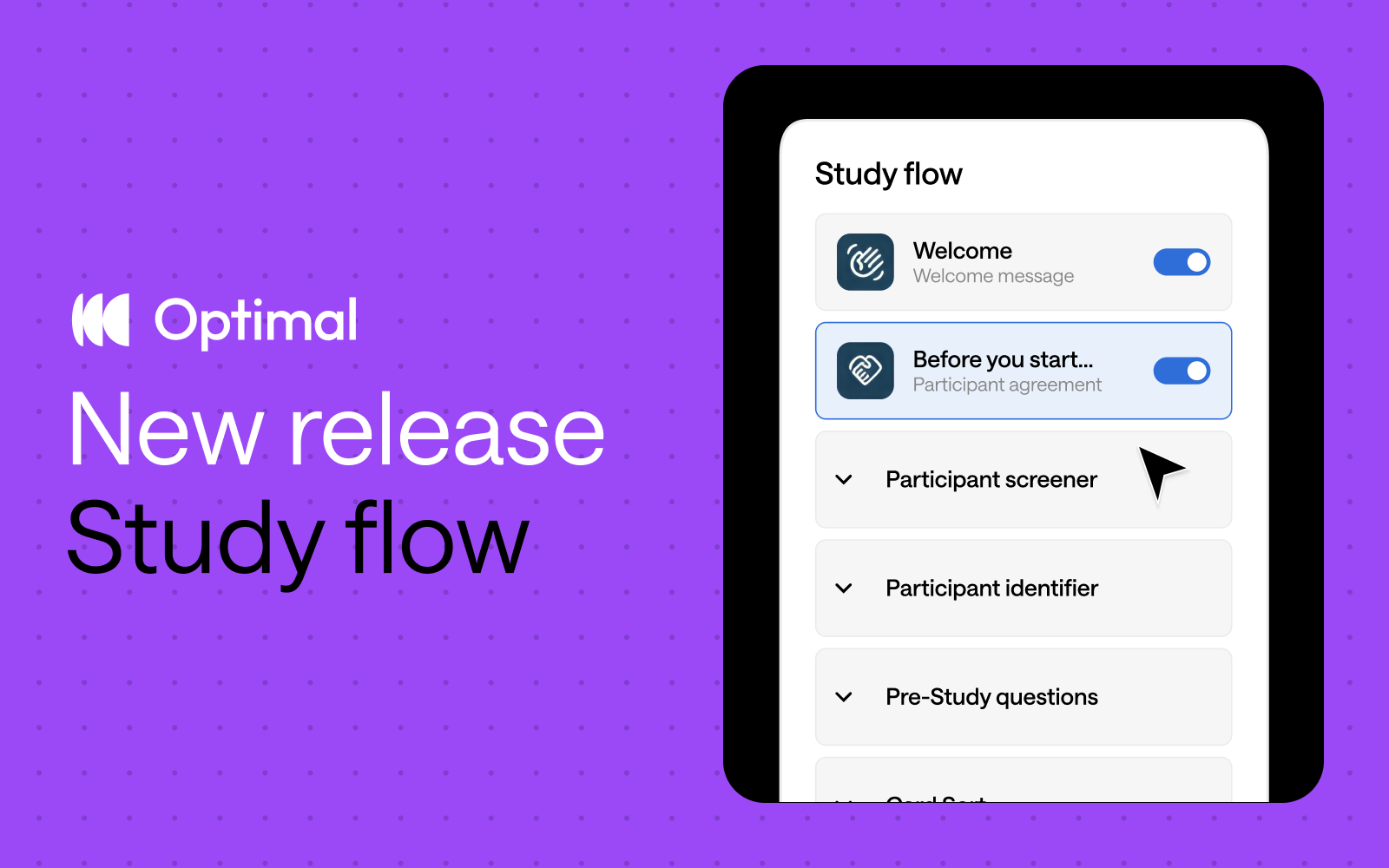
Inspired by insights from Optimal users, we’ve reimagined study creation to bring you a beautifully streamlined experience with the new Study Flow tab.
⚡ Enjoy faster study set up: Messages & instructions and Questionnaire tabs are combined in a single tab - called Study Flow - for faster editing and settings customization.
✨ See it all at a glance: Easily visualize and understand the participant experience—from the welcome message to the final thank-you screen—every step of the way.
🎯 Duplicate questions: Save time and quickly replicate questions for surveys, screening questions, and pre- and post-study questions.
⭐ Experience enhanced UI: Enjoy a modern, clean design with intuitive updates that minimize scrolling and reduce mental load.
🗂️ Collapse and expand sections: Easily navigate studies by collapsing and expanding sections, making it easier to build out specific parts of your study.
This Study Flow tab is available across all Optimal tools, except for Qualitative Insights.
We’re not stopping there. We have some significant improvements on the horizon designed to give you even greater flexibility and control.
Advanced logic: Enhanced logic capabilities is one of our most highly requested features, and we’re thrilled to introduce new capabilities to help you build your ideal study experience – available for surveys and other tools. We will first introduce “display logic”, allowing for:
Customizable sections: Organize your questions into different sections to build a better study experience for your participants. For example, segment your questions into relevant groupings, such as demographics or product usage. With custom sections, you can add new sections, rename, reorder, duplicate, and move questions between different sections.*
*Note: Questions cannot be moved to/from the screening questions section.
These upcoming features will empower you to create dynamic, tailored study experiences for different audiences with ease for more valuable insights.
Start exploring the new Study Flow now.

User research is invaluable, but in fast-paced environments, researchers often struggle with tight deadlines, limited resources, and the need to prove their impact. In our recent UX Insider webinar, Weidan Li, Senior UX Researcher at Seek, shared insights on Efficient Research—an approach that optimizes Speed, Quality, and Impact to maximize the return on investment (ROI) of understanding customers.
At the heart of this approach is the Efficient Research Framework, which balances these three critical factors:
Within this framework, Weidan outlined nine tactics that help UX researchers work more effectively. Let’s dive in.

Not all research requires the same level of depth. Efficient researchers prioritize their time by categorizing projects based on urgency and impact:
By allocating time wisely, researchers can avoid spending weeks on minor issues while ensuring critical decisions are well-informed.
AI is transforming UX research, enabling faster and more scalable insights. Weidan suggests using AI to:
While AI can’t replace human judgment, it can free up researchers to focus on higher-value tasks like interpreting results and influencing strategy.
Research has a greater impact when it’s embedded into the product development process. Weidan emphasizes:
When research is shared and collaborative, it leads to faster adoption of insights and stronger decision-making.
With limited resources, researchers must choose their battles wisely. Weidan recommends using a prioritization framework to assess:
By filtering out low-priority projects, researchers can avoid research for research’s sake and focus on what truly drives change.
Speed is important, but efficient research isn’t about cutting corners. Weidan stresses that even quick studies should provide a deep understanding of users by:
Balancing speed with depth ensures research is not just fast, but meaningful.
Proactive researchers don’t wait for stakeholders to request studies—they anticipate needs and set up research ahead of time. This means:
By anticipating research needs, UX teams can reduce last-minute requests and deliver insights exactly when they’re needed.
Stakeholders may question research methods, especially when they seem time-consuming or expensive. Weidan highlights the importance of educating teams on why specific methods are used:
A well-justified approach ensures research is respected and acted upon.
Not all stakeholders consume research the same way. Weidan recommends adapting insights to fit different audiences:
By delivering insights in the right format, researchers increase the likelihood of stakeholder buy-in and action.
The ultimate goal of research is not just understanding users—but driving business decisions. To ensure research leads to action:
Research is most valuable when it translates into real business outcomes.
Efficient research is not just about doing more, faster—it’s about balancing speed, quality, and impact to maximize its influence. Weidan’s nine tactics help UX researchers work smarter by:
✔️ Prioritizing high-impact work
✔️ Leveraging AI and collaboration
✔️ Communicating research in a way that drives action
By adopting these strategies, UX teams can ensure their research is not just insightful, but transformational.

Investing in prototype testing and user-focused design isn't just about creating better products—it's a proven strategy to save costs, accelerate timelines, and drive customer loyalty. According to Forrester Research, companies that incorporate prototype testing in their design process can reduce development costs by 33% and cut collaboration time by 25%. UX-focused companies also see products hit the market 50% faster and loyalty rise by 240% (Forrester Research, Nielsen Norman Group)!
Whether you're refining user flows, testing new concepts, or optimizing your onboarding experience or conversion flows, prototype testing helps ensure your designs hit the mark—before you invest too heavily in the build.
With those benefits in mind, let's dive into how prototype testing can help you deliver user-centered designs efficiently and effectively.
Airline
Imagine your flight has been canceled. Ask how your customers self-service on the airline website to find new flight options.
Bank
Have a prospect or customer interact with a prototype to open a business account online. Uncover usability issues and streamline the process.
Insurance
Imagine you’re interested in switching car insurance. Explore how intuitive it is for customers to view coverage details in an app, helping insurers improve navigation and accessibility.
Optimal’s prototype testing gives you a variety of analysis options to help you to evaluate the effectiveness and usability of your prototypes. Use these to see exactly how users navigate, where they face challenges, and what areas are proving to be successful.
Ready to use prototype testing to help your team reduce development costs and get a faster time to market? Get started in your account by creating a new prototype test.
Not yet a user of Optimal? Sign up for a free 7-day trial.

As we approach the end of 2024, it’s a great time to reflect on the progress we’ve made as a community and at Optimal. This year, Optimal users launched over 100,000 studies with over 1.2 million participants sharing insights to drive better business decisions and experiences.
Here's how we’ve worked to make research more accessible, speed up insight discovery, empower enterprise teams, and grow our platform’s capabilities in 2024.
Research for All
Research shouldn’t be limited to specialists or select teams—it should be accessible to everyone. In 2024, we focused on breaking down barriers to user research so that individuals across all divisions and teams can uncover actionable insights. Our tools are built to help anyone make confident, user-centered decisions, and this year, we’ve seen Optimal users from across all different types of teams, including product, marketing, content, research, design, information architecture, and education. We work to make our platform easy to use and learn, ensuring everyone can dive into research without barriers, regardless of their role or experience.
A Milestone Year for UX Maturity
Understanding and improving UX maturity became a key focus for organizations this year. We launched our comprehensive UX Maturity Framework, complete with assessment tools that help teams identify their current state and plot a path forward. To support this journey, we developed detailed playbooks for each maturity level, offering practical guidance for teams looking to level up their UX practice.
Demonstrating the Value of UX
The conversation around UX value also took center stage in 2024. Our groundbreaking research into quantifying UX impact provided organizations with concrete data to support their UX investments. Through our popular webinar and blog series, we explored different approaches to communicating UX value to stakeholders, giving practitioners the tools they need to advocate for user-centered design.
Prototype Testing
This year, we introduced Prototype Testing, enabling teams to test designs early and often. Teams can iterate quickly and ensure their ideas resonate with users before committing to development.
Video Recording (Beta)
We added a new feature to Prototype Testing that captures screen, audio and nonverbal cues—such as frustration—providing deeper insights into your users' experiences.
Figma Integration
We also launched Figma integration for First-Click Testing and Prototype Testing, allowing users to connect design prototypes directly to Optimal studies. This integration makes it easier than ever to test, refine, and align designs with user needs—all without leaving Optimal.
AI-Powered Insights
Our AI-Powered Insights help to uncover patterns and themes in qualitative and interview data. By analyzing large datasets, AI helps you discover key trends and accelerate decision-making.
Optimal Recruitment
Recruiting high-quality participants can be a huge hassle and very time-consuming. That’s why we’ve relaunched Optimal Recruitment with expanded profiling capabilities, enhanced quality controls, and full-service support—to let you focus on what matters most: powerful insights to drive better business outcomes
Workspaces
For organizations with complex structures, we’ve introduced Workspaces and Projects to give admins greater control, improved organization, and increased privacy controls. Whether you're part of a large enterprise or a growing team, these enhancements simplify governance and amplify impact.
Looking Ahead
As we head into 2025, our roadmap is packed with exciting features and improvements to make research more accessible, efficient, and impactful. Expect advancements across our platform, including video recording for prototype testing, a brand new survey tool with improved usability, advanced logic, and AI-powered capabilities to meet the evolving needs of teams worldwide. The best is yet to come - stay tuned and see you in 2025!

After months of invaluable collaboration with our incredible community, we're thrilled to announce that Prototype Testing has officially graduated from beta and is now available to everyone on the Individual+, Team, and Enterprise plans!
The Prototype Testing Beta was launched with a singular mission: to gather feedback from our community to help shape the future of the tool. Over the past few months, we've been privileged to work alongside a diverse group of customers and UX leaders— who provided invaluable feedback, completed many Usability Tests, and helped us refine the tool.
From the initial rollout to the most recent updates, your input has shaped our decisions, from design tweaks to functional improvements. Together, we’ve tackled challenges, explored creative solutions, and built something that truly aligns with user needs.
We're thrilled to announce our most requested feature is coming to Prototype Testing: seamless video recording that captures the full depth of user experiences.
Video recording transforms your research by:
Your feedback during the beta has shaped an exciting roadmap for 2025 and beyond. While we can't reveal everything just yet, know that every feature and enhancement planned has been inspired by your needs and suggestions.
To our incredible beta participants: your partnership has been invaluable. You've shared your expertise, challenged our assumptions, and helped us build something truly special. Every piece of feedback, every suggestion, and every bug report has contributed to making Prototype Testing a tool that truly serves the UX research community.
This is just the beginning of our mission to make expert research accessible to all. Stay tuned for regular updates as we continue to evolve Prototype Testing based on your needs and feedback. Here's to the next chapter of creating exceptional digital experiences together!
.png)
Recruiting high quality participants can be a hassle and time-consuming. That’s why we’ve relaunched Optimal Recruitment with expanded profiling capabilities, enhanced quality controls, and full-service support—to let you focus on what matters most: powerful insights to drive better business outcomes.
With Optimal Recruitment, our in-house team makes it easy to connect with participants. We take care of all the details—from feasibility checks, recruitment, reminders, confirmations, and admin.
Thanks to our four award-winning panel providers, we can tailor recruitment to every recruitment need, giving you access to a vast pool of high-quality participants from across 150+ countries.
And this is just the beginning—our network will continue to grow, offering even greater targeting capabilities and expanded reach in the future.
All you need to do is provide your participant criteria and our team will handle the rest! We’ll select the best panel for your needs and ensure everything in your study is set up perfectly so you can sit back and watch the results flow in.
To get started, head over to the Recruit tab under an Optimal study.
Need more info? Find out more about getting started or reach out to Support or your account team for more details.
