June 4, 2026
5 minutes

Ushering a New Era of Usability Testing at Optimal: One Study, Multiple Methods, Better Insights

Header graphic for the article 'Ushering a New Era of Usability Testing at Optimal: One...'

The pace of product development has never been faster, and the cost of building on assumptions has never been higher. At Optimal, we've spent nearly two decades helping teams get closer to their users, and what we're seeing right now is a fundamental shift in how research gets done. More teams are running research than ever before and timelines to act on findings are tighter, while the expectations for what research needs to deliver keep rising. 

That shift is exactly what's driving Optimal 3.0, our most ambitious reinvention of the platform yet, designed to give every team the speed, depth, and flexibility that modern research demands. Today's release is the next step in that journey.

Optimal's new mixed-methods research tool tears down the boundaries between methods. It brings prototype testing, live site testing, and surveys into a single, end-to-end study workflow. And grounded in our product principles: speed to insights, access for all, and communication. 

A Unified Way to Test Usability

True multi-method research


Optimal’s new Usability Testing tool marks the next step in the evolution of Optimal 3.0, giving teams the flexibility to evaluate experiences in whatever form they exist today.

  • Early-stage ideas and concepts
  • Interactive prototypes
  • AI-generated or experimental flows
  • Live production experiences
  • Competitor or benchmark sites
  • Surveys and structured feedback

Combine prototype testing, AI prototype testing, live site testing, and surveys in a single study. Test multiple prototypes side by side, compare different live URLs, or mix prototype and live site tasks together all in one workflow. Research can now mirror how products actually evolve, from early concept to shipped experience.

Richer qualitative insight collection


New speak-aloud question types, custom message blocks, auto-generated transcripts and insights, citations and highlight clips help you capture the context and reasoning behind every action. AI-assisted analysis then helps you make sense of it all fast and communicate with impact.

A redesigned results and insights layer


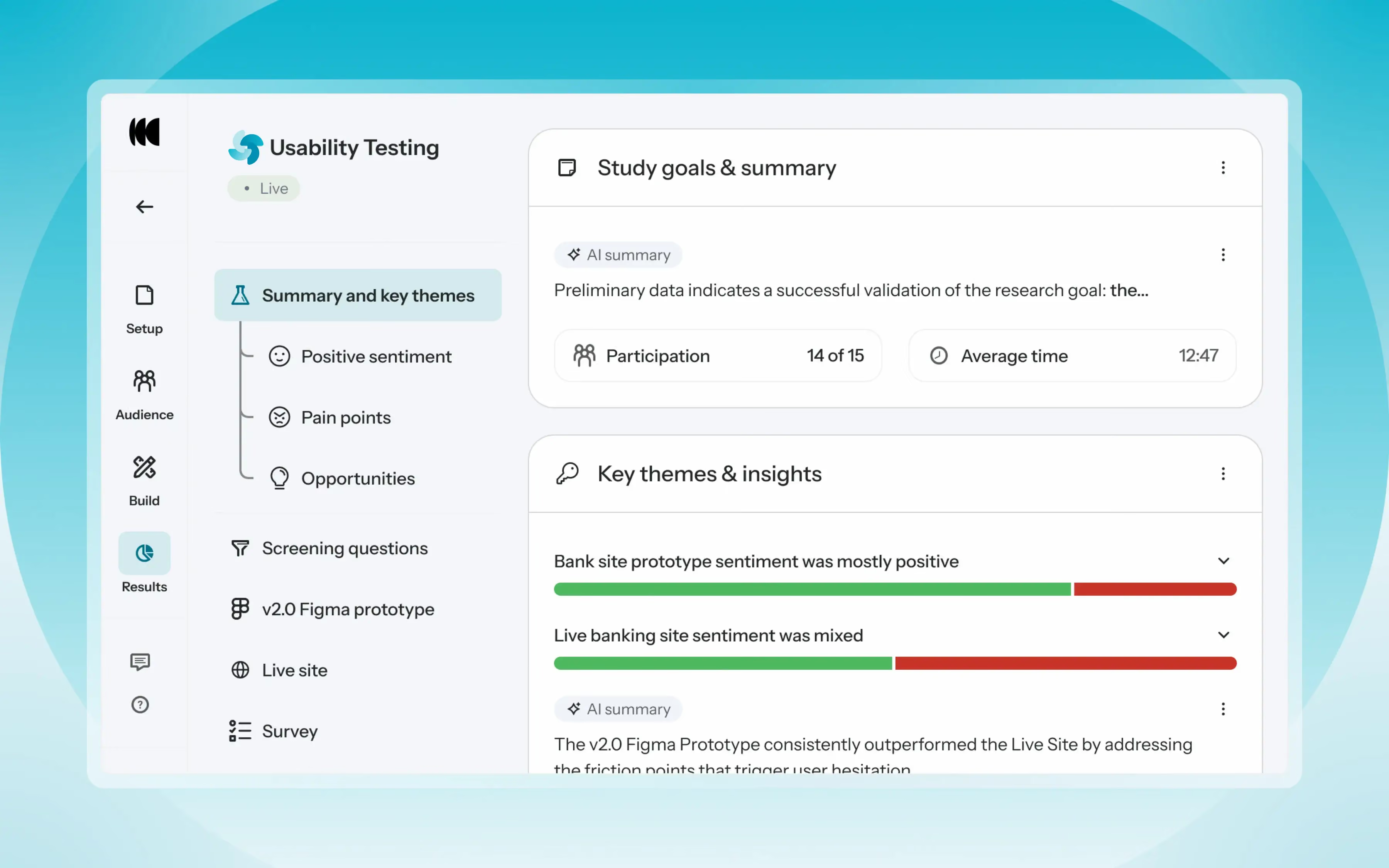
Review a study overview surfacing key themes, pain points, and sentiment analysis combining insights across all your study methods along with detailed results, task analysis and recordings, transcripts, key quotes, and automatically generated citations and video clips. 

Coming soon: you can also use AI Chat to chat with your data directly, asking questions and pulling new insights and evidence across all your qualitative and quantitative inputs.


Six ways to put it to work

  1. Compare design variations in a single study, such as multiple navigation layouts, checkout flows, or onboarding concepts
  2. Explore early-stage concepts before committing to build
  3. Benchmark current live experience vs a redesigned prototype
  4. Test staging vs production, or two campaign landing pages
  5. Validate end-to-end journeys from concept to live experiences
  6. Compare your experience against competitors


Why this matters


Modern product development is no longer linear. Teams continuously move between:

  • Discovery and validation
  • Design and iteration
  • Prototype and production
  • Concept and reality

Traditional usability testing tools were not built for this fluidity.  Optimal’s Usability Testing brings the flexibility to match how teams actually work today.

By combining multiple methods into a single study and pairing it with AI-powered synthesis, Usability Testing helps teams reduce setup and analysis time, recruit once, capture richer qualitative context, compare experiences more easily, move faster from feedback to action, and tell clearer, more compelling insight stories. 

Learn how to get started with Usability Testing in Optimal and accelerate your path from idea to insight. Book a meeting, start exploring in your account, or join our live training webinar on June 24th to see it in action.

Share this article
Author
Optimal
Workshop

Related articles

View all blog articles
Header graphic for the article 'Simplify Your Workflow with the Interviews Scheduler & Seamless...'
Learn more
1 min read

Simplify Your Workflow with the Interviews Scheduler & Seamless Calendar & Video Integrations

Coordinating user interviews shouldn’t feel like a full-time job. Between juggling calendars, chasing confirmations, and sending reminders, scheduling can be the hidden bottleneck in research velocity and quietly consume the time you actually want to spend talking to customers. 

If you want to run more interviews and generate insights more consistently, simplifying your scheduling process is one of best ways to remove friction and streamline your workflow.

Save time and streamline your workflow

What does a simpler workflow look like? 

With a tool like Optimal’s Interviews Scheduler, you can:

  • Invite participants via a booking link or email
  • View upcoming and completed sessions in one place
  • Connect with tools you already use like Google Calendar, Microsoft Outlook, Google Meet, Zoom, and Microsoft Teams.
  • Let participants reschedule themselves. No back-and-forth emails.
  • Add collaborators and automatically notify everyone of changes.
  • Set session limits and calendar buffers.
  • Automate email invites, reminders, confirmations, and thank-you messages.

It’s everything you need to manage interviews without the chaos.

Calendar integrations: Avoid conflicts and save time


With the Interviews Scheduler, you can sync your availability with Google Calendar and Microsoft Outlook in real time. Connect your own calendar or your team’s to ensure every busy slot is accounted for. Avoid double bookings, block out busy times, and keep everything in one place. 


Once set up, your availability automatically updates, and participants can book directly into open slots, eliminating the back-and-forth. Plus, depending on your preferences, your sessions will either sync directly to your calendar or come through as an .ics file in the confirmation email, saving you one more step.


Seamless video conferencing integrations


The Interviews Scheduler integrates directly with Zoom, Microsoft Teams, and Google Meet.


When someone books a session:

  • A video link is automatically generated
  • It’s added to the calendar invite
  • Everyone receives confirmation details
  • Sessions can be automatically recorded


No copying links. No switching between tools.


Built for research teams

The Interviews Scheduler isn’t just about booking time slots. It’s about removing friction from your research workflow.

With integrations at its core, you can:

  • Keep your calendar, video tools, and participants in sync
  • Reduce manual coordination
  • Eliminate scheduling errors
  • Focus on insights instead of admin

Whether you’re running one-off interviews or managing weekly research sprints, the Interviews Scheduler helps you move faster and stay organised.

Ready to give it a try? Log in to your Optimal account and get started or book a demo to learn more.

Header graphic for the article 'Speed Up Your Design Workflow with AI Prototyping + Optimal'
Learn more
1 min read

Speed Up Your Design Workflow with AI Prototyping + Optimal

AI prototyping isn’t just a side experiment anymore. It’s quickly becoming a real advantage for product and design teams. According to a 2025 industry report, companies using AI prototyping tools saw a 35% increase in development efficiency and a 25% improvement in user adoption rates compared to traditional coding methods.

The takeaway? Rapid prototyping with AI doesn’t just save time. It’s driving measurable product impact.

What Is AI Prototyping?


AI prototyping turns simple text prompts into interactive, functional prototypes. You can describe your design concept in plain English e.g. "I want to create a flight booking webpage to review a checkout flow" and minutes later, you have a working, clickable prototype. 

AI prototyping can also suggest layouts, flows, and components and lets you experiment without writing a single line of code. You can easily experiment with multiple design concepts and seamlessly transition from idea to testable prototype.

You bring the design thinking. AI handles the build.

Why AI Prototyping Matters for Product Teams


Product teams today are under pressure to ship faster without compromising quality. AI prototyping addresses one of the biggest bottlenecks in product development: turning ideas into something realistic enough to test.

Instead of debating static mockups in meetings, you can put a clickable experience in front of users and make decisions based on evidence.

Popular AI Prototyping Tools


Here are some widely used AI prototyping tools to explore:

How to Use AI Prototyping Tools with Optimal


AI prototyping gets you to a clickable experience quickly. Optimal helps you validate it with real users.

Here’s a step-by-step workflow to combine both:

  1. Generate your prototype
    • Prompt your AI tool with the desired layout or flow.
    • Publish and copy the shareable URL.
  2. Create a Live Site Test in Optimal
    • Add your AI-generated prototype URL along with key tasks.
    • Recruit participants and observe real-time interactions.
  3. Watch video recordings
    • Identify friction points, confusion, and usability issues.
  4. Extra tip: Add recordings into Optimal Interviews
    • Import your live site testing recordings to Optimal Interviews.
    • Get automated insights and highlight reels powered by AI.
    • Dig deeper into your session with AI Chat.
  5. Iterate and refine
    • Adjust your prototype based on insights.
    • Repeat testing.

Getting started 


Here’s how we recommend getting started. Pick something where you can experiment with low stakes and learn without pressure. Sign in to Optimal or sign up for a free trial and start testing. 


This isn’t about replacing design expertise. It’s about shifting time and energy toward understanding user needs and iterating based on evidence. AI can handle the heavy lifting of generating prototypes. Your team can focus on strategy, clarity, and experience quality.


The result? Faster validation. Smarter decisions. Better products. 

Header graphic for the article '7 Ways to Use AI Chat to Boost Collaboration...'
Learn more
1 min read

7 Ways to Use AI Chat to Boost Collaboration in Mural, FigJam, and Miro

Collaboration tools like Mural, FigJam, and Miro are staples of how modern teams can brainstorm, map ideas, align on plans, and build together. But a canvas alone can't tell you if you're on the right track or guide you to what comes next when progress stalls. That's where Optimal AI Chat and user insights come in.

By starting or bringing real user insights into the boards your team already works in, you can reduce ambiguity, ground discussions in real research, and accelerate decision-making. 

Here are 7 ways to use AI Chat alongside your collaboration boards.


1. Align on key objectives

Before your next planning session, use Optimal AI Chat to surface relevant insights from your interview recordings. Add a summary directly into your Mural, Miro, or FigJam board so everyone comes in with the same context and understanding of the objectives. Instead of starting with assumptions, your team can start with real user insights and clear trade-offs to discuss.

Try this prompt: "Summarize the key considerations for [decision topic] and flag any trade-offs we should discuss as a team."

AI Chat example

2. Create a user journey map

AI Chat can analyze interview transcripts and video recordings and highlight common jobs to be done, behaviors, and friction points. You can then map those steps visually on your board and identify where the experience breaks down.

Try these prompts: “Summarize the typical jobs to be done for the people we interviewed.”
“For this job you identified [paste job details], detail the journey steps.” 


3. Turn pain points into design and product decisions

AI Chat can analyze recurring themes from your interview recordings and convert them into concrete opportunities your team can explore next. Adding these to your board gives the team a clear starting point rather than a vague list of problems.

Try this prompt:  "Based on these pain points [paste notes or themes], suggest three product improvements we could explore."


4. Sharpen your marketing messaging

Interview insights aren’t just valuable for product, research, and design teams. Marketing teams can also use AI Chat to quickly evaluate messaging, positioning, and customer perception.

When running preference or concept testing interviews, AI Chat can quickly analyze the feedback and suggest positioning directions you can workshop on your board.

Try this prompt: “Suggest positioning options based on the interview feedback.”


5. Facilitate workshops

Running workshops and brainstorming sessions with cross-functional teams can be challenging. Conversations drift, discussions stall, and teams sometimes struggle to focus on the most important issues. 

AI Chat can help you structure the conversation before the workshop even begins by generating discussion guides based on user insights from your interviews. Add the chat outputs directly to your board to guide the session.

Try this prompt: “Generate a structured discussion guide based on the pain points of the interviewees.”


6. Make brainstorming more focused

Open brainstorming can be valuable. It can also be chaotic without clear direction. By leveraging AI Chat, you can guide your brainstorming sessions with intelligent suggestions, topic generation, and idea organization.

Try this prompt: “Generate 10 brainstorm ideas based on these user insights and group them into themes we could explore.”


7. Map complex processes

Visualizing complex processes and systems is easier with tools like Miro, FigJam, and Mural. AI Chat can help you map out each step. AI Chat can help break down a process step-by-step, highlighting decisions, dependencies, and potential friction points based on your interviews. Your team can then map these steps visually and identify opportunities for improvement.

Try this prompt: “Create a step-by-step process map for how users complete [task], including key decisions and potential friction points.”


Using Optimal AI Chat for seamless collaboration

The best collaboration happens when teams have the right information at the right time. 

Optimal AI Chat gives your team a jumpstart for your interview analysis: clearer inputs, faster synthesis, and smarter outputs that translate directly into what you're building on your boards.

Whether you're running a workshop, mapping a user journey, or planning a product launch, AI Chat helps you spend less time getting oriented and more time making decisions.

Ready to see what your team can do with it?
Learn more about best practices for AI Chat or book a demo

Seeing is believing

Explore our tools and see how Optimal makes gathering insights simple, powerful, and impactful.