Subscribe to OW blog for an instantly better inbox
Oops! Something went wrong while submitting the form.


Since launching Optimal Interviews in December, we've been tracking closely as research, product, and design teams put it to the test. The tool is driving a real transformation in workflows, and we’re energized by the feedback so far.
Optimal Interviews was built to remove the friction from one of research's most time-intensive steps: analyzing interview recordings. With automated transcription, AI-generated insights, highlight reels, summaries, and citations, the tool transforms hours of manual review into something that happens in minutes.
But we’re not done yet. We’re constantly building and evolving based on your feedback. With the latest releases like automatic recording, every session can now be captured and stored automatically, helping teams build a centralized user research repository and supporting continuous research.
Here’s a look at how teams are using Optimal Interviews, the latest work in this space, and where we’re headed.
Researchers across industries are leveraging Optimal Interviews in a variety of ways. Here are just a few examples from current users:
It’s been a busy few months, and we’ve shipped several meaningful updates over the past few months. Here’s what’s new:
Optimal Interviews now supports 13 languages, automatically detecting and transcribing interviews in their original languages. AI Chat is also ready to assist your team in these languages, ensuring a seamless experience no matter what language your team is using.
Sync Optimal Interviews with your Google Meet, Zoom, or Microsoft Teams account to automatically generate and attach meeting links to sessions scheduled with the Optimal scheduler.
You can choose to automatically record and upload sessions scheduled through Optimal, eliminating the need for manual uploads. Sessions can now be captured and stored automatically, enabling teams to conduct continuous research. Accumulate insights over time in a central repository, where they remain always accessible and ready to be explored further with AI Chat.
Custom topics allow you to define specific areas of interest for AI to focus on for interview insights. As more recordings are added, the tool will automatically generate insights based on these topics, so you can easily filter and focus on the data that matters most to you.
Our ultimate goal? To keep finding ways to reduce manual effort. Let Optimal streamline your research workflow, automate time-consuming tasks, and help you build out your qualitative research repository.
We have a number of significant additions in development, including:
Sync you and your team’s calendars (Google and Microsoft) with Optimal Interviews so you can easily schedule and sync you and your team’s interview availability. Avoid double booking and get scheduled sessions automatically added to your calendar.
Interviewers and participants will be able to message each other directly through Optimal. This helps protect personal contact details e.g. email addresses and reduces unintended bias, such as revealing the study creator’s organization. Teams can coordinate, add clarifications, and follow up more efficiently without exposing personal information.
How are you using Optimal Interviews in your research? What's working well, and what would you like to see us build next?
And if you're just getting started, our Interviews 101 guide is a great place to begin.
Want to learn more about how to harness the full potential of Optimal Interviews and AI Chat? Register for this live training.
Optimal Interviews is updated continuously and shaped with feedback from users. Follow our release notes or share your thoughts via live chat or feature request form to give your feedback and stay in the loop.
.avif)
Live site testing is now part of the Optimal platform and is designed to give you real insights from real user interactions without code, installs, or complicated setups.
If you missed our recent Live Site Testing Training webinar or want a refresher, we’ll get you up to speed with this recap of all the key insights.
Optimal’s live site testing lets you watch users navigate any website or web app, including your own staging or production site, or even competitor experiences. It’s all about understanding how people behave in the environments they actually use, helping you identify friction points you might otherwise miss.
In usability research, the “real world” often looks very different from controlled prototype tests. People use their own devices, have distractions, and bring patterns and expectations shaped by real life. Foundational research shows the richest insights often come from observing users in these real contexts.
Live site testing is built to reflect that reality, helping you answer not just if someone completes a task, but how they approach it and why they struggle.
One of the biggest barriers to live site testing historically is complexity, needing code snippets, extensions, or technical setup. Optimal’s tool removes all that friction so you can see natural behaviour without influence or disruption:
When crafting tasks for live site testing, think about real user goals. Asking people to complete realistic tasks (e.g., find a product, book a flight, compare two pages) and encouraging them to think out loud leads to much richer insights than purely metric‑focused tests. You can also mix tasks with survey questions for quantitative data.
A big part of getting real behavior is ensuring participants feel comfortable and unencumbered. Optimal’s built-in task window is readily available when needed but otherwise minimizes to stay out of the way. This flow helps people stay focused and act naturally, which directly improves the quality of insights you collect.
For even deeper insights, pair live site testing with Optimal Interviews. Once you upload live site testing recordings, you get automated insights, transcripts, summaries, as well as highlight reels in Interviews. You can also explore further with AI chat, so you can quickly uncover quotes, compare experiences, and answer ad‑hoc questions.
This combination doesn’t just make analysis faster; it helps you convince stakeholders with clear, digestible, and compelling evidence from real user behaviour. Instead of long reports, you can present snackable, actionable insights that drive alignment and decisions.
We’re evolving live site testing at Optimal with solution testing, a multi-method approach that combines prototypes, live sites, and surveys in a single study. This will let teams capture even richer insights with speak-aloud tasks, automated analysis, highlight reels, and AI chat, making it faster and easier to understand user behavior and share compelling findings.
Can you test staging or test environments and sites behind a password or firewall?
Yes, Optimal's live site testing tool works with any URL, including staging and test environments as well as sites behind a password or firewall.
You can share specific instructions with participants before they start. For example, if participants need to create an account and you don’t want that recorded, you can ask them to do this in advance via the welcome screen. That way, when the study begins, they’re already logged in.
Will live site testing affect my live website or real data?
No, user testers interacting with a live site test cannot make any changes to your website or its data.
What permissions are needed to test competitor websites?
With Optimal’s live site testing, you don't need special approval or permissions to evaluate public competitors' experiences.
If you want to experience the full walkthrough, demo, and Q&A from the session, we encourage you to watch the full webinar! You’ll learn how to start running your own live site tests and uncover real user behavior, plus pick up tips and best practices straight from the training.

When we planned our product roadmap for 2025 we talked to our users to understand their biggest pain points and one thing came up time and time again: conducting and analyzing user interviews, while still one of the most important aspects of user research, was still incredibly painful and time consuming.
So we went away, and we tried to envision the perfect workflow for user interviews for product, design and research terms and what we came up with looked a little something like this:
Then we went and built it.
Traditional interviews are passive. They sit in folders, waiting for someone to have time to review them. But what if interviews could speak for themselves? What if they could surface their own insights, highlight critical moments, and answer follow-up questions?
This isn't science fiction, it's the natural evolution of user research, powered by AI (and built by Optimal).
Most research teams have folders full of unanalyzed video content and hours of valuable insights buried in hours of footage and unfortunately, talking to your users doesn't matter if insights never surface. Most research teams area already trying to leverage AI for solve some of their challenges, but generic AI tools miss the nuance of user research. They can transcribe words but can't identify pain points. They can find keywords but can't surface behavioral patterns. They understand language but not user psychology. The next generation of user interview tools require research-grade AI. AI trained on user research methodologies. Algorithms that understand the difference between stated preferences and actual behavior. Technology that recognizes emotional cues, identifies friction points, and connects user needs to product opportunities.
Traditional analysis creates static reports. Product, design and research teams need tools for user interviews that create dynamic intelligence. Instead of documents that get filed away, imagine insights that flow directly into product decisions:
Manual analysis can take weeks or even months, especially for large datasets. AI-powered tools can speed this process up significantly, but time savings is just the beginning. The real transformation happens when researchers stop spending time on manual tasks and start spending time on strategic thinking. When analysis happens automatically, human intelligence can focus on synthesis, strategy, and storytelling.
We are reimagining user interviews from the ground up. Instead of weeks of manual analysis we want you to be able to surface insights in hours. Instead of static reports, we want you to have dynamic, searchable intelligence. Instead of user voices lost in transcripts, we want to help you get video evidence that influences every product decision.
This isn't a distant future, it's happening now. We can’t wait for you to see it.

When people come to us, we often hear the same story. The platforms they’ve used are clunky. Outdated. Confusing. Like navigating a maze of tabs, jargon, and complexity. Just to run a simple study.
That’s not what user testing should feel like.
At Optimal, we believe finding insights should feel energizing, not exhausting. So we’ve been working hard to make our platform easier than ever for anyone – no matter their experience level – to run meaningful research, fast.
We also know that the industry is changing. Teams want to do more with less, and platforms need to be able to empower more roles to run their own tests and find answers fast.
As pioneers in UX research, Optimal has always led the way. Today, Optimal is more powerful, intuitive, and impactful than ever, built to meet the needs of today’s teams and future-proofed for what’s next.
Access for All
We believe research should be accessible. Whether you’re a seasoned researcher or just getting started, you should be able to confidently run studies and uncover the “why” behind user behavior without facing a steep learning curve. All our latest plans include unlimited users, giving your whole team the ability to run research and find insights.
Speed to Insight
Time and budget shouldn't stand in your way. With smart automation and AI-powered insights, our tools help you go from question to clarity in days, not weeks.
Communicate with Impact
Great insights are only powerful if they’re shared. We help you translate data into clear, actionable stories that influence the right decisions across your team.
We’re entering a new era at Optimal, one that’s even faster, smoother, and more enjoyable to use.
Here’s what’s new:
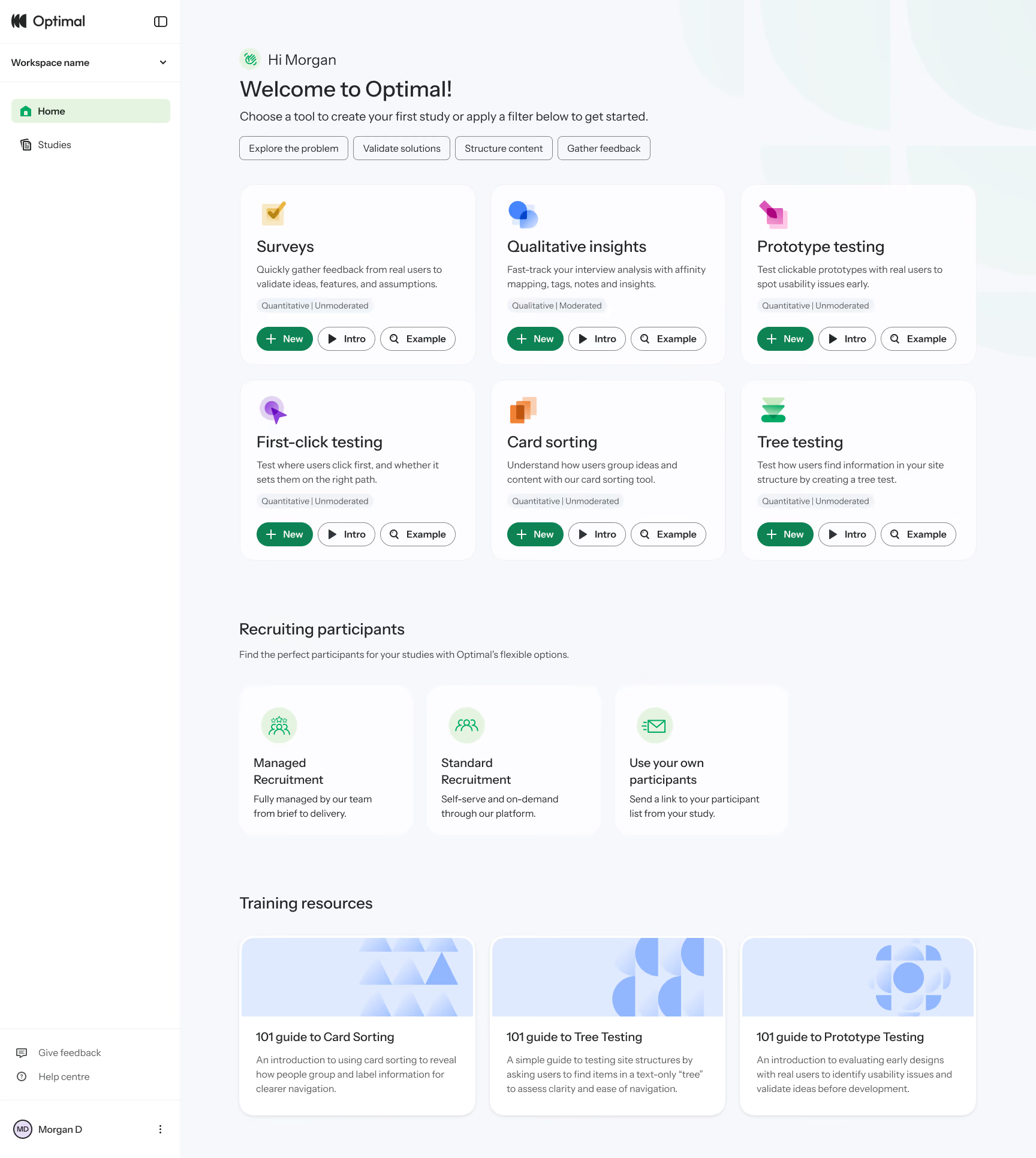
This year, we also launched our new study flow to reduce friction with study creation. It helps you easily visualize and understand the participant experience, from the welcome message to the final thank-you screen, every step of the way. Learn more about the Study Flow.
Our refreshed designs reduces mental load, minimizes unnecessary scrolling, and helps you move from setup to insight faster than ever before.
We’ve gone well beyond a new homepage and design refresh. Now’s the perfect time to take another look. We’ve made big changes to help you get up and running quickly and get more time uncovering the insights that matter.
Using Optimal already? Log in to see what’s new.
New to Optimal? Start a free trial and experience it for yourself.
This is just the beginning. We can’t wait to bring you even more. Welcome to a simpler, faster, more delightful way to find insights.
.avif)
We’re excited to launch our video recording functionality for prototype testing, enabling you to dive deeper into the “why” behind user actions and empowering you to make data-informed decisions faster and with greater confidence.
Capture the nuance of user interactions with screen, audio, and/or video recording. With Optimal’s video recording feature, you can:
By combining video recordings with prototype testing, you can unlock actionable insights that make a real impact.
Here’s how they drive value for your initiatives:
Optimal combines the power of video recording, participant recruitment, and a comprehensive UX insights and research platform to elevate your product and research process.
Use Optimal’s recruitment service to quickly connect you with millions of people in 150+ countries ready to take part in your study. Our in-house team handles feasibility assessments, sends reminders and confirmations, reviews personalized study setups, and conducts human checks to ensure high quality participants to maximize the value of your video recordings.
We’re grateful to our early adopters and beta testers for shaping the future of video recording and prototype testing. Based on your valuable feedback, we’ve made the following updates:
Video recording updates
Prototype testing updates
Ready to unlock the power of video recording?
Get started with a prototype test in Optimal or visit our help documentation to learn more.
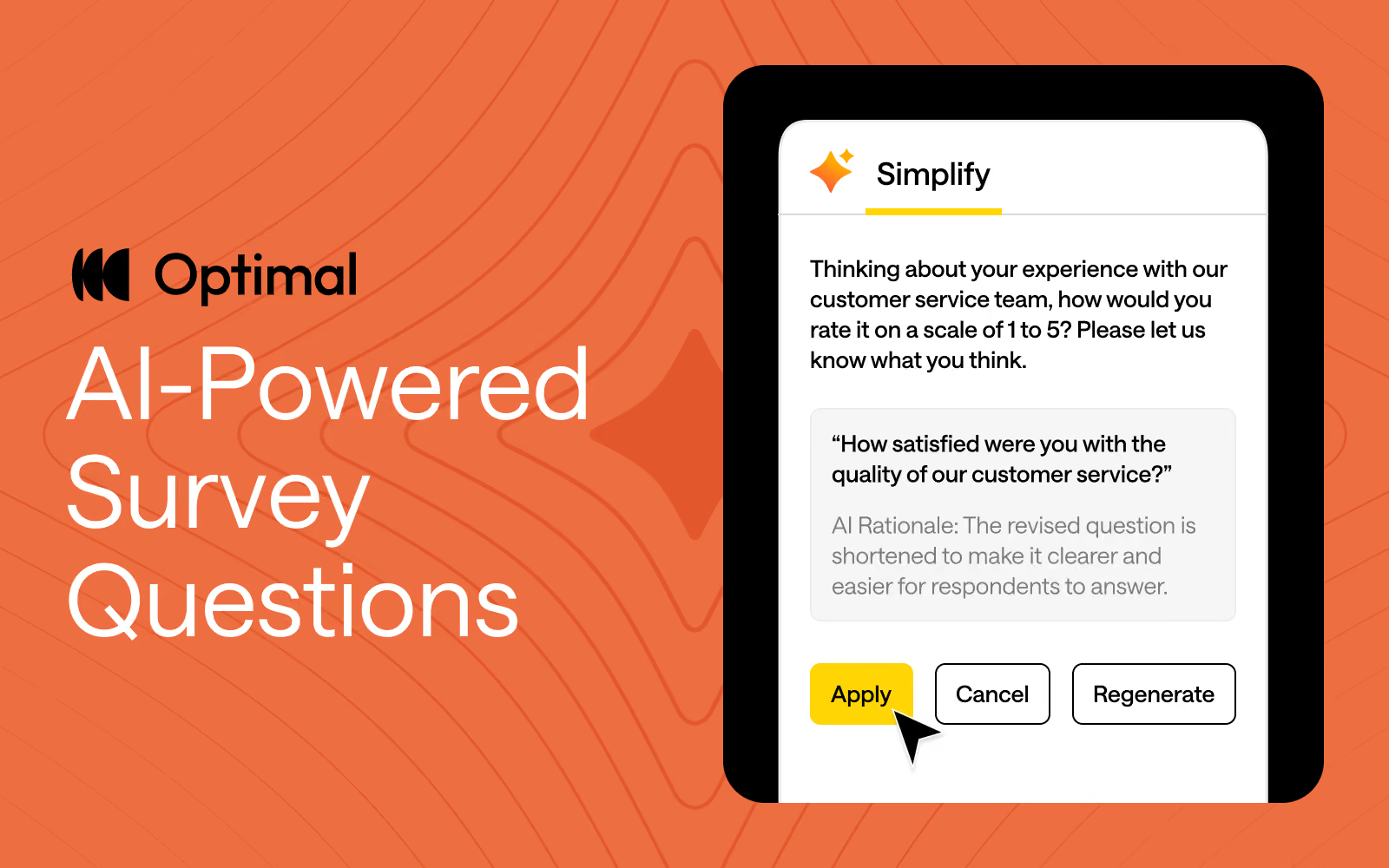
At Optimal, we believe in the transformative potential of AI to accelerate your workflow and time to insights. Our goal is simple: keep humans at the heart of every insight while using AI as a powerful partner to amplify your expertise.
By automating repetitive tasks, providing suggestions for your studies, and streamlining workflows, AI frees you up to focus on what matters most—delivering impact, making strategic decisions, and building products people love.
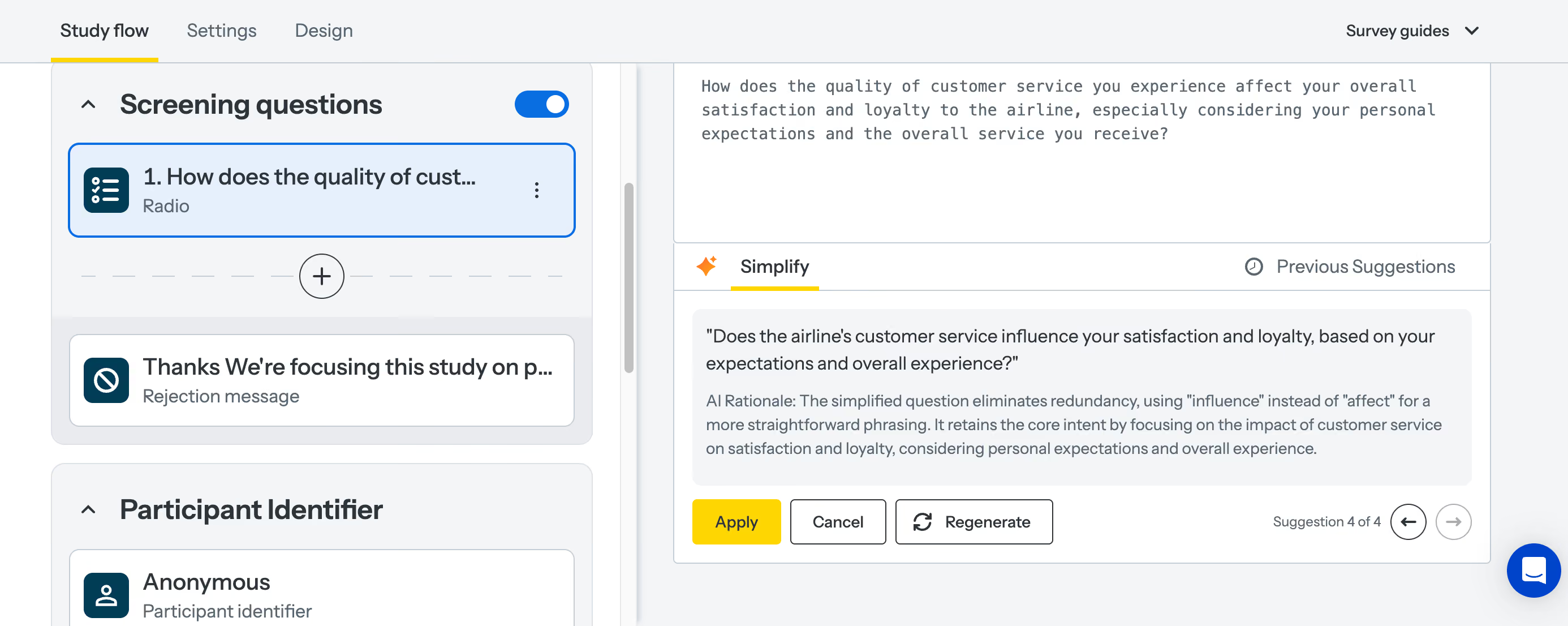
That’s why we’re excited to announce our latest AI feature: AI-Powered Question Simplification.
Ambiguous or overly complex wording can confuse respondents, making it harder to get reliable, accurate insights. Plus, refining survey and question language is manual and can be a time-consuming process with little guidance. To solve this, we built an AI-powered tool to help study creators craft questions that resonate with participants and speed up the process of designing studies.
Our new AI-powered feature helps with:
Apply AI-Powered Question Simplification to any of your survey questions or to screening questions, and pre- and post-study questions in prototype tests, surveys, card sorts, tree tests, and first-click tests.
AI is at the forefront of our innovation at Optimal this year, and we’re building AI into Optimal with clear principles in mind:
Keep an eye out for more updates throughout 2025 as we continue to expand our platform with AI-powered features that help you uncover insights with speed, clarity, and more confidence.
Want to see how AI can speed up your workflow?
Apply AI-Powered Question Simplification today or check out AI Insights to experience it for yourself!

