December 10, 2025
2 min read

Introducing Optimal’s New Interviews Tool: Automate Your Research, Accelerate Your Insights

At Optimal, we know the reality of user research: you've just wrapped up a fantastic interview session, your head is buzzing with insights, and then... you're staring at hours of video footage that somehow needs to become actionable recommendations for your team.

User interviews and usability sessions are treasure troves of insight, but the reality is reviewing hours of raw footage can be time-consuming, tedious, and easy to overlook important details. Too often, valuable user stories never make it past the recording stage.


That's why we’re excited to announce the launch of Interviews, a brand-new tool that saves you time with AI and automation, turns real user moments into actionable recommendations, and provides the evidence you need to shape decisions, bring stakeholders on board, and inspire action.

Interviews, Reimagined

We surveyed more than 100 researchers, designers, and product managers, conducted discovery interviews, tested prototypes, and ran feedback sessions to help guide the discovery and development of Optimal Interviews.

The result? What once took hours of video review now takes minutes. With Interviews, you get:

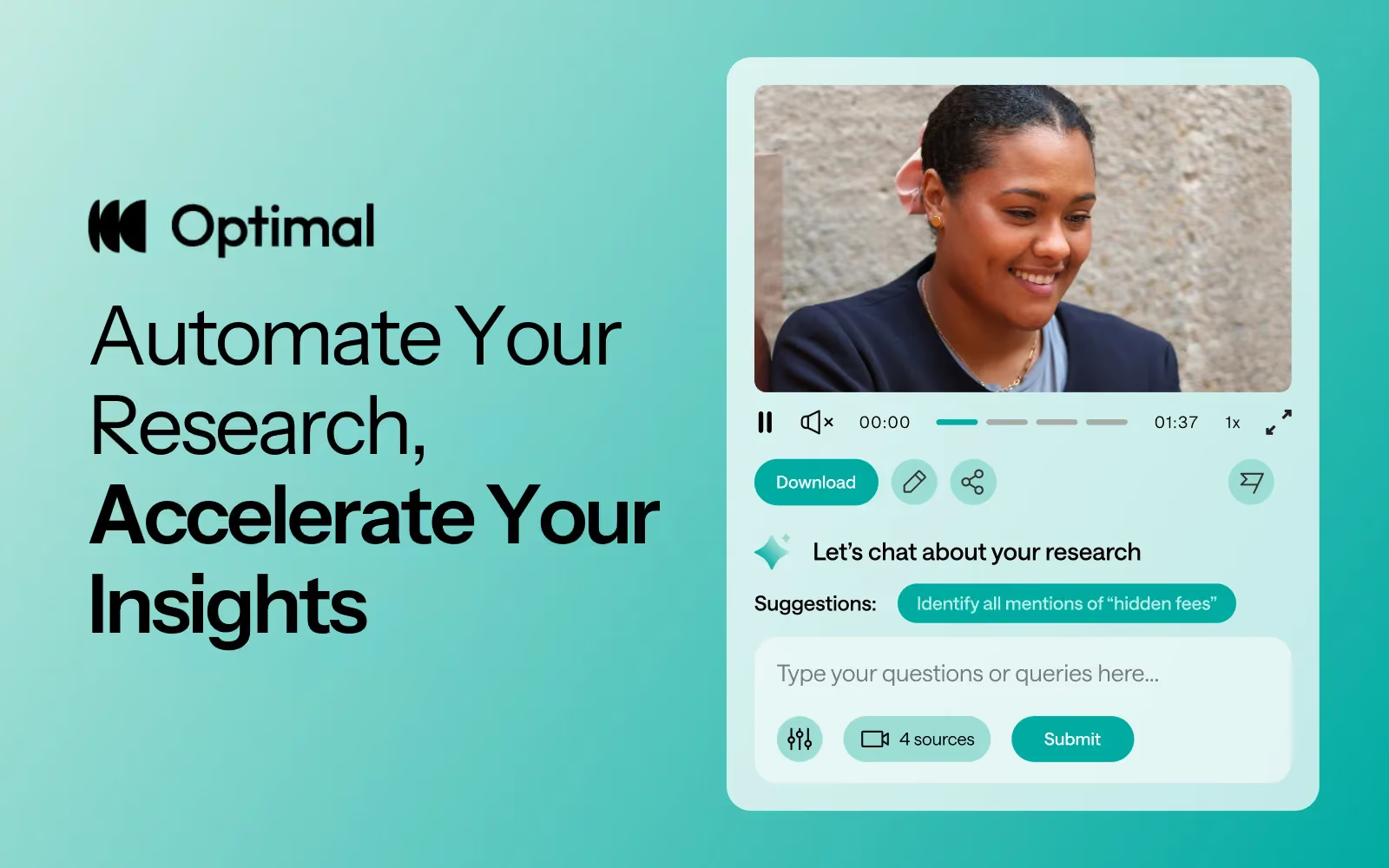
  • Instant clarity: Upload your interviews and let AI automatically surface key themes, pain points, opportunities, and other key insights.
  • Deeper exploration: Ask follow-up questions and anything with AI chat. Every insight comes with supporting video evidence, so you can back up recommendations with real user feedback.
  • Automatic highlight reels: Generate clips and compilations that spotlight the takeaways that matter.
  • Real user voices: Turn insight into impact with user feedback clips and videos. Share insights and download clips to drive product and stakeholder decisions.

Groundbreaking AI at Your Service

This tool is powered by AI designed for researchers, product owners, and designers. This isn’t just transcription or summarization, it’s intelligence tailored to surface the insights that matter most. It’s like having a personal AI research assistant, accelerating analysis and automating your workflow without compromising quality. No more endless footage scrolling.


The AI used for Interviews as well as all other AI with Optimal is backed by AWS Amazon Bedrock, ensuring that your AI insights are supported with industry-leading protection and compliance.

Evolving Optimal Interviews

A big thank you to our early access users! Your feedback helped us focus on making Optimal Interviews even better. Here's what's new:

  • Speed and easy access to insights: More video clips, instant download, and bookmark options to make sharing findings faster than ever.
  • Privacy: Disable video playback while still extracting insights from transcripts and get PII redaction for English audio alongside transcripts and insights.
  • Trust: Our enhanced, best-in-class AI chat experience lets teams explore patterns and themes confidently.
  • Expanded study capability: You can now upload up to 20 videos per Interviews study.


What’s Next: The Future of Moderated Interviews in Optimal

This new tool is just the beginning. Our vision is to help you manage the entire moderated interview process inside Optimal, from recruitment to scheduling to analysis and sharing.

Here’s what’s coming:

  • View your scheduled sessions directly within Optimal. Link up with your own calendar.
  • Connect seamlessly with Zoom, Google Meet, or Teams.

Imagine running your full end-to-end interview workflow, all in one platform. That’s where we’re heading, and Interviews is our first step.

Ready to Explore?


Interviews is available now for our latest Optimal plans with study limits. Start transforming your footage into minutes of clarity and bring your users’ voices to the center of every decision. We can’t wait to see what you uncover.

Get started with Interviews.

Share this article
Author
Optimal
Workshop

Related articles

View all blog articles
Learn more
1 min read

A Breakthrough Year for Optimal: Reflecting on 2025

As we close out 2025, we’ve been reflecting on what we’ve achieved together and where we’re headed next. 

We’re proud to have supported customers in 45+ countries and nearly 400 cities, powering insights for teams at LEGO, Google, Apple, Nike, and many more. Over the last 12 months alone, more than 1.2 million participants completed studies on Optimal, shaping decisions that lead to better, more intuitive products and experiences around the world.

We also strengthened and brought our community together. We attended 10 industry events, launched 4 leadership circle breakfasts for senior leaders in UX, product and design, and hosted 19 webinars, creating spaces to exchange ideas, share best practices, and explore the future of our changing landscape across topics like AI, automation, and accessibility.

But the real story isn't in the numbers. It's in what we built to meet this moment.

Entering a New Era for Insights


This year, we introduced a completely refreshed Optimal experience - a new Home and Studies interface designed to remove friction and help teams move faster. Clean, calm, intentional. Built not just to look modern, but to feel effortless.

Optimal: From Discovery to Delivery


2025 was a milestone year:
it marked the most significant expansion of the Optimal platform we think we’ve ever accomplished, with an introduction of automation powered by AI.

Interviews

A transformative way to accelerate insights from interviews and videos through automated highlight reels, instant transcripts, summaries, and AI chat, eliminating days and weeks of manual work.

Prototype Testing

Test designs early and often. Capture the nuance of user interactions with screen, audio, and/or video recording.

Live Site Testing

Watch real people interact with any website and web app to see what’s actually happening. Your direct window into reality.

We also continued enhancing our core toolkit, adding display logic to surveys and launching a new study creation flow to help teams move quickly and confidently across the platform.

AI: Automate the Busywork, Focus on the Breakthroughs

The next era of research isn't about replacing humans with AI. It’s about making room for the work humans do best. In 2025, we were intentional with where we added AI to Optimal, guided by our core principle to automate your research. Our ever-growing AI toolkit helps you:

  • accelerate your analysis and uncover key insights with automated insights
  • transcribe interviews 
  • refine study questions for clarity
  • dig deeper with AI chat 

AI handles the tedious parts so you can focus on the meaningful ones.

Looking Ahead: Raising the Bar for UX Research & Insights

2025 built out our foundation. The next will raise the bar.

We're entering a phase where research and insights becomes:

  • faster to run
  • easier to communicate
  • available to everyone on your team
  • and infinitely more powerful with AI woven throughout your workflow

To everyone who ran a study, shared feedback, or pushed us to do better: thank you. You make Optimal what it is. Here’s to an even faster, clearer, more impactful year of insights.


Onwards and upwards.

Learn more
1 min read

Figma + Optimal: Design, Test, Iterate Faster

Figma has long been the go-to tool for UI/UX designers, known for its intuitive interface and real-time collaboration. In fact, over 95% of Fortune 500 companies rely on Figma, and 13 million monthly active users trust it to design and prototype digital experiences.

If you’re already designing in Figma, integrating with Optimal can help to validate your ideas early, reduce costly mistakes, and deliver experiences users actually want.

The Hidden Cost of Skipping Design Validation

Validating designs before development and catching usability issues early has a measurable impact on both users and the business. Research consistently shows that:

Figma + Optimal: Prototype Testing and Design Validation

Instead of waiting for post-launch analytics or expensive redesigns, you can test your Figma prototypes with real users in hours, not weeks with Optimal. Get quantitative data, watch recordings, analyze heatmaps, and actually see where users struggle, all before a single line of code is written.

Here’s a look into 4 practical ways teams use Figma and Optimal together.

4 Ways to Test Figma Designs with Optimal

1. Preference Testing: Let Users Pick the Winner

Ever had a debate with your team about which design direction to take? Let data decide.

Here's how:

  • Create a Figma frame with two designs side-by-side (think: two homepage variations, competing button styles, different navigation approaches)
  • Copy your Figma link and drop it into an Optimal first-click test
  • Ask participants: "Which design do you prefer?"
  • Watch the results roll in with heatmaps showing exactly where users clicked

2. Concept Testing: Does Your Idea Actually Make Sense?

You've got a bold new concept. It makes perfect sense to you. But will users get it?

The process:

  • Build wireframes or mockups in Figma (they don't need to be pixel-perfect)
  • Import your Figma link into an Optimal first-click or prototype test
  • Create tasks like “Click the option that best matches what you’re trying to do.” or “Click where you would sign up.”
  • Analyze whether users successfully understand and navigate your concept

3. Prototype Testing: Find the Friction Before Development

You've built a clickable prototype with multiple screens and interactions. It looks polished. But does it actually work for users?

Step-by-step:

  • Build a complete interactive prototype in Figma
  • Ensure all frames and flows are complete in Figma before importing into Optimal.
  • Copy your Figma prototype URL (works even with password-protected links)
  • Paste it into an Optimal prototype test
  • Define realistic tasks: "You want to buy running shoes under $100. Complete the purchase."
  • Watch video recordings and analyze usability metrics, clickmaps, misclicks, successes/failures, and heatmaps

What you'll discover might surprise you. Users will:

  • Click on things you never intended to be clickable
  • Miss obvious CTAs you thought were perfectly placed
  • Get lost in navigation that seemed intuitive to your team
  • Abandon tasks at friction points you didn't know existed

4. AI Prototype Testing: Validate AI-Generated Designs

The rise of AI design tools like Figma Make has changed the game. You can now generate a functional prototype from a text prompt in minutes. But just because AI can create it doesn't mean users can use it.

Quick workflow:

  • Generate a prototype using Figma Make
  • Copy the URL and drop it into an Optimal live site test
  • Add your testing tasks
  • Review recordings to spot usability issues

This is perfect for rapid experimentation. 

Getting Started Is Simple

  1. Prep your Figma file - Have a prototype or design ready
  2. Copy the link - Grab your Figma share URL
  3. Create your test - Choose first-click, prototype test, or live site test in Optimal
  4. Paste and configure - Add your Figma URL and write your test tasks
  5. Launch - Use your own participants or tap into Optimal's panel or Managed Recruitment services
  6. Analyze - Review results and iterate

Launch Designs Users Love

Figma gives you the power to design and prototype rapidly, while Optimal gives you the insights to make sure those designs actually work for real users. Together, they create a workflow built on real insights, not guesswork.

By testing early and often, teams can reduce risk, build confidence in their designs, and move into development knowing their work has already been validated by users. Gather insights quickly, collaborate more effectively, and keep projects moving forward with evidence-backed decisions.

Ready to validate your next Figma prototype? Use Optimal as part of your workflow and start testing with real users today.

Learn more
1 min read

Introducing Optimal’s New Interviews Tool: Automate Your Research, Accelerate Your Insights

At Optimal, we know the reality of user research: you've just wrapped up a fantastic interview session, your head is buzzing with insights, and then... you're staring at hours of video footage that somehow needs to become actionable recommendations for your team.

User interviews and usability sessions are treasure troves of insight, but the reality is reviewing hours of raw footage can be time-consuming, tedious, and easy to overlook important details. Too often, valuable user stories never make it past the recording stage.


That's why we’re excited to announce the launch of Interviews, a brand-new tool that saves you time with AI and automation, turns real user moments into actionable recommendations, and provides the evidence you need to shape decisions, bring stakeholders on board, and inspire action.

Interviews, Reimagined

We surveyed more than 100 researchers, designers, and product managers, conducted discovery interviews, tested prototypes, and ran feedback sessions to help guide the discovery and development of Optimal Interviews.

The result? What once took hours of video review now takes minutes. With Interviews, you get:

  • Instant clarity: Upload your interviews and let AI automatically surface key themes, pain points, opportunities, and other key insights.
  • Deeper exploration: Ask follow-up questions and anything with AI chat. Every insight comes with supporting video evidence, so you can back up recommendations with real user feedback.
  • Automatic highlight reels: Generate clips and compilations that spotlight the takeaways that matter.
  • Real user voices: Turn insight into impact with user feedback clips and videos. Share insights and download clips to drive product and stakeholder decisions.

Groundbreaking AI at Your Service

This tool is powered by AI designed for researchers, product owners, and designers. This isn’t just transcription or summarization, it’s intelligence tailored to surface the insights that matter most. It’s like having a personal AI research assistant, accelerating analysis and automating your workflow without compromising quality. No more endless footage scrolling.


The AI used for Interviews as well as all other AI with Optimal is backed by AWS Amazon Bedrock, ensuring that your AI insights are supported with industry-leading protection and compliance.

Evolving Optimal Interviews

A big thank you to our early access users! Your feedback helped us focus on making Optimal Interviews even better. Here's what's new:

  • Speed and easy access to insights: More video clips, instant download, and bookmark options to make sharing findings faster than ever.
  • Privacy: Disable video playback while still extracting insights from transcripts and get PII redaction for English audio alongside transcripts and insights.
  • Trust: Our enhanced, best-in-class AI chat experience lets teams explore patterns and themes confidently.
  • Expanded study capability: You can now upload up to 20 videos per Interviews study.


What’s Next: The Future of Moderated Interviews in Optimal

This new tool is just the beginning. Our vision is to help you manage the entire moderated interview process inside Optimal, from recruitment to scheduling to analysis and sharing.

Here’s what’s coming:

  • View your scheduled sessions directly within Optimal. Link up with your own calendar.
  • Connect seamlessly with Zoom, Google Meet, or Teams.

Imagine running your full end-to-end interview workflow, all in one platform. That’s where we’re heading, and Interviews is our first step.

Ready to Explore?


Interviews is available now for our latest Optimal plans with study limits. Start transforming your footage into minutes of clarity and bring your users’ voices to the center of every decision. We can’t wait to see what you uncover.

Get started with Interviews.

Seeing is believing

Explore our tools and see how Optimal makes gathering insights simple, powerful, and impactful.