Subscribe to OW blog for an instantly better inbox
Oops! Something went wrong while submitting the form.


As artificial intelligence (AI) continues to advance and permeate various industries, the field of user experience (UX) research is no exception.
At Optimal Workshop, our recent Value of UX report revealed that 68% of UX professionals believe AI will have the greatest impact on analysis and synthesis in the research project lifecycle. In this article, we'll explore the current and potential applications of AI in UXR, its limitations, and how the role of UX researchers may evolve alongside these technological advancements.
AI is already making inroads in UX research, primarily in tasks that involve processing large amounts of data, such as
As AI technology continues to evolve, its role in UX research is poised to expand, offering even more sophisticated tools and capabilities. While AI will undoubtedly enhance efficiency and uncover deeper insights, it's important to recognize that human expertise remains crucial in interpreting context, understanding nuanced user needs, and making strategic decisions.
The future of UX research lies in the synergy between AI's analytical power and human creativity and empathy, promising a new era of user-centered design that is both data-driven and deeply insightful.
As AI capabilities advance, the potential to accelerate UX research processes grows exponentially. We anticipate AI revolutionizing UXR by enabling rapid synthesis of qualitative data, offering predictive analysis to guide research focus, automating initial reporting, and providing real-time insights during user testing sessions.
These advancements could dramatically enhance the efficiency and depth of UX research, allowing researchers to process larger datasets, uncover hidden patterns, and generate insights faster than ever before. As we continue to develop our platform, we're exploring ways to harness these AI capabilities, aiming to empower UX professionals with tools that amplify their expertise and drive more impactful, data-driven design decisions.
While AI shows great promise in accelerating certain aspects of UX research, it's important to recognize its limitations, particularly when it comes to understanding the nuances of human experience. AI may struggle to grasp the full context of user responses, missing subtle cues or cultural nuances that human researchers would pick up on. Moreover, the ability to truly empathize with users and understand their emotional responses is a uniquely human trait that AI cannot fully replicate. These limitations underscore the continued importance of human expertise in UX research, especially when dealing with complex, emotionally-charged user experiences.
Furthermore, the creative problem-solving aspect of UX research remains firmly in the human domain. While AI can identify patterns and trends with remarkable efficiency, the creative leap from insight to innovative solution still requires human ingenuity. UX research often deals with ambiguous or conflicting user feedback, and human researchers are better equipped to navigate these complexities and make nuanced judgment calls. As we move forward, the most effective UX research strategies will likely involve a symbiotic relationship between AI and human researchers, leveraging the strengths of both to create more comprehensive, nuanced, and actionable insights.
As AI becomes more integrated into UX research processes, several ethical considerations come to the forefront. Data security emerges as a paramount concern, with our report highlighting it as a significant factor when adopting new UX research tools. Ensuring the privacy and protection of user data becomes even more critical as AI systems process increasingly sensitive information. Additionally, we must remain vigilant about potential biases in AI algorithms that could skew research results or perpetuate existing inequalities, potentially leading to flawed design decisions that could negatively impact user experiences.
Transparency and informed consent also take on new dimensions in the age of AI-driven UX research. It's crucial to maintain clarity about which insights are derived from AI analysis versus human interpretation, ensuring that stakeholders understand the origins and potential limitations of research findings. As AI capabilities expand, we may need to revisit and refine informed consent processes, ensuring that users fully comprehend how their data might be analyzed by AI systems. These ethical considerations underscore the need for ongoing dialogue and evolving best practices in the UX research community as we navigate the integration of AI into our workflows.
As AI technologies advance, the role of UX researchers is not being replaced but rather evolving and expanding in crucial ways. Our Value of UX report reveals that while 35% of organizations consider their UXR practice to be "strategic" or "leading," there's significant room for growth. This evolution presents an opportunity for researchers to focus on higher-level strategic thinking and problem-solving, as AI takes on more of the data processing and initial analysis tasks.
The future of UX research lies in a symbiotic relationship between human expertise and AI capabilities. Researchers will need to develop skills in AI collaboration, guiding and interpreting AI-driven analyses to extract meaningful insights. Moreover, they will play a vital role in ensuring the ethical use of AI in research processes and critically evaluating AI-generated insights. As AI becomes more prevalent, UX researchers will be instrumental in bridging the gap between technological capabilities and genuine human needs and experiences.
The integration of AI into UX research processes holds immense potential for democratizing the field, making advanced research techniques more accessible to a broader range of organizations and professionals. Our report indicates that while 68% believe AI will impact analysis and synthesis, only 18% think it will affect co-presenting findings, highlighting the enduring value of human interpretation and communication of insights.
At Optimal Workshop, we're excited about the possibilities AI brings to UX research. We envision a future where AI-powered tools can lower the barriers to entry for conducting comprehensive UX research, allowing smaller teams and organizations to gain deeper insights into their users' needs and behaviors. This democratization could lead to more user-centered products and services across various industries, ultimately benefiting end-users.
However, as we embrace these technological advancements, it's crucial to remember that the core of UX research remains fundamentally human. The unique skills of empathy, contextual understanding, and creative problem-solving that human researchers bring to the table will continue to be invaluable. As we move forward, UX researchers must stay informed about AI advancements, critically evaluate their application in research processes, and continue to advocate for the human-centered approach that is at the heart of our field.
By leveraging AI to handle time-consuming tasks and uncover patterns in large datasets, researchers can focus more on strategic interpretation, ethical considerations, and translating insights into impactful design decisions. This shift not only enhances the value of UX research within organizations but also opens up new possibilities for innovation and user-centric design.
As we continue to develop our platform at Optimal Workshop, we're committed to exploring how AI can complement and amplify human expertise in UX research, always with the goal of creating better user experiences.
The future of UX research is bright, with AI serving as a powerful tool to enhance our capabilities, democratize our practices, and ultimately create more intuitive, efficient, and delightful user experiences for people around the world.

In today's fast-paced product development landscape, the ability to quickly gather and act on user insights is more critical than ever. While dedicated UX researchers play a crucial role, there's a growing trend towards democratizing UX research – empowering team members across various functions to contribute to and benefit from user insights. Let's explore how this approach can transform your organization's approach to user-centered design.
Democratizing UX research is a transformative approach that empowers organizations to unlock the full potential of user insights. By breaking down traditional barriers and involving a broader range of team members in the research process, companies can foster a culture of user-centricity, accelerate decision-making, and drive innovation. This inclusive strategy not only enhances the depth and breadth of user understanding but also aligns diverse perspectives to create more impactful, user-friendly products and services. Here are a few of the benefits of this movement:
By enabling more team members to conduct basic research, organizations can gather insights more frequently and rapidly. This means that instead of waiting for dedicated UX researchers to be available, product managers, designers, or marketers can quickly run simple surveys or usability tests. For example, a product manager could use a user-friendly tool to get quick feedback on a new feature idea, allowing the team to iterate faster. This increased velocity helps organizations stay agile and responsive to user needs in a fast-paced market.
Cross-functional participation brings diverse viewpoints to research, potentially uncovering insights that might be missed by specialized researchers alone. A developer might ask questions from a technical feasibility standpoint, while a marketer might focus on brand perception. This diversity in approach can lead to richer, more comprehensive insights. For instance, during a user interview, a sales team member might pick up on specific pain points related to competitor products that a UX researcher might not have thought to explore.
When more team members engage directly with users, it fosters a culture of user-centricity across the organization. This direct exposure to user feedback and behaviors helps all team members develop empathy for the user. As a result, user needs and preferences become a central consideration in all decision-making processes, not just in UX design. For example, seeing users struggle with a feature firsthand might motivate a developer to champion user-friendly improvements in future sprints.
Team members who participate in research are more likely to understand and act on the insights generated. When people are involved in gathering data, they have a deeper understanding of the context and nuances of the findings. This personal investment leads to greater buy-in and increases the likelihood that research insights will be applied in practical ways. For instance, a product manager who conducts user interviews is more likely to prioritize features based on actual user needs rather than assumptions.
Democratization allows dedicated researchers to focus on more complex, high-value research initiatives. By offloading simpler research tasks to other team members, professional UX researchers can dedicate their expertise to more challenging projects, such as longitudinal studies, complex usability evaluations, or strategic research initiatives. This optimization ensures that specialized skills are applied where they can have the most significant impact.
Our survey revealed that organizations with a more democratized approach to UXR tend to have higher levels of research maturity and integration into product development processes. This correlation suggests that democratization not only increases the quantity of research conducted but also enhances its quality and impact. Organizations that empower cross-functional teams to participate in UXR often develop more sophisticated research practices over time.
For example, these organizations might:
By democratizing UXR, organizations can create a virtuous cycle where increased participation leads to better research practices, which in turn drives more value from UXR activities. This approach helps to embed user-centricity deeply into the organizational culture, leading to better products and services that truly meet user needs.
To successfully democratize UXR, it's crucial to provide proper training and support:
Offer regular training sessions on fundamental research methods and best practices. These workshops should cover a range of topics, including:
For example, a monthly "UXR 101" workshop could be organized, where different aspects of UX research are covered in depth. These sessions could be led by experienced researchers and include practical exercises to reinforce learning.
Pair non-researchers with experienced UX researchers for guidance and support. This one-on-one relationship allows for personalized learning and hands-on guidance.
Mentors can:
A formal mentorship program could be established with clear goals, regular check-ins, and a defined duration (e.g., 6 months), after which mentees could become mentors themselves, scaling the program.
Develop standardized templates and guidelines for common research activities. These playbooks serve as go-to resources for non-researchers, ensuring consistency and quality across studies.
They might include:
For instance, a "Usability Testing Playbook" could walk a product manager through the entire process of planning, conducting, and reporting on a usability test.
Involve non-researchers in studies led by experienced UX professionals to provide hands-on learning opportunities.
This approach allows non-researchers to:
For example, a designer could assist in a series of user interviews, gradually taking on more responsibility with each session under the researcher's supervision.
Provide access to online courses, webinars, and industry events to foster ongoing skill development. This could include:
An internal UX research resource hub could be created, curating relevant articles, videos, and courses for easy access by team members.
As one UX leader in our study noted, "It's been exciting to see [UXR] evolve as a discipline and see where it is today, and to see the various backgrounds and research specialisms that [user] researchers have today is not something I'd have expected."
This quote highlights the dynamic nature of UX research and the diversity it now encompasses. The field has evolved to welcome practitioners from various backgrounds, each bringing unique perspectives and skills. This diversity enriches the discipline and makes it more adaptable to different organizational contexts.
For example:
By embracing this diversity and providing comprehensive support for skill development, organizations can create a rich ecosystem of UX research capabilities. This not only democratizes the practice but also elevates its overall quality and impact.
The key to successful democratization lies in balancing accessibility with rigor. While making UX research more widely practiced, it's crucial to maintain high standards and ethical practices. The strategies outlined above help achieve this balance by providing structure, guidance, and ongoing support to those new to UX research, while leveraging the expertise of experienced researchers to ensure quality and depth in the organization's overall research efforts.
The democratization of UXR has been greatly facilitated by comprehensive, user-friendly research platforms like Optimal Workshop. Our all-in-one solution offers a suite of tools designed to empower both seasoned researchers and non-researchers alike:
Our intuitive survey creation tool allows anyone in your organization to quickly design and distribute surveys. With customizable templates and an easy-to-use interface, gathering user feedback has never been simpler.
These powerful tools simplify the process of conducting information architecture and card sorting studies. Non-researchers can easily set up and run tests to validate navigation structures and content organization.
Our powerful qualitative analysis tool enables team members across your organization to efficiently analyze and synthesize user interview data. With its user-friendly interface, our Qualitative Insights tool makes deriving meaningful insights from qualitative research accessible to researchers and non-researchers alike.
This easy-to-use first-click testing tool empowers anyone in your team to quickly set up and run tests to evaluate the effectiveness of their designs. First-click Testing simplifies the process of gathering initial user impressions, allowing for rapid iteration and improvement of user interfaces.
These tools, integrated into a single, user-friendly platform, make it possible for non-researchers to conduct basic studies and contribute to the overall research effort without extensive training. The intuitive design of the Optimal Workshop UXR and insights platform ensures that team members across different functions can easily engage in user research activities, from planning and execution to analysis and sharing of insights.
By providing a comprehensive, accessible platform, Optimal Workshop plays a crucial role in democratizing UX research, enabling organizations to build a more user-centric culture and make data-driven decisions at all levels.
While democratizing UXR offers numerous benefits, it's crucial to strike a balance with professional expertise. This balance involves establishing quality control measures, reserving complex research initiatives for trained professionals, maintaining strategic oversight by experienced researchers, providing clear guidelines on research ethics and data privacy, and leveraging dedicated researchers' expertise for insight synthesis.
Our survey revealed that organizations successfully balancing democratization with expertise tend to see the highest impact from their UXR efforts. The goal of democratization is not to replace dedicated researchers but to expand the organization's capacity for generating user insights. By empowering cross-functional teams to participate in UXR, companies can foster a more user-centric culture, increase the velocity of insight generation, and ultimately create products that better meet user needs.
As we look to the future, the trend towards democratization is likely to continue, and organizations that can effectively balance broad participation with professional expertise will be best positioned to thrive in an increasingly user-centric business landscape.
Ready to democratize your UX research? Optimal Workshop's platform empowers your entire team to contribute to user insights while maintaining professional quality. Our intuitive tools accelerate research velocity and foster a user-centric culture.
Start your free trial today and transform your UXR practice.
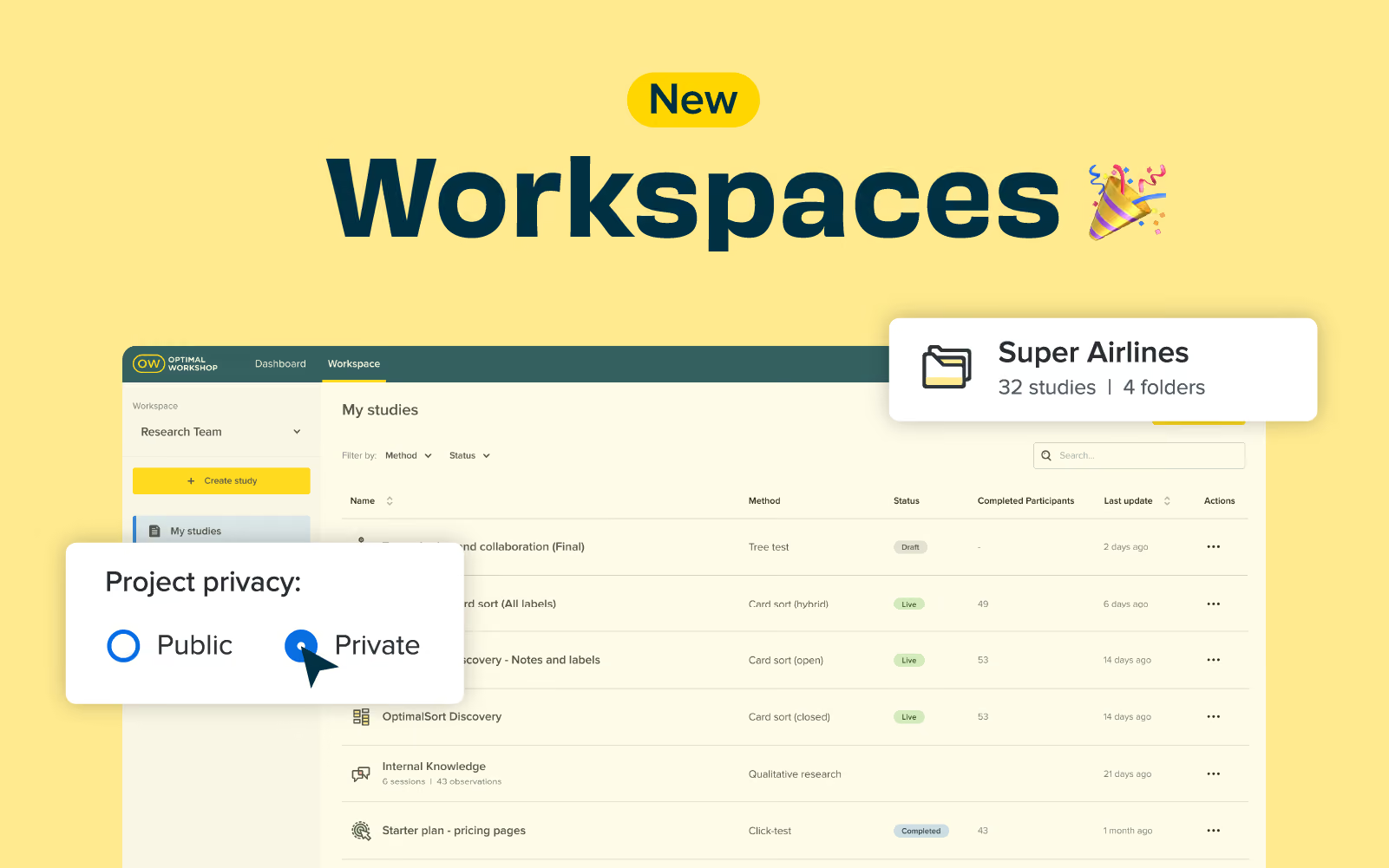
One of our key priorities in 2024 is making Optimal Workshop easier for large organizations to manage teams and collaborate more effectively on delivering optimal digital experiences. Workspaces is going live this week, which replaces teams, and introduces projects and folders for improved organization and privacy controls. Our latest release lays the foundations to provide more control over managing users, licenses, and user roles in the app in the near future.
Private projects allow greater flexibility on who can see what in your workspace, with the ability to make projects public or private and manage who can access a project. Find out more about how to set up private projects in this help article.
Customers on either a Professional or Team plan will notice the studies tab will now be called Workspace. We have introduced another layer of organization called projects, and there is a new-look sidebar on the left to create projects, folders, and studies.
This new release is an essential step towards improving how we manage users, licenses, and different role types in Optimal Workshop. We hope to deliver more updates, such as the ability to move studies between workspaces, in the near future. If you have any feedback or ideas you want to share on workspaces or Optimal Workshop, please email product@optimalworkshop.com; we'd love to hear from you.

Designing in teams with different stakeholders can be incredibly complex. Each person looks at projects through their own lens, and can potentially introduce jargon and concepts that are confusing to others. Simplicity advocate Ella Stoner knows this scenario all too well. It’s what led her to create an easy three-step tool for recognizing problems and developing solutions. By getting everyone on the same page and creating an understanding of what the simplest solution is, designers can create products with customer needs in mind.
Ella Stoner is a CX Designer at Spark in New Zealand. She is a creative thought leader and a talented designer who has facilitated over 50 Human Centered Design Workshops. Ella and her team have developed a cloud product that enables businesses to connect with Public Cloud Services such as Amazon, Google and Azure in a human-centric way. She brings a simplistic approach to her work that is reflected in her UX New Zealand talk. It’s about cutting out complex details to establish an agreed starting point that is easily understood by all team members.
Contact Details:
You can find Ella on LinkedIn.
Ella is confident that she is not the only designer who has felt overwhelmed with technical and industry specific jargon in product meetings. For example, on Ella’s first day as a designer with Spark, she attended a meeting about an HSNS (High Speed Network Services) tool. Ella attempted to use context clues to try and predict what HSNS could mean. However, as the meeting went on, the technical and industry-specific jargon built on each other and Ella struggled to follow what was being said. At one point Ella asked the team to clarify this mysterious term:
“What’s an HSNS and why would the customer use it?” she asked. Much to her surprise, the room was completely silent. The team struggled to answer a basic question, about a term that appeared to be common knowledge during the meeting. There’s a saying, “Why do something simply when you can make it as complicated as possible?”. This happens all too often, where people and teams struggle to communicate with each other, and this results in projects and products that customers don’t understand and can’t use. Ella’s In A Nutshell tool is designed to cut through all that. It creates a base level starting point that’s understood by all, cuts out jargon, and puts the focus squarely on the customer. It:
Here’s how it works:
First, you complete this phrase as it pertains to your work: “In a nutshell, (project/topic) is (describe what the project or topic is in a few words), that (state what the project/topic does) for (indicate key customer/users and why). In order for this method to work, each of the four categories you insert must be simple and understandable. All acronyms, complex language, and technical jargon must be avoided. In a literal sense, anyone reading the statement should be able to understand what is being said “in a nutshell.” When you’ve done this, you’ll have a statement that can act as a guide for the goals your project aims to achieve.
Applying the “In A Nutshell” tool doesn’t take long. However, it's important to write this statement as a team. Ideally, it’s best to write the statement at the start of a project, but you can also write it in the middle if you need to create a reference point, or any time you feel technical jargon creeping in.
Here’s what you’ll need to get started:
Before you start, you may need to pitch the idea to someone in a technical role. If you’re feeling lost or confused, chances are someone else will be too. Breaking down the technical concepts into easy-to-understand and digestible language is of utmost importance:
Use the most popular answers as your final “In a Nutshell” statement.
Side note: Keep all the options that come through the brainstorm. They can still be useful in the design process to help form a full picture of what you’re working on, what it should do, who it should be for etc.
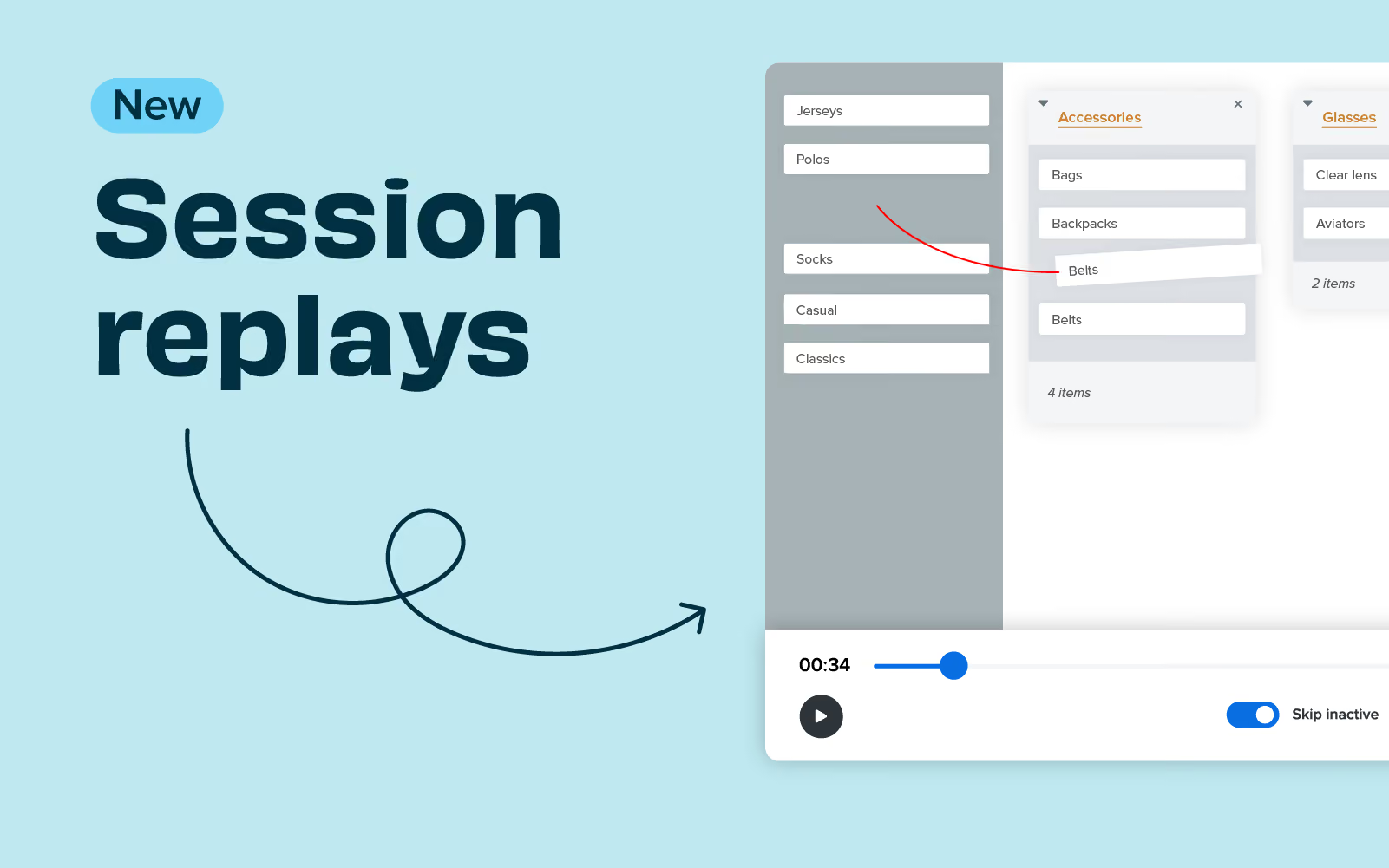
Session replay allows you to record participants completing a card sort without the need for plug-ins or integrations. This great new feature captures the participant's interactions and creates a recording for each participant completing the card sort that you can view in your own time. It’s a great way to identify where users may have struggled to categorize information to correlate with the insights you find in your data.
Help article 🩼
Guide to using session replay
To activate session replay, create a card sort or open an existing card sort that has not yet been launched. Click on ‘set up,’ then ‘settings’; here, you will see the option to turn on session replay for your card sort. This feature will be off by default, and you must turn it on for each card study.
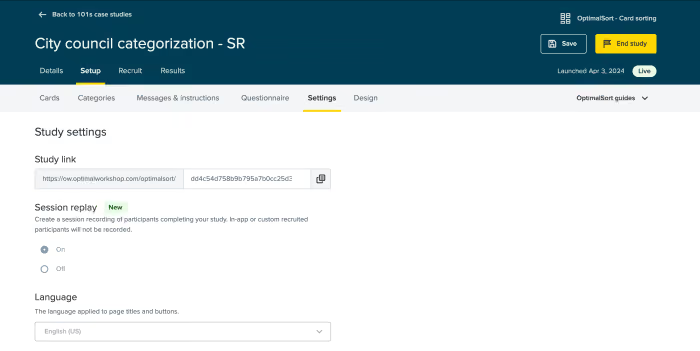
To view a session replay of a card sort, go to Results > Participants > Select a participant > Session replay.

If this is the case, you will need to reach out to your organization's account admin to ask for this to be activated at an organizational level. It’s really easy for session replay to be enabled or disabled by the organization admin just by navigating to Settings > Features > Session Replay, where it can be toggled on/off.
In UX research we are told again and again that to ensure truly user-centered design, it’s important to test ideas with real users as early as possible. There are many benefits that come from introducing the voice of the people you are designing for in the early stages of the design process. The more feedback you have to work with, the more you can inform your design to align with real needs and expectations. In turn, this leads to better experiences that are more likely to succeed in the real world.It is not surprising then that paper prototypes have become a popular tool used among researchers. They allow ideas to be tested as they emerge, and can inform initial designs before putting in the hard yards of building the real thing. It would seem that they’re almost a no-brainer for researchers, but just like anything out there, along with all the praise, they have also received a fair share of criticism, so let’s explore paper prototypes a little further.
Paper prototyping is a simple usability testing technique designed to test interfaces quickly and cheaply. A paper prototype is nothing more than a visual representation of what an interface could look like on a piece of paper (or even a whiteboard or chalkboard). Unlike high-fidelity prototypes that allow for digital interactions to take place, paper prototypes are considered to be low-fidelity, in that they don’t allow direct user interaction. They can also range in sophistication, from a simple sketch using a pen and paper to simulate an interface, through to using designing or publishing software to create a more polished experience with additional visual elements.
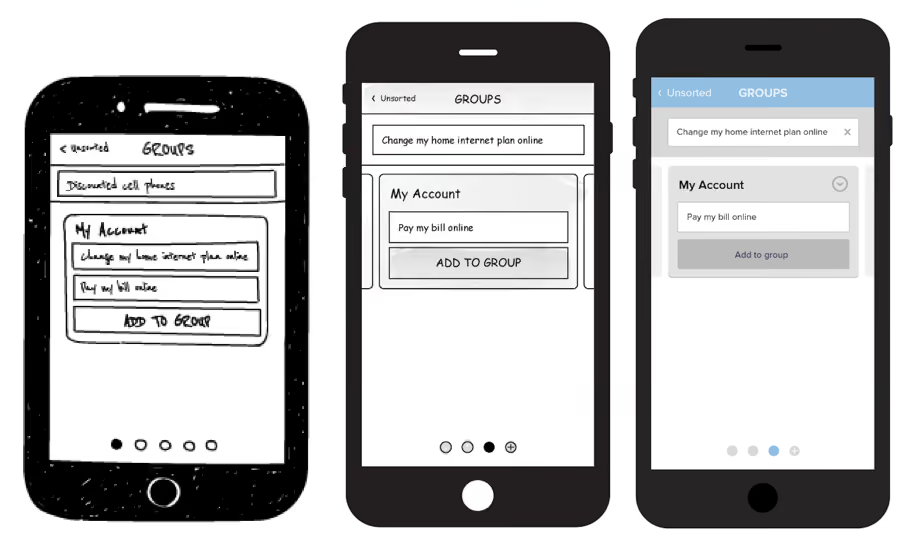
Showing a research participant a paper prototype is far from the real deal, but it can provide useful insights into how users may expect to interact with specific features and what makes sense to them from a basic, user-centered perspective. There are some mixed attitudes towards paper prototypes among the UX community, so before we make any distinct judgements, let's weigh up their pros and cons.
We recently embarked on a research project looking at the user interface of our card-sorting tool, OptimalSort. Our research has two main objectives — first of all to benchmark the current experience on laptops and tablets and identify ways in which we can improve the current interface. The second objective is to look at how we can improve the experience of card sorting on a mobile phone.
Rather than replicating the desktop experience on a smaller screen, we want to create an intuitive experience for mobiles, ensuring we maintain the quality of data collected across devices.Our current mobile experience is a scaled down version of the desktop and still has room for improvement, but despite that, 9 per cent of our users utilize the app. We decided to start from the ground up and test an entirely new design using paper prototypes. In the spirit of testing early and often, we decided to jump right into testing sessions with real users. In our first testing sprint, we asked participants to take part in two tasks. The first was to perform an open or closed card sort on a laptop or tablet. The second task involved using paper prototypes to see how people would respond to the same experience on a mobile phone.
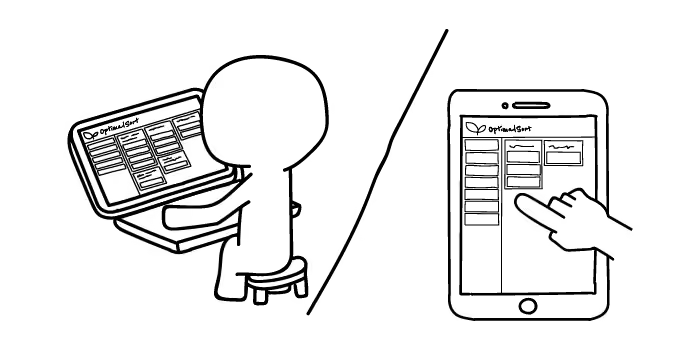
What did we find? In the context of our research project, paper prototypes worked remarkably well. We were somewhat apprehensive at first, trying to figure out the exact flow of the experience and whether the people coming into our office would get it. As it turns out, people are clever, and even those with limited experience using a smartphone were able to navigate and identify areas for improvement just as easily as anyone else. Some participants even said they prefered the experience of testing paper prototypes over a laptop. In an effort to make our prototype-based tasks easy to understand and easy to explain to our participants, we reduced the full card sort to a few key interactions, minimizing the number of branches in the UI flow.
This could explain a preference for the mobile task, where we only asked participants to sort through a handful of cards, as opposed to a whole set.The main thing we found was that no matter how well you plan your test, paper prototypes require you to be flexible in adapting the flow of your session to however your user responds. We accepted that deviating from our original plan was something we had to embrace, and in the end these additional conversations with our participants helped us generate insights above and beyond the basics we aimed to address. We now have a whole range of feedback that we can utilize in making more sophisticated, interactive prototypes.
Whether our success with using paper prototypes was determined by the specific setup of our testing sessions, or simply by their pure usefulness as a research technique is hard to tell. By first performing a card sorting task on a laptop or tablet, our participants approached the paper prototype with an understanding of what exactly a card sort required. Therefore there is no guarantee that we would have achieved the same level of success in testing paper prototypes on their own. What this does demonstrate, however, is that paper prototyping is heavily dependent on the context of your assessment.
Paper prototypes are not guaranteed to work for everybody. If you’re designing an entirely new experience and trying to describe something complex in an abstracted form on paper, people may struggle to comprehend your idea. Even a careful explanation doesn’t guarantee that it will be fully understood by the user. Should this stop you from testing out the usefulness of paper prototypes in the context of your project? Absolutely not.
In a perfect world we’d test high fidelity interactive prototypes that resemble the real deal as closely as possible, every step of the way. However, if we look at testing from a practical perspective, before we can fully test sophisticated designs, paper prototypes provide a great solution for generating initial feedback.In his article criticizing the use of paper prototypes, Jake Knapp makes the point that when we show customers a paper prototype we’re inviting feedback, not reactions. What we found in our research however, was quite the opposite.
In our sessions, participants voiced their expectations and understanding of what actions were possible at each stage, without us having to probe specifically for feedback. Sure we also received general comments on icon or colour preferences, but for the most part our users gave us insights into what they felt throughout the experience, in addition to what they thought.

