Subscribe to OW blog for an instantly better inbox
Oops! Something went wrong while submitting the form.
Articles and Podcasts on Customer Service, AI and Automation, Product, and more
The pace of product development has never been faster, and the cost of building on assumptions has never been higher. At Optimal, we've spent nearly two decades helping teams get closer to their users, and what we're seeing right now is a fundamental shift in how research gets done. More teams are running research than ever before and timelines to act on findings are tighter, while the expectations for what research needs to deliver keep rising.
That shift is exactly what's driving Optimal 3.0, our most ambitious reinvention of the platform yet, designed to give every team the speed, depth, and flexibility that modern research demands. Today's release is the next step in that journey.
Optimal's new mixed-methods research tool tears down the boundaries between methods. It brings prototype testing, live site testing, and surveys into a single, end-to-end study workflow. And grounded in our product principles: speed to insights, access for all, and communication.
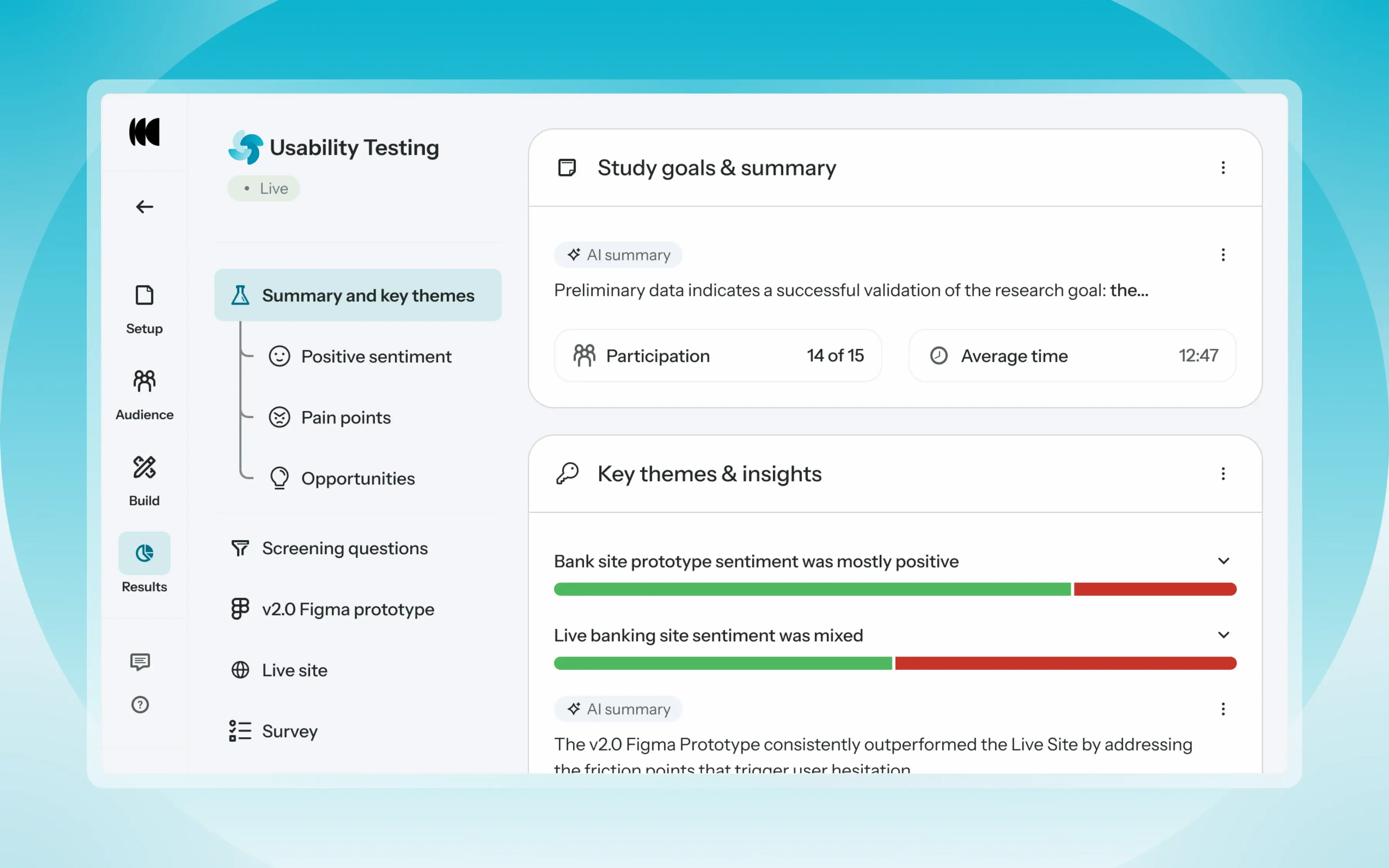
Optimal’s new Usability Testing tool marks the next step in the evolution of Optimal 3.0, giving teams the flexibility to evaluate experiences in whatever form they exist today.
Combine prototype testing, AI prototype testing, live site testing, and surveys in a single study. Test multiple prototypes side by side, compare different live URLs, or mix prototype and live site tasks together all in one workflow. Research can now mirror how products actually evolve, from early concept to shipped experience.
New speak-aloud question types, custom message blocks, auto-generated transcripts and insights, citations and highlight clips help you capture the context and reasoning behind every action. AI-assisted analysis then helps you make sense of it all fast and communicate with impact.
Review a study overview surfacing key themes, pain points, and sentiment analysis combining insights across all your study methods along with detailed results, task analysis and recordings, transcripts, key quotes, and automatically generated citations and video clips.
Coming soon: you can also use AI Chat to chat with your data directly, asking questions and pulling new insights and evidence across all your qualitative and quantitative inputs.
Modern product development is no longer linear. Teams continuously move between:
Traditional usability testing tools were not built for this fluidity. Optimal’s Usability Testing brings the flexibility to match how teams actually work today.
By combining multiple methods into a single study and pairing it with AI-powered synthesis, Usability Testing helps teams reduce setup and analysis time, recruit once, capture richer qualitative context, compare experiences more easily, move faster from feedback to action, and tell clearer, more compelling insight stories.
Learn how to get started with Usability Testing in Optimal and accelerate your path from idea to insight. Book a meeting, start exploring in your account, or join our live training webinar on June 24th to see it in action.


The choice between comprehensive research platforms and tools designed for smaller teams becomes increasingly critical as research and product teams work to scale their user insight capabilities. This decision impacts not only immediate research outcomes but also long-term strategic planning and organizational growth. While platforms like Lyssna focus on rapid feedback collection and quick turnaround times which are valuable for teams needing fast validation, Optimal delivers the depth, reliability, and enterprise features that the world's biggest brands require to make strategic product decisions.
Optimal's Comprehensive Approach: Optimal combines speed with depth, delivering rapid study launch alongside AI-powered analysis, detailed reporting, and enterprise-grade insights that transform user feedback into actionable business intelligence. This includes live site testing capabilities that let you test actual websites and web apps without code, enabling continuous optimization post-launch.
Lyssna's Speed Focus: In contrast, Lyssna optimizes for quick feedback collection with simple testing workflows, but lacks AI-powered analysis, advanced reporting, and the sophisticated insights enterprise research programs require for strategic decision-making.
Trusted by Global Brands: Optimal serves enterprise clients including Lego, Nike, and Amazon with SOC 2 compliance, global security protocols, and dedicated enterprise support that meets Fortune 500 requirements.
Limited Enterprise Features: Lyssna operates as a testing tool rather than an enterprise platform, lacking the compliance, security, and support infrastructure global brands require for mission-critical research programs.
Global Participant Network: Optimal's 10+ million verified participants across 150+ countries enable sophisticated audience targeting, global market research, and reliable recruitment for any demographic or geographic requirement.
Limited Panel Reach: Lyssna's small participant panel restricts targeting options and geographic coverage, particularly for niche audiences or international research requirements.
Verified Participant Quality: Optimal implements comprehensive fraud prevention, advanced screening protocols, and quality assurance processes that ensure participant authenticity and criteria matching for reliable research results.
Quality Control Issues: Users report that Lyssna participants often don't match requested criteria, compromising study validity and requiring additional screening overhead.
AI-Powered Insights: Optimal includes sophisticated AI analysis tools that automatically generate insights, identify patterns, and create actionable recommendations from research data. Our new Interviews tool exemplifies this innovation, upload interview videos and let AI automatically surface key themes, generate smart highlight reels with timestamped evidence, and produce actionable insights in hours instead of weeks.
Manual Analysis Required: Lyssna provides basic reporting without integrated AI tools, requiring teams to manually analyze results and generate insights from raw data.
Full-Service Flexibility: Optimal provides both self-service and white-glove managed recruitment services, accommodating varying team resources and research complexity with dedicated support for challenging recruitment scenarios.
Self-Service Only: Lyssna operates exclusively as a self-service platform without managed recruitment options for teams requiring specialized audience targeting or complex demographic requirements.
Sophisticated Yet Accessible: Optimal balances powerful functionality with intuitive design, providing guided templates and automation features that enable complex research without overwhelming users.
Simple but Limited: While Lyssna offers a straightforward interface, this simplicity comes with functional limitations that restrict test design flexibility and advanced research capabilities.
Lyssna may suffice for teams with:
Optimal becomes essential for:
While Lyssna serves basic testing needs, enterprise research requires the depth, reliability, and global reach that only comprehensive platforms provide. Optimal delivers speed without sacrificing the sophisticated capabilities enterprise teams need for strategic decision-making. Don't compromise research quality for simple, quick tools.
Ready to see how leading brands including Lego, Netflix and Nike achieve better research outcomes? Experience how Optimal's platform delivers user insights that adapt to your team's growing needs.


When evaluating research and insight tools, a proven track record makes a difference. Askable is beginning to expand into unmoderated testing, while Optimal brings over a decade of enterprise-ready experience supporting the full research and product development lifecycle.
Ready to see how leading brands including Lego, Netflix and Nike achieve better research outcomes? Experience how Optimal's platform delivers user insights that adapt to your team's growing needs.


Enterprise teams frequently encounter pressure from leadership to adopt consolidated platforms like Qualtrics that promise to handle multiple functions including PX, EX, and CX, in a single solution for all user feedback needs. While these multidisciplinary platforms may seem appealing from a procurement perspective, they often fall short for specialized use cases. UX and product teams typically find that purpose-built platforms like Optimal deliver superior results and stronger ROI. These specialized solutions offer the depth of functionality teams actually need while maintaining significantly reduced complexity and cost compared to enterprise-wide platforms that try to be everything to everyone.
Purpose-Built Research Features: Specialized platforms eliminate feature bloat while providing deep capabilities in their area of focus, enabling teams to achieve better results.
Feature Overload: In contrast, enterprise platforms like Qualtrics provide hundreds of features across multiple use cases, creating complexity and inefficiency for research and product teams looking for user insight to drive their decisions.
Research Team Optimization: Purpose-built research platforms optimize specifically for product and research team workflows, participant experience, and user insight quality.
Multi-Department Compromise: Enterprise platforms often represent compromises across multiple departments, resulting in tools that serve everyone to some degree but no one team really well.
Optimal's UX Research Focus: Built specifically for UX and product research, Optimal eliminates unnecessary complexity while providing deep capabilities for user testing, prototype validation, and product insight that UX teams actually use. Optimal includes comprehensive capabilities like live site testing (test actual websites and web apps without code), advanced prototype testing with Figma integration, and AI-powered Interviews that transform hours of video analysis into automated insights with key themes, highlight reels, and timestamped evidence.
Qualtrics' Broad Scope Challenge: Qualtrics serves customer experience (CX), employee experience (EX), and product experience (PX) across entire enterprises. This broad scope creates feature overload that overwhelms UX research teams who need focused, efficient tools. They are a "jack of all trades, master of none".
Transparent UX Research Pricing: Optimal offers straightforward, flat-rate pricing focused on UX research capabilities without forcing teams to subsidize enterprise modules irrelevant to their workflow.
License Costs: In contrast, Qualtrics is the most expensive tool on the market with complex modular licensing that forces teams to pay for CX and EX capabilities they don't need for UX research.
Get Started in Minutes: Optimal's intuitive design enables teams to launch studies in minutes, no complex set up, no engineering support required.
Professional Services Requirements: Qualtrics implementations often require expensive professional services, extended onboarding periods, and ongoing consulting to achieve success.
In addition to feature complexity, platforms like Qualtrics often come with high costs for the features your team doesn't really need. While some of these larger, multi-department platforms may appear cost-effective because they offer tool consolidation, the total cost of ownership often includes substantial professional services, extended training periods, and ongoing support requirements that specialized teams end up absorbing, despite utilizing only a fraction of available capabilities.
While Qualtrics serves enterprise survey needs across multiple departments, UX research teams achieve better results with purpose-built platforms that eliminate unnecessary features while providing clear ROI. Optimal delivers 90% of Qualtrics' enterprise platform value with 10% of the complexity.
User research excellence requires tools designed specifically for UX workflows. Smart research and product teams choose platforms that enhance your research impact rather than adding implementation overhead and workflow friction.
Ready to see how leading brands including Lego, Netflix and Nike achieve better research outcomes? Experience how Optimal's platform delivers user insights that adapt to your team's growing needs.


Product teams face an important decision when selecting the right user research platform: do they prioritize speed and simplicity, or invest in a more comprehensive platform that offers real research depth and insights? This choice becomes even more critical as user research scales and those insights directly influence major product decisions.
Maze has gained popularity in recent years among design and product teams for its focus on rapid prototype testing and design workflow integration. However, as teams scale their research programs and require more sophisticated insights, many discover that Maze's limitations outweigh its simplicity. Platform stability issues, restricted tools and functionality, and a lack of enterprise features creates friction that end up compromising insight speed, quality and overall business impact.
Optimal Offers Comprehensive Test Flexibility: Optimal has a Figma integration, image import capabilities, and fully customizable test flows designed for agile product teams.
Maze has Rigid Question Types: In contrast, Maze's focus on speed comes with design inflexibility, including rigid question structures and limited customization options that reduce overall test effectiveness.
Optimal Delivers Comprehensive Live Site Testing: Optimal's live site testing allows you to test your actual website or web app in real-time with real users, gathering behavioral data and usability insights post-launch without any code requirements. This enables continuous testing and iteration even after products are in users' hands.
Maze Offers Basic Live Website Testing: While Maze provides live website testing capabilities, its focus remains primarily on unmoderated studies with limited depth for ongoing site optimization.
Optimal Interviews Transforms Research Analysis: Optimal's new Interviews tool revolutionizes how teams extract insights from user research. Upload interview videos and let AI automatically surface key themes, generate smart highlight reels, create timestamped transcripts, and produce actionable insights in hours instead of weeks. Every insight comes with supporting video evidence, making it easy to back up recommendations with real user feedback and share compelling clips with stakeholders.
Maze Interview Studies Requires Enterprise Plan: Maze's Interview Studies feature for moderated research is only available on their highest-tier Organization plan, putting live moderated sessions out of reach for small and mid-sized teams. Teams on lower tiers must rely solely on unmoderated testing or use separate tools for interviews.
Optimal has Advanced Prototype Testing: Optimal supports sophisticated prototype testing with full Figma integration, comprehensive interaction capture, and flexible testing methods that accommodate modern product design and development workflows.
Maze has Limited Prototype Support: Users report difficulties with Maze's prototype testing capabilities, particularly with complex interactions and advanced design systems that modern products require.
Optimal has Rich, Actionable Insights: Optimal delivers AI-powered analysis with layered insights, export-ready reports, and sophisticated visualizations that transform data into actionable business intelligence.
Maze Only Offers Surface-Level Reporting: Maze provides basic metrics and surface-level analysis without the depth required for strategic decision-making or comprehensive user insight.
Optimal Provides Dedicated Enterprise Support: Optimal offers fast, personalized support with dedicated account teams and comprehensive training resources built by user experience experts that ensure your team is set up for success.
Maze has a Reactive Support Model: Maze provides responsive support primarily for critical issues but lacks the proactive, dedicated support enterprise product teams require.
Optimal is an Enterprise-Built Platform: Optimal was designed for enterprise use with comprehensive security protocols, compliance certifications, and scalability features that support large research programs across multiple teams and business units. Optimal is currently trusted by some of the world's biggest brands including Netflix, Lego and Nike.
Maze is Built for Individuals: Maze was built primarily for individual designers and small teams, lacking the enterprise features, compliance capabilities, and scalability that large organizations need.
While Maze's focus on speed appeals to design teams seeking rapid iteration, enterprise product teams need the stability and reliability that only mature platforms provide. Optimal delivers both speed and dependability, enabling teams to iterate quickly without compromising research quality or business impact. Platform reliability isn't just about uptime, it's about helping product teams make high quality strategic decisions and to build organizational confidence in user insights. Mature product, design and UX teams need to choose platforms that enhance rather than undermine their research credibility.
Don't let platform limitations compromise your research potential.
Ready to see how leading brands including Lego, Netflix and Nike achieve better research outcomes? Experience how Optimal's platform delivers user insights that adapt to your team's growing needs.


The user research landscape has evolved significantly in recent years, but not all platforms have adapted at the same pace. UserTesting for example, despite being one of the largest players in the market, still operates on legacy infrastructure with outdated pricing models that no longer meet the evolving needs of mature UX, design and product teams. More and more we see enterprises choosing platforms like Optimal, because we represent the next generation of user research and insight platforms: ones that are purpose-built for modern teams that are prioritizing agility, insight quality, and value.
Optimal has Transparent Pricing: Optimal offers flat-rate pricing without per-seat fees or session units, enabling teams to scale research sustainably. Our transparent pricing eliminates budget surprises and enables predictable research ops planning.
UserTesting is Expensive: In contrast, UserTesting has very high per user fees annually plus additional session-based fees, creating unpredictable costs that escalate the more research your team does. This means that teams often face budget surprises when conducting longer studies or more frequent research.
The Best Value in the Market: Optimal's straightforward pricing and comprehensive feature set deliver measurable ROI. We offer 90% of the features that UserTesting provides at 10% of the price.
Justifying the Cost of UserTesting: UserTesting's high costs and complex pricing structure make it hard to prove the ROI, particularly for teams conducting frequent research or extended studies that trigger additional session fees.
Optimal is Purpose-Built for Modern Research: Optimal has invested heavily over the last few years in features for contemporary research needs, including AI-powered analysis and automation capabilities. Our new Interviews tool exemplifies this innovation, transforming hours of manual video analysis into automated, AI-powered insights that surface key themes, generate highlight reels, and produce timestamped transcripts in a fraction of the time.
UserTesting is Struggling to Modernize: UserTesting's platform shows signs of aging infrastructure, with slower performance and difficulty integrating modern research methodologies. Their technology advancement has lagged behind industry innovation.
Built by Researchers for Researchers: Optimal has built from the ground up a single, cohesive platform without the complexity of merged acquisitions, ensuring consistent user experience and seamless workflow integration.
UserZoom Integration Challenges: UserTesting's acquisition of UserZoom has created platform challenges that continue to impact user experience. UserTesting customers report confusion navigating between legacy systems and inconsistent feature availability and quality.
Flexibility = Quality: Optimal prioritizes flexibility for our users, allowing our customers to bring their own participants for free or use our high-quality panels, with over 100+ million verified participants across 150+ countries who meet strict quality standards.
Poor Quality, In-House Panel: UserTesting's massive scale has led to participant quality issues, with researchers reporting difficulty finding high-quality participants for specialized research needs and inconsistent participant engagement.
Agile, Personal Support: At Optimal we pride ourselves on our fast, human support with dedicated account management and direct access to product teams, ensuring fast and personalized support.
Impersonal, Enterprise Support: In contrast, users report that UserTesting's large organizational structure creates slower support cycles, outsourced customer service, and reduced responsiveness to individual customer needs.
The future of user research platforms is here, and smart teams are re-evaluating their platform needs to reflect that future state. What was once a fragmented landscape of basic testing tools and legacy systems has evolved into one where comprehensive user insight platforms are now the preferred solution. Today's UX, product and design teams need platforms that have evolved to include:
When selecting a vendor, teams need to choose a platform with the functionality that their teams need now but also one that will also grow with the needs of your team in the future. Scalable, adaptable platforms enable research teams to:
The key is choosing a platform that continues to evolve rather than one constrained by outdated infrastructure and complex, legacy pricing models.
Ready to see how leading brands including Lego, Netflix and Nike achieve better research outcomes? Experience how Optimal's platform delivers user insights that adapt to your team's growing needs.

When it comes to financial services, user experience goes way beyond just making things easy to use. It’s about creating a seamless journey and establishing trust at every touchpoint. Think about it: as we rely more and more on digital banking and financial apps in our everyday lives, we need to feel absolutely confident that our personal information is safe and that the companies managing our money actually know what they're doing. Without that trust foundation, even the most competitive brands will struggle with customer adoption.
The stakes are uniquely high in financial UX. Unlike other digital products where a poor experience might result in minor frustration, financial applications handle our life savings, investment portfolios, and sensitive personal data. A single misstep in design can trigger alarm bells for users, potentially leading to lost customers.
Building high trust experiences requires deep insights into user perceptions, behaviors, and pain points. The best UX platforms can help financial companies spot trust issues and test whether their solutions actually work.
Tree testing helps financial institutions understand how easily users can find critical information and features:
First-click testing helps identify where users naturally look for visual symbols and cues that are associated with security:
Card sorting helps brands understand how users organize concepts. Reducing confusion, helps your financial brand appear more trustworthy, quickly:
Gathering qualitative data through strategically placed questions allows financial institutions to collect rich, timely insights about how much their customers trust their brand:
When someone opens your financial app or website, they're making snap judgments about whether they can trust you with their money. It happens in milliseconds, and a lot of that decision comes down to how polished and consistent everything looks.Clean, consistent design sends that signal of stability and attention to detail that people expect when money's involved.
To achieve this, develop and rigorously apply a solid design system across all digital touchpoints including fonts, colors, button styles, and spacing, it all needs to be consistent across every page and interaction. Even small inconsistencies can make people subconsciously lose confidence.
Unlike walking into a bank where you can see the vault and security cameras, digital security happens behind the scenes. Users can't see all the protection you've built in unless you make a point of showing them.
Highlighting your security measures in ways that feel reassuring rather than overwhelming gives people that same sense of "my money is safe here" that they'd get from seeing a bank's physical security.
From a design perspective, apply this thinking to elements like:
You can test the success of these design elements through preference testing, where you can compare different approaches to security visualization to determine which elements most effectively communicate trust without creating anxiety.
Financial terminology is naturally complex, but your interface content doesn't have to be. Clear, straightforward language builds trust so it’s important to develop a content strategy that:
You can test your language and navigation elements by using tree testing to evaluate user understanding of different terminology, measuring success rates for finding information using different labeling options.
A user research platform enables financial institutions to implement ongoing trust measurement across the product lifecycle:
Use UX research tools to establish baseline metrics for measuring user trust:
Before implementing changes to critical elements, use quick tests to validate designs:
Create a dashboard of trust metrics that can be tracked regularly:
While UX designers can significantly impact brand credibility, remember that trust is earned across the entire customer experience:
In an industry where products and services can often seem interchangeable to consumers, trust becomes a powerful differentiator. By placing trust at the center of your design philosophy and using comprehensive user research to measure and improve trust metrics, you're not just improving user experience, you're creating a foundation for lasting customer relationships in an industry where loyalty is increasingly rare.
The most successful financial institutions of the future won't necessarily be those with the most features or the slickest interfaces, but those that have earned and maintained user trust through thoughtful UX design built on a foundation of deep user research and continuous improvement.
