Subscribe to OW blog for an instantly better inbox
Oops! Something went wrong while submitting the form.

Articles and Podcasts on Customer Service, AI and Automation, Product, and more
A year ago, we looked at the user research market and made a decision.
We saw product teams shipping faster than ever while research tools stayed stuck in time. We saw researchers drowning in manual work, waiting on vendor emails, stitching together fragmented tools. We heard "should we test this?" followed by "never mind, we already shipped."
The dominant platforms got comfortable. We didn't.
Today, we're excited to announce Optimal 3.0, the result of refusing to accept the status quo and building the fresh alternative teams have been asking for.
The gap between product velocity and research velocity has never been wider. The situation isn't sustainable. And it's not the researcher's fault. The tools are the problem. They’re:
These platforms haven't changed because they don't have to, so we set out to challenge them.
Optimal 3.0 isn't an incremental update to the old way of doing things. It's a fundamental rethinking of what a research platform should be.
Research For All, Not Just Researchers.
For 18 years, we've believed research should be accessible to everyone, not just specialists. Optimal 3.0 takes that principle further.
Unlimited seats. Zero gatekeeping.
Designers can validate concepts without waiting for research bandwidth. PMs can test assumptions without learning specialist tools. Marketers can gather feedback without procurement nightmares. Research shouldn't be rationed by licenses or complexity. It should be a shared capability across your entire team.
A Complete Ecosystem in One Place.
Stop stitching together point solutions.Optimal 3.0 gives you everything you need in one platform:
Recruitment Built In Access millions of verified participants worldwide without the vendor tag. Target by demographics, behaviors, and custom screeners. Launch studies in minutes, not days. No endless email chains. No procurement delays.
Testing That Adapts to You
Learn more about Live Site Testing
AI-Powered Analysis (With Control) Interview analysis used to take weeks. We've reduced it to minutes.
Our AI automatically identifies themes, surfaces key quotes, and generates summaries, while you maintain full control over the analysis.
As one researcher told us: "What took me 4 weeks to manually analyze now took me 5 minutes."
This isn't about replacing researcher judgment. It's about amplifying it. The AI handles the busywork, tagging, organizing, timestamping. You handle the strategic thinking and judgment calls. That's where your value actually lives.
Learn more about Optimal Interviews
Chat Across All Your Data Your research data is now conversational.
Ask questions and get answers instantly, backed by actual video evidence from your studies. Query across multiple Interview studies at once. Share findings with stakeholders complete with supporting clips.
Every insight comes with the receipts. Because stakeholders don't just need insights, they need proof.
A Dashboard Built for Velocity See all your studies, all your data, in one place. Track progress across your entire team. Jump from question to insight in seconds. Research velocity starts with knowing what you have.
Integration Layer
Optimal 3.0 fits your workflow. It doesn't dominate it. We integrate with the tools you already use, Figma, Slack, your existing tech stack, because research shouldn't force you to abandon how you work.
What Didn't Change: Methodological Rigor
Here's what we didn't do: abandon the foundations that made teams trust us.
Card sorting, tree testing, first-click tests, surveys, the methodologically sound tools that Amazon, Google, Netflix, and HSBC have relied on for years are all still here. Better than ever.
We didn't replace our roots. We built on them.
18 years of research methodology, amplified by modern AI and unified in a complete ecosystem.
Product development isn't slowing down. AI is accelerating everything. Competitors are moving faster. Customer expectations are higher than ever.
Research can either be a bottleneck or an accelerator.
The difference is having a platform that:
Optimal 3.0 is built for research that arrives before the decision is made. Research that shapes products, not just documents them. Research that helps teams ship confidently because they asked users first.
A Fresh Alternative
We're not trying to be the biggest platform in the market.
We're trying to be the best alternative to the clunky tools that have dominated for years.
Amazon, Google, Netflix, Uber, Apple, Workday, they didn't choose us because we're the incumbent. They chose us because we make research accessible, fast, and actionable.
"Overall, each release feels like the platform is getting better." — Lead Product Designer at Flo
"The one research platform I keep coming back to." — G2 Review
This launch represents our biggest transformation, but it's not the end. It's a new beginning.
We're continuing to invest in:
Our goal is simple: make user research so fast and accessible that it becomes impossible not to include users in every decision.
See What We've Built
If you're evaluating research platforms and tired of the same old clunky tools, we'd love to show you the alternative.
Book a demo or start a free trial
The platform that turns "should we?" into "we did."
Welcome to Optimal 3.0.
Designing in teams with different stakeholders can be incredibly complex. Each person looks at projects through their own lens, and can potentially introduce jargon and concepts that are confusing to others. Simplicity advocate Ella Stoner knows this scenario all too well. It’s what led her to create an easy three-step tool for recognizing problems and developing solutions. By getting everyone on the same page and creating an understanding of what the simplest solution is, designers can create products with customer needs in mind.
Ella Stoner is a CX Designer at Spark in New Zealand. She is a creative thought leader and a talented designer who has facilitated over 50 Human Centered Design Workshops. Ella and her team have developed a cloud product that enables businesses to connect with Public Cloud Services such as Amazon, Google and Azure in a human-centric way. She brings a simplistic approach to her work that is reflected in her UX New Zealand talk. It’s about cutting out complex details to establish an agreed starting point that is easily understood by all team members.
Contact Details:
You can find Ella on LinkedIn.
Ella is confident that she is not the only designer who has felt overwhelmed with technical and industry specific jargon in product meetings. For example, on Ella’s first day as a designer with Spark, she attended a meeting about an HSNS (High Speed Network Services) tool. Ella attempted to use context clues to try and predict what HSNS could mean. However, as the meeting went on, the technical and industry-specific jargon built on each other and Ella struggled to follow what was being said. At one point Ella asked the team to clarify this mysterious term:
“What’s an HSNS and why would the customer use it?” she asked. Much to her surprise, the room was completely silent. The team struggled to answer a basic question, about a term that appeared to be common knowledge during the meeting. There’s a saying, “Why do something simply when you can make it as complicated as possible?”. This happens all too often, where people and teams struggle to communicate with each other, and this results in projects and products that customers don’t understand and can’t use. Ella’s In A Nutshell tool is designed to cut through all that. It creates a base level starting point that’s understood by all, cuts out jargon, and puts the focus squarely on the customer. It:
Here’s how it works:
First, you complete this phrase as it pertains to your work: “In a nutshell, (project/topic) is (describe what the project or topic is in a few words), that (state what the project/topic does) for (indicate key customer/users and why). In order for this method to work, each of the four categories you insert must be simple and understandable. All acronyms, complex language, and technical jargon must be avoided. In a literal sense, anyone reading the statement should be able to understand what is being said “in a nutshell.” When you’ve done this, you’ll have a statement that can act as a guide for the goals your project aims to achieve.
Applying the “In A Nutshell” tool doesn’t take long. However, it's important to write this statement as a team. Ideally, it’s best to write the statement at the start of a project, but you can also write it in the middle if you need to create a reference point, or any time you feel technical jargon creeping in.
Here’s what you’ll need to get started:
Before you start, you may need to pitch the idea to someone in a technical role. If you’re feeling lost or confused, chances are someone else will be too. Breaking down the technical concepts into easy-to-understand and digestible language is of utmost importance:
Use the most popular answers as your final “In a Nutshell” statement.
Side note: Keep all the options that come through the brainstorm. They can still be useful in the design process to help form a full picture of what you’re working on, what it should do, who it should be for etc.
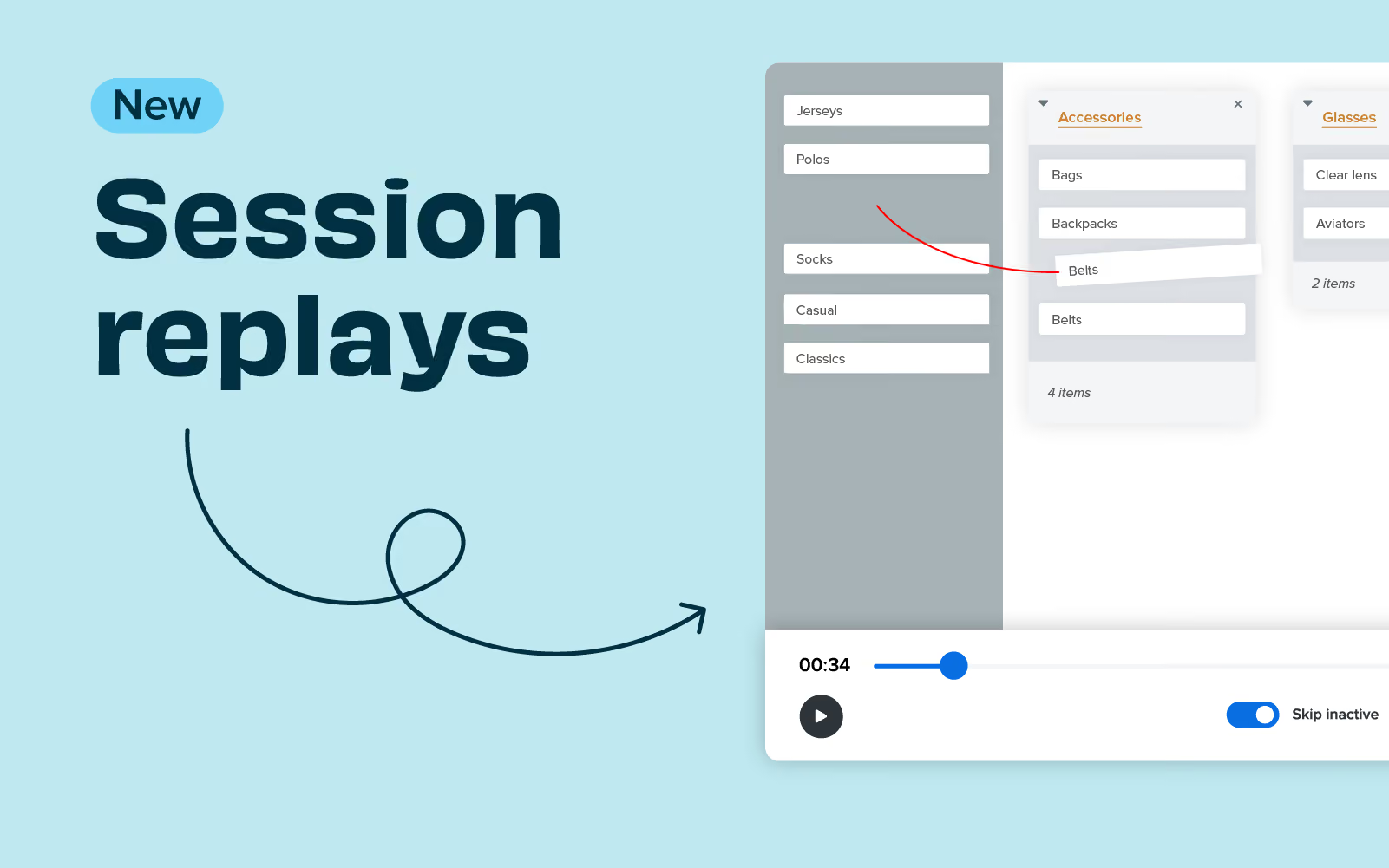
Session replay allows you to record participants completing a card sort without the need for plug-ins or integrations. This great new feature captures the participant's interactions and creates a recording for each participant completing the card sort that you can view in your own time. It’s a great way to identify where users may have struggled to categorize information to correlate with the insights you find in your data.
Help article 🩼
Guide to using session replay
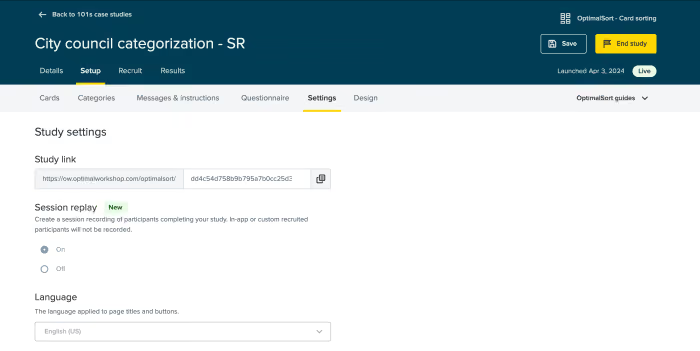
To activate session replay, create a card sort or open an existing card sort that has not yet been launched. Click on ‘set up,’ then ‘settings’; here, you will see the option to turn on session replay for your card sort. This feature will be off by default, and you must turn it on for each card study.
To view a session replay of a card sort, go to Results > Participants > Select a participant > Session replay.

If this is the case, you will need to reach out to your organization's account admin to ask for this to be activated at an organizational level. It’s really easy for session replay to be enabled or disabled by the organization admin just by navigating to Settings > Features > Session Replay, where it can be toggled on/off.
Being able to design for different perspectives and preferences is a real skill, and it’s extremely difficult. It can become even harder when designing for neurodiverse audiences, where people are hard-wired in unique ways. However, being able to cater to neurodiverse preferences is extremely important.
Designer Kalina Tyrkiel says between 15-20% of people around the world are neurodiverse, which is a significant proportion. Various conditions such as dyslexia, attention deficit disorders, and autism can have considerable impacts on how people interact with interfaces and platforms. By considering these implications, designers can dramatically improve the accessibility of their work and improve engagement for neurodiverse individuals. Even simple tweaks like using an actual number instead of writing it out (i.e., 1 instead of “one”) can make a huge difference.
Kalina explores universal tips and techniques that allow designers to cater for neurodiverse audiences.
Kalina Tyrkiel is a content designer with a unique background that spans both technical UX skills and a human-centric approach to design. She primarily works as a designer for Polish healthtech company DocPlanner, connecting users with relevant health services. Her background as a trained psychologist significantly supports her work and provides a deeper understanding into how people think. She is also a UX writing trainer and university lecturer, which further speaks to her expertise.
Contact Details:
You can find Kalina on LinkedIn.
Neurodiversity is often misunderstood by society at large. Neurodiverse conditions often exist on a spectrum, and solutions that work for one person don’t necessarily work for someone else. Similarly, neurodiversity often comes in batches. Kalina outlines how 60% of people with ADHD also have traits of autism. This further complicates their perspectives and needs.
So this leaves us with a pressing question. How can designers cater for all people with such different needs? Kalina describes how designing for a neurodiverse audience is actually not much different from designing for a neurotypical audience. For example, on any given day, individuals experience varying levels of stress or relaxation which impacts their energy and attention levels.
For example, ensure the title aligns with the content the user can expect. Misalignment can create significant confusion for neurodiverse audiences.
Justifying text and varying the spacing between words makes it harder to read, particularly for dyslexic users.
For example, some people may prefer voice search, others may prefer content that’s not in a video. Again, this is no different from neurotypical audiences.
The simpler the interface and the simpler the copy, the better. Pay attention to consistency too - if a platform or site varies a lot, this can be confusing.
Considering neurodiverse audiences in the design process is critical in making platforms easy to use for all people. The needs of neurodiverse users can amplify problems or create critical issues out of something that’s a minor inconvenience for someone else. Again, a 15-20% audience is not insignificant, so it pays to be mindful of their needs. So how can you actually do it?
Having diverse teams can bring a broad array of perspectives to the design process. Just remember that not all neurodiverse people think the same. Dr Stephen Shore said “when you know one person with autism, you know one person with autism”. Think about diversity as creating preferences, rather than labels. Ask respectfully about someone’s preferences and don’t judge them (or others) based on their condition.
Interestingly, closed captions and subtitles are also being more and more preferred by younger generations.
In the last few years, the influence of AI has steadily been expanding into various aspects of design. In early 2023, that expansion exploded. AI tools and features are now everywhere, and there are two ways designers commonly react to it:
Google UX researcher Clara Kliman-Silver is at the forefront of researching and understanding the potential impact of AI on design into the future. This is a hot topic that’s on the radar of many designers as they grapple with what the new normal is, and how it will change things in the coming years.
Clara Kliman-Silver spends her time studying design teams and systems, UX tools and designer-developer collaboration. She’s a specialist in participatory design and uses generative methods to investigate workflows, understand designer-developer experiences, and imagine ways to create UIs. In this work, Clara looks at how technology can be leveraged to help people make things, and do it more efficiently than they currently are.
In today’s context, that puts generative AI and machine learning right in her line of sight. The way this technology has boomed in recent times has many people scrambling to catch up - to identify the biggest opportunities and to understand the risks that come with it. Clara is a leader in assessing the implications of AI. She analyzes both the technology itself and the way people feel about it to forecast what it will mean into the future.
Contact Details:
You can find Clara in LinkedIn or on Twitter @cklimansilver
Clara’s expertise in understanding the role of AI in design comes from significant research and analysis of how the technology is being used currently and how industry experts feel about it. AI is everywhere in today’s world, from home devices to tech platforms and specific tools for various industries. In many cases, AI automation is used for productivity, where it can speed up processes with subtle, easy to use applications.
As mentioned above, the transformational capabilities of AI are met with equal parts of enthusiasm and skepticism. The way people use AI, and how they feel about it is important, because users need to be comfortable implementing the technology in order for it to make a difference. The question of what value AI brings to the design process is ongoing. On one hand, AI can help increase efficiency for systems and processes. On the other hand, it can exacerbate problems if the user's intentions are misunderstood.
There’s no doubt that AI tools enable novices to perform tasks that, in years gone by, required a high level of expertise. For example, film editing was previously a manual task, where people would literally cut rolls of film and splice them together on a reel. It was something only a trained editor could do. Now, anyone with a smartphone has access to iMovie or a similar app, and they can edit film in seconds.
For film experts, digital technology allows them to speed up tedious tasks and focus on more sophisticated aspects of their work. Clara hypothesizes that AI is particularly valuable when it automates mundane tasks. AI enables more individuals to leverage digital technologies without requiring specialist training. Thus, AI has shifted the landscape of what it means to be an “expert” in a field. Expertise is about more than being able to simply do something - it includes having the knowledge and experience to do it for an informed reason.
Clara performs a lot of concept testing, which involves recognizing the perceived value of an approach or method. Concept testing helps in scenarios where a solution may not address a problem or where the real problem is difficult to identify. In a recent survey, Clara describes two predominant benefits designers experienced from AI:
Overall, Clara says UX designers tend to see AI as a creative partner. However, most users don’t yet trust AI enough to give it complete agency over the work it’s used for. The level of trust designers have exists on a continuum, where it depends on the nature of the work and the context of what they’re aiming to accomplish. Other factors such as where the tech comes from, who curated it and who’s training the model also influences trust. For now, AI is largely seen as a valued tool, and there is cautious optimism and tentative acceptance for its application.
AI presents as potentially one of the biggest game-changers to how people work in our generation. Although AI has widespread applications across sectors and systems, there are still many questions about it. In the design world, systems like DALL-E allow people to create AI-generated imagery, and auto layout in various tools allows designers to iterate more quickly and efficiently.
Like many other industries, designers are wondering where AI might go in the future and what it might look like. The answer to these questions has very real implications for the future of design jobs and whether they will exist. In practice, Clara describes the current mood towards AI as existing on a continuum between adherence and innovation:
The current environment is extremely subjective, and there’s no agreed best practice. This makes it difficult to recommend a certain approach to adopting AI and creating permanent systems around it. Both the technology and the sentiment around it will evolve through time, and it’s something designers, like all people, will need to maintain good awareness of.
When Bear Liu was teaching himself design, he struggled remembering concepts since English wasn’t his first language. To help, he started doodling. By drawing pictures that related to what he was learning, he found he could not only remember them better, he could understand and communicate more effectively too. Ever since, he’s used the power of drawings and pictures to relay information in ways people can use.
Bear gives examples of how visual communication can help design workplaces to relay information in a more memorable and usable way. It may only seem like a minor change, but the difference can be significant.
Bear Liu is a Product Designer at Xero, an online accounting platform that’s used all over the world. He’s also a Design Mentor at Springboard and CareerFoundry, and an Apple Award-Winning podcast host at BearTalk.
His background is in science education. As a self-taught designer, Bear has helped a raft of large and small businesses with digital products over the last 16 years. His clients come from diverse backgrounds and industries across the globe. Bear's professional passions also carry over into his hobbies. Outside of work he enjoys reading, drawing, and producing videos & podcasts on tech and design.
Contact Details:
You can find Bear on LinkedIn, or listen to his podcast, BearTalk.
When it comes to addressing business challenges it is important to keep these three aspects in mind:
Bear Liu strongly believes that visual communication helps people understand, remember and communicate information more effectively. Why?
But what if I can’t draw? This is a common issue Bear finds when talking to people about this. It’s not about the quality of the drawing itself, it’s about what it means. By delivering a message through a picture, it becomes understandable. Many of Bear’s drawings only ever remain in draft form. Even simple doodles can have meanings that make concepts clear.
In his design work at Xero, Bear has used drawing and sketches to great effect in a range of instances:
Bear has adapted visual thinking to his own product design process and has seen a noticeable improvement in communication as a result.
People are busy - their brains are packed with all sorts of information, and they’re easily distracted by other things they have on their minds. By delivering information in a way that helps them to focus on it, remember and understand it, designers can achieve their ultimate goals.
As Bear also notes, drawing is fun. It’s much more rewarding than using words, as well as much more effective.
Bear used the example of his talk at UX New Zealand 2023 as a great place to use a drawing. Rather than follow along with his message by scribbling notes the whole way through, those in the audience could capture the biggest lessons easily in one simple drawing.
That one simple drawing is a template that can be used in any speech or meeting to remember the key points.
Recently, Optimal Workshop partnered with Eniola Abioye, Lead UX Researcher at Meta and UXR Career Coach at UX Outloud to host a career masterclass featuring practical advice and guidance on how to: revamp and build a portfolio, emphasize the impact of your projects and showcase valuable collaborations. It also included panel discussions with experts from a variety of roles (UX, product management, engineering, career coaching and content design) talking about their journeys to becoming UX leaders.
Keep reading to get key takeaways from the discussion on:
At a time when businesses are reducing costs to focus on profitability - proving the value of your work is more important than ever. Unfortunately, measuring the impact of UX isn’t as straightforward as tracking sales or marketing metrics. With this in mind, Eniola asked the panelists - how do you show the impact of UX in your work?Providing insights is simply not enough. “As a product manager, what I really care about is insights plus recommendations, because recommendations make my life easier,” said Kwame Odame.
Auset Parris added her perspective on this topic as a Growth Content Designer, “the biggest thing for me to be impactful in my space [Content Design] is to consistently document the changes that I’ve made and share them with the team along with recommendations.” Auset also offered her perspective regarding recommendations, “recommendations are not always going to lead to the actual product executions, but recommendations are meant to guide us.” When it comes to deciding which recommendation to proceed with (if any) it's important to consider whether or not they are aligned with the overarching goal.
As UXR becomes more democratized in many businesses and the number of stakeholders increases, the ability to gain cross-functional buy-in for the role and outcomes of UXR is a key way to help keep research a priority.
In his past experience, Kwame has realized that the role of a user experience researcher is just as important as that of a product manager, data scientist, engineer, or designer. However, one of the biggest blockers for him as a product manager is how the role of a UX researcher is often overlooked. “Just because I’m the product manager doesn’t mean that I’m owning every aspect of the product. I don’t have a magic wand right? We all work as a team.” Furthermore, Kwame notes that a user researcher is an incredibly hard role and a very important one, and I think we need to invest more in the UX space.
Auset also shared her perspective on the topic, “I wouldn’t say this is a blocker, but I do think this is a challenging piece of working in a team - there are so many stakeholders.” Although it would be ideal for each of the different departments to work seamlessly together at all times, that’s not always the case. Auset spoke about a time where the data scientists and user researchers were in disagreement. Her role as a Growth Content Designer is to create content that enhances the user experience. “But if I’m seeing two different experiences, how do I move forward? That’s when I have to ask everyone - come on let’s dig deeper. Are we looking at the right things?” If team members are seeing different results, or having different opinions, then maybe they are not asking the right questions and it's time to dig deeper.
The number and type of roles that now engage with research are increasing. As they do, the ability to collaborate and manage stakeholders in research projects has become essential.
Kwame discussed how he sets up a meeting for the team to discuss their goals for the next 6 months. Then, he meets with the team on a weekly basis to ensure alignment. The main point of the meeting is to ensure everyone is leaving with their questions answered and blockers addressed. It's important to ensure everyone is moving in the right direction.
Auset added that she thinks documentation is key to ensuring alignment. “One thing that has been helpful for me is having the documentation in the form of a product brief or content brief.” The brief can include the overarching goal, strategy, and indicate what each member of the team is working on. Team members can always look back at this document to ensure they are on the right track.
One of the participants asked the panel, “how do you secure the stability of your UX career?”
Eniola took this opportunity to share some invaluable advice as a career coach, “I think the biggest thing that comes to mind is value proposition. It's important to be very clear about the value and impact you bring to the team. It used to be enough to just be really, really good at research and just do research and provide recommendations. Now that’s not enough. Now you have to take your teams through the process, integrate your recommendations into the product, and focus on driving impact.”
Companies aren’t looking to hire someone who can perform a laundry list of tasks, they’re looking for UX professionals who can drive results. Think about the metrics you can track, to help showcase the impact of your work. For example, if you’re a UX designer - how much less time did the user spend on the task with your new design? Did the abandonment or error rate decrease significantly as a result of your work? How much did the overall customer satisfaction score rise, after you implemented your project? Before starting your project, decide on several metrics to track (make sure they align with your organization’s goals), and reflect on these after each project.
Fatimah Richmond offered another piece of golden career advice. She encourages UX researchers to create an ongoing impact tracker. She’ll create a document where she lists the company's objectives, the projects she worked on, and the specific impact she made on the companies objectives. It's much easier to keep track of the wins as they happen, and jot a few notes about the impact you’ve made with each project, then scrambling to think of all the impact you’ve made when writing your resume. It's also important to note the impact your work has made on the different departments - product, marketing, sales, etc.
She also advises UX researchers to frequently share their science insights with their colleagues as the project progresses. Instead of waiting until the very end of the project and providing a “perfectly polished” deck, be transparent with the team about what you are working on and the impact it's having throughout the duration of the project.
Another participant asked - what if you need help determining the value you bring? Auset recommends asking for actionable feedback from coworkers. These people work with you every single day, so they know your contributions you are making to the team.
Documenting the tangible impact you make as a UX professional is crucial - not only will it help create greater stability for your career, but it will also help organizations recognize the importance of a UX research. As Kwame discussed in the “blockers” section, one of the biggest challenges he faces as a product manager is the perception of the UX role as less important than the more traditional product manager, Engineer, and Designer roles.
Eniola helps UX researchers improve their research practice. Whether you’re seasoned and looking to level up or a new researcher looking to get your bearings in UX, Eniola can help you focus and apply your skillset. She is a UX Researcher and Founder of UX Outloud. As a career coach, she guides her clients through short and long term SMART goals and then works with them to build a strategic plan of attack. She is innately curious, a self-starter, adaptable, and communicative with a knack for storytelling.
Learn more about UX Outloud.
Connect with Eniola on Linkedin.
The panel was comprised of talented professionals from a variety of fields including UX research, content strategy, product management & engineering, and career coaching. Their diverse perspectives led to an insightful and informative panel session. Keep reading to get to know each of the amazing panelists:
Growth Content Designer: Auset Parris is a growth content designer at Meta. She has spent 7 years navigating the ever-evolving landscape of content strategy. She is passionate about the role of user research in shaping content strategies. Furthermore, Auset believes that understanding user behavior and preferences is fundamental to creating content that not only meets but exceeds user expectations.
Senior UX Researcher: Jasmine Williams, Ph.D. is a senior researcher with over a decade of experience conducting youth-focused research. She has deep expertise in qualitative methods, child and adolescent development, and social and emotional well-being. Jasmine is currently a user experience researcher at Meta and her work focuses on teen safety and wellbeing.
Product Manager: Kwame Odame has over 7 years of high-tech experience working in product management and software engineering. At Meta, Kwame is currently responsible for building the product management direction for Fan Engagement on Facebook. Kwame has also helped build Mastercard’s SaaS authentication platform, enabling cardholders to quickly confirm their identity when a suspicious transaction occurred, leveraging biometric technology.
UX Researcher (UXR): Fatimah Richmond is a well-rounded UX researcher with over 15 years of experience, having influenced enterprise products across leading tech giants like Google, SAP, Linkedin, and Microsoft. Fatimah has led strategy for research, programs and operations that have significantly impacted the UXR landscape, from clinician engagement strategist to reshaping Linkedin Recruiter and Jobs. As a forward thinker, she’s here to challenge our assumptions and the status quo on how research gets planned, communicated, and measured.
Career Coach: An Xia spent the first decade of her professional life in consulting and Big Tech data science (Netflix, Meta). As a career coach, An has supported clients in gaining clarity on their career goals, navigating challenges of career growth, and making successful transitions. As a somatic coach, An has helped clients tap into the wisdom of their soma to reconnect with what truly matters to them.
UX Strategist: Natalie Gauvin is an experienced professional with a demonstrated history of purpose-driven work in agile software development industries and higher education. Skilled in various research methodologies. Doctor of Philosophy (Ph.D.) Candidate in Learning Design and Technology from the University of Hawaii at Manoa, focused on empathy in user experience through personas
Here at Optimal we really care about helping UX researchers level up their career. This is why we’ve developed the Optimal Academy, to help you master your Optimal Workshop skills and learn more about user research and information architecture.
Check out some of our free courses here: https://academy.optimalworkshop.com/
