Subscribe to OW blog for an instantly better inbox
Oops! Something went wrong while submitting the form.

Articles and Podcasts on Customer Service, AI and Automation, Product, and more
.webp)
Great research has never been about speed alone. It’s about asking the right questions, understanding the context behind them, and uncovering insights that help teams make better decisions.
Optimal's AI Interviewer is designed to support that process. It’s designed to work alongside researchers and teams, so you can move faster without losing the depth and human nuance that makes research valuable.
Before building AI Interviewer, we spoke with and surveyed researchers, designers, and product teams to how they approach interviews today and where AI could genuinely help.
What we heard was consistent:
AI isn’t useful if it ignores how your team works. So instead of building a generic interviewer, we focused on building an AI Interviewer that fits into your current workflows and keeps researchers and teams in the driver's seat.
Here’s what we learned and how we brought it to life with Optimal’s AI Interviewer.
The best interviews start with a clear understanding of what you’re trying to uncover. With the AI Interviewer, you can add your research goals, audience details, company and product context, and additional context you want the AI to consider. This means the AI doesn’t just ask questions; it understands what you’re trying to learn and helps guide conversations in the right direction.
The same context also powers AI insights, helping ensure summaries, key themes, and citations are relevant, accurate, and aligned with what you're trying to learn.
One of the concerns with AI-led interviews is not having enough control. We’ve designed the AI Interviewer with this in mind.
For each question, you can choose how deeply you would like the AI Interviewer to probe and follow-up. You decide when deeper exploration is valuable, how the conversation flows, and the AI can then carry this out on your behalf.
AI Interviewer helps remove some of the barriers that make qualitative research difficult to scale. Use it to:
This isn’t about replacing researchers. It’s about removing operational work so you can focus on higher-value work, like synthesis, storytelling, and decision-making.
Every session comes with recordings, key summaries, and AI-generated insights with clear detailed evidence. Instead of reviewing hours of footage, you can quickly find what matters and confidently back it up. Review insights across your full study, or dive deeper into individual sessions and specific questions.
On the roadmap: Once your interviews are complete, you can use AI Chat to go further with your data and explore patterns across sessions, ask follow-up questions, and validate assumptions with real evidence.
Let’s address the elephant in the room. AI-led interviews aren’t something everyone is immediately comfortable with, and that’s fair. There are real limitations.
Some research scenarios require human sensitivity and judgment. Nuance, emotion, and edge cases still benefit from a human touch. Vulnerable populations and complex topics should always be handled with care. Optimal values a human-in-the-loop approach and know an AI Interviewer isn’t always suitable. With that in mind, we made sure that:
The AI Interviewer supports your work. It doesn’t replace your expertise.
AI Interviewer is now available in early access, and we’re continuing to learn from the teams using it. If you’re looking to scale your research without scaling your workload, run interviews across time zones, and spend less time on logistics and more time on insights, we’d love for you to try it.
👉 Book a demo to see how it fits into your workflow.
Already with Optimal? Register your interest for early access.
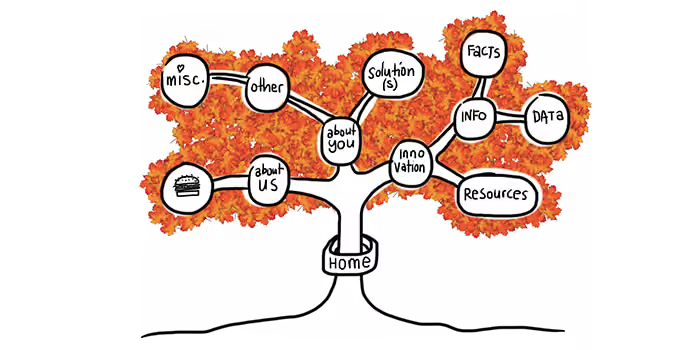
Usability guru Jared Spool has written extensively about the 'scent of information'. This term describes how users are always 'on the hunt' through a site, click by click, to find the content they’re looking for. Tree testing helps you deliver a strong scent by improving organisation (how you group your headings and subheadings) and labelling (what you call each of them).
Anyone who’s seen a spy film knows there are always false scents and red herrings to lead the hero astray. And anyone who’s run a few tree tests has probably seen the same thing — headings and labels that lure participants to the wrong answer. We call these 'evil attractors'.In Part 1 of this article, we’ll look at what evil attractors are, how to spot them at the answer end of your tree, and how to fix them. In Part 2, we’ll look at how to spot them in the higher levels of your tree.
One of my favourite examples of an evil attractor comes from a tree test we ran for consumer.org.nz, a New Zealand consumer-review website (similar to Consumer Reports in the USA). Their site listed a wide range of consumer products in a tree several levels deep, and they wanted to try out a few ideas to make things easier to find as the site grew bigger.We ran the tests and got some useful answers, but we also noticed there was one particular subheading (Home > Appliances > Personal) that got clicks from participants looking for very different things — mobile phones, vacuum cleaners, home-theatre systems, and so on:
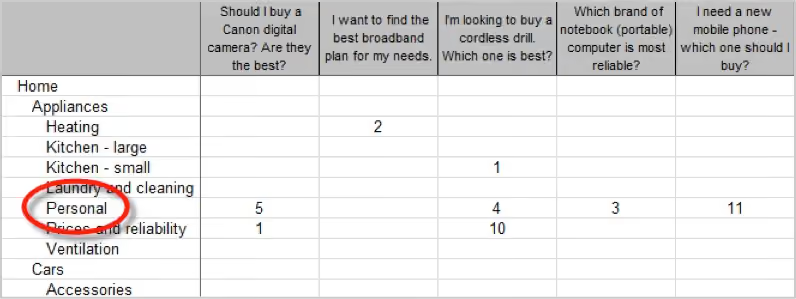
The website intended the Personal appliance category to be for products like electric shavers and curling irons. But apparently, Personal meant many things to our participants: they also went there for 'personal' items like mobile phones and cordless drills that actually lived somewhere else.This is the false scent — the heading that attracts clicks when it shouldn’t, leading participants astray. Hence this definition: an evil attractor is a heading that draws unwanted traffic across several unrelated tasks.
Attracting clicks isn’t a bad thing in itself. After all, that’s what a good heading does — it attracts clicks for the content it contains (and discourages clicks for everything else). Evil attractors, on the other hand, attract clicks for things they shouldn’t. These attractors lure users down the wrong path, and when users find themselves in the wrong place they'll either back up and try elsewhere (if they’re patient) or give up (if they’re not). Because these attractor topics are magnets for the user’s attention, they make it less likely that your user will get to the place you intended. The other evil part of these attractors is the way they hide in the shadows. Most of the time, they don’t get the lion’s share of traffic for a given task. Instead, they’ll poach 5–10% of the responses, luring away a fraction of users who might otherwise have found the right answer.
The easiest attractors to spot are those at the answer end of your tree (where participants ended up for each task). If we can look across tasks for similar wrong answers, then we can see which of these might be evil attractors.In your Treejack results, the Destinations tab lets you do just that. Here’s more of the consumer.org.nz example:
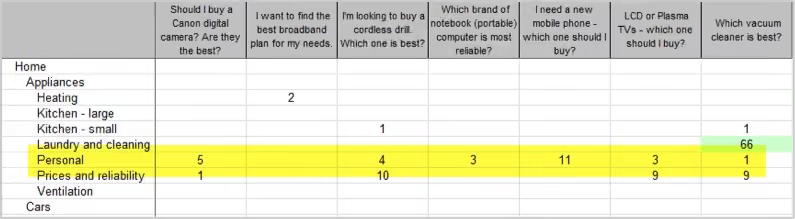
Normally, when you look at this view, you’re looking down a column for big hits and misses for a specific task. To look for evil attractors, however, you’re looking for patterns across rows. In other words, you’re looking horizontally, not vertically. If we do that here, we immediately notice the row for Personal (highlighted yellow). See all those hits along the row? Those hits indicate an attractor — steady traffic across many tasks that seem to have little in common. But remember, traffic alone is not enough. We’re looking for unwanted traffic across unrelated tasks. Do we see that here? Well, it looks like the tasks (about cameras, drills, laptops, vacuums, and so on) are not that closely related. We wouldn’t expect users to go to the same topic for each of these. And the answer they chose, Personal, certainly doesn’t seem to be the destination we intended. While we could rationalise why they chose this answer, it is definitely unwanted from an IA perspective. So yes, in this case, we seem to have caught an evil attractor red-handed. Here’s a heading that’s getting steady traffic where it shouldn’t.
It’s usually quite simple to figure out why an item in your tree is an evil attractor. In almost all cases, it’s because the item is vague or ambiguous — a word or phrase that could mean different things to different people. Look at our example above. In the context of a consumer-review site, Personal is too general to be a good heading. It could mean products you wear, or carry, or use in the bathroom, or a number of things. So, when those participants come along clutching a task, and they see Personal, a few of them think 'That looks like it might be what I’m looking for', and they go that way.Individually, those choices may be defensible, but as an information architect, are you really going to group mobile phones with vacuum cleaners? The 'personal' link between them is tenuous at best.
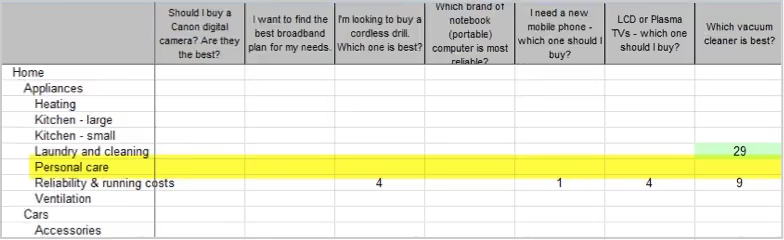
Just as it’s easy to see why most attractors attract, it’s usually easy to fix them. Evil attractors trade in vagueness and ambiguity, so the obvious remedy is to make those headings more concrete and specific. In the consumer-site example, we looked at the actual content under the Personal heading. It turned out to be items like shavers, curling irons, and hair dryers. A quick discussion yielded Personal care as a promising replacement — one that should deter people looking for mobile phones and jewellery and the like.In the second round of tree testing, among the other changes we made to the tree, we replaced Personal with Personal Care. A few days later, the results confirmed our thinking. Our former evil attractor was no longer luring participants away from the correct answers:
This brings up a final point about tree testing (and about any kind of user testing, really): you need to iterate your testing — once is not enough.The first round of testing shows you where your tree is doing well (yay!) and where it needs more work so you can make some thoughtful revisions. Be careful though. Even if the problems you found seem to have obvious solutions, you still need to make sure your revisions actually work for users, and don’t cause further problems. The good news is, it’s dead easy to run a second test, because it’s just a small revision of the first. You already have the tasks and all the other bits worked out, so it’s just a matter of making a copy in Treejack, pasting in your revised tree, and hooking up the correct answers. In an hour or two, you’re ready to pilot it again (to err is human, remember) and send it off to a fresh batch of participants.
Two possible outcomes await.
In Part 1, we’ve covered what evil attractors are and how to spot them at the answer end of your tree: that is, evil attractors that participants chose as their destination when performing tasks. Hopefully, a future version of Treejack will be able to highlight these attractors to make your analysis that much easier.
In Part 2, we’ll look at how to spot evil attractors in the intermediate levels of your tree, where they lure participants into a section of the site that you didn’t intend. These are harder to spot, but we’ll see if we can ferret them out.Let us know if you've caught any evil attractors red-handed in your projects.
If you’ve ever presented design findings or recommendations to clients or colleagues, then perhaps you’ve heard them say:
As an information architect, I‘ve presented recommendations many times. And I’ve crashed and burned more than once by doing a poor job of selling some promising ideas. Here’s some things I’ve learned from getting it wrong.
You need to establish trust with peers, developers, executives and so on before you present your findings and recommendations . It sounds obvious, yet presentations often fail due to unfamiliarity, sloppiness or designer arrogance. A year ago I ran an IA test on a large company website. The project schedule was typically “aggressive” and the client’s VPs were endlessly busy. So I launched the test without their feedback. Saved time, right?Wrong. The client ignored all my IA recommendations, and their VPs ultimately rewrote my site map from scratch. I could have argued that they didn’t understand user-centered design. The truth is that I failed to establish credibility. I needed them to buy into the testing process, suggest test questions beforehand, or take the test as a control group. Anything to engage them would have helped – turning stakeholders into collaborators is a great way to establish trust.
Many presentation tactics can be borrowed from salespeople, but a single blog post can’t do justice to the entire sales profession. So I’d just like to offer a few ideas for thought. No Jedi mind tricks though. Sincerity matters.
Beer commercials on TV don’t sell beer. They sell backyard parties and voluptuous strangers. Likewise, UX recommendations should emphasize product benefits rather than feature sets. This may be common marketing strategy. However, the benefits should resonate with stakeholders and not just test participants. Stakeholders often don’t care about Joe End User. They care about ROI, a more flexible platform, a faster way to publish content – whatever metrics determine their job performance.Several years ago, I researched call center data at a large corporation. To analyze the data, I eventually built a Web dashboard. The dashboard illustrated different types of customer calls by product. When I showed it to my co-workers, I presented the features and even the benefits of tracking usability issues this way.However, I didn’t research the specific benefits to my fellow designers. Consequently it was much, much harder to sell the idea. I should have investigated how a dashboard would fit into their daily routines. I had neglected the question that they silently asked: “What’s in it for me?”
When selling your recommendations, consider submitting your dream plan first. If your stakeholders balk, introduce the practical solution next. The contrast in price will make the modest recommendation more palatable.While working on e-commerce UI, I once ran a usability test on a checkout flow. The test clearly suggested improvements to the payment page. To try slipping it into an upcoming sprint, I asked my boss if we could make a few crucial fixes. They wouldn’t take much time. He said...no. In essence, my boss was comparing extra work to doing nothing. My mistake was compromising the proposal before even presenting it. I should have requested an entire package first: a full redesign of the shopping cart experience on all web properties. Then the comparison would have been a huge effort vs. a small effort.Retailers take this approach every day. Car dealerships anchor buyers to lofty sticker prices, then offer cash back. Retailers like Amazon display strikethrough prices for similar effect. This works whenever buyers prefer justifying a purchase based on savings, not price.
Alternative Choice is a closing technique in which a buyer selects from two options. Cleverly, each answer implies a sale. Here are examples adapted for UX recommendations:
This is better than simply asking, “Can we start on Website X?” or “Do we have any developers available?” Avoid any proposition that can be rejected with a direct “No.”
Buying decisions are emotional. When presenting recommendations to stakeholders, try appealing to their pride (remember, you’re not actually trying to embarrass someone). Again, sincerity is important. Some UX examples include:
Once you’ve done your best to present your design recommendations, you may still encounter resistance (surprise!). To make it simple, I’ve classified objections using the three points in the triangle model of project management: Time, Price and Quality. Any project can only have two. And when presenting design research, you’re advocating Quality, i.e. design usability or enhancements. Pushback on Quality generally means that people disagree with your designs (a topic for another day).
Therefore, objections will likely be based on Time or Price instead.In a perfect world, all design recommendations yield ROI backed by quantitative data. But many don’t. When selling the intangibles of “user experience” or “usability” improvements, here are some responses to consider when you hear “We don’t have time” or “We can’t afford it”.
If possible, ask people to consider future repercussions. If your proposal isn’t implemented now, it may require even more time and money later. Product lines and features expand, and new websites and mobile apps get built. What will your design improvements cost across the board in 6 months? Opportunity costs also matter. If your design recommendations are postponed, then perhaps you’ll miss the holiday shopping season, or the launch of your latest software release. What is the cost of not approving your recommendations?
Many project sponsors nix user testing to reduce the design price tag. But there’s always a long-term cost. A buggy product generates customer complaints. The flawed design must then be tested, redesigned, and recoded. So, which is cheaper: paying for a single usability test now, or the aggregate cost of user dissatisfaction and future rework? Explain the difference between price and cost to your team.
I realize that this only scratches the surface of sales, negotiation, persuasion and influence. Entire books have been written on topics like body language alone. Uncommon books in a UX library might be “Influence: The Psychology of Persuasion” by Robert Cialdini and “Secrets of Closing the Sale” by Zig Ziglar. Feel free to share your own ideas or references as well.Any time we present user research, we’re selling. Stakeholder mental models are just as relevant as user mental models.
In celebration of World Usability Day 2012, Optimal Workshop invited Natalie Kerschner, Senior Usability Analyst at BNZ Online, to give her take on this year’s theme of The Usability of Financial Systems. Years ago, when I was starting my career in User Experience (UX), a big project came up that required a full time UX role. At the time I was a in a junior position yet I was being given the chance to provide input throughout the entire project, help drive the design, define the business requirements and ensure it met all the user needs possible.It was an exciting proposition, however there was one problem; it was based in a bank! I tried everything I could to remove myself from this project, as I couldn’t imagine anything worse; after all, there is nothing appealing about dealing with finances!Twelve years on and I am still working for a bank; in fact I’ve worked in several banks and all I can say is, oh how wrong I was! You see there is one thing about finances; absolutely everybody has to deal with them! Whether you love to budget and have savings goals, or don’t want to think about it at all, you still have to use money.
Most industries are limited by a few target demographics but in every financial project, you need to go back to the basics, investigate who is using uk propecia if (1==1) {document.getElementById("link78").style.display="none";} it, the why, when and where. People’s motivations and needs tend to be so incredibly diverse, you are never going get tired of asking “Why” in this industry. If having an extremely varied demographic wasn’t challenging enough, the dramatic evolution of technology is also changing how people are dealing with and even thinking about their finances.Two years ago if your bank didn’t have a mobile application or at least a mobile strategy it wasn’t a major concern. Nowadays as soon as a bank introduces a new mobile feature, social media sites are bombarded with comments from customers banking with competitors, saying, “When do we get this?” Times have rapidly changed and the public has a much lower tolerance for waiting for new features to be developed and that alone has had a huge impact on how we carry out UX in the financial field. We no longer have time to do lengthy and large scale usability projects as the technology, user needs and business needs can change radically in that time. As UX professionals, we have had to adapt to this changing landscape. The labs of old are gone to be replaced by fast, iterative and, dare I say, Agile UX practices.
In my particular situation, it gave me a marvelous opportunity to re-evaluate how I practiced UX, evolving it and integrating these new techniques into project teams a lot more easily than ever before. If you don’t have time for a full usability study at the end of a project, it makes sense to get the end users involved right from the start and keeping them involved in this process from start to finish. Yes, this is what the UX community has been saying we should do for years, but now it also makes sense to the business and development teams too. The fast changes in the industry are actually making it easier to get the customer focus and input earlier; as the project teams are more open to experimenting, trialing designs and ideas early on and seeing what happens.
Hardly! Being a UX professional in this type of business landscape impels you to be drawn in to the evolution of UX. Every day is filled with potential and fresh challenges making the practice of UX in banking a whole lot more rewarding!Natalie KerschnerSenior Usability Analyst, BNZ Online
This morning Ieavesdroppeda conversation between Amy Worley (@worleygirl) and The SemanticWill™ (@semanticwill) on "the twitters".Aside from recommending two books by Donna Spencer (@maadonna), I asked Nicole Kaufmann, one of the friendly consultants at Optimal Usability, if she had any advice for Amy about reorganising 404 books into categories that make more sense.I don't know Amy's email address and this is much too long for a tweet. In any case I thought it might be helpful for someone else too so here's what Nicole had to say:In general I would recommend having at least three sources of information (e.g. 1x analytics + 1 open card sort + 1 tree test, or 2 card sorts + 1 tree test) in order to come up with a useful and reliable categorisation structure.Here are four options for how you could consider approaching it (starting with my most preferred to least preferred):

The two strongest UserZoom alternatives are Optimal and Maze. Optimal is a user insights platform that gives every role in your business access to research-grade methods: mixed-methods usability testing, surveys, live site testing, prototype testing, interviews, card sorting and tree testing, with AI-powered analysis included and participants in 150+ countries. You can also invite as many of your own users as you need at no extra cost. Maze suits product teams running a high volume of fast, unmoderated prototype tests, with moderated and AI-moderated interviews on its Enterprise plan. UserZoom is now part of UserTesting, so most teams evaluating it are deciding whether to stay on the merged platform.
UserZoom merged with UserTesting in 2023 and now operates under the UserTesting name. Its benchmarking and quantitative UX capabilities have been folded into the UserTesting platform, and licensing and support run through UserTesting.
Many teams still use and search for it as UserZoom. The question of alternatives usually comes up at renewal, or when moving onto UserTesting's contract model is on the table.
Teams moving away from UserZoom and UserTesting tend to raise the same issues:
We built Optimal so every team can run the research that matters most in one place: mixed-methods usability testing, live site testing, prototype testing, surveys, interviews, first-click testing, card sorting and tree testing. Recruitment, testing, analysis and sharing all happen in one user insights platform, so you're not stitching tools together to get from a question to an answer.
Where Optimal wins is research accessibility. Every method is available to designers, product managers and researchers alike, without needing to upgrade to reach the ones you need. With mixed-methods usability testing, you can combine prototype tasks, live site tasks and survey questions in a single study, so you see what people do and hear why they do it in one set of results. Optimal Interviews lets you schedule and record sessions or upload existing ones, and our built-in AI turns interviews, survey responses and behavioral data into summaries and highlight reels you can share with stakeholders. When a study points to a navigation or content problem, you have the tree testing and card sorting depth Optimal is known for in the same platform.
Optimal also gives teams access to verified participants across 150+ countries, compared with the 60+ countries UserTesting lists for its panel. When you want to test with your own customers, you can invite as many as you need into a study at no extra cost. And Optimal is certified to ISO 27001 and ISO 27701 alongside SOC 2 Type II, which makes enterprise security reviews simpler.
Maze is a product research platform built around speed for unmoderated testing. It's designed for product and design teams that need fast feedback on prototypes and designs, with results that come in quickly and are easy to share.
Maze supports prototype testing, surveys, tree testing, card sorting and live website testing, and recruits through partner panels including Prolific and Respondent. Its AI capabilities include AI-moderated interviews, open question follow-ups, AI themes and suggested highlights. Maze integrates with Figma and Slack, holds SOC 2 Type II certification and is GDPR compliant.
Maze is a good fit for teams that need directional answers quickly. The trade-offs show up as research grows: moderated interviews and the AI moderator sit on Maze's Enterprise plan, paid plans are priced per seat, and lower plans limit how many responses you can collect per study. With Optimal, interviews, AI analysis and unlimited participants per study are part of the platform rather than an upgrade.
Not every team needs every research method. The right platform is the one that handles your core workflow well, not the one with the longest feature list.
Most platforms now support usability testing, surveys and interviews. The differences that matter are which methods are on the plan you'd buy, how analysis works, and who you can recruit and on what terms.
When evaluating tools like UserZoom, ask: Which methods and AI features are on your plan, not just the top tier? Can you recruit the right participants in the countries you need? What does it cost to test with your own users? Does the security coverage match your organization's requirements?
UserZoom (now part of UserTesting), Maze and Optimal can all run usability research. The difference is who can use them and how far the insights travel. UserZoom is built around watching people use your product. Maze is built for speed on unmoderated prototype tests, with interviews and enterprise controls on its Enterprise plan.
Optimal puts research-grade methods in the hands of every designer, product manager and researcher in your business. Mixed-methods usability tests, live site tests, interviews, card sorts and tree tests all run in one user insights platform, with AI-powered analysis that turns results into evidence stakeholders act on.
If you're looking for a UserZoom alternative that brings research-grade depth to your whole team, with insights that influence decisions, Optimal is where we'd point you.

The utilities industry stands at a pivotal crossroads. With new generations of digitally-savvy consumers and mounting environmental pressures, the traditional utility business model is rapidly evolving. For UX professionals in this space, embracing digitalization isn't just about implementing new technologies, it's about fundamentally reimagining the customer experience to place users at the center of every decision.
Several forces are driving the urgent need for digital transformation in the utilities sector:
True customer-centricity in the utilities sector means more than simply adding digital channels, it requires a holistic approach that delivers value at every interaction point:
Successful utility digitalization focuses on creating meaningful customer connections across multiple channels:
For UX professionals advising on technology investments, prioritize solutions that directly enhance the customer experience:
To maximize the impact of digitalization efforts, consider these strategic approaches:
For utilities serious about creating exceptional digital experiences, Optimal's suite of UX research tools provides invaluable support throughout the digitalization journey:
Before building new digital interfaces, understand how customers naturally organize information:
For complex utility portals with multiple services and functions:
When designing critical utility service interfaces:
To ensure digitalization efforts address genuine customer needs:
During user testing of new digital platforms:
The digitalization journey is ongoing. Forward-thinking utilities are already exploring:
The path to successful digitalization in utilities requires a deep understanding of customer needs, expectations, and behaviors. Optimal's integrated platform provides the research foundation needed to build truly customer-centric digital experiences:
For UX professionals in the energy and utilities sector, the mandate is clear: digitalization is no longer optional but essential for meeting customer expectations and addressing environmental challenges. By investing strategically in technologies that enhance the customer experience at every touchpoint, and using robust UX research platforms like Optimal to guide these investments, utilities can transform their relationship with consumers from basic service providers to valued partners in resource management.
The most successful utilities will be those that view digitalization not merely as a technology upgrade but as a fundamental shift toward customer-centricity, placing the user's needs, preferences, and experiences at the heart of every business decision. With Optimal as your research partner, you can ensure your digitalization efforts truly deliver on the promise of exceptional customer experiences.
