Subscribe to OW blog for an instantly better inbox
Oops! Something went wrong while submitting the form.


About six months ago, I came across aninteresting question on Stack Exchange headlined 'Should you concede to user demands that are clearly inferior?' It stuck in my mind because the question in itself is complex, and contains a few complicated assumptions.
In the world of user experience research and design, the users needs and wants are paramount. Dollars and hours are spent poring through data and interviewing and collating information into a cohesive explanation of what works and what doesn't for users. Designs are based on how users intuitively interact with products and websites. Organisations respond to suggestions that come through on support and on Twitter, and if a significant numbers of users want a particular change, chances are those organisations will act. But the question itself throws this most sacred of stances up in the air, because it contains the phrase 'user demands that are clearly inferior'. Now, that is a loaded statement.
I imagine it's sometimes hard for designers to get rid of the feeling that they know best. As a writer, I know what I like and don't like. I 'know' good writing from bad, and I have strong opinions about books and articles that aren't worth the pages or bandwidth it takes to publish them. But this stance often puts me in conflict with the huge amount of empirical evidence that certain writing I disdain is actually 'good': and that evidence is readers. For Fifty Shades of Lame, it's millions of them. Aggghh!
In the same way, I've never met a designer who didn't have strong opinions about what they adore and deplore in their own art forms. And I wonder how tough it sometimes is to implement changes that to a designers mind make no sense. Do any of you UX designers out there ever secretly think, when you discover what users are asking for, 'these people have no taste, they don't know what they want, how ridiculous!'? Is there a secret current of despair and frustration at user ignorance running deep and unspoken through the river of design?
On Stack Exchange, Matt described how he and his team implemented a single tree view (75 items) with a scroll wheel, and because it was an internalchange,they were able to get quick feedback from existing users. The feedback wasn't positive, and many people wanted the change to be reversed. He explains: ‘To my mind, the way we redeveloped it is unambiguously better. But the user base was equally emphatic in rejecting it. So today, to the complaints of my fellow team members, I removed our new implementation and set it to work in the manner the users were used to.'
He then goes on to ask 'What was the right course of action here? Is there a point at which the user's fear of change becomes an important UX consideration in its own right?' The responses are varied and fascinating, and can be roughly broken into three camps:
One of the problems with the term 'User Experience' is the word 'user'. It's a depersonalised and generic way of describing who it is you're serving. Because there is a person at the heart of the enterprise who is trying to achieve something. They may not be trying to achieve what you expect them to. They certainly may not be trying to achieve what you want them to.
Context is everything.
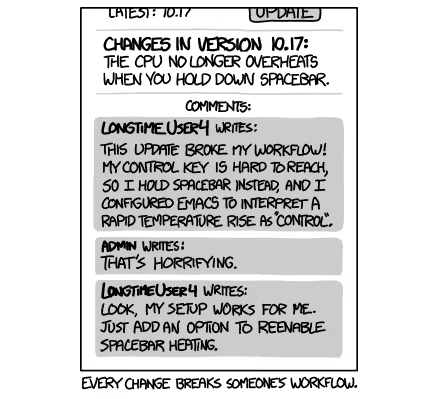
Who is the person who is asking for a change, or asking for something to stay the same?We would argue that people aren't 'change-averse', but 'confusion/discomfort/inefficiency-averse' people want easier ways of doing things. So if by changing a feature you mess up a person's workflow, then potentially you didn't do your research.
If you look closely at the behavior of users — how people actually interact with a particular aspect of your design, rather than just hearing their opinions — then you'll be able to base your design on empirical evidence. So, we (roughly) come down on the side of the people who use the product. If they want to get something done, and they want to do that in a particular way, then they have right of way.
It's your job not to serve your tastes, but to give people the experience you promise them. And to the author of Fifty Shades of Grey, I say, 'Good on you EL James. You gave them what they wanted.'
What do you think?
If you’ve ever presented design findings or recommendations to clients or colleagues, then perhaps you’ve heard them say:
As an information architect, I‘ve presented recommendations many times. And I’ve crashed and burned more than once by doing a poor job of selling some promising ideas. Here’s some things I’ve learned from getting it wrong.
You need to establish trust with peers, developers, executives and so on before you present your findings and recommendations . It sounds obvious, yet presentations often fail due to unfamiliarity, sloppiness or designer arrogance. A year ago I ran an IA test on a large company website. The project schedule was typically “aggressive” and the client’s VPs were endlessly busy. So I launched the test without their feedback. Saved time, right?Wrong. The client ignored all my IA recommendations, and their VPs ultimately rewrote my site map from scratch. I could have argued that they didn’t understand user-centered design. The truth is that I failed to establish credibility. I needed them to buy into the testing process, suggest test questions beforehand, or take the test as a control group. Anything to engage them would have helped – turning stakeholders into collaborators is a great way to establish trust.
Many presentation tactics can be borrowed from salespeople, but a single blog post can’t do justice to the entire sales profession. So I’d just like to offer a few ideas for thought. No Jedi mind tricks though. Sincerity matters.
Beer commercials on TV don’t sell beer. They sell backyard parties and voluptuous strangers. Likewise, UX recommendations should emphasize product benefits rather than feature sets. This may be common marketing strategy. However, the benefits should resonate with stakeholders and not just test participants. Stakeholders often don’t care about Joe End User. They care about ROI, a more flexible platform, a faster way to publish content – whatever metrics determine their job performance.Several years ago, I researched call center data at a large corporation. To analyze the data, I eventually built a Web dashboard. The dashboard illustrated different types of customer calls by product. When I showed it to my co-workers, I presented the features and even the benefits of tracking usability issues this way.However, I didn’t research the specific benefits to my fellow designers. Consequently it was much, much harder to sell the idea. I should have investigated how a dashboard would fit into their daily routines. I had neglected the question that they silently asked: “What’s in it for me?”
When selling your recommendations, consider submitting your dream plan first. If your stakeholders balk, introduce the practical solution next. The contrast in price will make the modest recommendation more palatable.While working on e-commerce UI, I once ran a usability test on a checkout flow. The test clearly suggested improvements to the payment page. To try slipping it into an upcoming sprint, I asked my boss if we could make a few crucial fixes. They wouldn’t take much time. He said...no. In essence, my boss was comparing extra work to doing nothing. My mistake was compromising the proposal before even presenting it. I should have requested an entire package first: a full redesign of the shopping cart experience on all web properties. Then the comparison would have been a huge effort vs. a small effort.Retailers take this approach every day. Car dealerships anchor buyers to lofty sticker prices, then offer cash back. Retailers like Amazon display strikethrough prices for similar effect. This works whenever buyers prefer justifying a purchase based on savings, not price.
Alternative Choice is a closing technique in which a buyer selects from two options. Cleverly, each answer implies a sale. Here are examples adapted for UX recommendations:
This is better than simply asking, “Can we start on Website X?” or “Do we have any developers available?” Avoid any proposition that can be rejected with a direct “No.”
Buying decisions are emotional. When presenting recommendations to stakeholders, try appealing to their pride (remember, you’re not actually trying to embarrass someone). Again, sincerity is important. Some UX examples include:
Once you’ve done your best to present your design recommendations, you may still encounter resistance (surprise!). To make it simple, I’ve classified objections using the three points in the triangle model of project management: Time, Price and Quality. Any project can only have two. And when presenting design research, you’re advocating Quality, i.e. design usability or enhancements. Pushback on Quality generally means that people disagree with your designs (a topic for another day).
Therefore, objections will likely be based on Time or Price instead.In a perfect world, all design recommendations yield ROI backed by quantitative data. But many don’t. When selling the intangibles of “user experience” or “usability” improvements, here are some responses to consider when you hear “We don’t have time” or “We can’t afford it”.
If possible, ask people to consider future repercussions. If your proposal isn’t implemented now, it may require even more time and money later. Product lines and features expand, and new websites and mobile apps get built. What will your design improvements cost across the board in 6 months? Opportunity costs also matter. If your design recommendations are postponed, then perhaps you’ll miss the holiday shopping season, or the launch of your latest software release. What is the cost of not approving your recommendations?
Many project sponsors nix user testing to reduce the design price tag. But there’s always a long-term cost. A buggy product generates customer complaints. The flawed design must then be tested, redesigned, and recoded. So, which is cheaper: paying for a single usability test now, or the aggregate cost of user dissatisfaction and future rework? Explain the difference between price and cost to your team.
I realize that this only scratches the surface of sales, negotiation, persuasion and influence. Entire books have been written on topics like body language alone. Uncommon books in a UX library might be “Influence: The Psychology of Persuasion” by Robert Cialdini and “Secrets of Closing the Sale” by Zig Ziglar. Feel free to share your own ideas or references as well.Any time we present user research, we’re selling. Stakeholder mental models are just as relevant as user mental models.

AI-driven personalization is redefining digital experiences, allowing companies to tailor content, recommendations, and interfaces to individual users at an unprecedented scale. From e-commerce product suggestions to content feeds, streaming recommendations, and even customized user interfaces, personalization has become a cornerstone of modern digital strategy. The appeal is clear: research shows that effective personalization can increase engagement by 72%, boost conversion rates by up to 30%, and drive revenue growth of 10-15%.
However, the reality often falls short of these impressive statistics. Personalization can easily backfire, frustrating users instead of engaging them, creating experiences that feel invasive rather than helpful, and sometimes actively driving users away from the very content or products they might genuinely enjoy. Many organizations invest heavily in AI technology while underinvesting in understanding how these personalized experiences actually impact their users.
The technical capability to personalize digital experiences has advanced rapidly, but the quality of these experiences hasn't always kept pace. According to a 2023 survey by Baymard Institute, 68% of users reported encountering personalization that felt "off-putting" or "frustrating" in the previous month, while only 34% could recall a personalized experience that genuinely improved their interaction with a digital product.
This disconnect stems from a fundamental misalignment: while AI excels at pattern recognition and prediction based on historical data, it often lacks the contextual understanding and nuance that make personalization truly valuable. The result? Technically sophisticated personalization regularly misses the mark on actual user needs and preferences.
Many companies struggle with personalization due to several common pitfalls that undermine even the most sophisticated AI implementations:
AI that assumes too much can make users feel restricted or trapped in a "filter bubble" of limited options. This phenomenon, often called "over-personalization," occurs when algorithms become too confident in their understanding of user preferences.
Signs of over-personalization include:
A study by researchers at University of Minnesota found that highly personalized news feeds led to a 23% reduction in content diversity over time, even when users actively sought varied content. This "filter bubble" effect not only limits discovery but can leave users feeling manipulated or constrained.
AI recommendations based on incomplete or misinterpreted data can lead to irrelevant, inappropriate, or even offensive suggestions. These incorrect assumptions often stem from:
These misinterpretations can range from merely annoying (continuously recommending products similar to a one-time purchase) to deeply problematic (showing weight loss ads to users with eating disorders based on their browsing history).
A particularly striking example occurred when a major retailer's algorithm began sending pregnancy-related offers to a teenage girl before her family knew she was pregnant. While technically accurate in its prediction, this incident highlights how even "correct" personalization can fail to consider the broader human context and implications.
Users increasingly want to understand why they're being shown specific content or recommendations. When personalization happens behind a "black box" without explanation, it can create:
Research from the Pew Research Center shows that 74% of users consider it important to know why they are seeing certain recommendations, yet only 22% of personalization systems provide clear explanations for their suggestions.
Many organizations struggle to maintain consistent personalization across different touchpoints, creating disjointed experiences:
This inconsistency can make personalization feel random or arbitrary rather than thoughtfully tailored to the user's needs.
As personalization becomes more sophisticated, user concerns about privacy intensify. Key issues include:
A recent study found that 79% of users want control over what personal data influences their recommendations, but only 31% felt they had adequate control in their most-used digital products.
To create a personalized experience that feels natural and helpful rather than creepy or restrictive, UX teams need to validate AI-driven decisions through systematic research with real users. Rather than treating personalization as a purely technical challenge, successful organizations recognize it as a human-centered design problem that requires continuous testing and refinement.
Card sorting and tree testing help structure content in a way that aligns with users' expectations and mental models, creating a foundation for personalization that feels intuitive rather than imposed:
Case Study: A financial services company used card sorting with different customer segments to discover distinct mental models for organizing financial products. Rather than creating a one-size-fits-all personalization system, they developed segment-specific personalization frameworks that aligned with these different mental models, resulting in a 28% increase in product discovery and application rates.
First-click testing ensures users interact with personalized experiences as intended across different contexts and scenarios:
Research by the Nielsen Norman Group found that getting the first click right increases the overall task success rate by 87%. For personalized experiences, this is even more critical, as users may abandon a site entirely if early personalized recommendations seem irrelevant or confusing.
Direct observation and conversation with users provides critical context for personalization strategies:
These qualitative approaches help answer critical questions like:
Systematic feedback collection helps gauge users' comfort levels with AI-driven recommendations:
A streaming service discovered through targeted surveys that users were significantly more satisfied with content recommendations when they could see a clear explanation of why items were suggested (e.g., "Because you watched X"). Implementing these explanations increased content exploration by 34% and reduced account cancellations by 8%.
Experimental validation ensures personalization actually improves key metrics:
Importantly, A/B testing should look beyond immediate conversion metrics to consider longer-term impacts on user satisfaction, trust, and retention.
To implement personalization that truly enhances user experience, organizations should follow these research-backed principles:
The most effective personalization addresses genuine user needs rather than showcasing algorithmic sophistication:
Users increasingly expect to understand and control how their experiences are personalized:
Effective personalization balances predictability with discovery:
Rather than immediately implementing highly tailored experiences, consider a gradual approach:
Personalization should never be "set and forget":
As AI capabilities continue to advance, the companies that will succeed with personalization won't necessarily be those with the most sophisticated algorithms, but those who best integrate human understanding into their approach. The future of personalization lies in creating systems that:
AI should learn from real people, not just data. UX research ensures that personalization enhances, rather than alienates, users by bringing human insight to algorithmic decisions.
By combining the pattern-recognition power of AI with the contextual understanding provided by UX research, organizations can create personalized experiences that feel less like surveillance and more like genuine understanding: experiences that don't just predict what users might click, but truly respond to what they need and value.

