Subscribe to OW blog for an instantly better inbox
Oops! Something went wrong while submitting the form.

Articles and Podcasts on Customer Service, AI and Automation, Product, and more
A year ago, we looked at the user research market and made a decision.
We saw product teams shipping faster than ever while research tools stayed stuck in time. We saw researchers drowning in manual work, waiting on vendor emails, stitching together fragmented tools. We heard "should we test this?" followed by "never mind, we already shipped."
The dominant platforms got comfortable. We didn't.
Today, we're excited to announce Optimal 3.0, the result of refusing to accept the status quo and building the fresh alternative teams have been asking for.
The gap between product velocity and research velocity has never been wider. The situation isn't sustainable. And it's not the researcher's fault. The tools are the problem. They’re:
These platforms haven't changed because they don't have to, so we set out to challenge them.
Optimal 3.0 isn't an incremental update to the old way of doing things. It's a fundamental rethinking of what a research platform should be.
Research For All, Not Just Researchers.
For 18 years, we've believed research should be accessible to everyone, not just specialists. Optimal 3.0 takes that principle further.
Unlimited seats. Zero gatekeeping.
Designers can validate concepts without waiting for research bandwidth. PMs can test assumptions without learning specialist tools. Marketers can gather feedback without procurement nightmares. Research shouldn't be rationed by licenses or complexity. It should be a shared capability across your entire team.
A Complete Ecosystem in One Place.
Stop stitching together point solutions.Optimal 3.0 gives you everything you need in one platform:
Recruitment Built In Access millions of verified participants worldwide without the vendor tag. Target by demographics, behaviors, and custom screeners. Launch studies in minutes, not days. No endless email chains. No procurement delays.
Testing That Adapts to You
Learn more about Live Site Testing
AI-Powered Analysis (With Control) Interview analysis used to take weeks. We've reduced it to minutes.
Our AI automatically identifies themes, surfaces key quotes, and generates summaries, while you maintain full control over the analysis.
As one researcher told us: "What took me 4 weeks to manually analyze now took me 5 minutes."
This isn't about replacing researcher judgment. It's about amplifying it. The AI handles the busywork, tagging, organizing, timestamping. You handle the strategic thinking and judgment calls. That's where your value actually lives.
Learn more about Optimal Interviews
Chat Across All Your Data Your research data is now conversational.
Ask questions and get answers instantly, backed by actual video evidence from your studies. Query across multiple Interview studies at once. Share findings with stakeholders complete with supporting clips.
Every insight comes with the receipts. Because stakeholders don't just need insights, they need proof.
A Dashboard Built for Velocity See all your studies, all your data, in one place. Track progress across your entire team. Jump from question to insight in seconds. Research velocity starts with knowing what you have.
Integration Layer
Optimal 3.0 fits your workflow. It doesn't dominate it. We integrate with the tools you already use, Figma, Slack, your existing tech stack, because research shouldn't force you to abandon how you work.
What Didn't Change: Methodological Rigor
Here's what we didn't do: abandon the foundations that made teams trust us.
Card sorting, tree testing, first-click tests, surveys, the methodologically sound tools that Amazon, Google, Netflix, and HSBC have relied on for years are all still here. Better than ever.
We didn't replace our roots. We built on them.
18 years of research methodology, amplified by modern AI and unified in a complete ecosystem.
Product development isn't slowing down. AI is accelerating everything. Competitors are moving faster. Customer expectations are higher than ever.
Research can either be a bottleneck or an accelerator.
The difference is having a platform that:
Optimal 3.0 is built for research that arrives before the decision is made. Research that shapes products, not just documents them. Research that helps teams ship confidently because they asked users first.
A Fresh Alternative
We're not trying to be the biggest platform in the market.
We're trying to be the best alternative to the clunky tools that have dominated for years.
Amazon, Google, Netflix, Uber, Apple, Workday, they didn't choose us because we're the incumbent. They chose us because we make research accessible, fast, and actionable.
"Overall, each release feels like the platform is getting better." — Lead Product Designer at Flo
"The one research platform I keep coming back to." — G2 Review
This launch represents our biggest transformation, but it's not the end. It's a new beginning.
We're continuing to invest in:
Our goal is simple: make user research so fast and accessible that it becomes impossible not to include users in every decision.
See What We've Built
If you're evaluating research platforms and tired of the same old clunky tools, we'd love to show you the alternative.
Book a demo or start a free trial
The platform that turns "should we?" into "we did."
Welcome to Optimal 3.0.
“The art and science of asking questions is the source of all knowledge.”- Thomas Berger
In 1974, Elizabeth Loftus and John Palmer conducted a simple study to illustrate the impact of different wording on responses to a question. The two researchers quizzed their participants on an accident that occurred, asking them to recall the speed that two vehicles were traveling before the incident happened.
One of the questions Loftus and Palmer asked was: “About how fast were the cars going when they smashed into each other?”, which elicited higher speed estimates than questions containing the verbs ‘collided’, ‘bumped’, ‘contacted’ or ‘hit’. Unsurprisingly the ‘smashed’ group was also more likely to recall seeing broken glass at the scene, without there being any glass present.Small wording changes can impact your data in a big way. The way you ask a question not only frames how a person responds to it, but it can introduce unintended bias in your findings. If you intend to use the data you collect in meaningful ways — to identify issues, deepen your understanding or make evidence-based decisions — you want to ensure your data is of the highest possible quality. The best way to be confident that you’re collecting quality data and not wasting your time and resources is knowing how to avoid the common mistakes that plague question design.
Regardless of whether you’re adding some pre- or post-survey questions to your Treejack, OptimalSort or Chalkmark survey, or simply aiming to ask your questions on paper, in person or your website, there are some basic principles you should follow. But first…
Questionnaire and survey are terms that are frequently used interchangeably, and it is often tempting to use them synonymously. Unless you’re a word purist, chances are people will understand what you’re saying regardless of the term you use, however, it’s good to be aware of their differences in order to understand how they relate.A survey is a type of research design. It’s the process of gathering information for the purpose of measuring something, which encompasses everything from design, sampling, data collection and analysis. Surveys involve aggregating your data to reveal patterns and draw conclusions.
A questionnaire is a method of data collection.
Traditionally, questionnaires are used to collect information on an individual level, and have use cases such as job or loan applications, patient history forms etc. Think of questionnaires as an instrument you can use within conducting a wider survey, alongside other methods such as face-to-face interviews.There are differences involved in collecting survey information by post, email, online, telephone or face to face, and each method comes with its own set of advantages and disadvantages to consider. For now, however, let’s keep things simple, and focus on the very basic principles that will hold true regardless of the method you choose.
Here are some practical tips to help you become a confident question writer.
Clearly define your objectives. Start by asking yourself “What do I really need to learn?”When planning research, it’s tempting to jump right into writing your questions. However, taking a step back can save you a lot of time and frustration later down the road. Start by thinking about what you want to get out of your questions. Understand your information needs, draft your research questions and review them with your team or stakeholders before proceeding. Once you know what you want to get out of your study, you can narrow your focus and start to think about your objectives in greater detail. Being precise about the data you want to get out of your questions means it will be easier to plan how to organize and filter your findings.
Badly worded questions lead to poor quality data. To help you write better questions it’s good to be aware of seemingly obvious, yet common mistakes that can plague question writing. Here are some tips to follow.
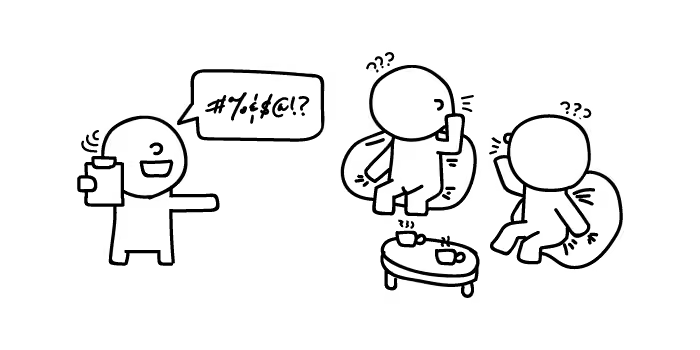
Avoid technical descriptions, acronyms and jargon. If necessary, add a definition or some help text around your question to avoid confusion.
Avoid ambiguity in what you are asking. The more specific your question is, the more likely people are to understand it in the same way. “Where do you usually shop?” will likely be interpreted differently by each respondent.
Bias can be introduced into your questions in many ways:
Utilizing appropriate timeframes in your questions leads to better estimates and more reliable data from your respondents. When providing timeframes, be sure to keep them reasonable — some behaviors can be asked on a yearly basis (e.g., switching internet providers), while others are easier to think of over the space of a week (e.g., supermarket visits).It is also important to be realistic about how much people are able to remember over time. If asking about satisfaction with a service in the past year, people are most likely to remember either their most recent, or their worst experiences. Sticking to reasonable recall periods will lead to better quality data.
The way we experience the world influences our thinking, and it is important to be aware of your own biases to avoid questions that make assumptions, e.g., “How many UX Researchers do you have at your company?”.
Avoid the use of negatives and double negatives when writing your questions. On a cognitive level, negative questions take more time to comprehend and process. Double negatives include two negative aspects within a question e.g., “Do you agree or disagree that it is not a good idea to not show up to work on time”. Negatives and double negatives can lead to confusion and contradictory responses.
Who is likely to answer your questions? What are the characteristics of the people you are trying to target? Consider the group you are writing for, and what kind of language and terminology they may be familiar with. Remember that not everyone is a native speaker of your language and no matter how sophisticated your vocabulary might be, plain language is going to lead to a better result.Context is important and knowing your audience can impact their willingness to contribute to your research. Questions written for a sample of academics will differ in tone from those intended for high school students. Don’t be afraid to give your questions a casual feel if you’re trying to connect to a group that may otherwise be unwilling to provide their answers.
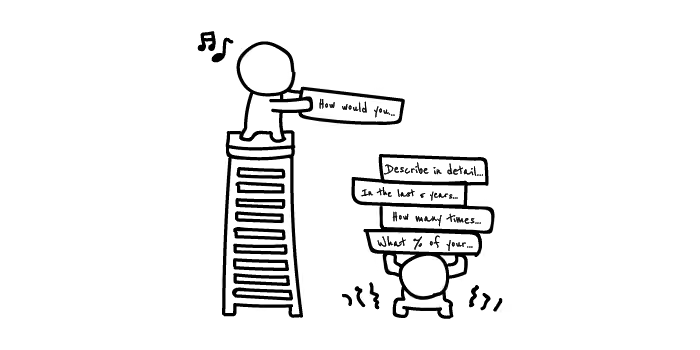
No matter how great your questions are, if they are too long, complex or repetitive, it’s likely your respondents will quickly lose interest. Bored respondents lead to not only poor quality data, but also higher nonresponse rates. Some subject areas lend themselves to higher respondent burden by nature, for example insurance, mortgages, or medical histories.Generally if it’s not an immediate priority, avoid unnecessary details. A shorter set of high quality data is more valuable than a whole stack of potentially erroneous data collected via a lengthy questionnaire. One way to remedy respondent burden is to offer incentives like vouchers, discount codes or competition entries. Giving people a good reason to answer your questions will not only make it easier for you to find willing respondents, but may increase engagement and lead to higher quality data.
It is important to be pragmatic when choosing your response options to avoid being swarmed with data that’s difficult to handle and analyze.Open questions invite respondents to elaborate and can help in identifying themes that closed questions may overlook. So, on the one hand they can provide a wealth of useful information, but on the other it is important to consider their practicality. If you want to collect 1,000 responses but don’t have the time or resources to review a multitude of varying open-ended data, consider whether it’s worth collecting in the first place. Open ended questions can be useful when you’re not quite sure what you’re looking for, so unless you’re running an exploratory study on a small group of people, try to limit their use.
Closed questions force respondents to select an existing option from a list. They are quick to fill in, and easy to code and analyze. Closed questions can include tick boxes, scales or single choice radio buttons. When asking closed questions it’s important to ensure the response options you provide are balanced, exclusive (they don’t overlap) and exhaustive (they contain all possible answers), even if this means adding an ‘other — please specify’ or a ‘not applicable’ option. For potentially sensitive questions, it’s important to give your respondents a ‘prefer not to say’ option, as forcing responses may lead to higher dropout rates and poor quality data.
Question order is important as it can impact the truthfulness of the responses you collect.The general rule to follow is to start simple with easy, factual questions that are relevant to the objective of your survey. Additionally, it’s good to start with closed questions before introducing open-ended questions that may require more consideration. Once you get the basics out of the way, you can then introduce questions that are more specific, difficult, or abstract. Situate unrelated or demographic questions at the end. Once a rapport has been established your respondents will be more likely to answer these questions without dropping out.
Pretesting your questions before you go out to collect your data is a great way to identify any immediate issues. In a lot of cases, a simple peer review by a friend or colleague will help identify the things that are likely to cause problems for respondents. For evaluating your questions more thoroughly, you may want to observe people as they make their way through your survey. This is a good time to see whether respondents are understanding and interpreting your questions in the same way, and will help identify issues with wording and response options. Getting your participants to think aloud is a useful technique for understanding how people are working through your questions.
Always explain the purpose of your research to your participants and how the information you collect will be used. Provide a statement that guarantees confidentiality and outline who will have access to the information provided.Above all, remember to thank your participants for their time. We’re all human, and people want to know that their contribution is valuable and appreciated.
There has been a flurry of new faces in the Optimal Workshop office since the beginning of the year, myself included! One of the more recent additions is Andy (not to be confused with our CEO Andrew) who has stepped into the role of product manager. I caught up with Andy to hear about how he’s making use of OptimalSort to fast-track the process of prioritizing product improvements.
I was also keen to learn more about how he ensures our users are at the forefront throughout the prioritization process.Only a few weeks in, it’s no surprise that the current challenges of the product manager role are quite different to what they’ll be in a year or two. Aside from learning all he can about Optimal Workshop and our suite of tools, Andy says that the greatest task he currently faces is prioritizing the infinite list of things that we could do. There's certainly no shortage of high value ideas!
So, what’s the best approach for prioritization, especially when everything is brand new to you? Andy says that despite his experience working with a variety of people and different techniques, he’s found that there’s no single, perfect answer. Factors that could favor a particular technique over another range from company strategy, type of product or project, team structure, and time constraints. Just to illustrate the range of potential approaches, this guide by Daniel Zacarias, a freelance product management consultant, discusses no less than 20 popular product prioritization techniques! Above all, a product manager should never make decisions in isolation; you can only be successful if you bring in experts on the business direction and the technical considerations — and of course your users!
For his first pass at tackling the lengthy list of improvements, Andy settled on running a prioritization exercise in OptimalSort. As an added benefit, this gave him the chance to familiarize himself with one of Optimal Workshop’s tools from a user’s perspective.In preparation for the sort, Andy ran quick interviews with members across the Optimal Workshop team in order to understand what they saw as the top priority features. The Customer Success and User Research teams, in particular, were encouraged to contribute suggestions directly from the wealth of user feedback that they receive.
From these suggestions, Andy eliminated any duplicates and created a list of 30 items that covered the top priority features. He then created a closed card sort with these items and asked the whole team to to rank cards as ‘Most important’, ‘Very important’, and ‘Important’. He also added the options ‘Not sure what these cards mean’ and ‘No opinion on these cards’.
He provided descriptions to give a short explanation of each feature, and set the survey options so that participants were required to sort all cards. Although this is not compulsory for an internal prioritization sort such as this, particularly if your participants are motivated to provide feedback, it can ensure that you gather as much feedback as possible.
The benefit of using OptimalSort to prioritize product improvements was that it allowed Andy to efficiently tap into the collective knowledge of the whole team. He admits that he could have approached the activity by running a series of more focussed, detailed meetings with key decision makers, but this wouldn’t have allowed him to engage the whole team and may have taken him longer to arrive at similar insights.
Following an initial review of the prioritization sort results, there were some clear areas of agreement across the team. Topping the lot was implementing the improvements to Reframer that our research has identified as critical. Other clear priorities were increasing the functionality of Chalkmark and streamlining the process of upgrading surveys, so that users can carry this out themselves.Outside of this, the other priorities were not quite as evident. Andy decided to apply a two-tiered approach for ranking the sorted cards by including:
By applying the following criteria to the sort results, Andy was left with a solid list of 15 priority features to take forward. While there’s still more work to be done in terms of integrating these priorities into the product roadmap, the prioritization sort got Andy to the point where he could start having more useful conversations. In addition, he said the exercise gave him confidence in understanding the areas that need more investigation.
Is there anything that we’d do differently when using card sorting for future prioritization exercises? For our next exercise, Andy recommended ensuring each card represented a feature of a similar size. For this initial sort, some cards described smaller, specific features, while others were larger and less well-defined, which meant it could be difficult to compare them side by side in terms of priority.
Thinking back, a ‘Not important’ category could also have been useful. He had initially shied away from doing this, as each card had come from at least one team member’s top five priorities. Andy now recognizes this could have actually encouraged good debate if some team members thought a particular feature was a priority, whereas others ranked it as ‘Not important’.
For the purposes of this sort, he didn’t make use of the card ranking feature which shows the order in which each participant sorted a card within a category. However, he thinks this would be invaluable if he was looking to carry out finer analysis for future prioritization sorts.
While this initial prioritization sort included indirect user feedback via the Customer Success and User Research teams, it would also be invaluable to run a similar exercise with users themselves. In the longer-term, Andy mentioned he’d love to look into developing a customer-facing roadmap and voting system, similar to those run by companies such as Atlassian.
"It’s a product manager’s dream to have a community of highly engaged users and for them to be able to view and directly feedback on the development pipeline. People then have visibility over the range of requests, can see how others’ receive their requests and can often answer each other’s questions," Andy explains.
Have you ever used OptimalSort for a prioritization exercise? What other methods do you use to prioritize what needs to be done? Have you worked somewhere with a customer-facing product road map and how did this work for you? We’d love to learn about your ideas and experience, so leave us a comment below!

“Dear Optimal, I want to test the structure of a university website (well certain sections anyway). My gut instinct is that it's pretty 'broken'. Lots of sections feel like they're in the wrong place. I want to test my hypotheses before proposing a new structure. I'm definitely going to do some card sorting, and was planning a mixture of online and offline. My question is about when to bring in tree testing. Should I do this first to test the existing IA? Or is card sorting sufficient? I do intend to tree test my new proposed IA in order to validate it, but is it worth doing it upfront too?" — Matt
Dear Matt,
Ah, the classic chicken or the egg scenario: Which should come first, tree testing or card sorting?
It’s a question that many researchers often ask themselves, but I’m here to help clear the air! You should always use both methods when changing up your information architecture (IA) in order to capture the most information.
Tree testing and card sorting, when used together, can give you fantastic insight into the way your users interact with your site. First of all, I’ll run through some of the benefits of each testing method.
Card sorting is a great method to gauge the way in which your users organize the content on your site. It helps you figure out which things go together and which things don’t. There are two main types of card sorting: open and closed.
Closed card sorting involves providing participants with pre-defined categories into which they sort their cards. For example, you might be reorganizing the categories for your online clothing store for women. Your cards would have all the names of your products (e.g., “socks”, “skirts” and “singlets”) and you also provide the categories (e.g.,“outerwear”, “tops” and “bottoms”).
Open card sorting involves providing participants with cards and leaving them to organize the content in a way that makes sense to them. It’s the opposite to closed card sorting, in that participants dictate the categories themselves and also label them. This means you’d provide them with the cards only, and no categories.
Card sorting, whether open or closed, is very user focused. It involves a lot of thought, input, and evaluation from each participant, helping you to form the structure of your new IA.
Tree testing is a fantastic way to determine how your users are navigating your site and how they’re finding information. Your site is organized into a tree structure, sorted into topics and subtopics, and participants are provided with some tasks that they need to perform. The results will show you how your participants performed those tasks, if they were successful or unsuccessful, and which route they took to complete the tasks. This data is extremely useful for creating a new and improved IA.
Tree testing is an activity that requires participants to seek information, which is quite the contrast to card sorting. Card sorting is an activity that requires participants to sort and organize information. Each activity requires users to behave in different ways, so each method will give its own valuable results.
Tree testing and card sorting are complementary methods within your UX toolkit, each unlocking unique insights about how users interact with your site structure. The difference is all about direction.
Card sorting is generative. It helps you understand how users naturally group and label your content; revealing mental models, surfacing intuitive categories, and informing your site’s information architecture (IA) from the ground up. Whether using open or closed methods, card sorting gives users the power to organize content in ways that make sense to them.
Tree testing is evaluative. Once you’ve designed or restructured your IA, tree testing puts it to the test. Participants are asked to complete find-it tasks using only your site structure – no visuals, no design – just your content hierarchy. This highlights whether users can successfully locate information and how efficiently they navigate your content tree.
In short:
Using both methods together gives you clarity and confidence. One builds the structure. The other proves it works.
The right method depends on where you are in your IA journey. If you're beginning from scratch or rethinking your structure, starting with card sorting is ideal. It will give you deep insight into how users group and label content.
If you already have an existing IA and want to validate its effectiveness, tree testing is typically the better fit. Tree testing shows you where users get lost and what’s working well. Think of card sorting as how users think your site should work, and tree testing as how they experience it in action.
In this scenario, I’d recommend running a tree test first in order to find out how your existing IA currently performs. You said your gut instinct is telling you that your existing IA is pretty “broken”, but it’s good to have the data that proves this and shows you where your users get lost.
An initial tree test will give you a benchmark to work with – after all, how will you know your shiny, new IA is performing better if you don’t have any stats to compare it with? Your results from your first tree test will also show you which parts of your current IA are the biggest pain points and from there you can work on fixing them. Make sure you keep these tasks on hand – you’ll need them later!
Once your initial tree test is done, you can start your card sort, based on the results from your tree test. Here, I recommend conducting an open card sort so you can understand how your users organize the content in a way that makes sense to them. This will also show you the language your participants use to name categories, which will help you when you’re creating your new IA.
Finally, once your card sort is done you can conduct another tree test on your new, proposed IA. By using the same (or very similar) tasks from your initial tree test, you will be able to see that any changes in the results can be directly attributed to your new and improved IA.
Once your test has concluded, you can use this data to compare the performance from the tree test for your original information architecture.
Card sorting and tree testing aren’t rivals, view them as allies. Used together, they give you end-to-end clarity. Card sorting informs your IA design based on user mental models. Tree testing evaluates that structure, confirming whether users can find what they need. This combination creates a feedback loop that removes guesswork and builds confidence. You'll move from assumptions to validation, and from confusion to clarity – all backed by real user behavior.
There’s no doubt usability is a key element of all great user experiences, how do we apply and test usability principles for a website? This article looks at usability principles in web design, how to test it, practical tips for success and a look at our remote testing tool, Treejack.
Web usability is defined as the extent to which a website can be used to achieve a specific task or goal by a user. It refers to the quality of the user experience and can be broken down into five key usability principles:
Aside from the obvious desire to improve the experience for the people who use our websites, web usability is crucial to your website’s survival. If your website is difficult to use, people will simply go somewhere else. In the cases where users do not have the option to go somewhere else, for example government services, poor web usability can lead to serious issues. How do we know if our website is well-designed? We test it with users.
There are many ways to evaluate web usability and here are the common methods:
Tree testing is a remote usability testing tool that uses tree testing to help you discover exactly where your users are getting lost in the structure of your website. Treejack uses a simplified text-based version of your website structure removing distractions such as navigation and visual design allowing you to test the design from its most basic level.
Like any other tree test, it uses task based scenarios and includes the opportunity to ask participants pre and post study questions that can be used to gain further insights. Tree testing is a useful tool for testing those five key usability principles mentioned earlier with powerful inbuilt features that do most of the heavy lifting for you. Tree testing records and presents the following for each task:
The level of detail recorded on the pathways followed by your participants makes it easy for you to determine the ease of use, learnability, efficiency and impact of errors of your website. The time taken to complete each task and the directness of each result also provide insights in relation to those four principles and user satisfaction can be measured through the results to your pre and post survey questions.
The first click data brings in the added benefits of first click testing and knowing when and where your participants gave up and moved on can help you identify any issues.Another thing tree testing does well is the way it brings all data for each task together into one comprehensive overview that tells you everything you need to know at a glance. Tree testing's task overview- all the key information in one placeIn addition to this, tree testing also generates comprehensive pathway maps called pietrees.
Each junction in the pathway is a piechart showing a statistical breakdown of participant activity at that point in the site structure including details about: how many were on the right track, how many were following the incorrect path and how many turned around and went back. These beautiful diagrams tell the story of your usability testing and are useful for communicating the results to your stakeholders.
Here are seven practical usability testing tips to get you started:

It requires a certain kind of mind to see beauty in a hamburger bun—Ray Kroc
Maccas. Mickey D’s. The golden arches. Whatever you call it, you know I’m talking about none other than fast-food giant McDonald’s. A survey of 7000 people across six countries 20 years ago by Sponsorship Research International found that more people recognized the golden arches symbol (88%) than the Christian cross (54%). With more than 35,000 restaurants in 118 countries and territories around the world, McDonald’s has come a long way since multi-mixer salesman Ray Kroc happened upon a small fast-food restaurant in 1954.
For an organization of this size and reach, consistency and strong branding are certainly key ingredients in its marketing mix. McDonald’s restaurants all over the world are easily recognised and while the menu does differ slightly between countries, users know what kind of experience to expect. With this in mind, I wondered if the same is true for McDonald’s web presence? How successful is a large organization like McDonald’s at delivering a consistent online user experience tailored to suit diverse audiences worldwide without losing its core meaning? I decided to investigate and gave McDonald’s a good grilling by testing ten of its country-specific websites’ home pages in one Chalkmark study.
First-click testing reveals the first impressions your users have of your designs. This information is useful in determining whether users are heading down the right path when they first arrive at your site. When considering the best way to measure and compare ten of McDonald’s websites from around the world, I choose first-click testing because I wanted to be able to test the visual designs of each website and I wanted to do it all in one research study.My first job in the setup process was to decide which McDonald’s websites would make the cut.
The approach was to divide the planet up by continent, combined with the requirement that the sites selected be available in my native language (English) in order to interpret the results. I chose: Australia, Canada, Fiji, India, Malaysia, New Zealand, Singapore, South Africa, the UK, and the US. The next task was to figure out how to test this. Ten tasks is ideal for a Chalkmark study, so I made it one task per website; however, determining what those tasks would be was tricky. Serving up the same task for all ten ran the risk of participants tiring of the repetition, but a level of consistency was necessary in order to compare the sites. I decided that all tasks would be different, but tied together with one common theme: burgers.
After all, you don’t win friends with salad.
When sourcing participants for my research, I often hand the recruitment responsibilities over to Optimal Workshop because it’s super quick and easy; however, this time I decided to do something a bit different. Because McDonald’s is such a large and well-known organization visited by hundreds of millions of people every year, I decided to recruit entirely via Twitter by simply tweeting the link out. Am I three fries short of a happy meal for thinking this would work? Apparently not. In just under a week I had the 30+ completed responses needed to peel back the wrapper on McDonald’s.
Imagine what could have happened if it had been McDonald’s tweeting that out to the burger-loving masses? Ideally when recruiting for a first-click testing study the more participants you can get the more sure you can be of your results, but aiming for 30-50 completed responses will still provide viable results. Conducting user research doesn’t have to be expensive; you can achieve quality results that cut the mustard for free. It’s a great way to connect with your customers, and you could easily reward participants with, say, a burger voucher by redirecting them somewhere after they do the activity—ooh, there’s an idea!
Interpreting the results from a Chalkmark study is quick and easy.
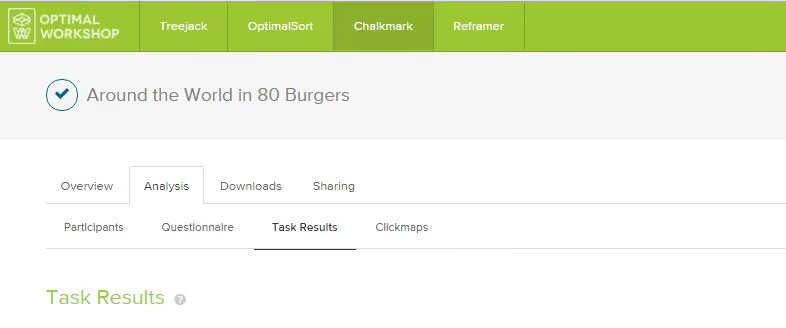
Everything you need presented under a series of tabs under ‘Analysis’ in the results section of the dashboard:
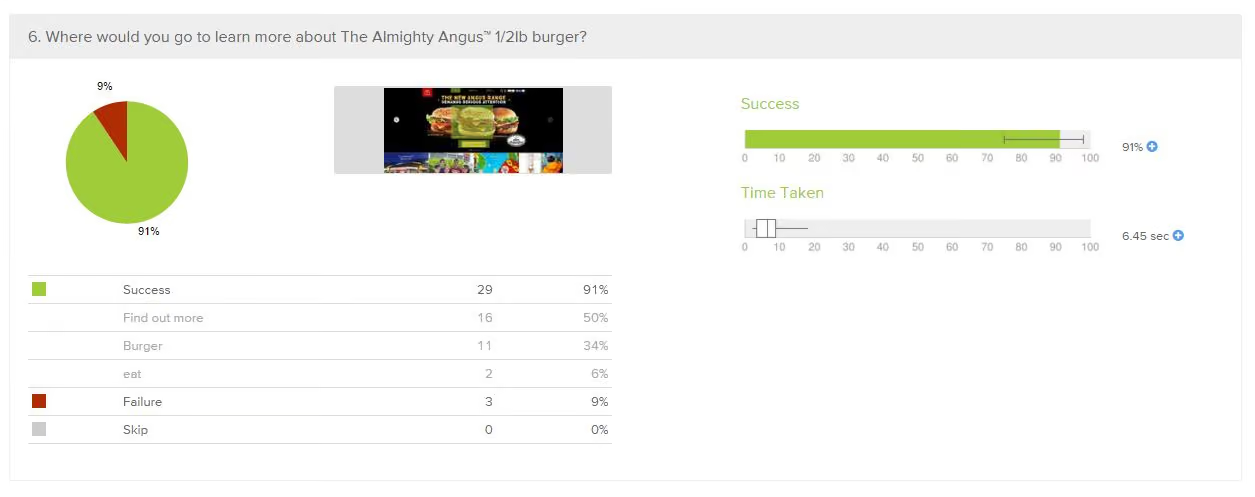
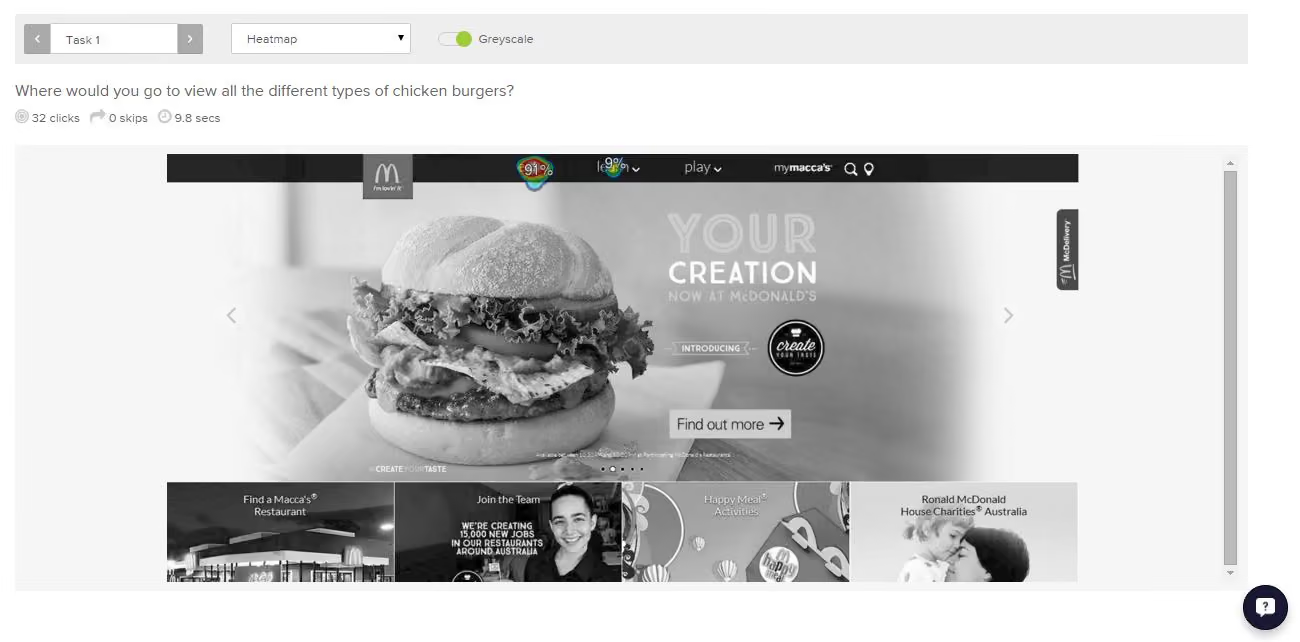
McDonald’s tested ridiculously well right across the board in the Chalkmark study. Country by country in alphabetical order, here’s what I discovered:
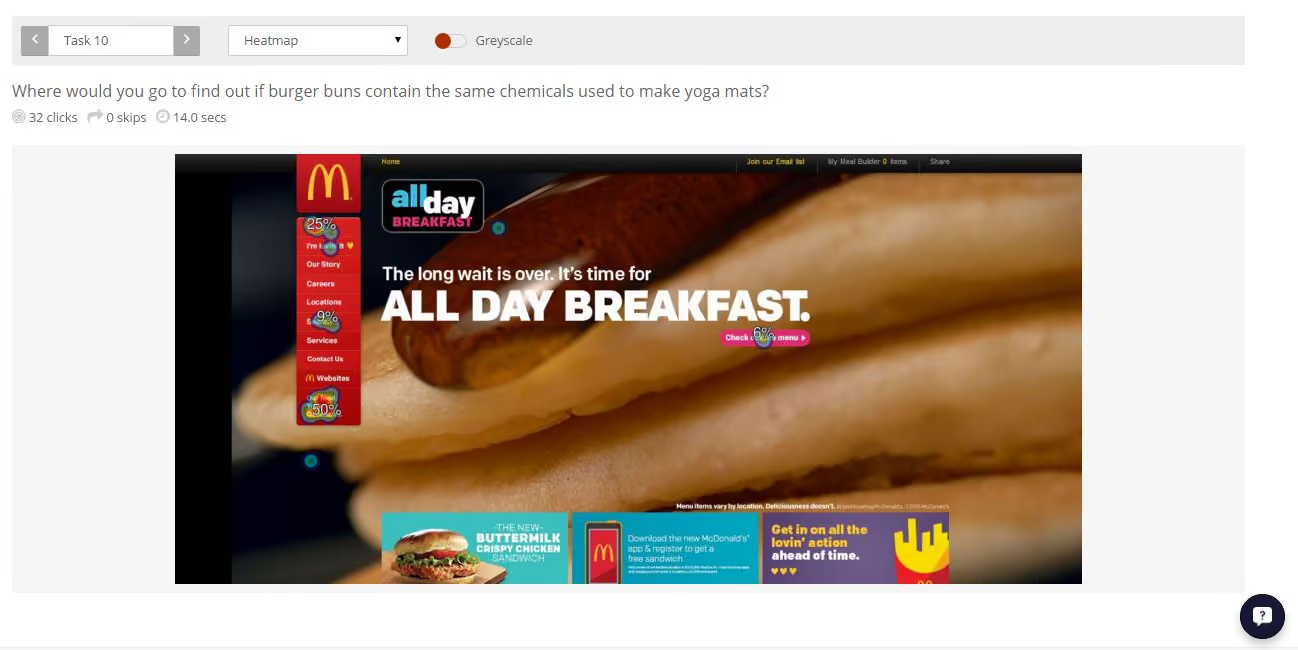
This study clearly shows that McDonald’s are kicking serious goals in the online stakes but before we call it quits and go home, let’s look at why that may be the case. Approaching this the way any UXer worth their salt on their fries would, I stuck all the screens together on a wall, broke out the Sharpies and the Tesla Amazing magnetic notes (the best invention since Post-it notes), and embarked on the hunt for patterns and similarities—and wow did I find them!
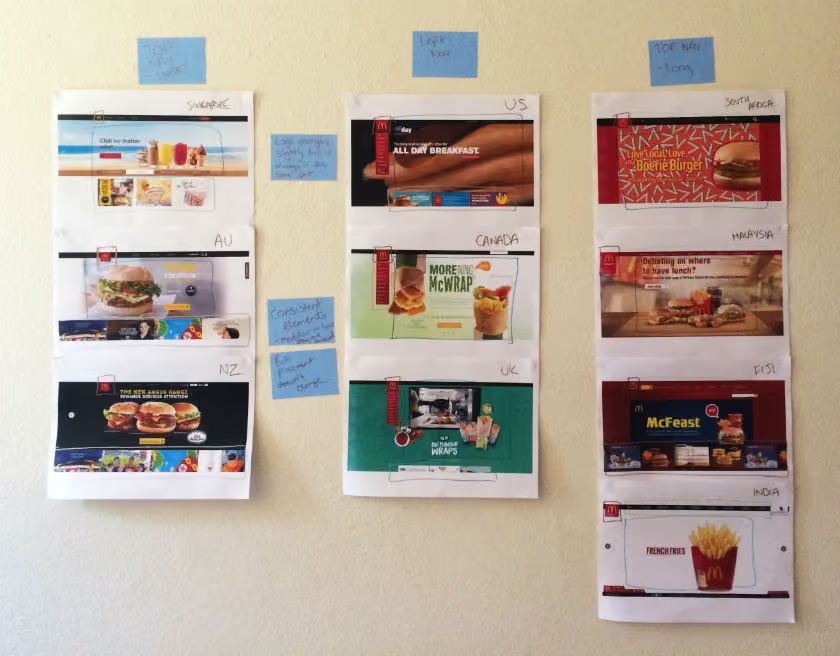
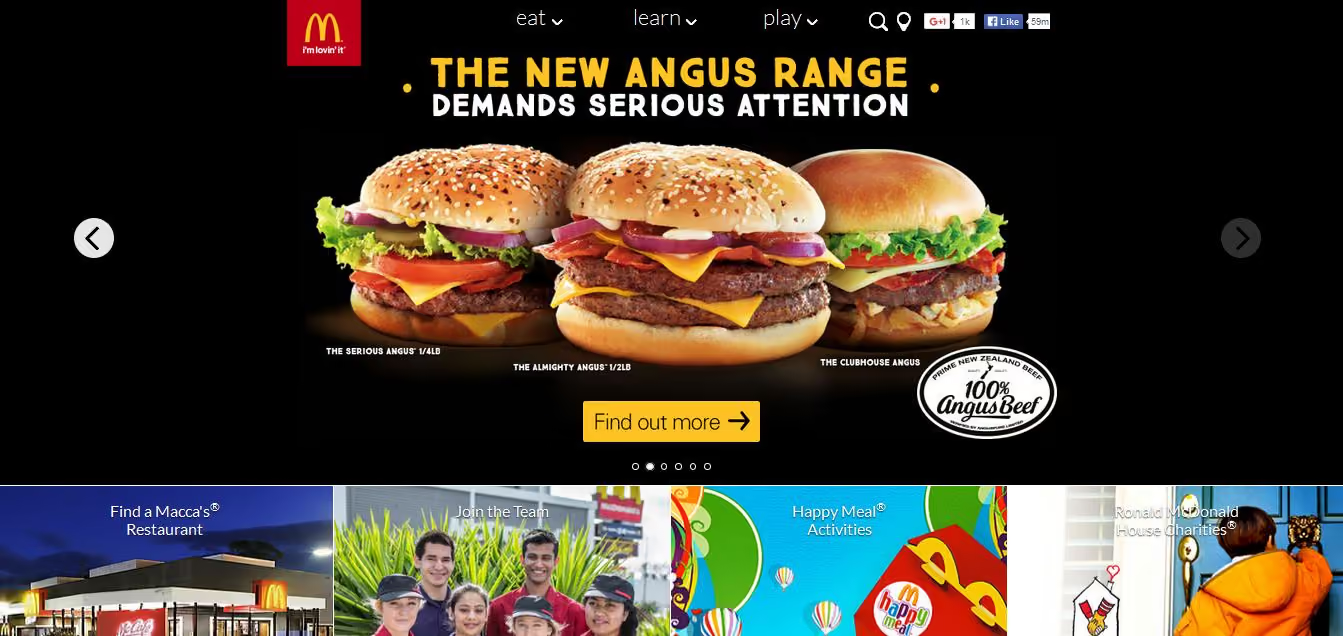
Across the ten websites, I observed just two distinct navigation patterns: navigation menus at the top and to the left. The sites with a top navigation menu could also be broken down into two further groups: those with three labels (Australia, New Zealand, and Singapore) and those with more than three labels (Fiji, India, Malaysia, and South Africa). Australia and New Zealand shared the exact same labelling of ‘eat’, ‘learn’, and ‘play’ (despite being distinct countries), whereas the others had their own unique labels but with some subject matter crossover; for example, ‘People’ versus ‘Our People’.
Canada, the UK, and the US all had the same look and feel with their left side navigation bar, but each with different labels. All three still had navigation elements at the top of the page, but the main content that the other seven countries had in their top navigation bars was located in that left sidebar.
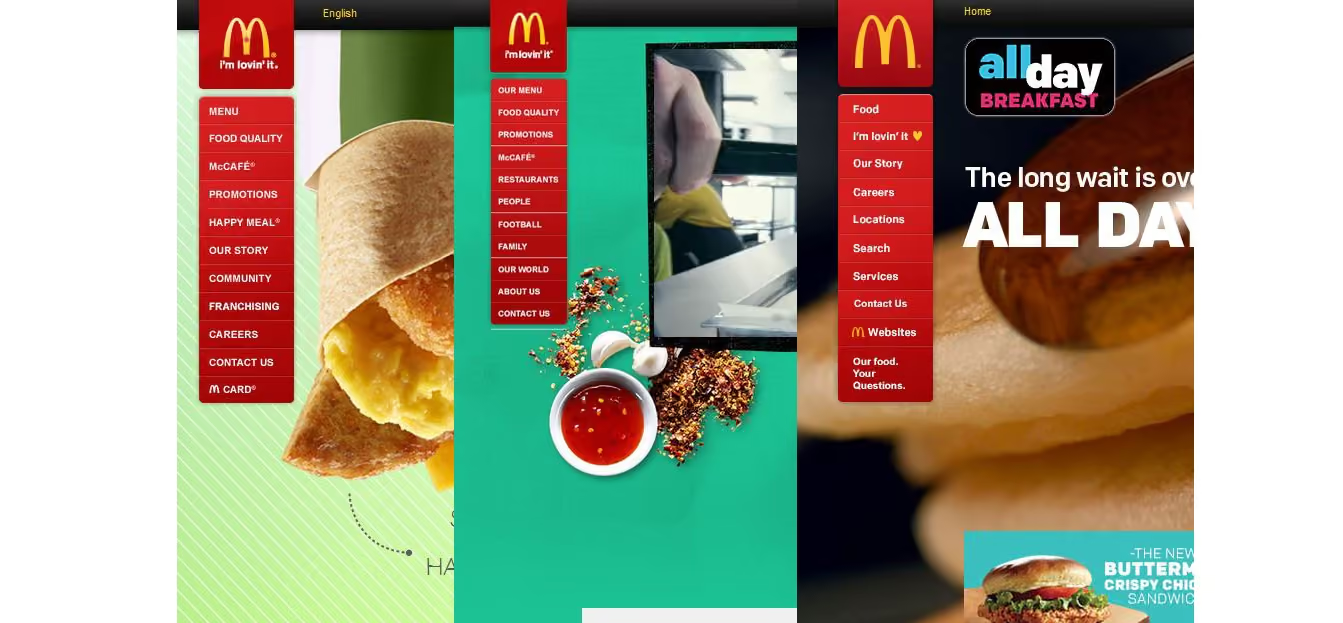
These patterns ensure that each site is tailored to its unique audience while still maintaining some consistency so that it’s clear they belong to the same entity.
If there’s one aspect that screams McDonald’s, it’s the iconic golden arches on the logo. Across the ten sites, the logo does vary slightly in size, color, and composition, but it’s always in the same place and the golden arches are always there. Logo consistently is a no-brainer, and in this case McDonald’s clearly recognizes the strengths of its logo and understands which pieces it can add or remove without losing its identity.

Navigation and logo placement weren’t the only connections one can draw from looking at my wall of McDonald’s. There were also some very interesting but subtle similarities in the page layouts. The middle of the page is always used for images and advertising content, including videos and animated GIFs. The US version featured a particularly memorable advertisement for its all-day breakfast menu, complete with animated maple syrup slowly drizzling its way over a stack of hotcakes.
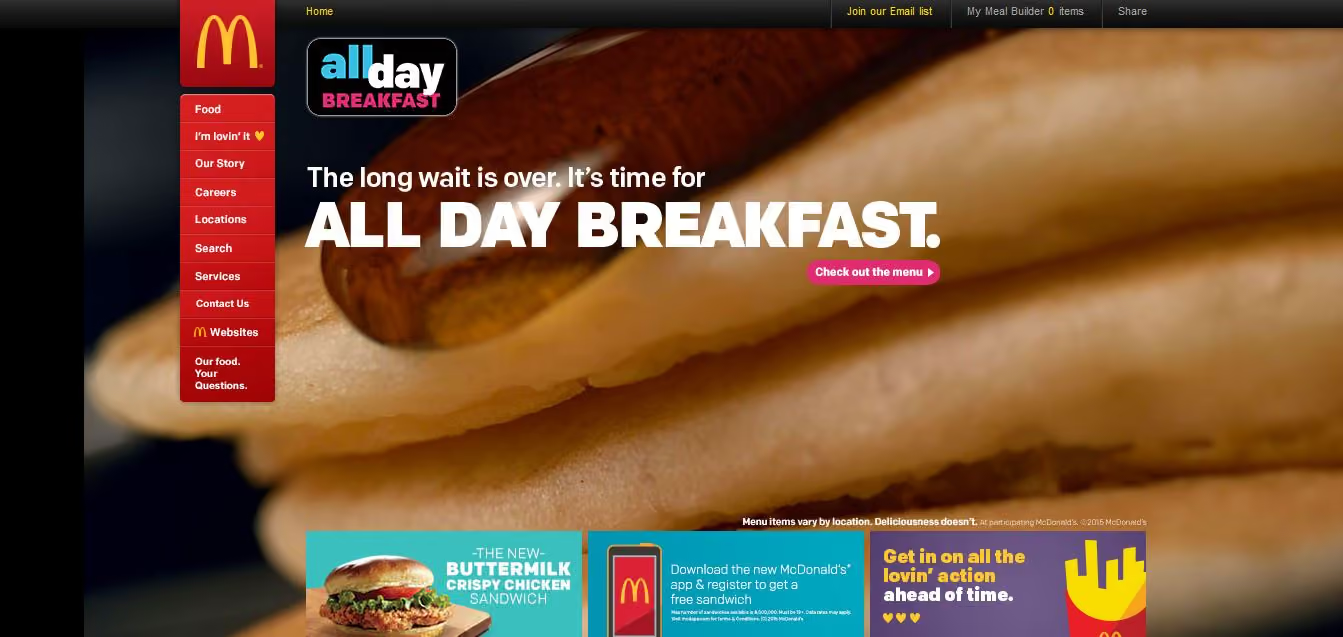
The bottom of the page is consistently used on most sites to house more advertising content in the form of tiles. The sites without the tiles left this space blank.
Looking at these results, it is quite clear that the same level of consistency and recognition between McDonald’s restaurants is also present between the different country websites. This did make me wonder what role does familiarity play in determining usability? In investigating I found a few interesting articles on the subject. This article by Colleen Roller on UXmatters discusses the connection between cognitive fluency and familiarity, and the impact this has on decision-making. Colleen writes:Because familiarity enables easy mental processing, it feels fluent. So people often equate the feeling of fluency with familiarity. That is, people often infer familiarity when a stimulus feels easy to process. If we’re familiar with an item, we don’t have to think too hard about it and this reduction in performance load can make it feel easier to use. I also found this fascinating read on Smashing Magazine by Charles Hannon that explores why Apple were able to claim ‘You already know how to use it’ when launching the iPad. It’s well worth a look!Oh and about those yoga mats … the answer is yes.
Usability testing has an important role in UX and if you’re new to it, this article gives you a solid introduction to it with practical tips, a checklist for success and a look at our remote testing tool, Treejack.
Usability testing is the process of evaluating a product or service with users prior to implementation. The goal of usability testing is to identify any usability issues before the product or service is released into the world for use. Usability testing is a research activity that results in both quantitative and qualitative insights and can be used to gauge user satisfaction.A typical usability testing session is moderated and involves a participant, a facilitator and an observer. The facilitator leads the session and the observer takes notes while the participant completes the task based scenario.
While this is common, usability testing is scalable and the possible approaches are endless giving you the flexibility to work with the resources you have available—sometimes one person performs the role of facilitator and observer!Location also varies for usability testing. For example, you might conduct your testing in a lab environment or you might talk to users in a specific environment. It also worth noting that not all usability testing sessions are moderated—more about this later.Usability testing usually occurs multiple times during the design process and can be conducted anytime you have a design you would like to test.
User research activities like a focus group for example, are conducted early in the design process to explore and gain understanding before ideas are generated. Usability testing is about testing those ideas as early and as often as possible. From a fully functioning digital prototype to a simple hand drawn wireframe on paper, nothing is too unrefined or too rough to be tested.
Before you start a round of usability testing, you need to develop a usability test plan. The usability test plan will keep you organised and is an opportunity to define roles and set clear expectations upfront. The first step in developing this is to hold a meeting with your team and stakeholders to discuss what you are going to do and how you plan to achieve it. Following this meeting, a document outlining the usability test plan as it was discussed is created and shared with the group for review. Any changes suggested by the group are then added to the final document for approval from the relevant stakeholders.
Once you have developed your test plan, you need to create a list of questions and task based scenarios for the testing session. These form the structure for your testing and provide a framework of consistency across all testing sessions in the study.The questions serve as a warm up to ease the participant into the session and can also provide insights on the user that you may not have had before. These questions can be a combination of open and closed questions and are especially useful if you are also developing personas for example. Some examples of what you might ask include:
The purpose of the task based scenarios is to simulate a real life experience as closely as possible. They provide a contextual setting for the participant to frame their approach and they need to be realistic—your participant needs an actionable starting point to work from. A good starting point for task based scenario development would be to look at a use case.It is also important that you avoid using language that provides clues to the solution or leads your participant as this can produce inaccurate results. An example of a task based scenario would be:You’re planning a Christmas vacation to New Zealand for your family of two adults and 4 children. Find the lowest priced airfares for your trip.
Treejack is a remote information architecture (IA) validation tool that shows you exactly where users are getting lost in your content. Knowing this will enable you to design a structure for your website that makes sense to users before moving on to the user interface (UI) design.Treejack works like a card sort in reverse. Imagine you have just completed a card sort with your users to determine your IA and you are now working backwards to test that thinking against real world task based scenarios. Treejack does this using a text-based version of your IA that is free from distracting visual aids such as navigation and colour allowing you to determine if your structure is usable from the ground up. A Treejack study is structured around task based scenarios and comes with the option to include pre and post study questionnaires.

As a remote testing tool, Treejack is unmoderated and provides the opportunity to reach a much larger audience because all you have to do is share a link to the study with your participants to gain insights. You also have the option of handing the task of targeted participant recruitment over to Optimal Workshop.Once launched and shared with participants, Treejack takes care of itself by recording the results as they come in giving you the freedom to multitask while you wait for the testing to finish.
The results produced by Treejack are not only detailed and comprehensive but are also quite beautiful. The story of your participants’ journey through your testing activity is told through pietrees. A pietree is a detailed pathway map that shows where your participants went at each fork in the road and their destinations. They allow you to pinpoint exactly where the issues lie and are a powerful way to communicate the results to your team and stakeholders.
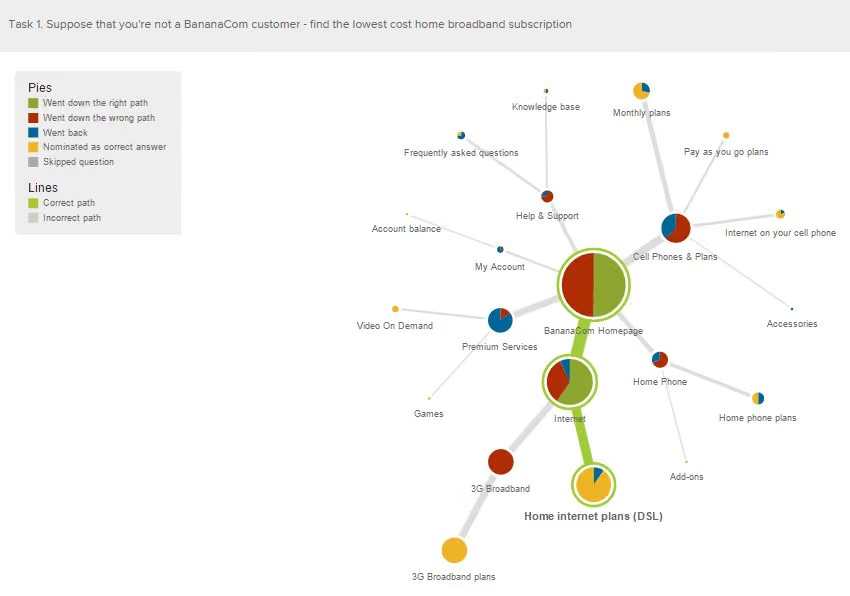
Treejack also provides insights into where your participants landed their first click and records detailed information on pathways followed by each individual participant.
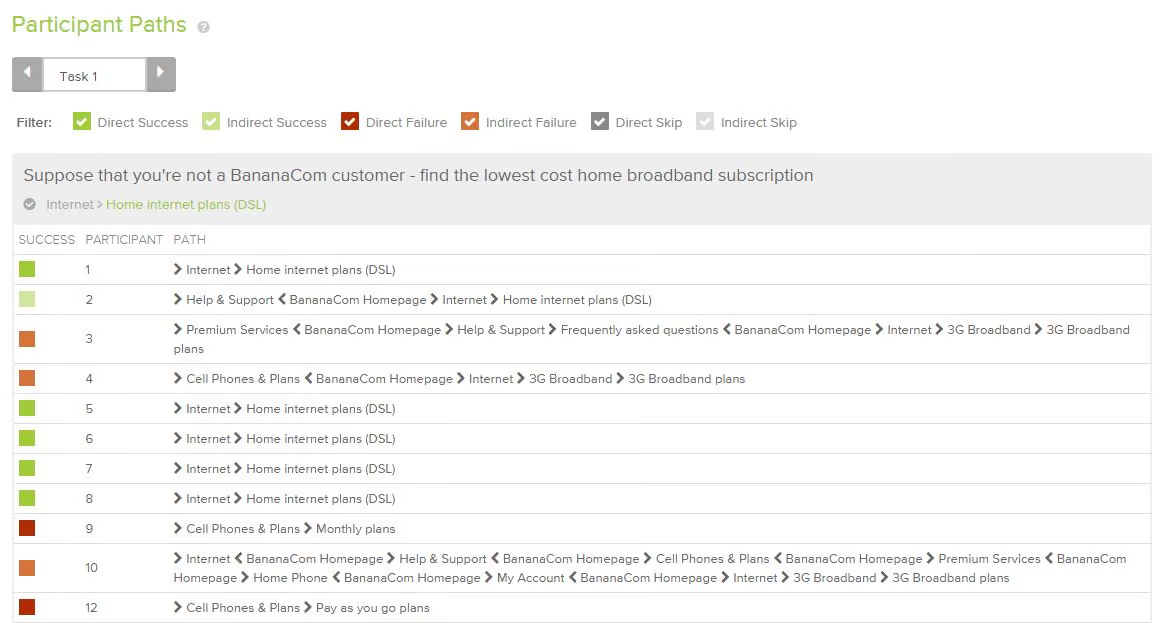
The following checklist will help ensure your usability testing process runs smoothly:
