Subscribe to OW blog for an instantly better inbox
Oops! Something went wrong while submitting the form.

There’s no doubt usability is a key element of all great user experiences, how do we apply and test usability principles for a website? This article looks at usability principles in web design, how to test it, practical tips for success and a look at our remote testing tool, Treejack.
Web usability is defined as the extent to which a website can be used to achieve a specific task or goal by a user. It refers to the quality of the user experience and can be broken down into five key usability principles:
Aside from the obvious desire to improve the experience for the people who use our websites, web usability is crucial to your website’s survival. If your website is difficult to use, people will simply go somewhere else. In the cases where users do not have the option to go somewhere else, for example government services, poor web usability can lead to serious issues. How do we know if our website is well-designed? We test it with users.
There are many ways to evaluate web usability and here are the common methods:
Tree testing is a remote usability testing tool that uses tree testing to help you discover exactly where your users are getting lost in the structure of your website. Treejack uses a simplified text-based version of your website structure removing distractions such as navigation and visual design allowing you to test the design from its most basic level.
Like any other tree test, it uses task based scenarios and includes the opportunity to ask participants pre and post study questions that can be used to gain further insights. Tree testing is a useful tool for testing those five key usability principles mentioned earlier with powerful inbuilt features that do most of the heavy lifting for you. Tree testing records and presents the following for each task:
The level of detail recorded on the pathways followed by your participants makes it easy for you to determine the ease of use, learnability, efficiency and impact of errors of your website. The time taken to complete each task and the directness of each result also provide insights in relation to those four principles and user satisfaction can be measured through the results to your pre and post survey questions.
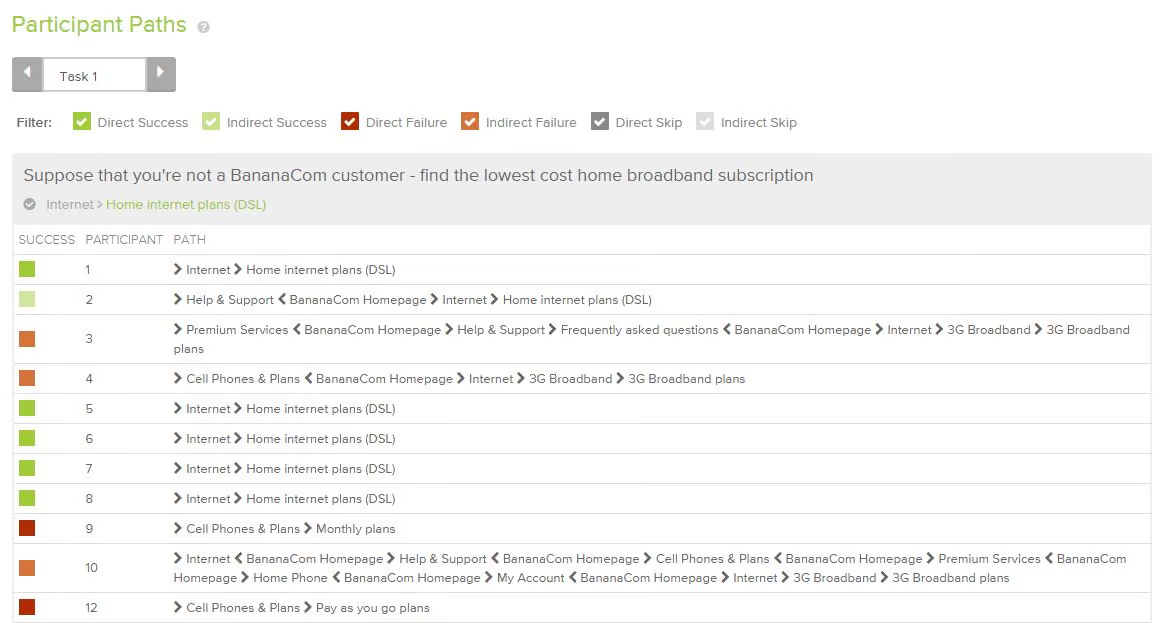
The first click data brings in the added benefits of first click testing and knowing when and where your participants gave up and moved on can help you identify any issues.Another thing tree testing does well is the way it brings all data for each task together into one comprehensive overview that tells you everything you need to know at a glance. Tree testing's task overview- all the key information in one placeIn addition to this, tree testing also generates comprehensive pathway maps called pietrees.
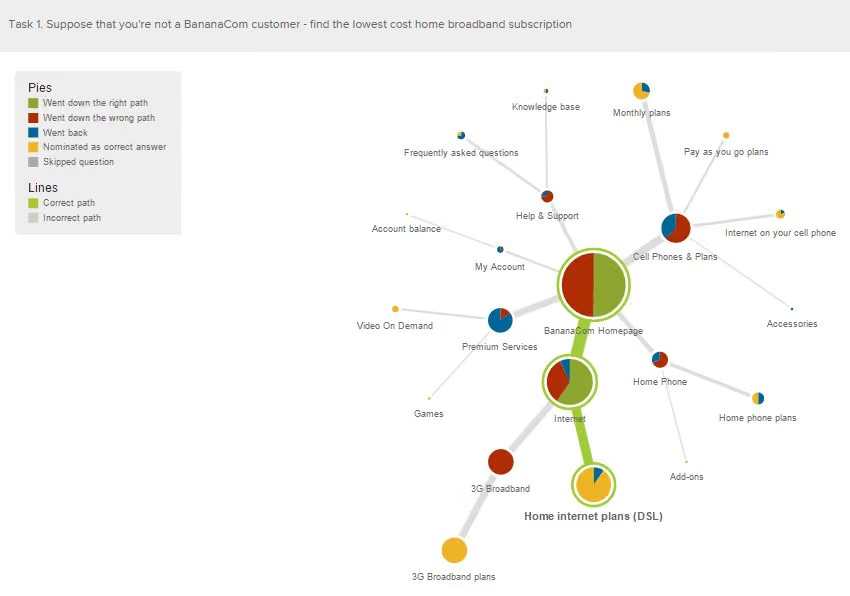
Each junction in the pathway is a piechart showing a statistical breakdown of participant activity at that point in the site structure including details about: how many were on the right track, how many were following the incorrect path and how many turned around and went back. These beautiful diagrams tell the story of your usability testing and are useful for communicating the results to your stakeholders.
Here are seven practical usability testing tips to get you started:
Usability testing has an important role in UX and if you’re new to it, this article gives you a solid introduction to it with practical tips, a checklist for success and a look at our remote testing tool, Treejack.
Usability testing is the process of evaluating a product or service with users prior to implementation. The goal of usability testing is to identify any usability issues before the product or service is released into the world for use. Usability testing is a research activity that results in both quantitative and qualitative insights and can be used to gauge user satisfaction.A typical usability testing session is moderated and involves a participant, a facilitator and an observer. The facilitator leads the session and the observer takes notes while the participant completes the task based scenario.
While this is common, usability testing is scalable and the possible approaches are endless giving you the flexibility to work with the resources you have available—sometimes one person performs the role of facilitator and observer!Location also varies for usability testing. For example, you might conduct your testing in a lab environment or you might talk to users in a specific environment. It also worth noting that not all usability testing sessions are moderated—more about this later.Usability testing usually occurs multiple times during the design process and can be conducted anytime you have a design you would like to test.
User research activities like a focus group for example, are conducted early in the design process to explore and gain understanding before ideas are generated. Usability testing is about testing those ideas as early and as often as possible. From a fully functioning digital prototype to a simple hand drawn wireframe on paper, nothing is too unrefined or too rough to be tested.
Before you start a round of usability testing, you need to develop a usability test plan. The usability test plan will keep you organised and is an opportunity to define roles and set clear expectations upfront. The first step in developing this is to hold a meeting with your team and stakeholders to discuss what you are going to do and how you plan to achieve it. Following this meeting, a document outlining the usability test plan as it was discussed is created and shared with the group for review. Any changes suggested by the group are then added to the final document for approval from the relevant stakeholders.
Once you have developed your test plan, you need to create a list of questions and task based scenarios for the testing session. These form the structure for your testing and provide a framework of consistency across all testing sessions in the study.The questions serve as a warm up to ease the participant into the session and can also provide insights on the user that you may not have had before. These questions can be a combination of open and closed questions and are especially useful if you are also developing personas for example. Some examples of what you might ask include:
The purpose of the task based scenarios is to simulate a real life experience as closely as possible. They provide a contextual setting for the participant to frame their approach and they need to be realistic—your participant needs an actionable starting point to work from. A good starting point for task based scenario development would be to look at a use case.It is also important that you avoid using language that provides clues to the solution or leads your participant as this can produce inaccurate results. An example of a task based scenario would be:You’re planning a Christmas vacation to New Zealand for your family of two adults and 4 children. Find the lowest priced airfares for your trip.
Treejack is a remote information architecture (IA) validation tool that shows you exactly where users are getting lost in your content. Knowing this will enable you to design a structure for your website that makes sense to users before moving on to the user interface (UI) design.Treejack works like a card sort in reverse. Imagine you have just completed a card sort with your users to determine your IA and you are now working backwards to test that thinking against real world task based scenarios. Treejack does this using a text-based version of your IA that is free from distracting visual aids such as navigation and colour allowing you to determine if your structure is usable from the ground up. A Treejack study is structured around task based scenarios and comes with the option to include pre and post study questionnaires.

As a remote testing tool, Treejack is unmoderated and provides the opportunity to reach a much larger audience because all you have to do is share a link to the study with your participants to gain insights. You also have the option of handing the task of targeted participant recruitment over to Optimal Workshop.Once launched and shared with participants, Treejack takes care of itself by recording the results as they come in giving you the freedom to multitask while you wait for the testing to finish.
The results produced by Treejack are not only detailed and comprehensive but are also quite beautiful. The story of your participants’ journey through your testing activity is told through pietrees. A pietree is a detailed pathway map that shows where your participants went at each fork in the road and their destinations. They allow you to pinpoint exactly where the issues lie and are a powerful way to communicate the results to your team and stakeholders.
Treejack also provides insights into where your participants landed their first click and records detailed information on pathways followed by each individual participant.
The following checklist will help ensure your usability testing process runs smoothly:
"Dear Optimal WorkshopMy question is about biasing users with the wording of questions. It seems that my co-workers and I spend too much time debating the wording of task items in usability tests or questions on surveys. Do you have any 'best practices' for wordings that evoke unbiased feedback from users?" — Dominic
Dear Dominic, Oh I feel your pain! I once sat through a two hour meeting that was dominated by a discussion on the merits of question marks!It's funny how wanting to do right by users and clients can tangle us up like fine chains in an old jewellery box. In my mind, we risk provoking bias when any aspect of our research (from question wording to test environment) influences participants away from an authentic response. So there are important things to consider outside of the wording of questions as well. I'll share my favorite tips, and then follow it up with a must-read resource or two.
The right balance of open and closed questions is essential to obtaining unbiased feedback from your users. Ask closed questions only when you want a very specific answer like 'How old are you?' or 'Are you employed?' and ask open questions when you want to gain an understanding of what they think or feel. For example, don’t ask the participant'Would you be pleased with that?' (closed question). Instead, ask 'How do you feel about that?' or even better 'How do you think that might work?' Same advice goes for surveys, and be sure to give participants enough space to respond properly — fifty characters isn’t going to cut it.
The above questions lead me to my next point — don’t use words like ‘happy’. Don’t ask if they like or dislike something. Planting emotion based words in a survey or usability test is an invite for them to tell you what they think you want to hear . No one wants to be seen as being disagreeable. If you word a question like this, chances are they will end up agreeing with the question itself, not the content or meaning behind it...does that make sense? Emotion based questions only serve to distract from the purpose of the testing — leave them at home.
No one wants to look stupid by not understanding the terms used in the question. If it’s too complicated, your user might just agree or tell you what they think you want to hear to avoid embarrassment. Another issue with jargon is that some terms may have multiple meanings which can trigger a biased reaction depending on the user’s understanding of the term. A friend of mine once participated in user testing where they were asked if what they were seeing made them feel ‘aroused’. From a psychology perspective, that means you’re awake and reacting to stimuli.
From the user's perspective? I’ll let you fill in the blanks on that one. Avoid using long, wordy sentences when asking questions or setting tasks in surveys and usability testing. I’ve seen plenty of instances of overly complicated questions that make the user tune out (trust me, you would too!). And because people don't tend to admit their attention has wandered during a task, you risk getting a response that lacks authenticity — maybe even one that aims to please (just a thought...).
Instead of asking your user what they think they would do in a given scenario, ask them to share an example of a time when they actually did do it. Try asking questions along the lines of 'Can you tell me about a time when you….?' or 'How many times in the last 12 months have you...?' Asking them to recall an experience they had allows you to gain factual insights from your survey or usability test, not hypothetical maybes that are prone to bias.
If you ask usability testing or survey questions in an order that doesn’t quite follow a logical flow, the user may think that the order holds some sort of significance which in turn may change the way they respond. It’s a good idea to ensure that the questions tell a story and follow a logical progression for example the steps in a process — don’t ask me if I’d be interested in registering for a service if you haven’t introduced the concept yet (you’d be surprised how often this happens!). For further reading on this, be sure to check out this great article from usertesting.com.
Reducing bias by asking questions the right way is really just one part of the picture. You can also reduce bias by influencing the wider aspects of the user testing process, and ensuring the participant is comfortable and relaxed.
This isn’t always possible, but it’s a good idea to try to get someone else to facilitate the usability testing on your design (and choose to observe if you like). This will prevent you from bringing your own bias into the room, and participants will be more comfortable being honest when the designer isn't asking the questions. I've seen participants visibly relax when I've told them I'm not the designer of a particular website, when it's apparent they've arrived expecting that to be the case.
The more comfortable your participants are, with both the tester and the observer, the more they can be themselves. There are labs out there with two-way mirrors to hide observers, but in all honesty the police interrogation room isn’t always the greatest look! I prefer to have the observer in the testing room, while being conscious that participants may instinctively be uncomfortable with being observed. I’ve seen observer guidelines that insist observers (in the room) stay completely silent the entire time, but I think that can be pretty creepy for participants! Here's what works best (in my humble opinion).
The facilitator leads the testing session, of course, but the observer is able to pipe up occasionally, mostly for clarification purposes, and certainly join in the welcoming, 'How's the weather?' chit chat before the session begins. In fact, when I observe usability testing, I like to be the one who collects the participant from the foyer. I’m the first person they see and it’s my job to make them feel welcome and comfortable, so when they find out I'll be observing, they know me already. Anything you can do to make the participant feel at home will increase the authenticity of their responses.
At the end of the day the reality is we’re all susceptible to bias. Despite your best efforts you’re never going to eradicate it completely, but just being aware of and understanding it goes a long way to reducing its impacts. Usability testing is, after all, something we design. I’ll leave you with this quote from Jeff Sauro's must-read article on 9 biases to watch out for in usability testing:
"We do the best we can to simulate a scenario that is as close to what users would actually do .... However, no amount of realism in the tasks, data, software or environment can change the fact that the whole thing is contrived. This doesn't mean it's not worth doing."
In 2009, Bob Bailey and Cari Wolfson published published findings that changed how we approach first click testing and usability testing. They analyzed 12 scenario-based user tests and found that if someone gets their first click right, they're about twice as likely to complete their task successfully. This finding was so compelling that we built First Click Testing (formerly Chalkmark) specifically to help teams test this. But we'd never actually validated their research using our own data, until now.
Turns out, we're sitting on one of the world's largest databases of tree testing results. So we analyzed millions of task responses to see if the "first click predicts success" hypothesis holds up.
It does. Convincingly.
Users who get their first click correct are nearly three times more likely to complete their task successfully (70% vs 24% success rate).
Here's how we validated the original study, what our data shows, and why first clicks matter more than you might think.
Bob and Cari analyzed data from twelve usability studies on websites and products with varying amounts and types of content, a range of subject matter complexity, and distinct user interfaces. They found that people were about twice as likely to complete a task successfully if they got their first click right, than if they got it wrong:
If the first click was correct, the chances of getting the entire scenario correct was 87% if the first click was incorrect, the chances of eventually getting the scenario correct was only 46%.
We analyzed millions of tree testing responses in our database. We've found that people who get the first click correct are almost three times as likely to complete a task successfully:
If the first click was correct, the chances of getting the entire scenario correct was 70% if the first click was incorrect, the chances of eventually getting the scenario correct was 24%
To give you another perspective on the same data, here's the inverse:
If the first click was correct, the chances of getting the entire scenario incorrect was 30% if the first click was incorrect, the chances of getting the whole scenario incorrect was 76%
Bob and Cari proved the usefulness of the methodology by linking two key metrics in scenario-based usability studies: first clicks and task success. First Click Testing doesn't measure task success — it's up to the researcher to determine as they're setting up the study what constitutes 'success', and then to interpret the results accordingly. Tree Testing (formerly Treejack) does measure task success — and first clicks.
In a tree test, participants are asked to complete a task by clicking though a text-only version of a website hierarchy, and then clicking 'I'd find it here' when they've chosen an answer. Each task in a tree test has a pre-determined correct answer — as was the case in Bob and Cari's usability studies — and every click is recorded, so we can see participant paths in detail.
Thus, every single time a person completes an individual tree testing task, we record both their first click and whether they are successful or not. When we came to test the 'correct first click leads to task success' hypothesis, we could therefore mine data from millions of task.
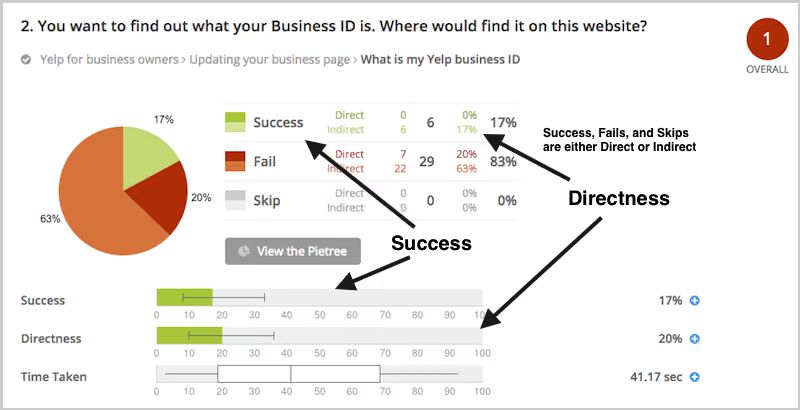
To illustrate this, have a look at the results for one task. The overall Task result, you see a score for success and directness, and a breakdown of whether each Success, Fail, or Skip was direct (they went straight to an answer), or indirect (they went back up the tree before they selected an answer):
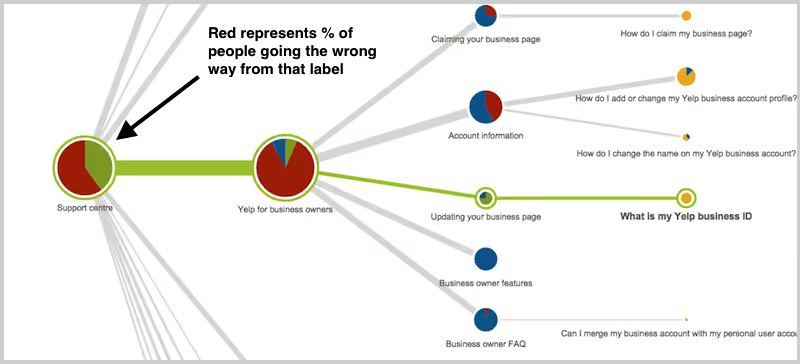
In the pie tree for the same task, you can look in more detail at how many people went the wrong way from a label (each label representing one page of your website):
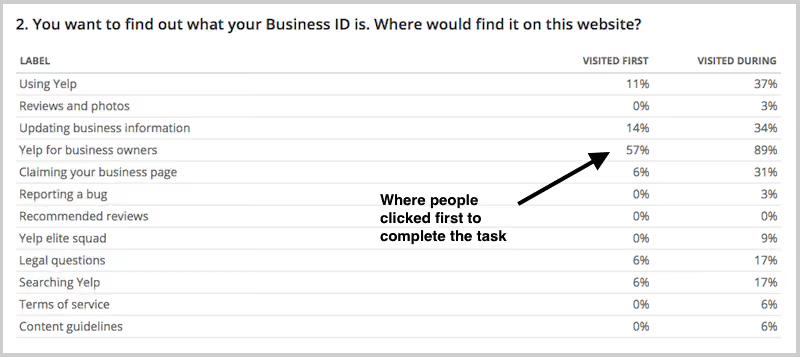
In the First Click tab, you get a percentage breakdown of which label people clicked first to complete the task:
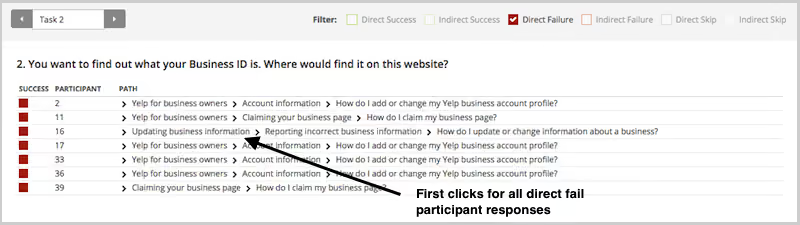
And in the Paths tab, you can view individual participant paths in detail (including first clicks), and can filter the table by direct and indirect success, fails, and skips (this table is only displaying direct success and direct fail paths):
First click analysis is one of the most predictive metrics in usability testing. Whether you're testing wireframes, landing pages, or information architecture, measuring first click success gives you early insight into whether your design will work.
This analysis reinforces something we already knew: first clicks matter. It is worth your time to get that first impression right. You have plenty of options for measuring the link between first clicks and task success in your scenario-based usability tests. From simply noting where your participants go during observations, to gathering quantitative first click data via online tools, you'll win either way. And if you want quantitative first click data, Optimal has you covered. First Click Testing works for wireframes and landing pages, while Tree Testing validates your information architecture.
To finish, here are a few invaluable insights from other researchers on getting the most from first click testing:
About this study
This analysis was conducted in 2015 using millions of task responses from Optimal’s First Click and Tree Testing tools. While the dataset predates recent UI trends, the underlying behavioral principle, that a correct first click strongly predicts task success, remains consistent with modern usability research.

