
April 13, 2015
3 min

First click testing data: Correct first click lead to 3X higher task success

In 2009, Bob Bailey and Cari Wolfson published published findings that changed how we approach first click testing and usability testing. They analyzed 12 scenario-based user tests and found that if someone gets their first click right, they're about twice as likely to complete their task successfully. This finding was so compelling that we built First Click Testing (formerly Chalkmark) specifically to help teams test this.  But we'd never actually validated their research using our own data, until now.

Turns out, we're sitting on one of the world's largest databases of tree testing results. So we analyzed millions of task responses to see if the "first click predicts success" hypothesis holds up.

It does. Convincingly.

Users who get their first click correct are nearly three times more likely to complete their task successfully (70% vs 24% success rate).

Here's how we validated the original study, what our data shows, and why first clicks matter more than you might think.

Original first click testing study: 87% task success rate

Bob and Cari analyzed data from twelve usability studies on websites and products with varying amounts and types of content, a range of subject matter complexity, and distinct user interfaces. They found that people were about twice as likely to complete a task successfully if they got their first click right, than if they got it wrong:

If the first click was correct, the chances of getting the entire scenario correct was 87% if the first click was incorrect, the chances of eventually getting the scenario correct was only 46%.

Our Tree Testing data: First clicks predict 70% task success rate

We analyzed millions of tree testing responses in our database. We've found that people who get the first click correct are almost three times as likely to complete a task successfully:

If the first click was correct, the chances of getting the entire scenario correct was 70% if the first click was incorrect, the chances of eventually getting the scenario correct was 24%

To give you another perspective on the same data, here's the inverse:

If the first click was correct, the chances of getting the entire scenario incorrect was 30% if the first click was incorrect, the chances of getting the whole scenario incorrect was 76%

How Tree Testing measures first click success and task completion

Bob and Cari proved the usefulness of the methodology by linking two key metrics in scenario-based usability studies: first clicks and task success. First Click Testing doesn't measure task success — it's up to the researcher to determine as they're setting up the study what constitutes 'success', and then to interpret the results accordingly. Tree Testing (formerly Treejack) does measure task success — and first clicks.

In a tree test, participants are asked to complete a task by clicking though a text-only version of a website hierarchy, and then clicking 'I'd find it here' when they've chosen an answer. Each task in a tree test has a pre-determined correct answer — as was the case in Bob and Cari's usability studies — and every click is recorded, so we can see participant paths in detail.

Thus, every single time a person completes an individual tree testing task, we record both their first click and whether they are successful or not. When we came to test the 'correct first click leads to task success' hypothesis, we could therefore mine data from millions of task.

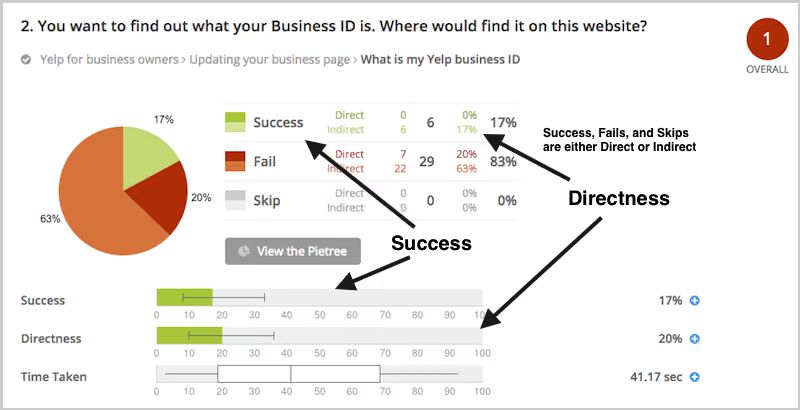
To illustrate this, have a look at the results for one task. The overall Task result, you see a score for success and directness, and a breakdown of whether each Success, Fail, or Skip was direct (they went straight to an answer), or indirect (they went back up the tree before they selected an answer):

Tree testing task results showing success and directness scores

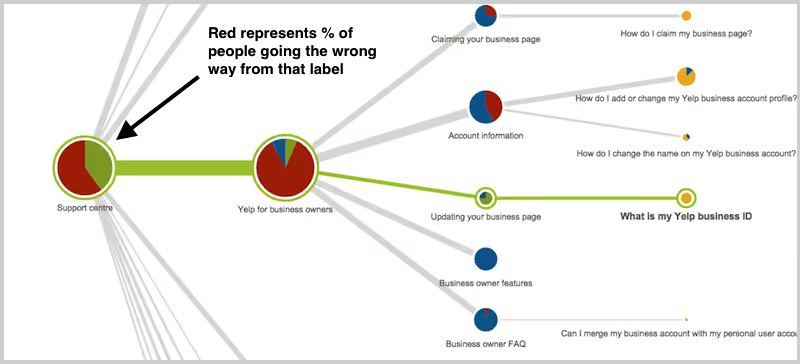
In the pie tree for the same task, you can look in more detail at how many people went the wrong way from a label (each label representing one page of your website):

Pie tree visualization showing first click paths in tree testing

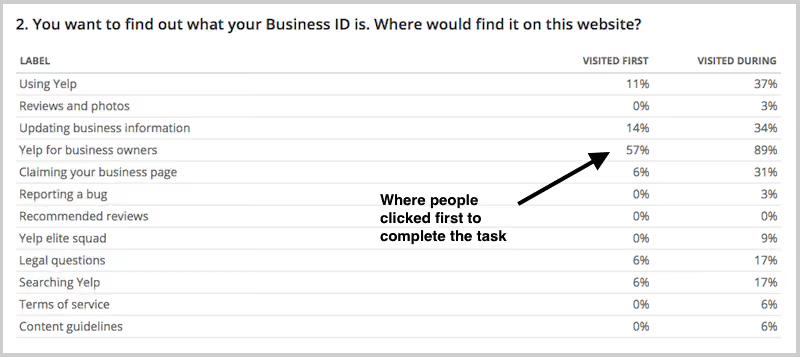
In the First Click tab, you get a percentage breakdown of which label people clicked first to complete the task:

First click data breakdown by label in tree testing

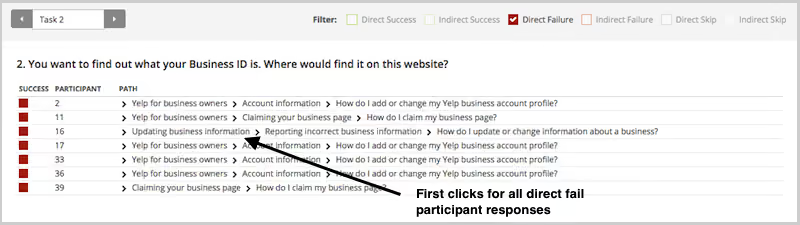
And in the Paths tab, you can view individual participant paths in detail (including first clicks), and can filter the table by direct and indirect success, fails, and skips (this table is only displaying direct success and direct fail paths):

Participant path analysis showing direct success and fail rates

How to run first click tests: Best practices for usability testing

First click analysis is one of the most predictive metrics in usability testing. Whether you're testing wireframes, landing pages, or information architecture, measuring first click success gives you early insight into whether your design will work.

This analysis reinforces something we already knew: first clicks matterIt is worth your time to get that first impression right. You have plenty of options for measuring the link between first clicks and task success in your scenario-based usability tests. From simply noting where your participants go during observations, to gathering quantitative first click data via online tools, you'll win either way. And if you want quantitative first click data, Optimal has you covered. First Click Testing works for wireframes and landing pages, while Tree Testing validates your information architecture.

To finish, here are a few invaluable insights from other researchers on getting the most from first click testing:

About this study

This analysis was conducted in 2015 using millions of task responses from Optimal’s First Click and Tree Testing tools. While the dataset predates recent UI trends, the underlying behavioral principle, that a correct first click strongly predicts task success, remains consistent with modern usability research.

Share this article
Author
Optimal
Workshop

Related articles

View all blog articles
Learn more
1 min read

Collating your user testing notes

It’s been a long day. Scratch that - it’s been a long week! Admit it. You loved every second of it.

Twelve hour days, the mad scramble to get the prototype ready in time, the stakeholders poking their heads in occasionally, dealing with no-show participants and the excitement around the opportunity to speak to real life human beings about product or service XYZ. Your mind is exhausted but you are buzzing with ideas and processing what you just saw. You find yourself sitting in your war room with several pages of handwritten notes and with your fellow observers you start popping open individually wrapped lollies leftover from the day’s sessions. Someone starts a conversation around what their favourite flavour is and then the real fun begins. Sound familiar? Welcome to the post user testing debrief meeting.

How do you turn those scribbled notes and everything rushing through your mind into a meaningful picture of the user experience you just witnessed? And then when you have that picture, what do you do next? Pull up a bean bag, grab another handful of those lollies we feed our participants and get comfy because I’m going to share my idiot-proof, step by step guide for turning your user testing notes into something useful.

Let’s talk

Get the ball rolling by holding a post session debrief meeting while it’s all still fresh your collective minds. This can be done as one meeting at the end of the day’s testing or you could have multiple quick debriefs in between testing sessions. Choose whichever options works best for you but keep in mind this needs to be done at least once and before everyone goes home and forgets everything. Get all observers and facilitators together in any meeting space that has a wall like surface that you can stick post its to - you can even use a window! And make sure you use real post its - the fake ones fall off!

Mark your findings (Tagging)

Before you put sharpie to post it, it’s essential to agree as a group on how you will tag your observations. Tagging the observations now will make the analysis work much easier and help you to spot patterns and themes. Colour coding the post its is by far the simplest and most effective option and how you assign the colours is entirely up to you. You could have a different colour for each participant or testing session, you could have different colours to denote participant attributes that are relevant to your study eg senior staff and junior staff, or you could use different colours to denote specific testing scenarios that were used. There’s many ways you could carve this up and there’s no right or wrong way. Just choose the option that suits you and your team best because you’re the ones who have to look at it and understand it. If you only have one colour post it eg yellow, you could colour code the pen colours you use to write on the notes or include some kind of symbol to help you track them.

Processing the paper (Collating)

That pile of paper is not going to process itself! Your next job as a group is to work through the task of transposing your observations to post it notes. For now, just stick them to the wall in any old way that suits you. If you’re the organising type, you could group them by screen or testing scenario. The positioning will all change further down the process, so at this stage it’s important to just keep it simple. For issues that occur repeatedly across sessions, just write them down on their own post its- doubles will be useful to see further down the track.In addition to  holding a debrief meetings, you also need to round up everything that was used to capture the testing session/s. And I mean EVERYTHING.

Handwritten notes, typed notes, video footage and any audio recordings need to be reviewed just in case something was missed. Any handwritten notes should be typed to assist you with the completion of the report. Don’t feel that you have to wait until the testing is completed before you start typing up your notes because you will find they pile up very quickly and if your handwriting is anything like mine…. Well let’s just say my short term memory is often required to pick up the slack and even that has it’s limits. Type them up in between sessions where possible and save each session as it’s own document. I’ll often use the testing questions or scenario based tasks to structure my typed notes and I find that makes it really easy to refer back to.Now that you’ve processed all the observations, it’s time to start sorting your observations to surface behavioural patterns and make sense of it all.

Spotting patterns and themes through affinity diagramming

Affinity diagramming is a fantastic tool for making sense of user testing observations. In fact it’s just about my favourite way to make sense of any large mass of information. It’s an engaging and visual process that grows and evolves like a living creature taking on a life of its own. It also builds on the work you’ve just done which is a real plus!By now, testing is over and all of your observations should all be stuck to a wall somewhere. Get everyone together again as a group and step back and take it all in. Just let it sit with you for a moment before you dive in. Just let it breathe. Have you done that? Ok now as individuals working at the same time, start by grouping things that you think belong together. It’s important to just focus on the content of the labels and try to ignore the colour coded tagging at this stage, so if session one was blue post its don’t group all the blue ones together just because they’re all blue! If you get stuck, try grouping by topic or create two groups eg issues and wins and then chunk the information up from there.

You will find that the groups will change several times over the course of the process  and that’s ok because that’s what it needs to do.While you do this, everyone else will be doing the same thing - grouping things that make sense to them.  Trust me, it’s nowhere near as chaotic as it sounds! You may start working as individuals but it won’t be long before curiosity kicks in and the room is buzzing with naturally occurring conversation.Make sure you take a step back regularly and observe what everyone else is doing and don’t be afraid to ask questions and move other people’s post its around- no one owns it! No matter how silly something may seem just put it there because it can be moved again. Have a look at where your tagged observations have ended up. Are there clusters of colour? Or is it more spread out? What that means will depend largely on how you decided to tag your findings. For example if you assigned each testing session its own colour and you have groups with lot’s of different colours in them you’ll find that the same issue was experienced by multiple people.Next, start looking at each group and see if you can break them down into smaller groups and at the same time consider the overall picture for bigger groups eg can the wall be split into say three high level groups.Remember, you can still change your groups at anytime.

Thinning the herd (Merging)

Once you and your team are happy with the groups, it’s time to start condensing the size of this beast. Look for doubled up findings and stack those post its on top of each other to cut the groups down- just make sure you can still see how many there were. The point of merging is to condense without losing anything so don’t remove something just because it only happened once. That one issue could be incredibly serious. Continue to evaluate and discuss as a group until you are happy. By now clear and distinct groups of your observations should have emerged and at a glance you should be able to identify the key findings from your study.

A catastrophe or a cosmetic flaw? (Scoring)

Scoring relates to how serious the issues are and how bad the consequences of not fixing them are. There are arguments for and against the use of scoring and it’s important to recognise that it is just one way to communicate your findings.I personally rarely use scoring systems. It’s not really something I think about when I’m analysing the observations. I rarely rank one problem or finding over another. Why? Because all data is good data and it all adds to the overall picture.I’ve always been a huge advocate for presenting the whole story and I will never diminish the significance of a finding by boosting another. That said, I do understand the perspective of those who place metrics around their findings. Other designers have told me they feel that it allows them to quantify the seriousness of each issue and help their client/designer/boss make decisions about what to do next.We’ve all got our own way of doing things, so I’ll leave it up to you to choose whether or not you score the issues. If you decide to score your findings there are a number of scoring systems you can use and if I had to choose one, I quite like Jakob Nielsen’s methodology for the simple way it takes into consideration multiple factors. Ultimately you should choose the one that suits your working style best.

Let’s say you did decide to score the issues. Start by writing down each key finding on it’s own post it and move to a clean wall/ window. Leave your affinity diagram where it is. Divide the new wall in half: one side for wins eg findings that indicate things that tested well and the other for issues. You don’t need to score the wins but you do need to acknowledge what went well because knowing what you’re doing well is just as important as knowing where you need to improve. As a group (wow you must be getting sick of each other! Make sure you go out for air from time to time!) score the issues based on your chosen methodology.Once you have completed this entire process you will have everything you need to write a kick ass report.

What could possibly go wrong? (and how to deal with it)

No process is perfect and there are a few potential dramas to be aware of:

People jumping into solution mode too early

In the middle of the debrief meeting, someone has an epiphany. Shouts of We should move the help button! or We should make the yellow button smaller! ring out and the meeting goes off the rails.I’m not going to point fingers and blame any particular role because we’ve all done it, but it’s important to recognise that’s not why we’re sitting here. The debrief meeting is about digesting and sharing what you and the other observers just saw. Observing and facilitating user testing is a privilege. It’s a precious thing that deserves respect and if you jump into solution mode too soon, you may miss something. Keep the conversation on track by appointing a team member to facilitate the debrief meeting.

Storage problems

Handwritten notes taken by multiple observers over several days of testing adds up to an enormous pile of paper. Not only is it a ridiculous waste of paper but they have to be securely stored for three months following the release of the report. It’s not pretty. Typing them up can solve that issue but it comes with it’s own set of storage related hurdles. Just like the handwritten notes, they need to be stored securely. They don’t belong on SharePoint or in the share drive or any other shared storage environment that can be accessed by people outside your observer group. User testing notes are confidential and are not light reading for anyone and everyone no matter how much they complain. Store any typed notes in a limited access storage solution that only the observers have access to and if anyone who shouldn’t be reading them asks, tell them that they are confidential and the integrity of the research must be preserved and respected.

Time issues

Before the storage dramas begin, you have to actually pick through the mountain of paper. Not to mention the video footage, and the audio and you have to chase up that sneaky observer who disappeared when the clock struck 5. All of this takes up a lot of time. Another time related issue comes in the form of too much time passing in between testing sessions and debrief meetings. The best way to deal with both of these issues  is to be super organised and hold multiple smaller debriefs in between sessions where possible. As a group, work out your time commitments before testing begins and have a clear plan in place for when you will meet.  This will prevent everything piling up and overwhelming you at the end.

Disagreements over scoring

At the end of that long day/week we’re all tired and discussions around scoring the issues can get a little heated. One person’s showstopper may be another person’s mild issue. Many of the ranking systems use words as well as numbers to measure the level of severity and it’s easy to get caught up in the meaning of the words and ultimately get sidetracked from the task at hand. Be proactive and as a group set ground rules upfront for all discussions. Determine how long you’ll spend discussing an issue and what you will do in the event that agreement cannot be reached. People want to feel heard and they want to feel like their contributions are valued. Given that we are talking about an iterative process, sometimes it’s best just to write everything down to keep people happy and merge and cull the list in the next iteration. By then they’ve likely had time to reevaluate their own thinking.

And finally...

We all have our own ways of making sense of our user testing observations and there really is no right or wrong way to go about it. The one thing I would like to reiterate is the importance of collaboration and teamwork. You cannot do this alone, so please don’t try. If you’re a UX team of one, you probably already have a trusted person that you bounce ideas off. They would be a fantastic person to do this with. How do you approach this process? What sort of challenges have you faced? Let me know in the comments below.

Learn more
1 min read

Web usability guide

There’s no doubt usability is a key element of all great user experiences, how do we apply and test usability principles for a website? This article looks at usability principles in web design, how to test it, practical tips for success and a look at our remote testing tool, Treejack.

A definition of usability for websites 🧐📖

Web usability is defined as the extent to which a website can be used to achieve a specific task or goal by a user. It refers to the quality of the user experience and can be broken down into five key usability principles:

  • Ease of use: How easy is the website to use? How easily are users able to complete their goals and tasks? How much effort is required from the user?
  • Learnability: How easily are users able to complete their goals and tasks the first time they use the website?
  • Efficiency: How quickly can users perform tasks while using your website?
  • User satisfaction: How satisfied are users with the experience the website provides? Is the experience a pleasant one?
  • Impact of errors: Are users making errors when using the website and if so, how serious are the consequences of those errors? Is the design forgiving enough make it easy for errors to be corrected?

Why is web usability important? 👀

Aside from the obvious desire to improve the experience for the people who use our websites, web usability is crucial to your website’s survival. If your website is difficult to use, people will simply go somewhere else. In the cases where users do not have the option to go somewhere else, for example government services, poor web usability can lead to serious issues. How do we know if our website is well-designed? We test it with users.

Testing usability: What are the common methods? 🖊️📖✏️📚

There are many ways to evaluate web usability and here are the common methods:

  • Moderated usability testing: Moderated usability testing refers to testing that is conducted in-person with a participant. You might do this in a specialised usability testing lab or perhaps in the user’s contextual environment such as their home or place of business. This method allows you to test just about anything from a low fidelity paper prototype all the way up to an interactive high fidelity prototype that closely resembles the end product.
  • Moderated remote usability testing: Moderated remote usability testing is very similar to the previous method but with one key difference- the facilitator and the participant/s are not in the same location. The session is still a moderated two-way conversation just over skype or via a webinar platform instead of in person. This method is particularly useful if you are short on time or unable to travel to where your users are located, e.g. overseas.
  • Unmoderated remote usability testing: As the name suggests, unmoderated remote usability testing is conducted without a facilitator present. This is usually done online and provides the flexibility for your participants to complete the activity at a time that suits them. There are several remote testing tools available ( including our suite of tools ) and once a study is launched these tools take care of themselves collating the results for you and surfacing key findings using powerful visual aids.
  • Guerilla testing: Guerilla testing is a powerful, quick and low cost way of obtaining user feedback on the usability of your website. Usually conducted in public spaces with large amounts of foot traffic, guerilla testing gets its name from its ‘in the wild’ nature. It is a scaled back usability testing method that usually only involves a few minutes for each test but allows you to reach large amounts of people and has very few costs associated with it.
  • Heuristic evaluation: A heuristic evaluation is conducted by usability experts to assess a website against recognized usability standards and rules of thumb (heuristics). This method evaluates usability without involving the user and works best when done in conjunction with other usability testing methods eg Moderated usability testing to ensure the voice of the user is heard during the design process.
  • Tree testing: Also known as a reverse card sort, tree testing is used to evaluate the findability of information on a website. This method allows you to work backwards through your information architecture and test that thinking against real world scenarios with users.
  • First click testing: Research has found that 87% of users who start out on the right path from the very first click will be able to successfully complete their task while less than half ( 46%) who start down the wrong path will succeed. First click testing is used to evaluate how well a website is supporting users and also provides insights into design elements that are being noticed and those that are being ignored.
  • Hallway testing: Hallway testing is a usability testing method used to gain insights from anyone nearby who is unfamiliar with your project. These might be your friends, family or the people who work in another department down the hall from you. Similar to guerilla testing but less ‘wild’. This method works best at picking up issues early in the design process before moving on to testing a more refined product with your intended audience.

Online usability testing tool: Tree testing 🌲🌳🌿

Tree testing is a remote usability testing tool that uses tree testing to help you discover exactly where your users are getting lost in the structure of your website. Treejack uses a simplified text-based version of your website structure removing distractions such as navigation and visual design allowing you to test the design from its most basic level.

Like any other tree test, it uses task based scenarios and includes the opportunity to ask participants pre and post study questions that can be used to gain further insights. Tree testing is a useful tool for testing those five key usability principles mentioned earlier with powerful inbuilt features that do most of the heavy lifting for you. Tree testing records and presents the following for each task:

  • complete details of the pathways followed by each participant
  • the time taken to complete each task
  • first click data
  • the directness of each result
  • visibility on when and where participants skipped a task

Participant paths data in our tree testing tool 🛣️

The level of detail recorded on the pathways followed by your participants makes it easy for you to determine the ease of use, learnability, efficiency and impact of errors of your website. The time taken to complete each task and the directness of each result also provide insights in relation to those four principles and user satisfaction can be measured through the results to your pre and post survey questions.

The first click data brings in the added benefits of first click testing and knowing when and where your participants gave up and moved on can help you identify any issues.Another thing tree testing does well is the way it brings all data for each task together into one comprehensive overview that tells you everything you need to know at a glance. Tree testing's task overview- all the key information in one placeIn addition to this, tree testing also generates comprehensive pathway maps called pietrees.

Each junction in the pathway is a piechart showing a statistical breakdown of participant activity at that point in the site structure including details about: how many were on the right track, how many were following the incorrect path and how many turned around and went back. These beautiful diagrams tell the story of your usability testing and are useful for communicating the results to your stakeholders.

Usability testing tips 🪄

Here are seven practical usability testing tips to get you started:

  • Test early and often: Usability testing isn’t something that only happens at the end of the project. Start your testing as soon as possible and iterate your design based on findings. There are so many different ways to test an idea with users and you have the flexibility to scale it back to suit your needs.
  • Try testing with paper prototypes: Just like there are many usability testing methods, there are also several ways to present your designs to your participant during testing. Fully functioning high fidelity prototypes are amazing but they’re not always feasible (especially if you followed the previous tip of test early and often). Paper prototypes work well for usability testing because your participant can draw on them and their own ideas- they’re also more likely to feel comfortable providing feedback on work that is less resolved! You could also use paper prototypes to form the basis for collaborative design sessions with your users by showing them your idea and asking them to redesign or design the next page/screen.
  • Run a benchmarking round of testing: Test the current state of the design to understand how your users feel about it. This is especially useful if you are planning to redesign an existing product or service and will save you time in the problem identification stages.
  • Bring stakeholders and clients into the testing process: Hearing how a product or service is performing direct from a user can be quite a powerful experience for a stakeholder or client. If you are running your usability testing in a lab with an observation room, invite them to attend as observers and also include them in your post session debriefs. They’ll gain feedback straight from the source and you’ll gain an extra pair of eyes and ears in the observation room. If you’re not using a lab or doing a different type of testing, try to find ways to include them as observers in some way. Also, don’t forget to remind them that as observers they will need to stay silent for the entire session beyond introducing themselves so as not to influence the participant - unless you’ve allocated time for questions.
  • Make the most of available resources: Given all the usability testing options out there, there’s really no excuse for not testing a design with users. Whether it’s time, money, human resources or all of the above making it difficult for you, there’s always something you can do. Think creatively about ways to engage users in the process and consider combining elements of different methods or scaling down to something like hallway testing or guerilla testing. It is far better to have a less than perfect testing method than to not test at all.
  • Never analyse your findings alone: Always analyse your usability testing results as a team or with at least one other person. Making sense of the results can be quite a big task and it is easy to miss or forget key insights. Bring the team together and affinity diagram your observations and notes after each usability testing session to ensure everything is captured. You could also use Reframer to record your observations live during each session because it does most of the analysis work for you by surfacing common themes and patterns as they emerge. Your whole team can use it too saving you time.
  • Engage your stakeholders by presenting your findings in creative ways: No one reads thirty page reports anymore. Help your stakeholders and clients feel engaged and included in the process by delivering the usability testing results in an easily digestible format that has a lasting impact. You might create an A4 size one page summary, or maybe an A0 size wall poster to tell everyone in the office the story of your usability testing or you could create a short video with snippets taken from your usability testing sessions (with participant permission of course) to communicate your findings. Remember you’re also providing an experience for your clients and stakeholders so make sure your results are as usable as what you just tested.

Related reading 🎧💌📖

Learn more
1 min read

Decoding Taylor Swift: A data-driven deep dive into the Swiftie psyche 👱🏻‍♀️

Taylor Swift's music has captivated millions, but what do her fans really think about her extensive catalog? We've crunched the numbers, analyzed the data, and uncovered some fascinating insights into how Swifties perceive and categorize their favorite artist's work. Let's dive in!

The great debate: openers, encores, and everything in between ⋆.˚✮🎧✮˚.⋆

Our study asked fans to categorize Swift's songs into potential opening numbers, encores, and songs they'd rather not hear (affectionately dubbed "Nah" songs). The results? As diverse as Swift's discography itself!

Opening with a bang 💥

Swifties seem to agree that high-energy tracks make for the best concert openers, but the results are more nuanced than previously suggested. "Shake It Off" emerged as the clear favorite for opening a concert, with 17 votes. "Love Story" follows closely behind with 14 votes, showing that nostalgia indeed plays a significant role. Interestingly, both "Cruel Summer" and "Blank Space" tied for third place with 13 votes each.

This mix of songs from different eras of Swift's career suggests that fans appreciate both her newer hits and classic favorites when it comes to kicking off a show. The strong showing for "Love Story" does indeed speak to the power of nostalgia in concert experiences. It's worth noting that "...Ready for It?", while a popular song, received fewer votes (9) for the opening slot than might have been expected.

Encore extravaganza 🎤

When it comes to encores, fans seem to favor a diverse mix of Taylor Swift's discography, with a surprising tie at the top. "Slut!" (Taylor's Version), "exile", "Guilty as Sin?", and "Bad Blood (Remix)" all received the highest number of votes with 13 each. This variety showcases the breadth of Swift's career and the different aspects of her artistry that resonate with fans for a memorable show finale.

Close behind are "evermore", "Wildest Dreams", "ME!", "Love Story", and "Lavender Haze", each garnering 12 votes. It's particularly interesting to see both newer tracks and classic hits like "Love Story" maintaining strong popularity for the encore slot. This balance suggests that Swifties appreciate both nostalgia and Swift's artistic evolution when it comes to closing out a concert experience.

The "Nah" list 😒

Interestingly, some of Taylor Swift's tracks found themselves on the "Nah" list, indicating that fans might prefer not to hear them in a concert setting. "Clara Bow" tops this category with 13 votes, closely followed by "You're On Your Own, Kid", "You're Losing Me", and "Delicate", each receiving 12 votes.

This doesn't necessarily mean fans dislike these songs - they might just feel they're not well-suited for live performances or don't fit as well into a concert setlist. It's particularly surprising to see "Delicate" on this list, given its popularity. The presence of both newer tracks like "Clara Bow" and older ones like "Delicate" suggests that the "Nah" list isn't tied to a specific era of Swift's career, but rather to individual song preferences in a live concert context.

It's worth noting that even popular songs can end up on this list, highlighting the complex relationship fans have with different tracks in various contexts. This data provides an interesting insight into how Swifties perceive songs differently when considering them for a live performance versus general listening.

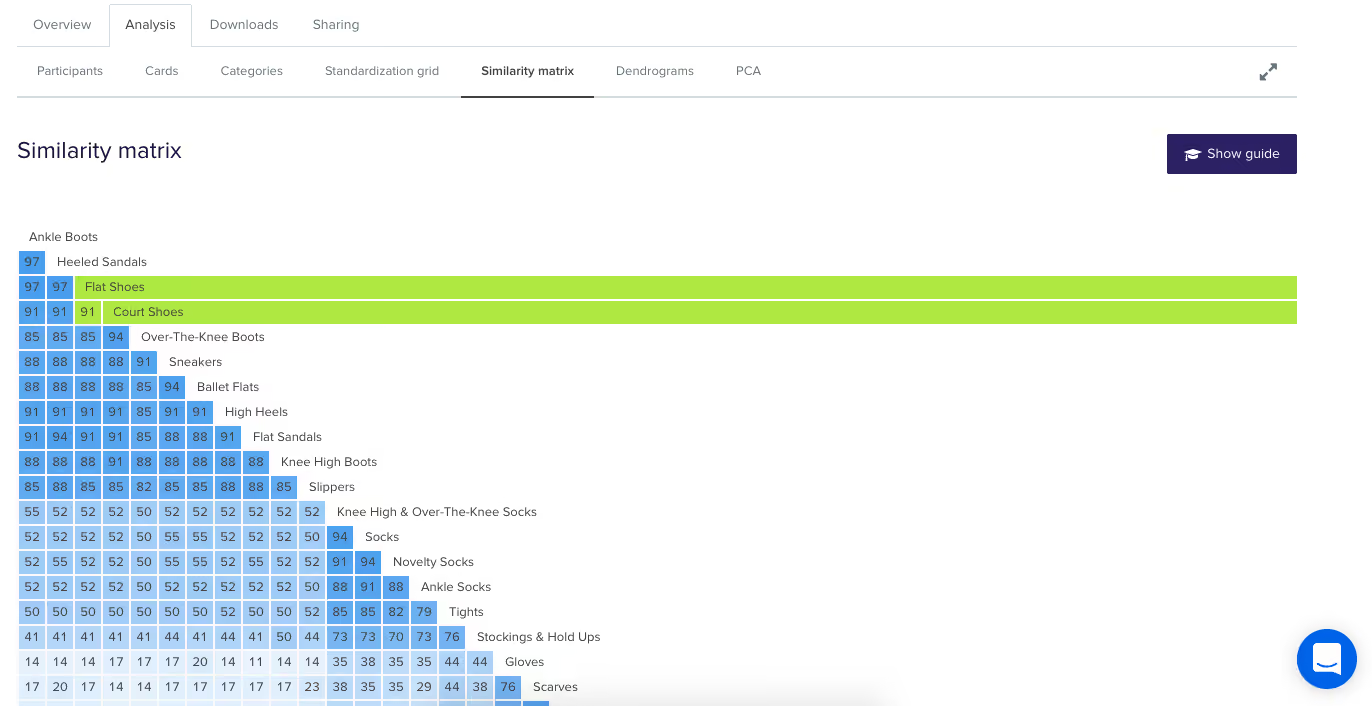
The Similarity Matrix: set list synergies ⚡

Our similarity matrix revealed fascinating insights into how fans envision Taylor Swift's songs fitting together in a concert set list:

1. The "Midnights" Connection: Songs from "Midnights" like "Midnight Rain", "The Black Dog", and "The Tortured Poets Department" showed high similarity in set list placement. This suggests fans see these tracks working well in similar parts of a concert, perhaps as a cohesive segment showcasing the album's distinct sound.

2. Cross-album transitions: There's an intriguing connection between "Guilty as Sin?" and "exile", with a high similarity percentage. This indicates fans see these songs from different albums as complementary in a live setting, potentially suggesting a smooth transition point in the set list that bridges different eras of Swift's career.

3. The show-stoppers: "Shake It Off" stands out as dissimilar to most other songs in terms of placement. This likely reflects its perceived role as a high-energy, statement piece that occupies a unique position in the set list, perhaps as an opener, closer, or peak moment.

4. Set list evolution: There's a noticeable pattern of higher similarity between songs from the same or adjacent eras, suggesting fans envision distinct segments for different periods of Swift's career within the concert. This could indicate a preference for a chronological journey through her discography or strategic placement of different styles throughout the show.

5. Thematic groupings: Some songs from different albums showed higher similarity, such as "Is It Over Now? (Taylor's Version)" and "You're On Your Own, Kid". This suggests fans see them working well together in the set list based on thematic or emotional connections rather than just album cohesion.

What does it all mean?! 💃🏼📊

This card sort data paints a picture of an artist who continually evolves while maintaining certain core elements that define her work. Swift's ability to create cohesive album experiences, make bold stylistic shifts, and maintain thematic threads throughout her career is reflected in how fans perceive and categorize her songs. Moreover, the diversity of opinions on song categorization - with 59 different songs suggested as potential openers - speaks to the depth and breadth of Swift's discography. It also highlights the personal nature of music appreciation; what one fan sees as the perfect opener, another might categorize as a "Nah".

In the end, this analysis gives us a fascinating glimpse into the complex web of associations in Swift's discography. It shows us not just how Swift has evolved as an artist, but how her fans have evolved with her, creating deep and sometimes unexpected connections between songs across her entire career. Whether you're a die-hard Swiftie or a casual listener, or a weirdo who just loves a good card sort, one thing is clear: Taylor Swift's music is rich, complex, and deeply meaningful to her fans. And with each new album, she continues to surprise, delight, and challenge our expectations.

Conclusion: shaking up our understanding 🥤🤔

This deep dive into the Swiftie psyche through a card sort reveals the complexity of Taylor Swift's discography and fans' relationship with it. From strategic song placement in a dream setlist to unexpected cross-era connections, we've uncovered layers of meaning that showcase Swift's artistry and her fans' engagement. The exercise demonstrates how a song can be a potential opener, mid-show energy boost, poignant closer, or a skip-worthy track, highlighting Swift's ability to create diverse, emotionally resonant music that serves various roles in the listening experience.

The analysis underscores Swift's evolving career, with distinct album clusters alongside surprising connections, painting a picture of an artist who reinvents herself while maintaining a core essence. It also demonstrates how fan-driven analyses like card sorting can be insightful and engaging, offering a unique window into music fandom and reminding us that in Swift's discography, there's always more to discover. This exercise proves valuable whether you're a die-hard Swiftie, casual listener, or someone who loves to analyze pop culture phenomena.

Seeing is believing

Explore our tools and see how Optimal makes gathering insights simple, powerful, and impactful.