
August 4, 2025
5 mins

When AI Meets UX: How to Navigate the Ethical Tightrope

As AI takes on a bigger role in product decision-making and user experience design, ethical concerns are becoming more pressing for product teams. From privacy risks to unintended biases and manipulation, AI raises important questions: How do we balance automation with human responsibility? When should AI make decisions, and when should humans stay in control?

These aren't just theoretical questions they have real consequences for users, businesses, and society. A chatbot that misunderstands cultural nuances, a recommendation engine that reinforces harmful stereotypes, or an AI assistant that collects too much personal data can all cause genuine harm while appearing to improve user experience.

The Ethical Challenges of AI

Privacy & Data Ethics

AI needs personal data to work effectively, which raises serious concerns about transparency, consent, and data stewardship:

  • Data Collection Boundaries – What information is reasonable to collect? Just because we can gather certain data doesn't mean we should.
  • Informed Consent – Do users really understand how their data powers AI experiences? Traditional privacy policies often don't do the job.
  • Data Longevity – How long should AI systems keep user data, and what rights should users have to control or delete this information?
  • Unexpected Insights – AI can draw sensitive conclusions about users that they never explicitly shared, creating privacy concerns beyond traditional data collection.

A 2023 study by the Baymard Institute found that 78% of users were uncomfortable with how much personal data was used for personalized experiences once they understood the full extent of the data collection. Yet only 12% felt adequately informed about these practices through standard disclosures.

Bias & Fairness

AI can amplify existing inequalities if it's not carefully designed and tested with diverse users:

  • Representation Gaps – AI trained on limited datasets often performs poorly for underrepresented groups.
  • Algorithmic Discrimination – Systems might unintentionally discriminate based on protected characteristics like race, gender, or disability status.
  • Performance Disparities – AI-powered interfaces may work well for some users while creating significant barriers for others.
  • Reinforcement of Stereotypes – Recommendation systems can reinforce harmful stereotypes or create echo chambers.

Recent research from Stanford's Human-Centered AI Institute revealed that AI-driven interfaces created 2.6 times more usability issues for older adults and 3.2 times more issues for users with disabilities compared to general populations, a gap that often goes undetected without specific testing for these groups.

User Autonomy & Agency

Over-reliance on AI-driven suggestions may limit user freedom and sense of control:

  • Choice Architecture – AI systems can nudge users toward certain decisions, raising questions about manipulation versus assistance.
  • Dependency Concerns – As users rely more on AI recommendations, they may lose skills or confidence in making independent judgments.
  • Transparency of Influence – Users often don't recognize when their choices are being shaped by algorithms.
  • Right to Human Interaction – In critical situations, users may prefer or need human support rather than AI assistance.

A longitudinal study by the University of Amsterdam found that users of AI-powered decision-making tools showed decreased confidence in their own judgment over time, especially in areas where they had limited expertise.

Accessibility & Digital Divide

AI-powered interfaces may create new barriers:

  • Technology Requirements – Advanced AI features often require newer devices or faster internet connections.
  • Learning Curves – Novel AI interfaces may be particularly challenging for certain user groups to learn.
  • Voice and Language Barriers – Voice-based AI often struggles with accents, dialects, and non-native speakers.
  • Cognitive Load – AI that behaves unpredictably can increase cognitive burden for users.

Accountability & Transparency

Who's responsible when AI makes mistakes or causes harm?

  • Explainability – Can users understand why an AI system made a particular recommendation or decision?
  • Appeal Mechanisms – Do users have recourse when AI systems make errors?
  • Responsibility Attribution – Is it the designer, developer, or organization that bears responsibility for AI outcomes?
  • Audit Trails – How can we verify that AI systems are functioning as intended?

How Product Owners Can Champion Ethical AI Through UX

At Optimal, we advocate for research-driven AI development that puts human needs and ethical considerations at the center of the design process. Here's how UX research can help:

User-Centered Testing for AI Systems

AI-powered experiences must be tested with real users to identify potential ethical issues:

  • Longitudinal Studies – Track how AI influences user behavior and autonomy over time.
  • Diverse Testing Scenarios – Test AI under various conditions to identify edge cases where ethical issues might emerge.
  • Multi-Method Approaches – Combine quantitative metrics with qualitative insights to understand the full impact of AI features.
  • Ethical Impact Assessment – Develop frameworks specifically designed to evaluate the ethical dimensions of AI experiences.

Inclusive Research Practices

Ensuring diverse user participation helps prevent bias and ensures AI works for everyone:

  • Representation in Research Panels – Include participants from various demographic groups, ability levels, and socioeconomic backgrounds.
  • Contextual Research – Study how AI interfaces perform in real-world environments, not just controlled settings.
  • Cultural Sensitivity – Test AI across different cultural contexts to identify potential misalignments.
  • Intersectional Analysis – Consider how various aspects of identity might interact to create unique challenges for certain users.

Transparency in AI Decision-Making

UX teams should investigate how users perceive AI-driven recommendations:

  • Mental Model Testing – Do users understand how and why AI is making certain recommendations?
  • Disclosure Design – Develop and test effective ways to communicate how AI is using data and making decisions.
  • Trust Research – Investigate what factors influence user trust in AI systems and how this affects experience.
  • Control Mechanisms – Design and test interfaces that give users appropriate control over AI behavior.

The Path Forward: Responsible Innovation

As AI becomes more sophisticated and pervasive in UX design, the ethical stakes will only increase. However, this doesn't mean we should abandon AI-powered innovations. Instead, we need to embrace responsible innovation that considers ethical implications from the start rather than as an afterthought.

AI should enhance human decision-making, not replace it. Through continuous UX research focused not just on usability but on broader human impact, we can ensure AI-driven experiences remain ethical, inclusive, user-friendly, and truly beneficial.

The most successful AI implementations will be those that augment human capabilities while respecting human autonomy, providing assistance without creating dependency, offering personalization without compromising privacy, and enhancing experiences without reinforcing biases.

A Product Owner's Responsibility: Leading the Charge for Ethical AI

As UX professionals, we have both the opportunity and responsibility to shape how AI is integrated into the products people use daily. This requires us to:

  • Advocate for ethical considerations in product requirements and design processes
  • Develop new research methods specifically designed to evaluate AI ethics
  • Collaborate across disciplines with data scientists, ethicists, and domain experts
  • Educate stakeholders about the importance of ethical AI design
  • Amplify diverse perspectives in all stages of AI development

By embracing these responsibilities, we can help ensure that AI serves as a force for positive change in user experience enhancing human capabilities while respecting human values, autonomy, and diversity.

The future of AI in UX isn't just about what's technologically possible; it's about what's ethically responsible. Through thoughtful research, inclusive design practices, and a commitment to human-centered values, we can navigate this complex landscape and create AI experiences that truly benefit everyone.

Share this article
Author
Optimal
Workshop
Topics

Related articles

View all blog articles
Learn more
1 min read

The AI Automation Breakthrough: Key Insights from Our Latest Community Event

Last night, Optimal brought together an incredible community of product leaders and innovators for "The Automation Breakthrough: Workflows for the AI Era" at Q-Branch in Austin, Texas. This two-hour in-person event featured expert perspectives on how AI and automation are transforming the way we work, create, and lead.

The event featured a lightning Talk on "Designing for Interfaces" featured Cindy Brummer, Founder of Standard Beagle Studio, followed by a dynamic panel discussion titled "The Automation Breakthrough" with industry leaders including Joe Meersman (Managing Partner, Gyroscope AI), Carmen Broomes (Head of UX, Handshake), Kasey Randall (Product Design Lead, Posh AI), and Prateek Khare (Head of Product, Amazon). We also had a fireside chat with our CEO, Alex Burke and Stu Smith, Head of Design at Atlassian. 

Here are the key themes and insights that emerged from these conversations:

Trust & Transparency: The Foundation of AI Adoption

Cindy emphasized that trust and transparency aren't just nice-to-haves in the AI era, they're essential. As AI tools become more integrated into our workflows, building systems that users can understand and rely on becomes paramount. This theme set the tone for the entire event, reminding us that technological advancement must go hand-in-hand with ethical considerations.

Automation Liberates Us from Grunt Work

One of the most resonant themes was how AI fundamentally changes what we spend our time on. As Carmen noted, AI reduces the grunt work and tasks we don't want to do, freeing us to focus on what matters most. This isn't about replacing human workers, it's about eliminating the tedious, repetitive tasks that drain our energy and creativity.

Enabling Creativity and Higher-Quality Decision-Making

When automation handles the mundane, something remarkable happens: we gain space for deeper thinking and creativity. The panelists shared powerful examples of this transformation:

Carmen described how AI and workflows help teams get to insights and execution on a much faster scale, rather than drowning in comments and documentation. Prateek encouraged the audience to use automation to get creative about their work, while Kasey shared how AI and automation have helped him develop different approaches to coaching, mentorship, and problem-solving, ultimately helping him grow as a leader.

The decision-making benefits were particularly striking. Prateek explained how AI and automation have helped him be more thoughtful about decisions and make higher-quality choices, while Kasey echoed that these tools have helped him be more creative and deliberate in his approach.

Democratizing Product Development

Perhaps the most exciting shift discussed was how AI is leveling the playing field across organizations. Carmen emphasized the importance of anyone, regardless of their role, being able to get close to their customers. This democratization means that everyone can get involved in UX, think through user needs, and consider the best experience.

The panel explored how roles are blurring in productive ways. Kasey noted that "we're all becoming product builders" and that product managers are becoming more central to conversations. Prateek predicted that teams are going to get smaller and achieve more with less as these tools become more accessible.

Automation also plays a crucial role in iteration, helping teams incorporate customer feedback more effectively, according to Prateek.

Practical Advice for Navigating the AI Era

The panelists didn't just share lofty visions, they offered concrete guidance for professionals navigating this transformation:

Stay perpetually curious. Prateek warned that no acquired knowledge will stay with you for long, so you need to be ready to learn anything at any time.

Embrace experimentation. "Allow your process to misbehave," Prateek advised, encouraging attendees to break from rigid workflows and explore new approaches.

Overcome fear. Carmen urged the audience not to be afraid of bringing in new tools or worrying that AI will take their jobs. The technology is here to augment, not replace.

Just start. Kasey's advice was refreshingly simple: "Just start and do it again." Whether you're experimenting with AI tools or trying "vibe coding," the key is to begin and iterate.

The energy in the room at Q-Branch reflected a community that's not just adapting to change but actively shaping it. The automation breakthrough isn't just about new tools, it's about reimagining how we work, who gets to participate in product development, and what becomes possible when we free ourselves from repetitive tasks.

As we continue to navigate the AI era, events like this remind us that the most valuable insights come from bringing diverse perspectives together. The conversation doesn't end here, it's just beginning.

Interested in joining future Optimal community events? Stay tuned for upcoming gatherings where we'll continue exploring the intersection of design, product, and emerging technologies.

Learn more
1 min read

Anatomy of a Website Footer: Key Elements, UX Best Practices, and Examples

Definition of a website footer

The footer of a website sits at the very bottom of every single web page and contains links to various types of content on your website. It’s an often overlooked component of a website, but it plays several important roles in your information architecture (IA) – it’s not just some extra thing that gets plonked at the bottom of every page.

Getting your website footer right matters!

The footer communicates to your website visitors that they’ve reached the bottom of the page and it’s also a great place to position important content links that don’t belong anywhere else – within reason. A website footer is not a dumping ground for random content links that you couldn’t find a home for, however there are some content types that are conventionally accessed via the footer e.g., privacy policies and copyright information just to name a few.

Lastly, from a usability and navigation perspective, website footers can serve as a bit of a safety net for lost website visitors. Users might be scrolling and scrolling trying to find something and the footer might be what catches them and guides them back to safety before they give up on your website and go elsewhere. Footers are a functional and important part of your overall IA, but also have their own architecture too.

Read on to learn about the types of content links that might be found in a footer, see some real life examples and discuss some approaches that you might take when testing your footer to ensure that your website is supporting your visitors from top to bottom.

What belongs in a website footer

Deciding which content links belong in your footer depends entirely on your website. The type of footer, its intent and content depends on its audience of your customers, potential customers and more — ie your website visitors. Every website is different, but here’s a list of links to content types that might typically be found in a footer.

  • Legal content that may include: Copyright information, disclaimer, privacy policy, terms or use or terms of service – always seek appropriate advice on legal content and where to place it!
  • Your site map
  • Contact details including social media links and live chat or chat bot access
  • Customer service content that may include: shipping and delivery details, order tracking, returns, size guides, pricing if you’re a service and product recall information.
  • Website accessibility details and ways to provide feedback 
  • ‘About Us’ type content that may include: company history, team or leadership team details, the careers page and more 
  • Key navigational links that also appear in the main navigation menu that is presented to website visitors when they first land on the page (e.g. at the top or the side)

Website footer examples

Let’s take a look at three diverse real life examples of website footers.


IKEA US

IKEA’s US website has an interesting double barrelled footer that is also large and complex – a ‘fat footer’ as it’s often called – and its structure changes as you travel deeper into the IA. The below image taken from the IKEA US home page shows two clear blocks of text separated by a blue horizontal line. Above the line we have the heading of ‘All Departments’ with four columns showing product categories and below the line there are seven clear groups of content links covering a broad range of topics including customer service information, links that appear in the top navigation menu and careers. At the very bottom of the footer there are social media links and the copyright information for the website.
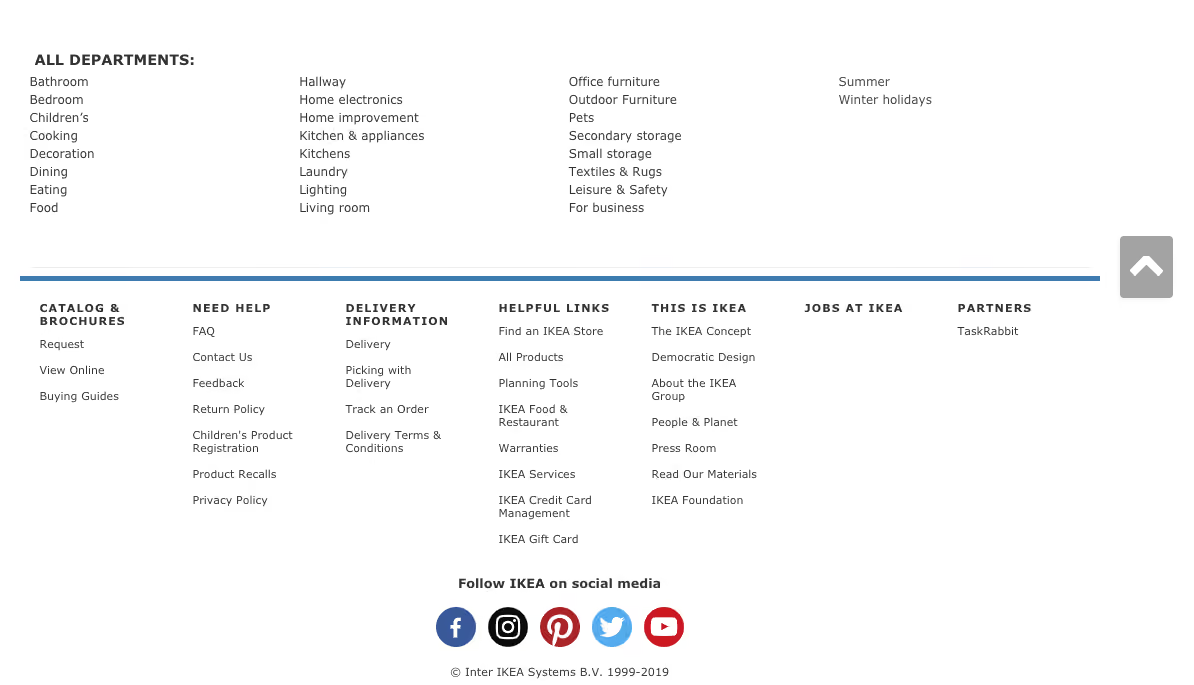
An image of IKEA US home page footer on their website, from 2019.
IKEA US home page footer (accessed May 2019)

As expected, IKEA’s overall website IA is quite large, and as a website visitor clicks deeper into the IA, the footer starts to change. On the product category landing pages, the footer is mostly the same but with a new addition of some handy breadcrumbs to aid navigation (see below image).
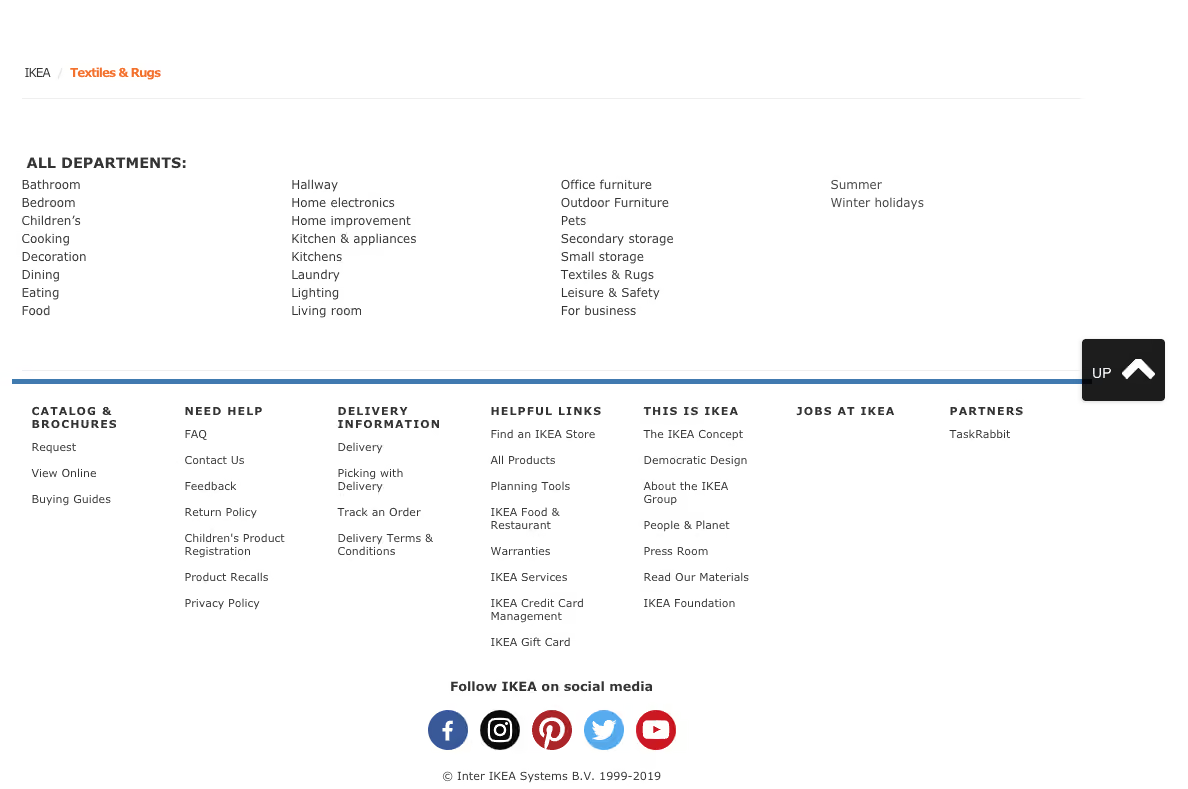
An image of IKEA US product page footer on their website, from 2019.
IKEA US website footer as it appears on the product category landing page for Textiles & Rugs (accessed May 2019).

When a website visitor travels all the way down to the individual product page level, the footer changes again. In the below image found on the product page for a bath mat, while the blue line and everything below it is still there, the ‘All Departments’ section of the footer has been removed and replaced with non-clickable text on the left hand side that reads as ‘More Bath mats’ and a link on the right hand side that says ‘Go to Bath mats’. Clicking on that link takes the website visitor back to the page above.

IKEA US website footer as it appears on the product page for a bath mat, from 2019.
IKEA US website footer as it appears on the product page for a bath mat (accessed May 2019).

Overall, evolving the footer content as the website visitor progresses deeper into the IA is an interesting approach - as the main page content becomes more focussed as does the footer while still maintaining multiple supportive safety net features.

M.A.C Cosmetics US

The footer for the US website of this well known cosmetics brand has a four part footer. At first it appears to just have three parts as shown in the image below: a wide section with seven content link categories covering a broad range of content types as the main part with a narrow black strip on either end of it making up the second and third parts. The strip above has loyalty program and live chat links and the strip below contains mostly links to legal content.
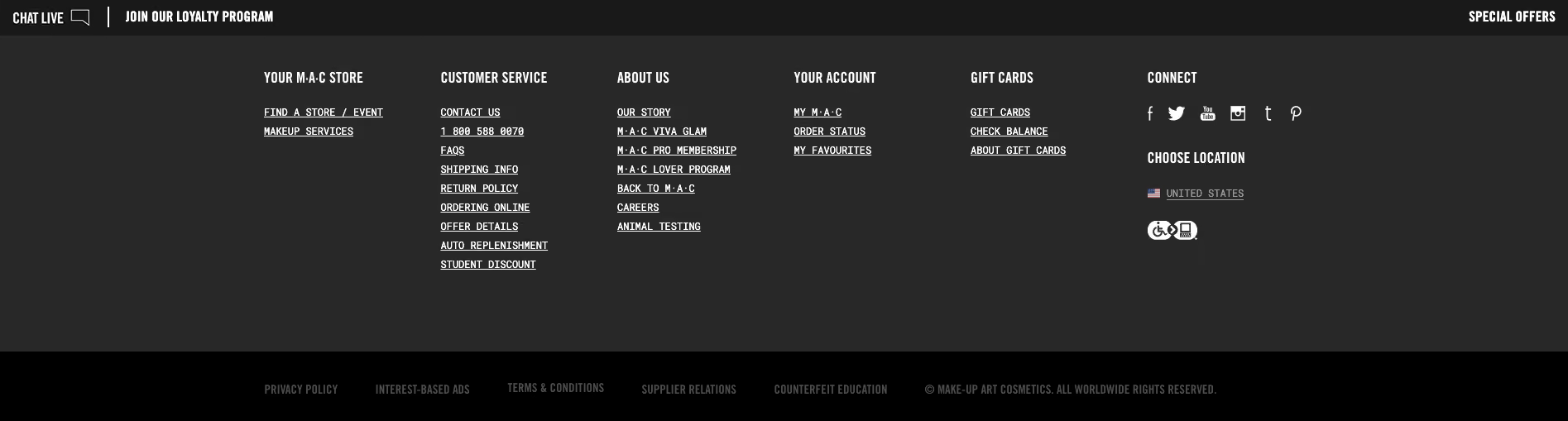
MAC Cosmetics US website footer with three parts as it appears on the home page upon first glance, from 2019.
MAC Cosmetics US website footer with three parts as it appears on the home page upon first glance (accessed May 2019).


When a website visitor hovers over the ‘Join our loyalty program’ call to action (CTA) in that top narrow strip, the hidden fourth part of the footer which is slightly translucent pulls up like a drawer and sits directly above the strip capping off the top of the main section (as shown in the below image). This section contains more information about the loyalty program and contains further CTAs to join or sign in. It disappears when the cursor is moved away from the hover CTA or it can be collapsed manually via the arrow in the top right hand corner of this fourth part. It’s an interesting and unexpected interaction to have with a footer, but it adds to the overall consistent and cohesive experience of this website because it feels like the footer is an active participant in that experience.
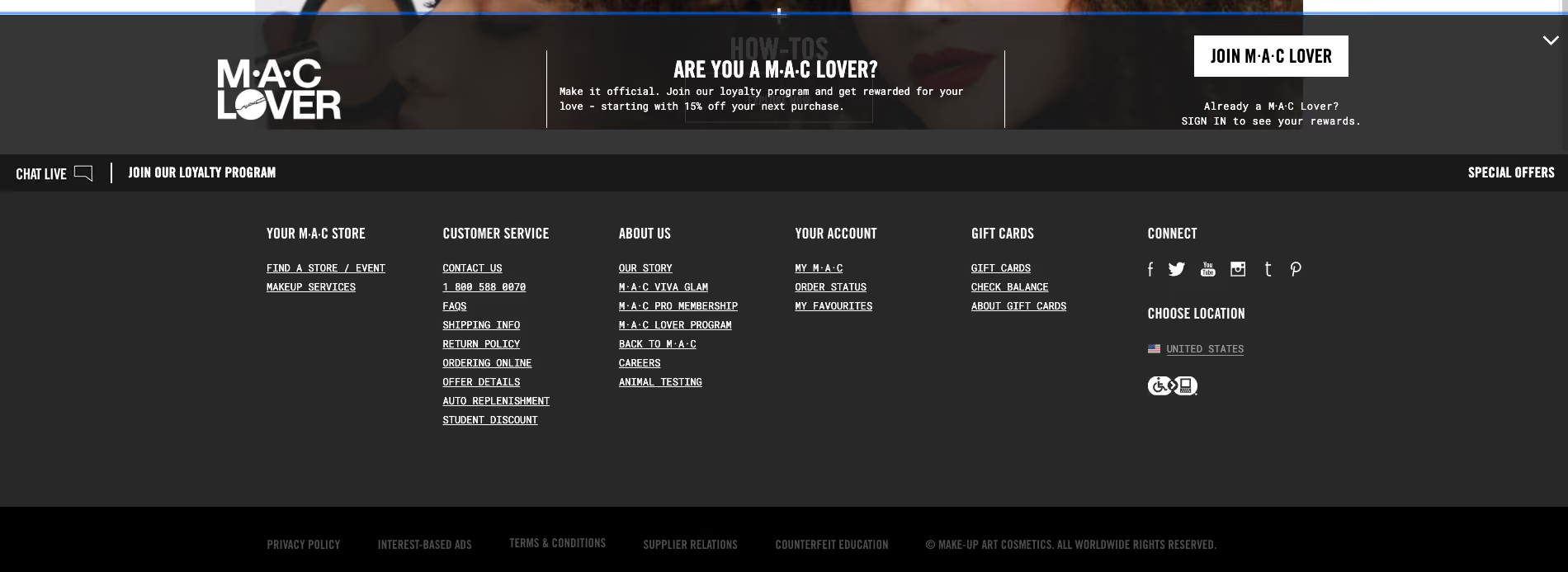
MAC Cosmetics US website footer as it appears on the home page with all four parts visible, from 2019.

MAC Cosmetics US website footer as it appears on the home page with all four parts visible (accessed May 2019).


Domino’s Pizza US

Domino’s Pizza’s US website has a reasonably flat footer in terms of architecture but it occupies as much space as a more complex or deeper footer. As shown in the image below, its content links are presented horizontally over three rows on the left hand side of the footer and these links are visually separated by forward slashes. It also displays social media links and some advertising content on the right hand side. The most interesting feature of this footer is the large paragraph of text titled ‘Legal Stuff’ below the links. Delightfully it uses direct, clear and plain language and even includes a note about delivery charges not including tips and to ‘Please reward your driver for awesomeness’.
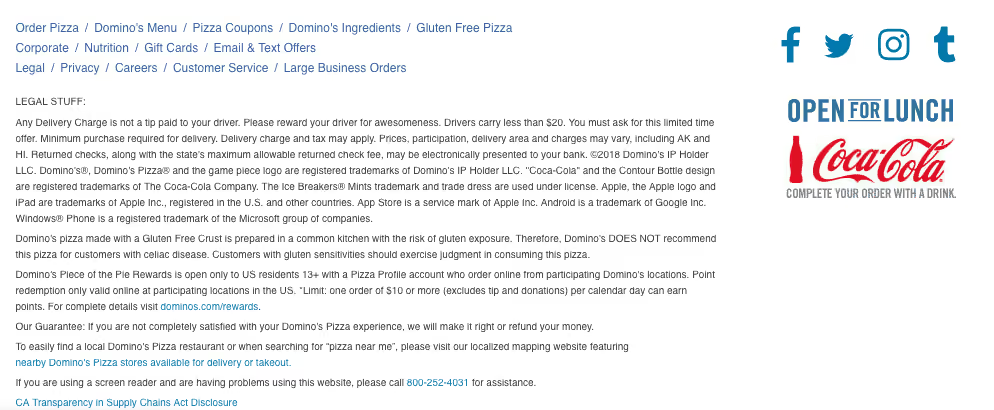
Domino’s Pizza US website footer as it appears on the home page, from 2019.

Domino’s Pizza US website footer as it appears on the home page (accessed May 2019).

How to test a website footer

Like every other part of your website, the only way you’re going to know if your footer is supporting your website visitors is if you test it with them. When testing a website’s IA overall, the footer is often excluded. This might be because we want to focus on other areas first or maybe it’s because testing everything at once has the potential to be overwhelming for our research participants.

Testing a footer is fairly easy thing to do and there’s no right or wrong approach – it really does depend on where you are up to in your project, the resources you have available to you and the size and complexity of the footer itself!

If you’re designing a footer for a new website there’s a few ways you might approach ensuring your footer is best supporting your website visitors. If you’re planning to include a large and complex footer, it’s a good idea to start by running an open card sort just on those footer links. An open card sort will help you understand how your website visitors expect those content links in your footer to be grouped and what they think those groups should be called.

If you’re redesigning an existing website, you might first run a tree test on the existing footer to benchmark test it and to pinpoint the exact issues. You might tree test just the footer in the study or you might test the whole website including the footer. Optimal's tree testing is really flexible and you can tree test just a small section of an IA or you can do the whole thing in one go to find out where people are getting lost in the structure. Your approach will depend on your project and what you already know so far. If you suspect there may be issues with the website’s footer, for example, if no one is visiting it and/or you’ve been receiving customer service requests from visitors to help them find content that only lives in the footer,  it would be a good idea to consider isolating it for testing. This will help you avoid any competition between the footer and the rest of your IA as well as any potential confusion that may arise from duplicated tree branches (i.e. when your footer contains duplicate labels).

If you’re short on time and there aren’t any known issues with the footer prior to a redesign, you might tree test the entire IA in your benchmark study, iterate your design and then along with everything else, include testing activities for your footer in your moderated usability testing plan. You might include a usability testing scenario or question that requires your participants to complete a task that involves finding content that can only be found in the footer (e.g., shipping information if it’s an ecommerce website). Also keep a close eye on how your participants are moving around the page in general and see if/when the footer comes into play – is it helping people when they’re lost and scrolling? Or is it going unnoticed? If so, why and so on. Talk to your research participants like you would about any other aspect of your website to find out what’s going on there. When resources are tight, use your best judgement and choose the research approach that’s best for your situation, we’ve all had moments where we’ve had to be pragmatic and do our best with what we have.

When you’re at a stage in your design process where you have a visual design or concept for your footer, you could also run a first-click test. First-click tests are quick and easy and will help you determine how your website visitors are faring once they reach your footer and if they can identify the correct content link to complete their task. Studies can be run remotely or in person and just like the rest of the tools in Optimal's user research platform, are super quick to run and great for reaching website visitors all over the world simply by sharing a link to the study.


Learn more
1 min read

Navigating the Regulatory Maze: UX Design in the Age of Compliance

Financial regulations exist for good reason: to protect consumers, prevent fraud, and ensure market stability. But for UX professionals in the financial sector, these necessary guardrails often feel like insurmountable obstacles to creating seamless user experiences. How do we balance strict compliance requirements with the user-friendly experiences consumers increasingly demand?

The Compliance vs. UX Tension

The fundamental challenge lies in the seemingly contradictory goals of regulatory compliance and frictionless UX:

  • Regulations demand verification steps, disclosures, documentation, and formality
  • Good UX principles favor simplicity, speed, clarity, and minimal friction

This tension creates the "compliance paradox": the very features that make financial services trustworthy from a regulatory perspective often make them frustrating from a user perspective.

Research Driven Compliance Design

Addressing regulatory challenges in financial UX requires more than intuition, it demands systematic research to understand user perceptions, identify friction points, and validate solutions. Optimal's research platform offers powerful tools to transform compliance from a burden to an experience enhancer:

Evaluate Information Architecture with Tree Testing

Regulatory information is often buried in complex navigation structures that users struggle to find when needed:

Implementation Strategy:

  • Test how easily users can find critical compliance information
  • Identify optimal placement for regulatory disclosures
  • Compare different organizational approaches for compliance documentation

Test Compliance Flows with First-Click Testing

Understanding where users instinctively look and click during compliance-critical moments helps optimize these experiences:

Implementation Strategy:

  • Test different approaches to presenting consent requests
  • Identify optimal placement for regulatory disclosures
  • Evaluate where users look for more information about compliance requirements

Understand Mental Models with Card Sorting

Regulatory terminology often clashes with users' mental models of financial services:

Implementation Strategy:

  • Use open card sorts to understand how users categorize compliance-related concepts
  • Test terminology comprehension for regulatory language
  • Identify user-friendly alternatives to technical compliance language

Key Regulatory Considerations Affecting Financial UX

KYC (Know Your Customer) Requirements

KYC procedures require financial institutions to verify customer identities, a process that can be cumbersome but is essential for preventing fraud and money laundering.

Design Opportunity: Transform identity verification from a barrier to a trust-building feature by:

  • Breaking verification into logical, manageable steps
  • Setting clear expectations about time requirements and necessary documents
  • Providing progress indicators and save-and-resume functionality
  • Explaining the security benefits of each verification step

Data Privacy Regulations (GDPR, CCPA, etc.)

Modern privacy frameworks grant users specific rights regarding their data while imposing strict requirements on how financial institutions collect, store, and process personal information.

This poses a specific ux challenge: privacy disclosures and consent mechanisms can overwhelm users with legal language and interrupt core user journeys.

Design Opportunity: Create privacy experiences that inform without overwhelming:

  • Layer privacy information with progressive disclosure
  • Use visual design to highlight key privacy choices
  • Develop privacy centers that centralize user data controls
  • Implement "just-in-time" consent requests that provide context

AML (Anti-Money Laundering) Compliance

AML regulations require monitoring unusual transactions and sometimes interrupting user actions for additional verification.

Design Opportunity: Design for transparency and education:

  • Provide clear explanations when additional verification is needed
  • Offer multiple verification options when possible
  • Create educational content explaining security measures
  • Use friction strategically rather than uniformly

Strategies for Compliance-Centered UX Design

1. Bring Compliance Teams into the Design Process Early

Rather than designing an ideal experience and then retrofitting compliance, involve your legal and compliance teams from the beginning. This collaborative approach can identify creative solutions that satisfy both regulatory requirements and user needs.

2. Design for Transparency, Not Just Disclosure

Regulations often focus on disclosure, ensuring users have access to relevant information. But disclosure alone doesn't ensure understanding. Focus on designing for true transparency that builds both compliance and comprehension.

3. Use Progressive Complexity

Not every user needs the same level of detail. Design interfaces that provide basic information by default but allow users to explore deeper regulatory details if desired.

4. Transform Compliance into Competitive Advantage

The most innovative financial companies are finding ways to turn compliance features into benefits users actually appreciate.

Measuring Success: Beyond Compliance Checklists

Traditional compliance metrics focus on binary outcomes: did we meet the regulatory requirement or not? For truly successful compliance-centered UX, consider measuring:

  • Completion confidence - How confident are users that they've completed regulatory requirements correctly?
  • Compliance comprehension - Do users actually understand key regulatory information?
  • Trust impact - How do compliance measures affect overall trust in your institution?
  • Friction perception - Do users view necessary verification steps as security features or annoying obstacles?

The financial institutions that will thrive in the coming years will be those that stop viewing regulations as UX obstacles and start seeing them as opportunities to demonstrate trustworthiness, security, and respect for users' rights. By thoughtfully designing compliance into the core experience, rather than bolting it on afterward, we can create financial products that are both legally sound and genuinely user-friendly.

Remember: Compliance isn't just about avoiding penalties, it's about treating users with the care and respect they deserve when entrusting you with their financial lives. And with the right research tools and methodologies, you can transform regulatory requirements from experience detractors into experience enhancers.

Seeing is believing

Explore our tools and see how Optimal makes gathering insights simple, powerful, and impactful.