Your research platform shouldn't be the slowest part of your sprint
Your team ships every two weeks. Your research platform takes three weeks to get a study live, recruited and analysed. By the time insights land, the roadmap has already moved on.
Speed is only half of it. A fast study with the wrong participants can be worse than no study at all. Screener gaming, ineligible respondents and AI-written answers are now regular complaints in platform reviews. When your data is skewed, the product decisions built on it are too. Your team pays for that later, in rework, missed adoption targets and a harder conversation with stakeholders.
In 2026 teams are asking more of their tools. They want studies live in minutes, participants they can trust, and pricing that doesn't punish them for doing more research. They want one place to run the methods they rely on, with no stitching together a recruitment tool, a testing tool and a repository.
We've compared seven of the most widely used user research platforms against Optimal on the things that decide whether research shapes what ships. Here's what we found, including where other platforms are the better fit.
How we evaluated each platform
Feature lists all start to look the same. So we judged each platform on five questions that we believe matters to setting up and running a successful research program from the get go:
Speed to insights. How quickly can you go from a research question to a study in field and results you can share? Approval queues, setup steps and analysis time all count.
Participant quality and reach. How big is the panel, how many countries does it cover, and how much can you trust the people in it? We also looked at whether you can bring your own participants.
Ease of setup. Can a designer or PM run a study on their own, or does every study need a specialist?
Price transparency. Can you see what you'll pay before you talk to sales? Are seats capped, and are core methods locked behind higher tiers?
Design tool workflow. How well does the platform fit the way your team designs, including Figma prototypes and early concepts?
We used public product pages, help docs, pricing pages and third-party review sites, current as of November 2026. Platforms change quickly, so check current plans before you buy.
The 2026 comparison at a glance
Optimal is the only platform here that combines instant launch, a 20M+ verified panel across 150+ countries, unlimited seats on every plan and core UX research and IA methods with no tier gating.
Platform
Best for
Participant panel
Setup and launch
Pricing
Optimal
Enterprise teams that want every research method and recruitment in one platform
20M+ · 150+ countriesBring your own free
Launch instantly, no approval queueGuided setup for designers and PMs
Quote onlyUnlimited seats and studies on enterprise plan
UserTesting (Auros)
Large enterprises running video-led usability tests on native mobile apps
2M+ own · 7.6M with User Interviews40+ countries
Fast for unmoderated videoModerated sessions use 3-5x more credits
Quote onlySeats plus credits
Maze
Product teams validating Figma prototypes inside sprints
6M+ · 130+ countriesBilled separately
Fast for unmoderated prototype testsQuick to start with free plan
Free planPaid tiers and Enterprise on quote
Great Question
Research ops teams wanting a participant CRM and repository
6M+ · 150+ countriesVia User Interviews integration
Fast with your own panelExternal recruitment through partner
Free trialSelf-serve capped at 5 paid seats
Lyssna
Quick design checks like five-second and preference tests
690K+ · 120+ countries
Very quick for short testsSimple and self-serve
Free planPublished tiers with seat caps on lower tiers
Dscout
In-context diary studies and mobile-first qualitative research
530K+ own · 3M+ partner
Dscout reviews screeners before launchCan add days
Quote only
UXtweak
Smaller teams running usability tests on a tight budget
Partner panels · 130+ countries
Quick for single testsStudy types can't be combined in one link
Free planPublished lower tiers, Enterprise on request
Sources: vendor product, help and pricing pages, plus G2 reviews, as of November 2026.
Platform by platform
Every platform here does something well. The question is whether it does what your team needs, at the pace you work.
Optimal
Optimal is a user insights platform and research repository built by research, product, and design leaders over 19+ years. It covers surveys, card sorting, tree testing, first-click testing, prototype testing, live site testing, native mobile app testing, AI Interviewer, and qualitative insights, all in one place.
Strengths: Studies go live the moment you're ready, with no review queue. You can recruit from 20M+ verified participants in 150+ countries, or bring your own for free. AI insights, summaries and an AI interviewer help you get from raw data to a shareable finding in minutes. Every plan includes unlimited seats, and the platform holds SOC 2, their management systems and infrastructure is ISO/IEC 27001 and ISO/IEC 27701 certified.
Limitations: There are no dedicated diary study or five-second test blocks. Teams running long-form diary research may want a specialist tool alongside.
Best for: Teams that want one platform for evaluative research, IA and recruitment, with room for the whole org to take part.
UserTesting
UserTesting is the long-standing name in remote video research. After merging with UserZoom and acquiring User Interviews, it now sits under the Auros brand.
Strengths: It covers a broad set of methods, including diary studies and native mobile app testing. Enterprise support and services are deep, and its MCP server connects to AI tools and Figma Make.
Limitations: Pricing is quote-only and credit-based, and reviewers report yearly price rises. Joining three platforms has left parts of the experience feeling disjointed, and some reviewers flag participant quality and fulfilment delays.
Best for: Large enterprises with a dedicated research budget and a heavy focus on video usability sessions.
Maze
Maze is built for rapid prototype validation inside design sprints.
Strengths: It has a well-loved Figma prototype testing flow, a free plan to get started, and a broad AI feature set.
Limitations: Card sorting, tree testing and its AI Moderator sit on the Enterprise tier. Reviewers report bugs with large prototypes and heatmaps, and first-click tests allow multiple clicks. Panel credits are billed separately.
Best for: Design teams whose research is mostly quick prototype checks.
Great Question
Great Question combines participant recruitment, a research CRM, mixed-method studies and an AI repository.
Strengths: Its participant CRM, API and MCP tooling are strong. Observer seats are unlimited, so stakeholders can follow along.
Limitations: Self-serve plans cap paid seats at five. Card sorting and tree testing sit on Enterprise. External recruitment runs through a User Interviews integration rather than an in-house panel, and some reviewers report lag on large datasets.
Best for: Research ops teams managing their own customer panel.
Lyssna
Lyssna, formerly UsabilityHub, is a simple, self-serve platform known for five-second and preference testing.
Strengths: It's quick to learn, has a free plan, and publishes its self-serve pricing. It recently added mobile testing and observer rooms.
Limitations: Its 690K+ panel has no managed recruitment, and reviewers say niche audiences can be hard to reach. AI analysis is lighter, and does not yet hold enterprise-grade security certifications.
Best for: Smaller teams running fast design checks.
Dscout
Dscout specialises in in-context, mobile-first qualitative research.
Strengths: Diary studies are its flagship, and recent AI moderation and insight features are a real investment.
Limitations: A Dscout advisor reviews screeners before launch, which can add days. Participants download an app, survey logic is limited, and there's no first-click testing.
Best for: Teams running longitudinal, in-the-moment qual research.
UXtweak
UXtweak is a researcher-founded platform with a broad toolkit, from card sorting to session recordings.
Strengths: It offers a free plan and published lower tiers, native mobile app testing without an SDK, and testing for AI-generated prototypes.
Limitations: AI insight is minimal. You can't combine study types in a single link, and reviewers call the setup interface dated. It's a small team, which can limit enterprise support.
Best for: Budget-conscious teams that want breadth without enterprise requirements.
Why Optimal wins in 2026
If your team runs one kind of study, a specialist tool may be all you need. Most enterprise teams don't work that way. Some weeks you're testing a prototype, other weeks you're restructuring navigation or checking a concept with a hard-to-reach audience. Your team needs a platform that keeps up with all of it.
We've spent 19+ years listening to researchers describe the same frustrations: waiting on approvals, chasing recruits, rationing seats and defending data quality to stakeholders. Optimal is built to remove that friction.
Insights in minutes. Launch the moment your study is ready, with no review queue, and let AI summaries turn results into findings you can share the same day.
Participants you can trust. Recruit from 20M+ verified participants across 150+ countries, or bring your own for free. Our recruitment team can help with niche and international audiences.
Simple enough for everyone. Designers, PMs and researchers run studies with guided setup and templates. Unlimited seats mean the whole team can join in without a budget conversation.
Optimal Intelligence. Optimal's growing AI and automation capabilities help you refine studies, uncover key themes, summaries, and insights, and dive deeper with AI chat and MCP.
Clear pricing. You pay one platform fee, sized to your research plan. Card sorting, tree testing and first-click testing come included, with no extra tier to unlock them.
Built into how you design. Test Figma prototypes or images alongside the IA methods that tell you whether people can find what you've built.
Enterprise ready. SOC 2, ISO/IEC 27001 and ISO/IEC 27701, with dedicated onboarding and a Customer Success Manager.
Netflix, Nike, Toyota, Apple, LEGO and Workday already trust Optimal with their research. Book a demo and we'll walk through your research plan with you.
When evaluating tools for user testing and participant recruitment, Askable often appears on the shortlist, especially for teams based in Australia and New Zealand. But in 2025, many researchers are finding Askable’s limitations increasingly difficult to work around: restricted study volume, inconsistent participant quality, and new pricing that limits flexibility.
If you’re exploring Askable alternatives that offer more scalability, higher data quality, and global reach, here are five strong options.
1. Optimal: Best Overall Alternative for Scalable, AI-Powered Research
Optimal is a comprehensive user insights platform supporting the full research lifecycle, from participant recruitment to analysis and reporting. Unlike Askable, which has historically focused on recruitment, Optimal unifies multiple research methods in one platform, including prototype testing, card sorting, tree testing, and AI-assisted interviews.
Why teams switch from Askable to Optimal
1. You can only run one study at a time in Askable
Optimal removes that bottleneck, letting you launch multiple concurrent studies across teams and research methods.
2. Askable’s new pricing limits flexibility
Optimal offers scalable plans with unlimited seats, so teams only pay for what they need.
3. Askable’s participant quality has dropped
Optimal provides access to over 100+ million verified participants worldwide, with strong fraud-prevention and screening systems that eliminate low-effort or AI-assisted responses.
Additional advantages
End-to-end research tools in one workspace
AI-powered insight generation that tags and summarizes automatically
Enterprise-grade reliability with decade-long market trust
Dedicated onboarding and SLA-backed support
Best for: Teams seeking an enterprise-ready, scalable research platform that eliminates the operational constraints of Askable.
2. UserTesting: Best for Video-Based Moderated Studies
UserTesting remains one of the most established platforms for moderated and unmoderated usability testing. It excels at gathering video feedback from participants in real time.
Pros:
Large participant pool with strong demographic filters
Supports moderated sessions and live interviews
Integrations with design tools like Figma and Miro
Cons:
Higher cost at enterprise scale
Less flexible for survey-driven or unmoderated studies compared with Optimal
The UI has become increasingly complex and buggy as UserTesting has been expanding their platform through acquisitions such as UserZoom and Validately.
Best for: Companies prioritizing live, moderated usability sessions.
3. Maze: Best for Product Teams Using Figma Prototypes
Maze offers seamless Figma integration and focuses on automating prototype-testing workflows for product and design teams.
Pros:
Excellent Figma and Adobe XD integration
Automated reporting
Good fit for early-stage design validation
Cons:
Limited depth for qualitative research
Smaller participant pool
Best for: Design-first teams validating prototypes and navigation flows.
4. Lyssna (formerly UsabilityHub): Best for Fast Design Feedback
Lyssna focuses on quick-turn, unmoderated studies such as preference tests, first-click tests, and five-second tests.
Pros:
Fast turnaround
Simple, intuitive interface
Affordable for smaller teams
Cons:
Limited participant targeting options
Narrower study types than Askable
Best for: Designers and researchers running lightweight validation tests.
5. Dovetail: Best for Research Repository and Analysis
Dovetail is primarily a qualitative data repository rather than a testing platform. It’s useful for centralizing and analyzing insights from research studies conducted elsewhere.
Pros:
Strong tagging and note-taking features
Centralized research hub for large teams
Cons:
Doesn’t recruit participants or run studies
Requires manual uploads from other tools like Askable or UserTesting
Best for: Research teams centralizing insights from multiple sources.
Final Thoughts on Alternatives to Askable
If your goal is simply to recruit local participants, Askable can still meet basic needs. But if you’re looking to scale research in your organization, integrate testing and analysis, and automate insights, Optimal stands out as the best long-term investment. Its blend of global reach, AI-powered analysis, and proven enterprise support makes it the natural next step for growing research teams. You can try Optimal for free here.
All the way back in 2014, the web passed a pretty significant milestone: 1 billion websites. Of course, fewer than 200 million of these are actually active as of 2019, but there’s an important underlying point. People love to create. If the current digital age that we live in has taught us anything, it’s that it’s never been as easy to get information and ideas out into the world.
Understandably, this ability has been used – and often misused. Overloaded, convoluted websites are par for the course, with a common tactic for website renewal being to simply update them with a new coat of paint while ignoring the swirling pile of outdated and poorly organized content below.
So what are you supposed to do when trying to address this problem on your own website or digital project? Well, there’s a fairly robust technique called top tasks management. Here, we’ll go over exactly what it is and how you can use it.
Getting to grips with top tasks
Ideally, all websites would be given regular, comprehensive reviews. Old content could be revisited and analyzed to see whether it’s still actually serving a purpose. If not, it could be reworked or just removed entirely. Based on research, content creators could add new content to address user needs. Of course, this is just the ideal. The reality is that there’s never really enough time or resource to manage the growing mass of digital content in this way. The solution is to hone in on what your users actually use your website for and tailor the experience accordingly by looking at top tasks.
What are top tasks? They're basically a small set of tasks (typically around 5, but up to 10 is OK too) that are most important to your users. The thinking goes that if you get these core tasks right, your website will be serving the majority of your users and you’ll be more likely to retain them. Ignore top tasks (and any sort of task analysis), and you’ll likely find users leaving your website to find something else that better fits their needs.
The counter to top tasks is tiny tasks. These are everything on a website that’s not all that important for the people actually using it. Commonly, tiny tasks are driven more by the organization’s needs than those of the users. Typically, the more important a task is to a user, the less information there is to support it. On the other hand, the less important a task is to a user, the more information there is. Tiny tasks stem very much from ‘organization first’ thinking, wherein user needs are placed lower on the list of considerations.
According to Jerry McGovern (who penned an excellent write-up of top tasks on A List Apart), the top tasks model says “Focus on what really matters (the top tasks) and defocus on what matters less (the tiny tasks).”
How to identify top tasks
Figuring out your top tasks is an important step in clearing away the fog and identifying what actually matters to your users. We’ll call this stage of the process task discovery, and these are the steps:
Gather: Work with your organization to gather a list of all customer tasks
Refine: Take this list of tasks to a smaller group of stakeholders and work it down into a shortlist
User feedback: Go out to your users and get a representative sample to vote on them
Finalise: Assemble a table of tasks with the one with the highest number of votes at the top and the lowest number of votes at the bottom
We’ll go into detail on the above steps, explaining the best way of handling each one. Keep in mind that this process isn’t something you’ll be able to complete in a week – it’s more likely a 6 to 8-week project, depending on the size of your website, how large your user base is and the receptiveness of your organization to help out.
Step 1: Gather – Figure out the long list of tasks
The first part of the task process is to get out into the wider organization and discover what your users are actually trying to accomplish on your website or by using your products. It’s all about getting into the minds of your users – trying to see the world through their eyes, effectively.
If you’re struggling to think of places where you might find customer tasks, here are some of the best sources:
Analytics: Take a deep dive into the analytics of your website or product to find out how people are using them. For websites, you’ll want to look at pages with high traffic and common downloads or interactions. The same applies to products – although the data you have access to will depend on the analytics systems in place.
Customer support teams: Your own internal support teams can be a great source of user tasks. Support teams commonly spend all day speaking to users, and as a result, are able to build up a cohesive understanding of the types of tasks users commonly attempt.
Sales teams: Similarly, sales teams are another good source of task data. Sales teams typically deal with people before they become your users, but a part of their job is to understand the problems they’re trying to solve and how your website or product can help.
Direct customer feedback: Check for surveys your organization has run in the past to see whether any task data already exists.
Social media: Head to Twitter, Facebook and LinkedIn to see what people are talking about with regards to your industry. What tasks are being mentioned?
It’s important to note that you need to cast a wide net when gathering task data. You can’t just rely on analytics data. Why? Well, downloads and page visits only reflect what you have, but not what your users might actually be searching for.
As for search, Jerry McGovern explains why it doesn’t actually tell the entire story: “When we worked on the BBC intranet, we found they had a feature called “Top Searches” on their homepage. The problem was that once they published the top searches list, these terms no longer needed to be searched for, so in time a new list of top searches emerged! Similarly, top tasks tend to get bookmarked, so they don’t show up as much in search. And the better the navigation, the more likely the site search is to reflect tiny tasks.”
At the end of the initial task-gathering stage you should be left with around 300 to 500 tasks. Of course, this can scale up or down depending on the size of the website or product.
Step 2: Refine – Create your shortlist
Now that you’ve got your long list of tasks, it’s time to trim them back until you’ve got a shortlist of 100 or less. Keep in mind that working through your long list of tasks is going to take some time, so plan for this process to take at least 4 weeks (but likely more).
It’s important to involve stakeholders from across the organization during the shortlist process. Bring in people from support, sales, product, marketing and leadership areas of the organization. In addition to helping you to create a more concise and usable list, the shortlist process helps your stakeholders to think about areas of overlap and where they may need to work together.
When working your list down to something more usable, try and consolidate and simplify. Stay away from product names as well as internal organization and industry jargon. With your tasks, you essentially want to focus on the underlying thing that a user is trying to do. If you were focusing on tasks for a bank, opt for “Transactions” instead of “Digital mobile payments”. Similarly, bring together tasks where possible. “Customer support”, “Help and support” and “Support center” can all be merged.
At a very technical level, it also helps to avoid lengthy tasks. Stick to around 7 to 8 words and try and avoid verbs, using them only when there’s really no other option. You’ll find that your task list becomes quick to navigate when tasks begin with “look”, “find” and “get”. Finally, stay away from specific audiences and demographics. You want to keep your tasks universal.
Step 3: User feedback – Get users to vote
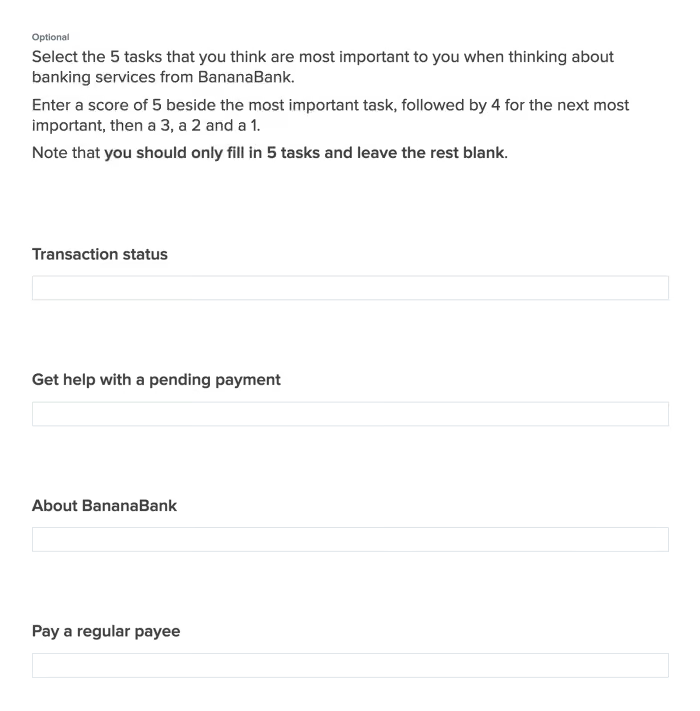
With your shortlist created, it’s time to take it to your users. Using a survey tool like Optimal's Surveys, add in each one of your shortlisted tasks and have users rank 5 tasks on a scale from 1 to 5, with 5 being the most important and 1 being the least important.
If you’re thinking that your users will never take the time to work through such a long list, consider that the very length of the list means they’ll seek out the tasks that matter to them and ignore the ones that don’t.
A section of the customer survey in Questions.
Step 4: Finalize – Analyze your results
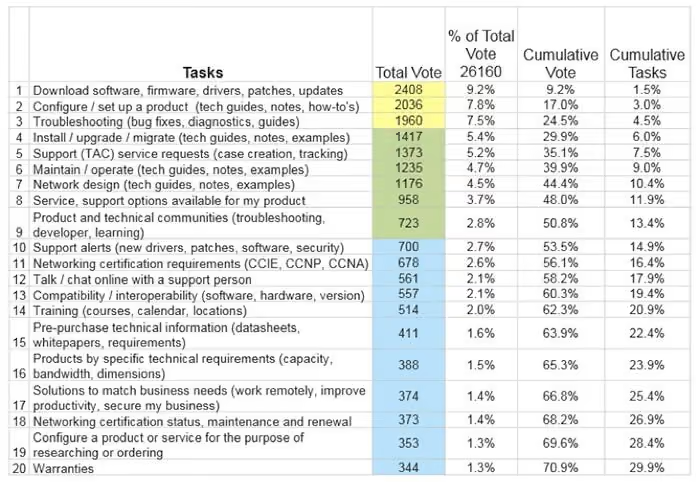
Now for the task analysis side of the project. What you want at the end of the user survey end of the project is a league table of entire shortlist of tasks. We’re going to use the example from Cisco’s top tasks project, which has been documented over at A List Apart by Gerry McGovern (who actually ran the project). The entire article is worth a read as it covers the process of running a top task project for a large organization.
Here’s what a league table of the top 20 tasks looks like from Cisco:
A league table of the top 20 tasks from Cisco’s top tasks project. Credit: Jerry McGovern.
Here’s the breakdown of the vote for Cisco’s tasks:
3 tasks got the first 25 percent of the vote
6 tasks got 25-50 percent of the vote
14 tasks got 50-75 percent of the vote
44 tasks got 75-100 percent of the vote
While the pattern may seem surprising, it’s actually not unusual. As Jerry explains: “We have done this process over 400 times and the same patterns emerge every single time.”
Final thoughts
Focusing on top tasks management is really a practice that needs to be conducted on a semi-regular basis. The approach benefits organizations in a multitude of ways, bringing different teams and people together to figure out how to best address why your users are coming to your website and what they actually need from you.
As we explained at the beginning of this article, top tasks is really about clearing away the fog and understanding on what really matters. Instead of spreading yourself thin and focusing on a host of tiny tasks, hone in on those top tasks that actually matter to your users.
Understanding how to improve your website
The top tasks approach is an effective way of giving you a clear idea of what you should be focusing on when designing or redesigning your website, but this should really just be one aspect of the work you do.
Utilizing a host of other UX research methods can give you a much more comprehensive idea of what’s working and what’s not. With card sorting, for example, you can learn how your users think the content on your website should be arranged. Then, with this data in hand, you can use tree testing to assemble draft structures of your website and test how people navigate their way through it. You can keep iterating on these structures to ensure you’ve created the most user-friendly navigation.
Take a look at our 101 guides to learn more about card sorting and tree testing, as well as the other user research methods you can use to make solid improvements to your website. If you’d rather just start putting methods into practice using user research tools, take our UX platform for a spin for free here.
When we spoke to study creators about what can cause a study to fail, the answer was rarely a methodology problem. It was recruitment.
If you've ever watched a study stall because the right participants didn't show up, you already know the problem we're trying to solve. The study is ready. The tasks are written. Stakeholders are waiting. And then recruitment breaks down.
Participants trickle in too slowly. The participant quality isn’t quite right. The timeline shifts. Confidence in the findings edges downward.
Recruitment: a moving target
Recruitment has always been a moving target. There are endless ways to improve it – through reach, participant quality, fraud prevention, and ease of use.
As part of our ongoing work to strengthen our recruitment offering, we’ve reimagined self-service recruitment at Optimal. We’ve taken a closer look at the experience and focused on giving research teams more options, greater control, and confidence in participant quality when recruiting participants.
What we heard from research teams
Across the teams we spoke to, several consistent themes emerged. Quality was a persistent concern. The issues were usually about fit. Participants sometimes didn’t meaningfully engage with the tasks or dropped off mid-session.
"Niche" participants were referenced often as well. What was usually meant wasn't rare profiles but it was a combination of specific targeting and filters applied at once. Seniority plus industry plus behaviour plus location. Multiple criteria that some existing tools just didn't handle well.
On the coordination side, we heard a consistent ask: researchers want to know who they've already spoken to. They don't want to contact the same people repeatedly without realizing it. They're tired of managing participant lists manually just to avoid that problem.
In short: speed matters, but predictability, visibility, and participant quality matter more.
Built for real-world studies
We've rebuilt Optimal’s self-service recruitment from the ground up.
Participant Profiles: more flexibility and control
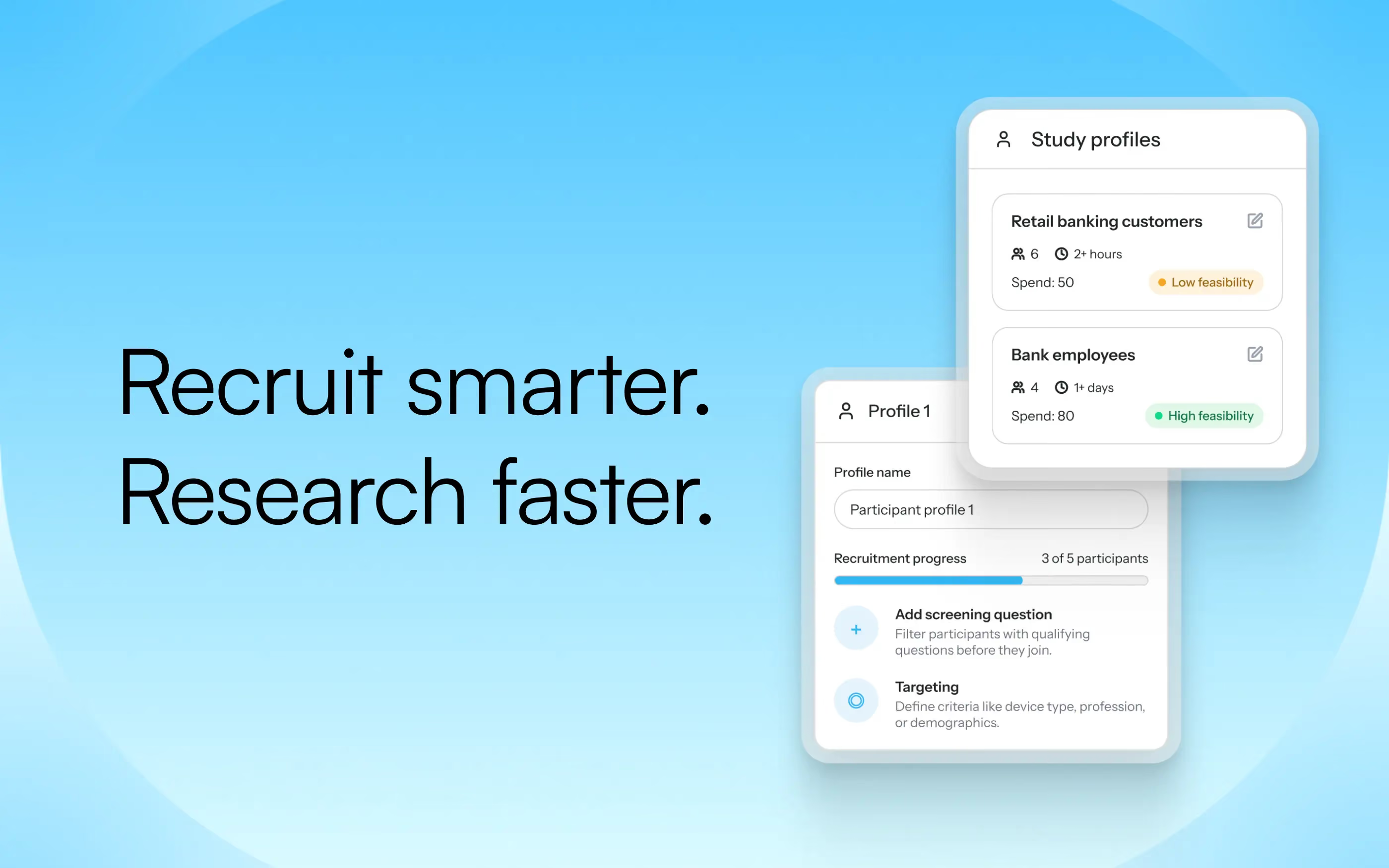
The centerpiece of the new experience is Participant Profiles. Build a profile for exactly who you need from demographics, location (down to the city), job title, seniority, company size, industry, B2B, language, and more. You’ll also have the ability to:
Run multiple profiles in a single study. If you need senior decision-makers from the UK and individual contributors from the US, you can define both profiles with separate quotas and recruit them simultaneously for the same study.
Set multiple quotas per profile. Define not just who you need, but how many of each. So if your study needs 30 brand managers and 20 operations managers, you can recruit for both.
Set exclusion controls. One of the clearest things we heard: researchers don't want to keep recruiting the same people. It can create a bias in their data, but managing participant history manually can be resource-intensive and tedious. Exclusion controls let you automatically exclude participants who've taken part in your studies within a set period; for example, the last three months.
More panels, more reach
To help research teams reach the right participants with greater reliability, Optimal’s self-service recruitment now draws from multiple panels. This increases the pool of available participants across regions and segments, giving research teams more opportunities to find the right fit even for more specific or multi-criteria profiles.
Access millions of participants across over 150 countries, with expanded targeting options beyond general population samples, including B2B audiences.
Visibility and predictability, from setup to launch
Before you launch, you'll see an estimated fill time, credit cost, and a feasibility check based on your profile and quotas. After launch, live recruitment progress sits alongside your study responses. You can see exactly how each profile quota is filling in real time.
Why this matters now
The teams we spoke to are running more ambitious studies than ever – recorded sessions, concept tests, and studies that sit between a quick survey and a full moderated interview. These studies demand reliable, targeted, well-matched participants. Recruitment is often the deciding factor in whether a study succeeds.
Recruitment has always been the part of research that feels the least in your control. We want to change that, not adding more complexity, but by giving you the right tools to recruit exactly who you need.
You should be able to see what's happening, trust that the right people are coming through, and stay focused on your study. Get the confidence in your participants so you can focus on what comes next: the decisions that matter.
Profiles are now available in Optimal’s Usability Testing tool and will be rolling out across the rest of the platform.