

July 14, 2020
5

How to create a UX research plan

Summary: A detailed UX research plan helps you keep your overarching research goals in mind as you work through the logistics of a research project.

There’s nothing quite like the feeling of sitting down to interview one of your users, steering the conversation in interesting directions and taking note of valuable comments and insights. But, as every researcher knows, it’s also easy to get carried away. Sometimes, the very process of user research can be so engrossing that you forget the reason you’re there in the first place, or unexpected things that come up that can force you to change course or focus.

This is where a UX research plan comes into play. Taking the time to set up a detailed overview of your high-level research goals, team, budget and timeframe will give your research the best chance of succeeding. It's also a good tool for fostering alignment - it can make sure everyone working on the project is clear on the objectives and timeframes. Over the course of your project, you can refer back to your plan – a single source of truth. After all, as Benjamin Franklin famously said: “By failing to prepare, you are preparing to fail”.

In this article, we’re going to take a look at the best way to put together a research plan.

Your research recipe for success

Any project needs a plan to be successful, and user research is no different. As we pointed out above, a solid plan will help to keep you focused and on track during your research – something that can understandably become quite tricky as you dive further down the research rabbit hole, pursuing interesting conversations during user interviews and running usability tests. Thought of another way, it’s really about accountability. Even if your initial goal is something quite broad like “find out what’s wrong with our website”, it’s important to have a plan that will help you to identify when you’ve actually discovered what’s wrong.

So what does a UX research plan look like? It’s basically a document that outlines the where, why, who, how and what of your research project.

It’s time to create your research plan! Here’s everything you need to consider when putting this plan together.

Make a list of your stakeholders

The first thing you need to do is work out who the stakeholders are on your project. These are the people who have a stake in your research and stand to benefit from the results. In those instances where you’ve been directed to carry out a piece of research you’ll likely know who these people are, but sometimes it can be a little tricky. Stakeholders could be C-level executives, your customer support team, sales people or product teams. If you’re working in an agency or you’re freelancing, these could be your clients.

Make a list of everyone you think needs to be consulted and then start setting up catch-up sessions to get their input. Having a list of stakeholders also makes it easy to deliver insights back to these people at the end of your research project, as well as identify any possible avenues for further research. This also helps you identify who to involve in your research (not just report findings back to).

Action: Make a list of all of your stakeholders.

Write your research questions

Before we get into timeframes and budgets you first need to determine your research questions, also known as your research objectives. These are the ‘why’ of your research. Why are you carrying out this research? What do you hope to achieve by doing all of this work? Your objectives should be informed by discussions with your stakeholders, as well as any other previous learnings you can uncover. Think of past customer support discussions and sales conversations with potential customers.

Here are a few examples of basic research questions to get you thinking. These questions should be actionable and specific, like the examples we’ve listed here:

  • “How do people currently use the wishlist feature on our website?”
  • “How do our current customers go about tracking their orders?”
  • “How do people make a decision on which power company to use?”
  • “What actions do our customers take when they’re thinking about buying a new TV?”

A good research question should be actionable in the sense that you can identify a clear way to attempt to answer it, and specific in that you’ll know when you’ve found the answer you’re looking for. It's also important to keep in mind that your research questions are not the questions you ask during your research sessions - they should be broad enough that they allow you to formulate a list of tasks or questions to help understand the problem space.

Action: Create a list of possible research questions, then prioritize them after speaking with stakeholders.

What is your budget?

Your budget will play a role in how you conduct your research, and possibly the amount of data you're able to gather.

Having a large budget will give you flexibility. You’ll be able to attract large numbers of participants, either by running paid recruitment campaigns on social media or using a dedicated participant recruitment service. A larger budget helps you target more people, but also target more specific people through dedicated participant services as well as recruitment agencies.

Note that more money doesn't always equal better access to tools - e.g. if I work for a company that is super strict on security, I might not be able to use any tools at all. But it does make it easier to choose appropriate methods and that allow you to deliver quality insights. E.g. a big budget might allow you to travel, or do more in-person research which is otherwise quite expensive.

With a small budget, you’ll have to think carefully about how you’ll reward participants, as well as the number of participants you can test. You may also find that your budget limits the tools you can use for your testing. That said, you shouldn’t let your budget dictate your research. You just have to get creative!

Action: Work out what the budget is for your research project. It’s also good to map out several cheaper alternatives that you can pursue if required.

How long will your project take?

How long do you think your user research project will take? This is a necessary consideration, especially if you’ve got people who are expecting to see the results of your research. For example, your organization’s marketing team may be waiting for some of your exploratory research in order to build customer personas. Or, a product team may be waiting to see the results of your first-click test before developing a new signup page on your website.

It’s true that qualitative research often doesn’t have a clear end in the way that quantitative research does, for example as you identify new things to test and research. In this case, you may want to break up your research into different sub-projects and attach deadlines to each of them.

Action: Figure out how long your research project is likely to take. If you’re mixing qualitative and quantitative research, split your project timeframe into sub-projects to make assigning deadlines easier.

Understanding participant recruitment

Who you recruit for your research comes from your research questions. Who can best give you the answers you need? While you can often find participants by working with your customer support, sales and marketing teams, certain research questions may require you to look further afield.

The methods you use to carry out your research will also have a part to play in your participants, specifically in terms of the numbers required. For qualitative research methods like interviews and usability tests, you may find you’re able to gather enough useful data after speaking with 5 people. For quantitative methods like card sorts and tree tests, it’s best to have at least 30 participants. You can read more about participant numbers in this Nielsen Norman article.

At this stage of the research plan process, you’ll also want to write some screening questions. These are what you’ll use to identify potential participants by asking about their characteristics and experience.

Action: Define the participants you’ll need to include in your research project, and where you plan to source them. This may require going outside of your existing user base.

Which research methods will you use?

The research methods you use should be informed by your research questions. Some questions are best answered by quantitative research methods like surveys or A/B tests, with others by qualitative methods like contextual inquiries, user interviews and usability tests. You’ll also find that some questions are best answered by multiple methods, in what’s known as mixed methods research.

If you’re not sure which method to use, carefully consider your question. If we go back to one of our earlier research question examples: “How do our current customers go about tracking their orders?”, we’d want to test the navigation pathways.

If you’re not sure which method to use, it helps to carefully consider your research question. Let’s use one of our earlier examples: “Is it easy for users to check their order history in our iPhone app?” as en example. In this case, because we want to see how users move through our app, we need a method that’s suited to testing navigation pathways – like tree testing.

For the question: “What actions do our customers take when they’re thinking about buying a new TV?”, we’d want to take a different approach. Because this is more of an exploratory question, we’re probably best to carry out a round of user interviews and ask questions about their process for buying a TV.

Action: Before diving in and setting up a card sort, consider which method is best suited to answer your research question.

Develop your research protocol

A protocol is essentially a script for your user research. For the most part, it’s a list of the tasks and questions you want to cover in your in-person sessions. But, it doesn’t apply to all research types. For example, for a tree test, you might write your tasks, but this isn't really a script or protocol.

Writing your protocol should start with actually thinking about what these questions will be and getting feedback on them, as well as:

  • The tasks you want your participants to do (usability testing)
  • How much time you’ve set aside for the session
  • A script or description that you can use for every session
  • Your process for recording the interviews, including how you’ll look after participant data.

Action: This is essentially a research plan within a research plan – it’s what you’d take to every session.

Happy researching!

Related UX plan reading

Related articles

View all blog articles
Learn more
1 min read

Using paper prototypes in UX

In UX research we are told again and again that to ensure truly user-centered design, it’s important to test ideas with real users as early as possible. There are many benefits that come from introducing the voice of the people you are designing for in the early stages of the design process. The more feedback you have to work with, the more you can inform your design to align with real needs and expectations. In turn, this leads to better experiences that are more likely to succeed in the real world.It is not surprising then that paper prototypes have become a popular tool used among researchers. They allow ideas to be tested as they emerge, and can inform initial designs before putting in the hard yards of building the real thing. It would seem that they’re almost a no-brainer for researchers, but just like anything out there, along with all the praise, they have also received a fair share of criticism, so let’s explore paper prototypes a little further.

What’s a paper prototype anyway? 🧐📖

Paper prototyping is a simple usability testing technique designed to test interfaces quickly and cheaply. A paper prototype is nothing more than a visual representation of what an interface could look like on a piece of paper (or even a whiteboard or chalkboard). Unlike high-fidelity prototypes that allow for digital interactions to take place, paper prototypes are considered to be low-fidelity, in that they don’t allow direct user interaction. They can also range in sophistication, from a simple sketch using a pen and paper to simulate an interface, through to using designing or publishing software to create a more polished experience with additional visual elements.

Screen Shot 2016-04-15 at 9.26.30 AM
Different ways of designing paper prototypes, using OptimalSort as an example

Showing a research participant a paper prototype is far from the real deal, but it can provide useful insights into how users may expect to interact with specific features and what makes sense to them from a basic, user-centered perspective. There are some mixed attitudes towards paper prototypes among the UX community, so before we make any distinct judgements, let's weigh up their pros and cons.

Advantages 🏆

  • They’re cheap and fastPen and paper, a basic word document, Photoshop. With a paper prototype, you can take an idea and transform it into a low-fidelity (but workable) testing solution very quickly, without having to write code or use sophisticated tools. This is especially beneficial to researchers who work with tight budgets, and don’t have the time or resources to design an elaborate user testing plan.
  • Anyone can do itPaper prototypes allow you to test designs without having to involve multiple roles in building them. Developers can take a back seat as you test initial ideas, before any code work begins.
  • They encourage creativityFrom both the product teams participating in their design, but also from the users. They require the user to employ their imagination, and give them the opportunity express their thoughts and ideas on what improvements can be made. Because they look unfinished, they naturally invite constructive criticism and feedback.
  • They help minimize your chances of failurePaper prototypes and user-centered design go hand in hand. Introducing real people into your design as early as possible can help verify whether you are on the right track, and generate feedback that may give you a good idea of whether your idea is likely to succeed or not.

Disadvantages 😬

  • They’re not as polished as interactive prototypesIf executed poorly, paper prototypes can appear unprofessional and haphazard. They lack the richness of an interactive experience, and if our users are not well informed when coming in for a testing session, they may be surprised to be testing digital experiences on pieces of paper.
  • The interaction is limitedDigital experiences can contain animations and interactions that can’t be replicated on paper. It can be difficult for a user to fully understand an interface when these elements are absent, and of course, the closer the interaction mimics the final product, the more reliable our findings will be.
  • They require facilitationWith an interactive prototype you can assign your user tasks to complete and observe how they interact with the interface. Paper prototypes, however, require continuous guidance from a moderator in communicating next steps and ensuring participants understand the task at hand.
  • Their results have to be interpreted carefullyPaper prototypes can’t emulate the final experience entirely. It is important to interpret their findings while keeping their limitations in mind. Although they can help minimize your chances of failure, they can’t guarantee that your final product will be a success. There are factors that determine success that cannot be captured on a piece of paper, and positive feedback at the prototyping stage does not necessarily equate to a well-received product further down the track.

Improving the interface of card sorting, one prototype at a time 💡

We recently embarked on a research project looking at the user interface of our card-sorting tool, OptimalSort. Our research has two main objectives — first of all to benchmark the current experience on laptops and tablets and identify ways in which we can improve the current interface. The second objective is to look at how we can improve the experience of card sorting on a mobile phone.

Rather than replicating the desktop experience on a smaller screen, we want to create an intuitive experience for mobiles, ensuring we maintain the quality of data collected across devices.Our current mobile experience is a scaled down version of the desktop and still has room for improvement, but despite that, 9 per cent of our users utilize the app. We decided to start from the ground up and test an entirely new design using paper prototypes. In the spirit of testing early and often, we decided to jump right into testing sessions with real users. In our first testing sprint, we asked participants to take part in two tasks. The first was to perform an open or closed card sort on a laptop or tablet. The second task involved using paper prototypes to see how people would respond to the same experience on a mobile phone.

blog_artwork_01-03

Context is everything 🎯

What did we find? In the context of our research project, paper prototypes worked remarkably well. We were somewhat apprehensive at first, trying to figure out the exact flow of the experience and whether the people coming into our office would get it. As it turns out, people are clever, and even those with limited experience using a smartphone were able to navigate and identify areas for improvement just as easily as anyone else. Some participants even said they prefered the experience of testing paper prototypes over a laptop. In an effort to make our prototype-based tasks easy to understand and easy to explain to our participants, we reduced the full card sort to a few key interactions, minimizing the number of branches in the UI flow.

This could explain a preference for the mobile task, where we only asked participants to sort through a handful of cards, as opposed to a whole set.The main thing we found was that no matter how well you plan your test, paper prototypes require you to be flexible in adapting the flow of your session to however your user responds. We accepted that deviating from our original plan was something we had to embrace, and in the end these additional conversations with our participants helped us generate insights above and beyond the basics we aimed to address. We now have a whole range of feedback that we can utilize in making more sophisticated, interactive prototypes.

Whether our success with using paper prototypes was determined by the specific setup of our testing sessions, or simply by their pure usefulness as a research technique is hard to tell. By first performing a card sorting task on a laptop or tablet, our participants approached the paper prototype with an understanding of what exactly a card sort required. Therefore there is no guarantee that we would have achieved the same level of success in testing paper prototypes on their own. What this does demonstrate, however, is that paper prototyping is heavily dependent on the context of your assessment.

Final thoughts 💬

Paper prototypes are not guaranteed to work for everybody. If you’re designing an entirely new experience and trying to describe something complex in an abstracted form on paper, people may struggle to comprehend your idea. Even a careful explanation doesn’t guarantee that it will be fully understood by the user. Should this stop you from testing out the usefulness of paper prototypes in the context of your project? Absolutely not.

In a perfect world we’d test high fidelity interactive prototypes that resemble the real deal as closely as possible, every step of the way. However, if we look at testing from a practical perspective, before we can fully test sophisticated designs, paper prototypes provide a great solution for generating initial feedback.In his article criticizing the use of paper prototypes, Jake Knapp makes the point that when we show customers a paper prototype we’re inviting feedback, not reactions. What we found in our research however, was quite the opposite.

In our sessions, participants voiced their expectations and understanding of what actions were possible at each stage, without us having to probe specifically for feedback. Sure we also received general comments on icon or colour preferences, but for the most part our users gave us insights into what they felt throughout the experience, in addition to what they thought.

Further reading 🧠

Learn more
1 min read

Create a user research plan with these steps

A great user experience (UX) is one of the largest drivers of growth and revenue through user satisfaction. However, when budgets get tight, or there is a squeeze on timelines, user research is one of the first things to go. Often at the cost of user satisfaction.  

This short sighted view can mean project managers are preoccupied with achieving milestones and short term goals. And UX teams get stuck researching products they weren’t actually involved with developing. As a result no one has the space and understanding to really develop a product that speaks to users needs, desires and wants. There must  be a better way to produce a product that is user-driven.  Thankfully there is.

What is user research and why should project managers care about it? 👨🏻💻

User research is an important part of the product development process. Primarily, user research involves using different research methods to gather information about your end users. 

Essentially it aims to create the best possible experience for your users by listening and learning directly from those that already or potentially will use your product. You might conduct interviews to help you understand a particular problem, carry out a tree test to identify bottlenecks or problems in your navigation, or do some usability testing to directly observe your users as they perform different tasks on your website or in your app. Or a combination of these to understand what users really want.

To a project manager and team, this likely sounds fairly familiar, that any project can’t be managed in a silo. Regular check-ins and feedback are essential to making smart decisions. The same with UX research. It can make the whole process quicker and more efficient. By taking a step back, digging into your users’ minds, and gaining a fuller understanding of what they want upfront, it can curtail short-term views and decisions.

Bringing more user research into your development process has major benefits for the team, and the ultimately the quality of that final product. There are three key benefits:

  1. Saves your development team time and effort. Ensuring the team is working on what users want, not wasting time on features that don’t measure up.
  2. Gives your users a better experience by meeting their requirements.
  3. Helps your team innovate quickly by understanding what users really want.

As a project manager, making space and planning for user research can be one of the best ways to ensure the team is creating a product that truly is user-driven.

How to bring research into your product development process 🤔

There are a couple of ways you can bring UX research into your product development process

  1. Start with a dedicated research project.
  2. Integrate UX research throughout the development project.

It can be more difficult to integrate UX research throughout the process, as it means planning the project with various stages of research built in to check the development of features. But ultimately this approach is likely to turn out the best product. One that has been considered, checked and well thought out through the whole product development process. To help you on the way we have laid out 6 key steps to help you integrate UX research into your product development process.

6 key steps to integrate UX research 👟

Step 1: Define your research questions

Take a step back, look at your product and define your research questions

It may be tempting just to ask, ‘do users like our latest release?’ This however does not get to why or what your users like or don’t like. Try instead:

  • What do our users really want from our product?
  • Where are they currently struggling while using our website?
  • How can we design a better product for our users?

These questions help to form the basis of specific questions about your product and specific areas of research to explore which in turn help shape the type of research you undertake.

Step 2: Create your research plan

With a few key research questions to focus on, it’s time to create your research plan.

A great research plan covers your project’s goals, scope, timing, and deliverables. It’s essential for keeping yourself organized but also for getting key stakeholder signoff.

Step 3: Prepare any research logistics

Every project plan requires attention to detail including a user research project. And with any good project there are a set of steps to help make sense of it.

  1. Method: Based on your questions, what is the best user research method to use? 
  2. Schedule: When will the research take place? How long will it go on for? If this is ongoing research, plan how it will be implemented and how often.
  3. Location: Where will the research take place? 
  4. Resources: What resources do you need? This could be technical support or team members.
  5. Participants: Define who you want to research. Who is eligible to take part in this research? How will you find the right people?
  6. Data: How will you capture the research data? Where will it be stored? How will you analyze the data and create insights and reports that can be used?
  7. Deliverables: What is the ultimate goal for your research project?

Step 4: Decide which method will be used

Many user research methods benefit from an observational style of testing. Particularly if you are looking into why users undertake a specific task or struggle.

Typically, there are two approaches to testing:

  1. Moderated testing is when a moderator is present during the test to answer questions, guide the participant, or dig deeper with further questions.
  2. Unmoderated testing is when a participant is left on their own to carry out the task. Often this is done remotely and with very specific instructions.Your key questions will determine which method will works best for your research.  Find our more about the differences.

Step 5: Run your research session

It’s time to gather insights and data. The questions you are asking will influence how you run your research sessions and the methods you’ve chosen. 

If you are running surveys you will be asking users through a banner or invitation to fill out your survey. Unmoderated and very specific questions. Gathering qualitative data and analyzing patterns.

If you’re using something qualitative like interviews or heat mapping, you’ll want to implement software and gather as much information as possible.

Step 6: Prepare a research findings report and share with stakeholders

Analyze your findings, interrogate your data and find those insights that dive into the way your users think. How do they love your product? But how do they also struggle?

Pull together your findings and insights into an easy to understand report. And get socializing. Bring your key stakeholders together and share your findings. Bringing everyone across the findings together can bring everyone on the journey. And for the development process can mean decisions can be user-driven. 

Wrap Up 🥙

Part of any project, UX research should be essential to developing a product that is user-driven. Integrating user research into your development process can be challenging. But with planning and strategy it can be hugely beneficial to saving time and money in the long run. 

Learn more
1 min read

User research and agile squadification at Trade Me

Hi, I’m Martin. I work as a UX researcher at Trade Me having left Optimal Experience (Optimal Workshop's sister company) last year. For those of you who don’t know, Trade Me is New Zealand’s largest online auction site that also lists real estate to buy and rent, cars to buy, jobs listings, travel accommodation and quite a few other things besides. Over three quarters of the population are members and about three quarters of the Internet traffic for New Zealand sites goes to the sites we run.

Leaving a medium-sized consultancy and joining Trade Me has been a big change in many ways, but in others not so much, as I hadn’t expected to find myself operating in a small team of in-house consultants. The approach the team is taking is proving to be pretty effective, so I thought I’d share some of the details of the way we work with the readers of Optimal Workshop’s blog. Let me explain what I mean…

What agile at Trade Me looks like

Over the last year or so, Trade Me has moved all of its development teams over to Agile following a model pioneered by Spotify. All of the software engineering parts of the business have been ‘squadified’. These people produce the websites & apps or provide and support the infrastructure that makes everything possible.Across Squads, there are common job roles in ‘Chapters’ (like designers or testers) and because people are not easy to force into boxes, and why should they be, there are interest groups called ‘Guilds’.The squads are self-organizing, running their own processes and procedures to get to where they need to. In practice, this means they use as many or as few of the Kanban, Scrum, and Rapid tools they find useful. Over time, we’ve seen that squads tend to follow similar practices as they learn from each other.

How our UX team fits in

Our UX team of three sits outside the squads, but we work with them and with the product owners across the business.How does this work? It might seem counter-intuitive to have UX outside of the tightly-integrated, highly-focused squads, sometimes working with product owners working on stuff that might have little to do with what’s being currently developed in the squads. This comes down to the way Trade Me divides down the UX responsibilities within the organization. Within each squad there is a designer. He or she is responsible for how that feature or app looks, and, more importantly, how it acts — interaction design as well as visual design.Then what do we do, if we are the UX team?

We represent the voice of Trade Me’s users

By conducting research with Trade Me’s users we can validate the squads’ day-to-day decisions, and help frame decisions on future plans. We do this by wearing two hats. Wearing the pointy hats of structured, detailed researchers, we look into long-term trends: the detailed behaviours and goals of our different audiences. We’ve conducted lots of one-on-one interviews with hundreds of people, including top sellers, motor parts buyers, and job seekers, as well as running surveys, focus groups and user testing sessions of future-looking prototypes. For example, we recently spent time with a number of buyers and sellers, seeking to understand their motivations and getting under their skin to find out how they perceive Trade Me.

This kind of research enables Trade Me to anticipate and respond to changes in user perception and satisfaction.Swapping hats to an agile beanie (and stretching the metaphor to breaking point), we react to the medium-term, short-term and very short-term needs of the squads testing their ideas, near-finished work and finished work with users, as well as sometimes simply answering questions and providing opinion, based upon our research. Sometimes this means that we can be testing something in the afternoon having only heard we are needed in the morning. This might sound impossible to accommodate, but the pace of change at Trade Me is such that stuff is getting deployed pretty much every day, many of which affects our users directly. It’s our job to ensure that we support our colleagues to do the very best we can for our users.

How our ‘drop everything’ approach works in practice
Screen Shot 2014-07-11 at 10.00.21 am

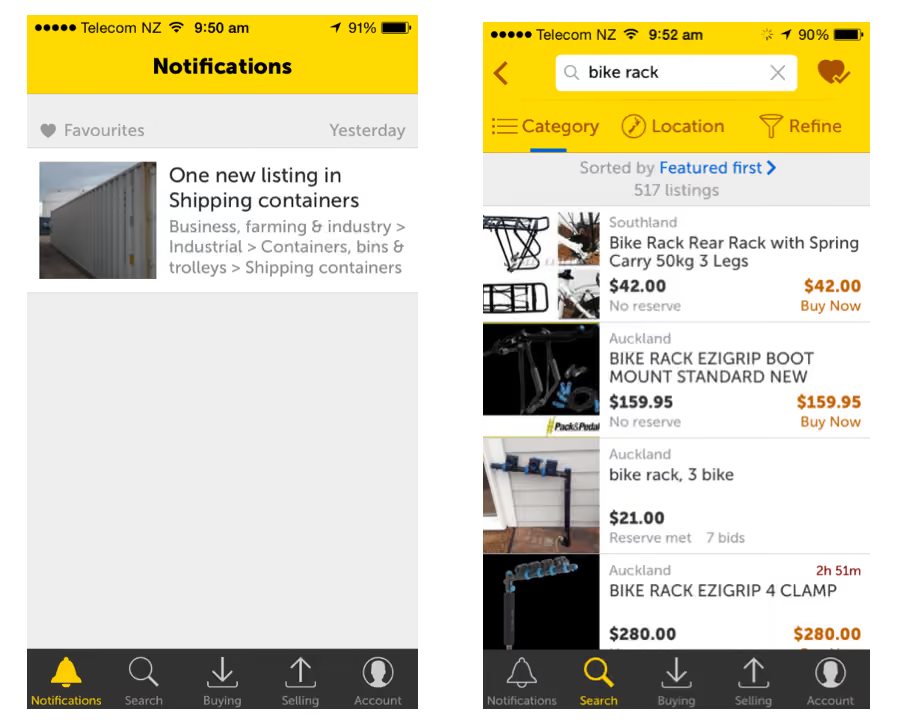
We recently conducted five or six rounds (no one can quite remember, we did it so quickly) of testing of our new iPhone application (pictured above) — sometimes testing more than one version at a time. The development team would receive our feedback face-to-face, make changes and we’d be testing the next version of the app the same or the next day. It’s only by doing this that we can ensure that Trade Me members will see positive changes happening daily rather than monthly.

How we prioritize what needs to get done

To help us try to decide what we should be doing at any one time we have some simple rules to prioritise:

  • Core product over other business elements
  • Finish something over start something new
  • Committed work over non-committed work
  • Strategic priorities over non-strategic priorities
  • Responsive support over less time-critical work
  • Where our input is crucial over where our input is a bonus

Applying these rules to any situation makes the decision whether to jump in and help pretty easy.At any one time, each of us in the UX team will have one or more long-term projects, some medium-term projects, and either some short-term projects or the capacity for some short-term projects (usually achieved by putting aside a long-term project for a moment).

We manage our time and projects on Trello, where we can see at a glance what’s happening this and next week, and what we’ve caught sniff of in the wind that might be coming up, or definitely is coming up.On the whole, both we and the squads favour fast response, bulleted list, email ‘reports’ for any short-term requests for user testing.  We get a report out within four hours of testing (usually well within that). After all, the squads are working in short sprints, and our involvement is often at the sharp end where delays are not welcome. Most people aren’t going to read past the management summary anyway, so why not just write that, unless you have to?

How we share our knowledge with the organization

Even though we mainly keep our reporting brief, we want the knowledge we’ve gained from working with each squad or on each product to be available to everyone. So we maintain a wiki that contains summaries of what we did for each piece of work, why we did it and what we found. Detailed reports, if there are any, are attached. We also send all reports out to staff who’ve subscribed to the UX interest email group.

Finally, we send out a monthly email, which looks across a bunch of research we’ve conducted, both short and long-term, and draws conclusions from which our colleagues can learn. All of these latter activities contribute to one of our key objectives: making Trade Me an even more user-centred organization than it is.I’ve been with Trade Me for about six months and we’re constantly refining our UX practices, but so far it seems to be working very well.Right, I’d better go – I’ve just been told I’m user testing something pretty big tomorrow and I need to write a test script!
Seeing is believing

Explore our tools and see how Optimal makes gathering insights simple, powerful, and impactful.